It is currently Sat Sep 26, 2026 6:11 pm


All times are UTC - 5 hours [ DST ]


Post new topic Reply to topic  [ 3 posts ] 
Author Message
 Post subject: Finding Patterns?
PostPosted: Sat Dec 07, 2013 9:50 pm  (#1) 
Offline
Administrator
User avatar

Joined: Aug 10, 2012
Posts: 14212
Location: Native to NYC living in Arizona, Gimp 2.8 - 3.0, Win 11 PC.
GIMP Version: 2.6.11
Operating System: Windows
GIMP Experience: Advanced Level

List any relevant plug-ins or scripts:
N/A

List any ERROR messages you received:
N/A


I had one heck of a time finding one of the "seamless Bat Patterns" I recently uploaded.
The smaller of the two patterns was 100X100 and created like a polka-dot kind of pattern, with a half images painted on each canvas edge.
I had to enlarge the preview image of my patterns to be able to notice it.
Is there any other way to look for patterns, maybe by name or some other way?

Remember... I'm still using 2.6, but do have a "Partha" portable 2.8 build installed as well.

_________________
Image
"A wise man learns more from a foolish question than a fool can learn from a wise answer"
Image


Share on Facebook Share on Twitter Share on Orkut Share on Digg Share on MySpace Share on Delicious Share on Technorati
Top
 Post subject: Re: Finding Patterns?
PostPosted: Sun Dec 08, 2013 12:54 am  (#2) 
Offline
Script Coder
User avatar

Joined: Feb 18, 2011
Posts: 4826
Location: Bendigo Vic. Australia
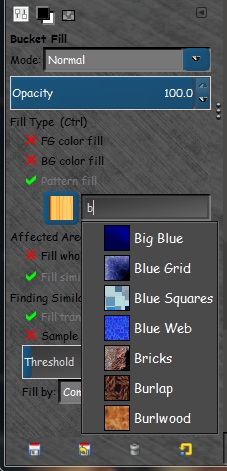
this should be the same for 2.6 and 2.8, go to your tools menu for bucket-fill and select pattern-fill then in the pattern dialogue enter the first letter of the pattern you need select the pattern from the drop down and that pattern will become your active pattern in gimps patterns menu.
Image

_________________
Image
No matter how much you push the envelope, it'll still be stationery.


Top
 Post subject: Re: Finding Patterns?
PostPosted: Sun Dec 08, 2013 1:03 am  (#3) 
Offline
Administrator
User avatar

Joined: Aug 10, 2012
Posts: 14212
Location: Native to NYC living in Arizona, Gimp 2.8 - 3.0, Win 11 PC.
Graechan wrote:
this should be the same for 2.6 and 2.8, go to your tools menu for bucket-fill and select pattern-fill then in the pattern dialogue enter the first letter of the pattern you need select the pattern from the drop down and that pattern will become your active pattern in gimps patterns menu.
[ Image ]

Thanks Graechan.
I'll try and see if this will work for me, never thought I could do this.

_________________
Image
"A wise man learns more from a foolish question than a fool can learn from a wise answer"
Image


Top
Post new topic Reply to topic  [ 3 posts ] 

All times are UTC - 5 hours [ DST ]


* Login  


Powered by phpBB3 © phpBB Group