It is currently Thu Jun 04, 2026 11:15 pm


All times are UTC - 5 hours [ DST ]


Post new topic Reply to topic  [ 3 posts ] 
Author Message
 Post subject: PNG is not transparent
PostPosted: Wed Dec 11, 2013 10:47 pm  (#1) 
Offline
New Member

Joined: Dec 11, 2013
Posts: 1
I am new to gimp and for some reason when I drag in a PNG image it still has the white around it. Randomly when scaling a PNG the white went away but I have no idea how I did it. Can anyone help me out on this?

Thanks,

Chase


Share on Facebook Share on Twitter Share on Orkut Share on Digg Share on MySpace Share on Delicious Share on Technorati
Top
 Post subject: Re: PNG is not transparent
PostPosted: Wed Dec 11, 2013 11:11 pm  (#2) 
Offline
GimpChat Member
User avatar

Joined: Nov 16, 2011
Posts: 5127
Location: Metro Vancouver, BC
Try adding an alpha channel to the layer.

_________________
Image
Gimp 2.8.18, Linux, median user
Gimp Chat Tutorials Index
Spirit Bear (Kermode)


Top
 Post subject: Re: PNG is not transparent
PostPosted: Thu Dec 12, 2013 12:54 am  (#3) 
Offline
Administrator
User avatar

Joined: Aug 10, 2012
Posts: 14011
Location: Native to NYC living in Arizona, Gimp 2.8 - 3.0, Win 11 PC.
Boosted_R wrote:
I am new to gimp and for some reason when I drag in a PNG image it still has the white around it. Randomly when scaling a PNG the white went away but I have no idea how I did it. Can anyone help me out on this?

Thanks,

Chase

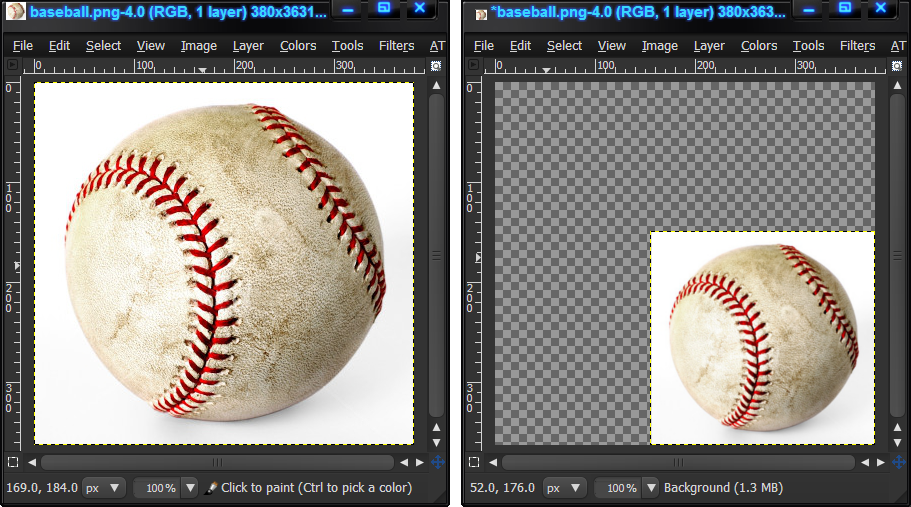
When you scaled the image down, (I'm assuming you scaled down) the spaces left over due to the scaling will appear transparent, ie.without 'white', but the image itself will still have it's white background. Some PNG images may not contain an alpha channel.
By scaling the image down, you have effectively added an alpha channel to the layer.

The image of the baseball on the right has no alpha channel. By scaling it down, you can see in the left image that the space left over is not filled with white. By scaling the image down I have created an alpha channel for this image.
Image
If you save your scaled image as a PNG, then opened it again in Gimp. You will see that it still has it's alpha channel. The image will then appear as it was after you scaled it down and saved it, with the alpha channel intact.

_________________
Image
"A wise man learns more from a foolish question than a fool can learn from a wise answer"
Image


Top
Post new topic Reply to topic  [ 3 posts ] 

All times are UTC - 5 hours [ DST ]


* Login  


Powered by phpBB3 © phpBB Group



