It is currently Wed Nov 11, 2026 12:50 am


All times are UTC - 5 hours [ DST ]


Post new topic Reply to topic  [ 13 posts ] 
Author Message
 Post subject: two questions
PostPosted: Mon Jan 20, 2014 8:16 pm  (#1) 
Offline
GimpChat Member
User avatar

Joined: May 27, 2011
Posts: 707
GIMP Version: 2.8.4
Operating System: Windows
GIMP Experience: Basic Level


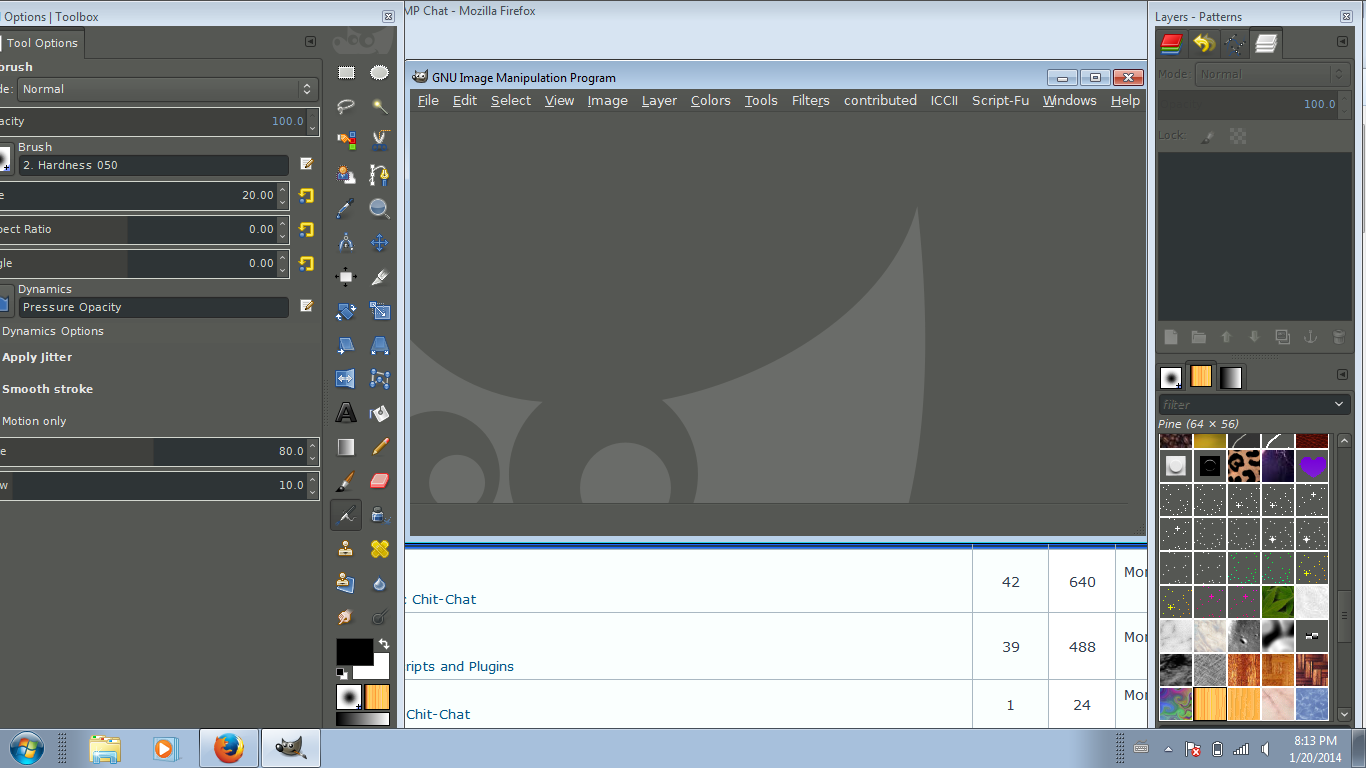
All of a sudden,Gimp opens with this huge tool box,and I can't figure out how to
shrink it.(see attached snapshot)
The other issue is that after I d/l the new Gimp release,G'Mic won't install at all

help please?

Image


Share on Facebook Share on Twitter Share on Orkut Share on Digg Share on MySpace Share on Delicious Share on Technorati
Top
 Post subject: Re: two questions
PostPosted: Mon Jan 20, 2014 8:23 pm  (#2) 
Offline
Script Coder
User avatar

Joined: Feb 18, 2011
Posts: 4826
Location: Bendigo Vic. Australia
If your version of gimp is 2.8.4 where did you get it from

_________________
Image
No matter how much you push the envelope, it'll still be stationery.


Top
 Post subject: Re: two questions
PostPosted: Mon Jan 20, 2014 8:37 pm  (#3) 
Offline
GimpChat Member
User avatar

Joined: May 27, 2011
Posts: 707
Graechan

It is 2.8.10..
http://www.gimp.org/downloads/


Top
 Post subject: Re: two questions
PostPosted: Mon Jan 20, 2014 8:52 pm  (#4) 
Offline
Script Coder
User avatar

Joined: Feb 18, 2011
Posts: 4826
Location: Bendigo Vic. Australia
sorry I was reading the top of your initial post, because you are not in single window mode just re-size your left hand window as you would any windows window (with the cursor when it changes to an arrow) at the edges of your left window

_________________
Image
No matter how much you push the envelope, it'll still be stationery.


Top
 Post subject: Re: two questions
PostPosted: Mon Jan 20, 2014 9:06 pm  (#5) 
Offline
GimpChat Member
User avatar

Joined: Nov 16, 2011
Posts: 5127
Location: Metro Vancouver, BC
You can also start again by resetting Gimp window positions to default.
Edit | Preferences | Window Management | Reset Saved Window Positions to Default Values

_________________
Image
Gimp 2.8.18, Linux, median user
Gimp Chat Tutorials Index
Spirit Bear (Kermode)


Top
 Post subject: Re: two questions
PostPosted: Mon Jan 20, 2014 9:17 pm  (#6) 
Offline
GimpChat Member
User avatar

Joined: May 27, 2011
Posts: 707
Graechan,Odin

i already tried all that.resetting to default didn't do anything and resizing the window only made it longer and made half the brushes disappear under the task bar


Top
 Post subject: Re: two questions
PostPosted: Mon Jan 20, 2014 9:23 pm  (#7) 
Offline
Script Coder
User avatar

Joined: Feb 18, 2011
Posts: 4826
Location: Bendigo Vic. Australia
when you installed you 2.8.10 was this how it started up

_________________
Image
No matter how much you push the envelope, it'll still be stationery.


Top
 Post subject: Re: two questions
PostPosted: Mon Jan 20, 2014 9:23 pm  (#8) 
Offline
GimpChat Founder
User avatar

Joined: May 22, 2008
Posts: 5241
Location: Gimpville
This was a known bug in GIMP 2.8.4 and it hit me a couple of times.

It was fixed in GIMP 2.8.8. This is the first time I've seen it since GIMP 2.8.4. Maybe you have some leftover junk in your sessionrc.

viewtopic.php?f=8&t=9122
viewtopic.php?f=8&t=8092

You could try manually backing up your sessionrc file. When GIMP restarts, it will re-create it using the defaults.

_________________
“If you reach for the stars, you just might land on a decently sized hill.” - Stuart Hill


Top
 Post subject: Re: two questions
PostPosted: Tue Jan 21, 2014 7:21 am  (#9) 
Offline
Global Moderator
User avatar

Joined: May 16, 2010
Posts: 16256
You may be able to go into single window mode then resize the dialog and then switch back to regular mode.

_________________
Image


Top
 Post subject: Re: two questions
PostPosted: Tue Jan 21, 2014 10:33 am  (#10) 
Offline
GimpChat Member
User avatar

Joined: May 27, 2011
Posts: 707
Gnutux,Rod
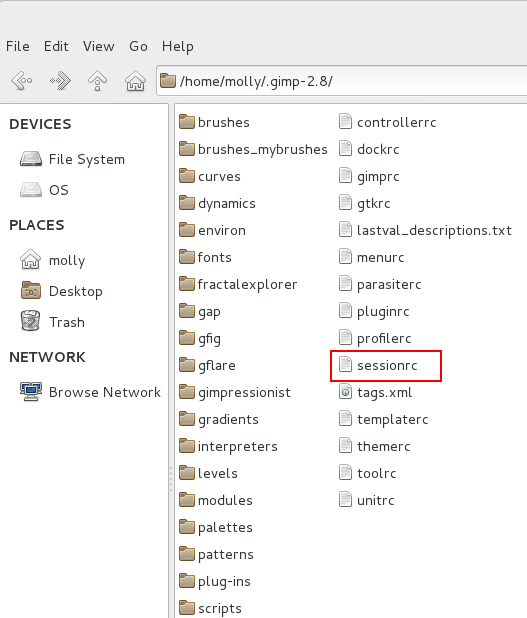
What in Heaven is a sessionrc file?


Top
 Post subject: Re: two questions
PostPosted: Tue Jan 21, 2014 10:51 am  (#11) 
Offline
Script Coder
User avatar

Joined: Oct 25, 2010
Posts: 4812
pirate541 wrote:
Gnutux,Rod
What in Heaven is a sessionrc file?

The file named "sessionrc" in your Gimp profile.

_________________
Image


Top
 Post subject: Re: two questions
PostPosted: Tue Jan 21, 2014 11:50 am  (#12) 
Offline
GimpChat Member
User avatar

Joined: Apr 07, 2010
Posts: 14182
Here is what mine looks like Pirate.
Image

_________________
Image


Top
 Post subject: Re: two questions
PostPosted: Wed Jan 22, 2014 4:01 pm  (#13) 
Offline
GimpChat Member
User avatar

Joined: May 27, 2011
Posts: 707
Ofnuts,Molly
Thank you,backing up session worked


Top
Post new topic Reply to topic  [ 13 posts ] 

All times are UTC - 5 hours [ DST ]


* Login  


Powered by phpBB3 © phpBB Group