It is currently Tue Sep 29, 2026 2:42 pm


All times are UTC - 5 hours [ DST ]


Post new topic Reply to topic  [ 29 posts ]  Go to page 1, 2  Next
Author Message
 Post subject: FX-Foundry and GAP for 2.8
PostPosted: Fri Feb 07, 2014 8:41 pm  (#1) 
Offline
GimpChat Member
User avatar

Joined: Jun 02, 2013
Posts: 2090
GIMP Version: 2.8.4
Operating System: Windows
GIMP Experience: Intermediate Level


I'm kind of wanting to install the full 2.8 version. I still have 2.6.11, and 2.8.4 portable. One of the reasons I'm hesitant to make the change, is because of all the scripts, etc, I already have installed in 2.6. I'm sure I'll have to find the 2.8 version of some of them. Anyways, in my 2.6 version, I have FX-Foundry installed. Is that the same as Layer FX? I can't remember. I have the LayerFX.py file already downloaded, but I don't get the header like on my 2.6. Is this because I have the portable version, and the path isn't correct? I also have the FX-Foundry .scm's, but when I put them in the scripts folder, nothing shows up when I fire up my 2.8. I'm really lost here. Here's a shot of the FX-Foundry that's on my 2.6. I really like this, and want it on my 2.8.

Image

_________________
Image


Last edited by The Warrior on Fri Feb 07, 2014 9:38 pm, edited 1 time in total.

Share on Facebook Share on Twitter Share on Orkut Share on Digg Share on MySpace Share on Delicious Share on Technorati
Top
 Post subject: Re: FX-Foundry
PostPosted: Fri Feb 07, 2014 8:47 pm  (#2) 
Offline
GimpChat Member
User avatar

Joined: Jun 02, 2013
Posts: 2090
Also, does the 2.6 version of GAP work in 2.8?

_________________
Image


Top
 Post subject: Re: FX-Foundry
PostPosted: Fri Feb 07, 2014 8:53 pm  (#3) 
Offline
Script Coder
User avatar

Joined: Feb 18, 2011
Posts: 4826
Location: Bendigo Vic. Australia
While the FX Foundry pkg is easy to install many of the scripts will be duplicates of scripts you may already have, I'd suggest installing them to a new folder in your user files and pointing your preferences/scripts to it so that they are easy to remove should any problem occur

There is a 2.7 version of GAP for 2.8

_________________
Image
No matter how much you push the envelope, it'll still be stationery.


Top
 Post subject: Re: FX-Foundry
PostPosted: Fri Feb 07, 2014 8:55 pm  (#4) 
Offline
GimpChat Member
User avatar

Joined: Jun 02, 2013
Posts: 2090
Graechan wrote:
While the FX Foundry pkg is easy to install many of the scripts will be duplicates of scripts you may already have, I'd suggest installing them to a new folder in your user files and pointing your preferences/scripts to it so that they are easy to remove should any problem occur

Gotcha. Also, I put all the .scm's that came with the fx-foundry download in a folder, that I titled fxfoundry. That didn't hurt anything, did it?

_________________
Image


Top
 Post subject: Re: FX-Foundry
PostPosted: Fri Feb 07, 2014 9:02 pm  (#5) 
Offline
Script Coder
User avatar

Joined: Feb 18, 2011
Posts: 4826
Location: Bendigo Vic. Australia
No and you could place that folder inside your scripts folder and set an extra preference for your user folder/scripts/fx-foundry

_________________
Image
No matter how much you push the envelope, it'll still be stationery.


Top
 Post subject: Re: FX-Foundry
PostPosted: Fri Feb 07, 2014 9:13 pm  (#6) 
Offline
GimpChat Member
User avatar

Joined: Jun 02, 2013
Posts: 2090
Graechan wrote:
No and you could place that folder inside your scripts folder and set an extra preference for your user folder/scripts/fx-foundry

Okay, I did that, but I can't seem to find the scripts once I fire 2.8 up. Here's a screenshot. You can see the path to my folder on the right, is the same as the path I created on the left. Man, I feel like such a noob:

Image

_________________
Image


Top
 Post subject: Re: FX-Foundry
PostPosted: Fri Feb 07, 2014 9:25 pm  (#7) 
Offline
GimpChat Founder
User avatar

Joined: May 22, 2008
Posts: 5241
Location: Gimpville
The big problem with Fx-Foundry is that whoever put it together, renamed the scripts. which caused lots of problems. For example, they took a couple of my scripts, renamed them, and when someone came along and grabbed an update from me, they now had two versions of the same script under different names. It was a big hassle then and it's still causing problems to this day. Whoever made the decision to rename those scripts, needs to be smacked upside the head. :hehe

My advice it to forget about reinstalling FX-Foundry and go grab the scripts you need from the original authors. If you need a specific script that's in FX-Foundy and can't find it, just copy over that script from your FX-Foundy backup.

_________________
“If you reach for the stars, you just might land on a decently sized hill.” - Stuart Hill


Top
 Post subject: Re: FX-Foundry
PostPosted: Fri Feb 07, 2014 9:27 pm  (#8) 
Offline
GimpChat Member
User avatar

Joined: Jun 02, 2013
Posts: 2090
GnuTux wrote:
The big problem with Fx-Foundry is that whoever put it together, renamed the scripts. which caused lots of problems. For example, they took a couple of my scripts, renamed them, and when someone came along and grabbed an update from me, they now had two versions of the same script under different names. It was a big hassle then and it's still causing problems to this day. Whoever made the decision to rename those scripts, needs to be smacked upside the head. :hehe

My advice it to forget about reinstalling FX-Foundry and go grab the scripts you need from the original authors. If you need a specific script that's in FX-Foundy and can't find it, just copy over that script from your FX-Foundy backup.

Gotcha. I did figure out what I was doing wrong, however. When I made the path to the folder, I had fxfoundry, and on the folder, I had a gap between fx and foundry, duh. Thanks for the help guys, appreciate it.

_________________
Image


Top
 Post subject: Re: FX-Foundry and GAP for 2.8
PostPosted: Fri Feb 07, 2014 9:39 pm  (#9) 
Offline
GimpChat Member
User avatar

Joined: Jun 02, 2013
Posts: 2090
So, now I'm trying to install GAP. I have the 2.7 version. Isn't there supposed to be an installer? Here what I get:

Image

_________________
Image


Top
 Post subject: Re: FX-Foundry and GAP for 2.8
PostPosted: Fri Feb 07, 2014 9:58 pm  (#10) 
Offline
GimpChat Founder
User avatar

Joined: May 22, 2008
Posts: 5241
Location: Gimpville
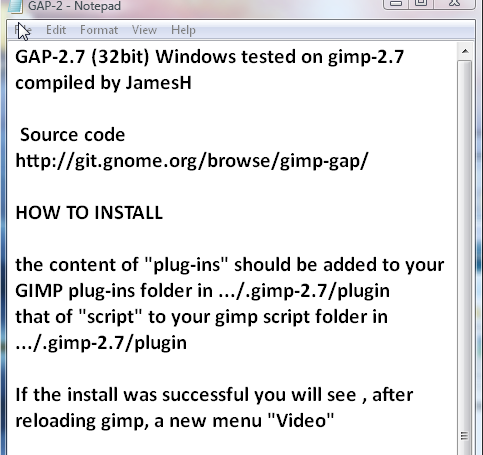
That README is a just a plain text file. You can open it in notepad.

This is what it says...

Copy the contents of "plug-ins" to your GIMP plug-ins folder
Copy the contents of "scripts" to your GIMP scripts folder

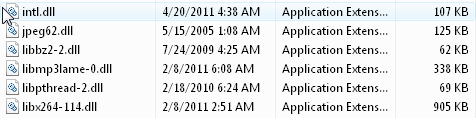
Not sure about those .dll files in the plug-ins folder though. I guess it's OK to install them in the GIMP plug-ins folder. Although, I would have thought they would be installed elsewhere in the path, but someone who has used GAP in Windows (Graechan) would know better than I do :hehe

_________________
“If you reach for the stars, you just might land on a decently sized hill.” - Stuart Hill


Top
 Post subject: Re: FX-Foundry and GAP for 2.8
PostPosted: Fri Feb 07, 2014 10:15 pm  (#11) 
Offline
GimpChat Member
User avatar

Joined: Jun 02, 2013
Posts: 2090
GnuTux wrote:
That README is a just a plain text file. You can open it in notepad.

This is what it says...

Copy the contents of "plug-ins" to your GIMP plug-ins folder
Copy the contents of "scripts" to your GIMP scripts folder

Not sure about those .dll files in the plug-ins folder though. I guess it's OK to install them in the GIMP plug-ins folder. Although, I would have thought they would be installed elsewhere in the path, but someone who has used GAP in Windows (Graechan) would know better than I do :hehe

Ah, you're right. And it had the instructions on it, of course, haha.

Thanks guys for all your help, appreciate it.

_________________
Image


Top
 Post subject: Re: FX-Foundry and GAP for 2.8
PostPosted: Fri Feb 07, 2014 10:22 pm  (#12) 
Offline
Script Coder
User avatar

Joined: Feb 18, 2011
Posts: 4826
Location: Bendigo Vic. Australia
Installers are a pain in the butt and I'd suggest always getting files from a pkg if possible so you know where they are going, place the plugins in a folder named gap in your User/user/plugins folder and point your preferences to it and the scripts you can just put in your scripts folder, there are no .dll files

_________________
Image
No matter how much you push the envelope, it'll still be stationery.


Top
 Post subject: Re: FX-Foundry and GAP for 2.8
PostPosted: Fri Feb 07, 2014 10:27 pm  (#13) 
Offline
GimpChat Member
User avatar

Joined: Jun 02, 2013
Posts: 2090
There were some .dll's. Here's the instructions, and the included .dll's. Worked fine:

Image

Image

_________________
Image


Top
 Post subject: Re: FX-Foundry and GAP for 2.8
PostPosted: Fri Feb 07, 2014 11:18 pm  (#14) 
Offline
Script Coder
User avatar

Joined: Feb 18, 2011
Posts: 4826
Location: Bendigo Vic. Australia
Yes you are right but intl.dll is probably already installed in your bin folder the others you can keep with the plugins
Sorry I missed them somehow :oops:

_________________
Image
No matter how much you push the envelope, it'll still be stationery.


Top
 Post subject: Re: FX-Foundry and GAP for 2.8
PostPosted: Tue Sep 16, 2014 10:42 pm  (#15) 
Offline
New Member

Joined: Sep 16, 2014
Posts: 1
Question for The Warrior (or anyone else): Where can I download GAP 2.7? Or if there's a newer version that works with GIMP 2.8, where can I get it?


Top
 Post subject: Re: FX-Foundry and GAP for 2.8
PostPosted: Tue Sep 16, 2014 11:37 pm  (#16) 
Offline
Script Coder
User avatar

Joined: Feb 18, 2011
Posts: 4826
Location: Bendigo Vic. Australia
aksjunk wrote:
Question for The Warrior (or anyone else): Where can I download GAP 2.7? Or if there's a newer version that works with GIMP 2.8, where can I get it?

download Gap 2.7 files here Gap 2.7-win32bit
Please Read the instructions carefully

_________________
Image
No matter how much you push the envelope, it'll still be stationery.


Last edited by Graechan on Wed Sep 17, 2014 6:48 pm, edited 2 times in total.

Top
 Post subject: Re: FX-Foundry and GAP for 2.8
PostPosted: Wed Sep 17, 2014 12:53 pm  (#17) 
Offline
GimpChat Member
User avatar

Joined: Mar 10, 2014
Posts: 845
Two weeks ago I downloaded and installed GAP 2.6win on my Vista 32bit (and it is working but I don’t know if is perfect!)

Today I discovered that exist GAP 2.7win , so I download that and I start to compare the two versions before to install.

I found that

all the exe files have more Kb except one that has the same dimension

four .exe files in the new version are new ( gap_colormask ; gap_movepath ; gap_water_patter ; gap_wr_color_balance

three are not in the new version ( gap_wr_resynth.exe ; gimp-lqr-plugin.exe ; plug_in_lqr_iter.exe

all the .dll are new except libpthread-2 that I have already in the normal plug-in folder ( I think for other application than GAP)

Note that I have a separate Gimp-GAP-plug-ins folder under the…..gimp2.8>plug-ins that is linked in the preferences

These are my questions

(1) can I substitute the old folder with the new (but what about the three exe files missing in the new version?)


(2)About the double .dll should I leave ( as they are in different folders) or delete one?
UPDATING: SHOULD STAY in different folder!!!!!!!!!!!!!!

Thank you in advance for your help!


Last edited by Marcello on Sat Sep 20, 2014 5:23 pm, edited 1 time in total.

Top
 Post subject: Re: FX-Foundry and GAP for 2.8
PostPosted: Thu Sep 18, 2014 7:37 am  (#18) 
Offline
GimpChat Member
User avatar

Joined: Jan 20, 2013
Posts: 590
Marcello, I often use the GAP in GIMP 2.6 and I like it very much. However the GAP does not work well in GIMP 2.8. For example, when I apply the filters to map objects and I need to do rotations, GAP does not work.

Do you know if GAPwin 2.7 version was adapted to GIMP 2.8?

I can not know which version is installed because I used the Installer. I can not even locate the GAP in my plugin folders.

_________________
Image


Top
 Post subject: Re: FX-Foundry and GAP for 2.8
PostPosted: Thu Sep 18, 2014 8:36 am  (#19) 
Offline
GimpChat Member
User avatar

Joined: Mar 10, 2014
Posts: 845
Carlos, I am just going out for 2 days; I will answer Saturday in detail
your comment is interesting


Top
 Post subject: Re: FX-Foundry and GAP for 2.8
PostPosted: Thu Sep 18, 2014 9:28 pm  (#20) 
Offline
Script Coder
User avatar

Joined: Feb 18, 2011
Posts: 4826
Location: Bendigo Vic. Australia
Carlos your gap should look like this below with fire and water pattern, if you used installer it is most likely GAP 2.6 and the files have been placed in \lib\gimp\2.0\plug-ins (this is what the installer does)
Image

_________________
Image
No matter how much you push the envelope, it'll still be stationery.


Top
Post new topic Reply to topic  [ 29 posts ]  Go to page 1, 2  Next

All times are UTC - 5 hours [ DST ]


* Login  


Powered by phpBB3 © phpBB Group