It is currently Sun Jun 21, 2026 12:47 pm


All times are UTC - 5 hours [ DST ]


Post new topic Reply to topic  [ 44 posts ]  Go to page Previous  1, 2, 3  Next
Author Message
 Post subject: Re: Shrink Grow Feather Selection with LIVE PREVIEW
PostPosted: Sun Dec 17, 2023 6:48 am  (#21) 
Offline
GimpChat Member
User avatar

Joined: Nov 15, 2014
Posts: 875
@TinT,

I couldn't resist trying to speed up the plug-in, so I have attached my attempt. The additions to the code I have marked with ##########.
I hope you will look at the changes and comment.

I am certain what I have done can be improved, but at least it does less updates of the preview while the pointers are moving.

Also I am still not convinced that I have the slider lower limits correct!

david.

NOTE: As with all my previous files in this thread it is only an experimental version.

Attachment:
grow-shrink-live_dm.zip [3.09 KiB]
Downloaded 90 times


Top
 Post subject: Re: Shrink Grow Feather Selection with LIVE PREVIEW
PostPosted: Sun Dec 17, 2023 2:01 pm  (#22) 
Offline
GimpChat Member
User avatar

Joined: Jan 13, 2011
Posts: 2640
Location: Poland
Changes in this version:
added: invert mask, next to slider also spinner, if you use Cancel: load old selection and remove chanel
David's changes included in the version in post #21 have not yet been incorporated.


Attachments:
Rev.4.jpg
Rev.4.jpg [ 92.07 KiB | Viewed 5417 times ]
Grow-Shrink Live Preview Rev.4.zip [3.94 KiB]
Downloaded 103 times

_________________
Image
Top
 Post subject: Re: Shrink Grow Feather Selection with LIVE PREVIEW
PostPosted: Sun Dec 17, 2023 5:15 pm  (#23) 
Offline
GimpChat Member
User avatar

Joined: Nov 15, 2014
Posts: 875
@MareroQ,

You have made many new additions to TinT's plug-in!
I will have to print out the code and study it carefully.

david.


Top
 Post subject: Re: Shrink Grow Feather Selection with LIVE PREVIEW
PostPosted: Tue Dec 19, 2023 11:49 am  (#24) 
Offline
GimpChat Member
User avatar

Joined: Nov 15, 2014
Posts: 875
I think, after extensive testing, that the slider lower limit should be:

    if h_box == width and v_box == height:
        h1_slider_lower = min(((h_box - 1)/2),((v_box - 1)/2))
        h1_slider_limit = 0
        h2_slider_lower = 0
        h2_slider_limit = min((height*0.5),(width*0.5))
    else:
        h1_slider_limit = min((height*0.5),(width*0.5))
        h1_slider_lower = min(((h_box - 1)/2),((v_box - 1)/2))
        h2_slider_lower = 0
        h2_slider_limit = min((height*0.5),(width*0.5))


This reduces the selection to one or two pixels.

I have tried two alternatives for the speed-up:

def on_param1_changed(scale):
    global global_param1
    global_param1 = scale.get_value()
    scale_val1 = global_param1        ##########
    scale_val2 = global_param1        ##########
    while scale_val1 != scale_val2:   ########## slider is moving   
        time.sleep(0.01)              ##########
        scale_val2 = global_param1    ########## slider value after 0.01 seconds
        scale_val1 = global_param1    ########## new start value for loop   
    update_live_preview()


When making a large change to the slider value it restricts the number of updates.

def on_param1_changed(scale):
    global global_param1
    global_param1 = scale.get_value()   
    scale_val1 = global_param1        ##########
    time.sleep(0.5)                            ########## detect if slider is moving
    scale_val2 = global_param1        ##########
   
    if scale_val1 != scale_val2:      ##########       
        scale_val2 = scale_val1       ########## slider value after delay
        time.sleep(0.5)               ########## wait to see if it has changed
        scale_val1 = global_param1    ########## new start value for loop       
    else:
        update_live_preview()


This version is more restrictive.

I have tested with an image of 3.6 MBytes (approximately 6 MegaPixels).
With the whole image selected, both versions take about 5 seconds to rewrite the image when the slider is moved to approximately half way.
When the OK button is clicked, approximately another 5 seconds to produce the final value.

However, if I do the same on an image of 24.2 MegaPixels, the plug-in becomes non-responsive and I get this error in the terminal:

(grow-shrink-live_dm.py:17560): LibGimpBase-WARNING **: 15:36:00.587: grow-shrink-live_dm.py: gimp_wire_read(): error

(script-fu:17454): LibGimpBase-WARNING **: 15:36:00.587: script-fu: gimp_wire_read(): error


I have no idea how to fix this!

david.


Top
 Post subject: Re: Shrink Grow Feather Selection with LIVE PREVIEW
PostPosted: Thu Dec 21, 2023 2:06 pm  (#25) 
Offline
Script Coder
User avatar

Joined: May 07, 2014
Posts: 4469
Location: Canada
I have only seen that error from loading of plug-in not from running so I don't know what that might be.

_________________
TinT
My GIMP 2.10 plug-in writer Fiverr Gig
Plaid Community Forum
Imageplaid-patterns.com


Top
 Post subject: Re: Shrink Grow Feather Selection with LIVE PREVIEW
PostPosted: Sat Dec 23, 2023 8:35 am  (#26) 
Offline
GimpChat Member
User avatar

Joined: Nov 15, 2014
Posts: 875
@TinT,

Ignore my comment about error - as usual self-inflicted!!!

I have had a quick play with the MareroQ version. He has taken your brilliant idea and added many bells and whistles. The spinners are particularly useful as on most occasions we will need to make small changes to a selection.

Out of curiosity, is it possible to update the channel after each change? This is only relevant for large images with large selections where we wish to make a big change.
For instance, with a 24 MegaPixel image, select all, if the slider is moved to about half-way it takes about 25 seconds to redraw the image. If the slider is then moved by 2 it takes another 25 seconds because it redraws from the original selection and clicking OK causes another redraw from the original selection.

My suggestion for speed-up was just an attempt to reduce the number of intermediate redraws. The sleep times would need to be experimented with to find the best compromise and it ought to become a separate thread to avoid repeating the code for every slider.

david.


Top
 Post subject: Re: Shrink Grow Feather Selection with LIVE PREVIEW
PostPosted: Sat Dec 23, 2023 3:42 pm  (#27) 
Offline
GimpChat Member

Joined: Dec 19, 2018
Posts: 164
Hello MareroQ,

Some time ago, when I tried this plugin for the first time I came across a problem that I exposed on gimp-forum.net, specifically in:
https://www.gimp-forum.net/Thread-Where ... led-plugin

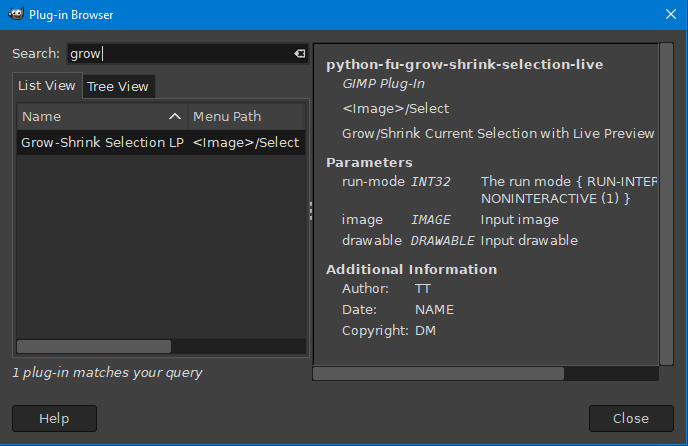
The issue was that the plugin simply didn't show itself anywhere. Not even via Help--> Plugin Browser.

David made some changes to the plugin and with this version the plugin now appears in the menu as expected. :bigthup

Today I became aware of the changes you made to the plugin (post #22), and decided to give it a try.

The problem is that the situation is back to square one. :hoh
Now again the plugin is nowhere to be found! :gaah
And the worst thing is that with the two versions installed together, the previous version; the one changed by David also disappeared from the menu, where it was previously located.

I took a look at the plugin codes in both versions (only superficially, since I don't know anything about codes), I found a difference between the versions between lines 16 and 19 of the code.

Trying to maintain the format used by David, I added the '#' symbol trying to nullify certain parts of the code in post #22 as follows:

16- from gimpfu import *
17- import gtk #, gimpui
18- #gimpui.gimp_ui_init () After the # sign was the original text
19- import mathematics

After this code change, I opened Gimp again, and found the version changed by David in the menu, as expected. However, the version of post #22 remains omitted, not accessible.

BTW, excellent additions to this version of post #22!
Opacity control already within the plugin, as well as defining the mask color, very good! :clap

David, your concern about the time the plugin takes with each use of the slider is legitimate. If I'm not mistaken, it was one of the problems that PixLab detected when testing the plugin.

Nice work gentlemen, thank you! :tyspin


Top
 Post subject: Re: Shrink Grow Feather Selection with LIVE PREVIEW
PostPosted: Sun Dec 24, 2023 1:30 am  (#28) 
Offline
GimpChat Member
User avatar

Joined: Jan 13, 2011
Posts: 2640
Location: Poland
@David
Maybe a solution would be to combine delay with image size?
My temporary solution is to add an option to activate sliders (Activate Parameters = No/Yes)

@Krikor
According to PixLab's correct comment, the location in the menu has changed - now:
Image

Rel.5
Changes;
- max/min correction according to David (#24)
- option added: Activate Parameters
Time corrections have not been taken into account yet - maybe they are no longer necessary?

Edit: New relase in post #38


Attachments:
G-S LP.png
G-S LP.png [ 8.77 KiB | Viewed 4727 times ]

_________________
Image


Last edited by MareroQ on Tue Jan 02, 2024 12:48 am, edited 1 time in total.
Top
 Post subject: Re: Shrink Grow Feather Selection with LIVE PREVIEW
PostPosted: Sun Dec 24, 2023 3:01 am  (#29) 
Offline
GimpChat Member
User avatar

Joined: Nov 15, 2014
Posts: 875
@Krikor,

I have attached a renamed version of the MareroQ plug-in.
After you install it, You will find it in the "Select" menu. Because it is renamed you can have two versions available at the same time.

(I think the problem may have been caused by spaces in the filename, so I have replaced them with underscores.)

Attachment:
grow_shrink_live_preview_mrq.py.zip [3.9 KiB]
Downloaded 90 times


Top
 Post subject: Re: Shrink Grow Feather Selection with LIVE PREVIEW
PostPosted: Mon Dec 25, 2023 5:59 am  (#30) 
Offline
GimpChat Member
User avatar

Joined: Nov 15, 2014
Posts: 875
@MareroQ,

Your temporary solution works, but needs the user to guess a setting closer to the one which is required.

I am trying to find why the plug-in is slow for large images. The slowness appears to be connected with gegl copy. The first time it is called (to save the original selection to a channel) it operates quickly, but every subsequent time it is called it is slower and slower.
I can monitor this by running with the terminal open.

By running the plug-in with the channels palette visible, I noticed that the channel does not get updated, so all updates are from the original channel.

Unfortunately my limited knowledge of Python and zero knowledge of GTK makes it difficult for me to investigate.

david.


Top
 Post subject: Re: Shrink Grow Feather Selection with LIVE PREVIEW
PostPosted: Mon Dec 25, 2023 2:03 pm  (#31) 
Offline
Script Coder
User avatar

Joined: May 07, 2014
Posts: 4469
Location: Canada
@David,
Hi, with some help of ChatGPT I noticed that the gobject.timeout_add() function works well with time.time() calls
here's the code I guess you play with time values if you wished but this worked pretty speedy to change settings on mine.
changed from code from Post #21

#!/usr/bin/env python
#grow-shrink-live_dm.py
# Creator: TT
# This should allow user to adjust grow/shrink current selection with live preview
# Open Source
# 09/12/2023 Modified DM to make sliders sensitive to image size.
#            Minimum slider value reduces selection to small value without destruction.
#            If run without selection, selects all so slider only enables reduction.
# 15/12/2023 Changed colour mask opacity to 50%.
# 16/12/2023 Corrected lower limits.
#
# 09/12/2023 Revision 1 by DM.
# 15/12/2023 Revision 2 by DM.
# 16/12/2023 Revision 3 by DM.
# 25/12/2023 Revision 4 by TT Change code to use gobjet along time time library for speedy reaction time when user is dragging and changing settings
from gimpfu import *
import gtk,gobject
import math
import time ##########

# Global variables to store the parameters used for our effect/work to show preview or actual layer when user OK it
global_param1 = 0 #in this example it's shrinkgrow radius
global_param2 = 0   #in this example it's feather_radius
global_param3 = 10  #in this example it's iterations
global_param4 = 0   #in this example it's enhance_shadows

image = 0 #we'll set these when dialog() is called so that we can access them later
drawable = 0
has_preview = False
preview_layer = 0
#for this operation
selection_channel = 0

def apply_effect(layer): #function to do work on either preview layer or actual drawable when user clicks OK
    global image
    radius = global_param1
    feather_radius = global_param2
    pdb.gimp_image_select_item(image,CHANNEL_OP_REPLACE,selection_channel) #first we selected the original saved channel
    if radius < 0:
        pdb.gimp_selection_shrink(image,-radius)
    else:
        pdb.gimp_selection_grow(image,radius)
    pdb.gimp_selection_feather(image,feather_radius)
    #do something to it to show it's effect so that user can distinguish between selected area or not
    pdb.gimp_drawable_edit_fill(layer,FILL_FOREGROUND)
   
    gimp.displays_flush()

def apply_final(layer): #wrapper to apply effect on final and remove preview_layer meant to be called by on_ok_button_clicked
    global preview_layer
    #pdb.gimp_image_undo_group_start(image) #so it's undone in Ctrl+Z
    pdb.gimp_image_undo_enable(image) #so that user can undo this next step
    apply_effect(preview_layer)
    #pdb.gimp_image_undo_group_end(image)
    if has_preview:
        pdb.gimp_image_remove_channel(image,selection_channel) #so that we don't leave a saved channel laying around
        pdb.gimp_image_remove_layer(image,preview_layer)
    pdb.gimp_image_set_active_layer(image,drawable)
    pdb.gimp_context_set_foreground(save_foreground)
    gimp.displays_flush()
   
# Function to update the live preview
def update_live_preview(): #this is called everytime some parameter changes
    global global_param1, global_param2, global_param3, global_param4
    global image,drawable
    global has_preview,preview_layer #deal with preview layer
    global selection_channel #this will save our current selection
    # Apply your plugin's effect using the current parameters
    # Use global_param1 and global_param2 to access the user's inputs
    if not has_preview: #create a preview layer
        #pdb.gimp_message("Creating preview")
        preview_layer = pdb.gimp_layer_new(image,image.width,image.height,RGBA_IMAGE,"preview",50,LAYER_MODE_NORMAL)
        pdb.gimp_image_insert_layer(image,preview_layer,None,0) #insert top most so we see it
        non_empty,x1,y1,x2,y2 = pdb.gimp_selection_bounds(image)
        if non_empty == TRUE:
            pass #there's already a selection
        else:
            pdb.gimp_selection_all(image) #if there's no selection we just select the whole image and work with that   
        selection_channel = pdb.gimp_selection_save(image)
        has_preview = True #now set it true so we can deal with existing layer in later calls
    else: # already have preview layer
        pass
        #pdb.gimp_message("Removing existing and creating new Preview")
        pdb.gimp_image_remove_layer(image,preview_layer) #remove it to create a new one to work on
        preview_layer = pdb.gimp_layer_new(image,image.width,image.height,RGBA_IMAGE,"preview",50,LAYER_MODE_NORMAL)
        pdb.gimp_image_insert_layer(image,preview_layer,None,0) #insert top most so we see it
       
    pdb.gimp_image_set_active_layer(image,preview_layer)
    apply_effect(preview_layer)
   
    # Update the live preview layer with the modified image
   
save_foreground = 0
hilightcolor = (255,0,0)
def dialog(image_, drawable_):
    global image, drawable, save_foreground
   
    non_empty,x1,y1,x2,y2=pdb.gimp_selection_bounds(image_)  # get limits of selection bounding box
    h_box = x2-x1 # horizontal width of bounding box
    v_box = y2-y1 # vertical height of bounding box
   
    width = image_.width
    height = image_.height
   
    if h_box == width and v_box == height:
        h1_slider_lower = (min((h_box/2),(v_box/2))) - 2 # corrected - revision 3 later found an error changed back to -2
        h1_slider_limit = 0
        h2_slider_lower = 0
        h2_slider_limit = min((height*0.5),(width*0.5))
    else:
        h1_slider_limit = min((height*0.5),(width*0.5))
        h1_slider_lower = (min((h_box/2),(v_box/2))) - 2 # corrected - revision 3 later found an error changed back to -2
        h2_slider_lower = 0
        h2_slider_limit = min((height*0.5),(width*0.5))
       
       
    #save these for updates
    image = image_
    pdb.gimp_image_undo_disable(image) #for speed and also when user undo it doesn't see our preview creations/deletions
    drawable = drawable_
    save_foreground = pdb.gimp_context_get_foreground()
    pdb.gimp_context_set_foreground(hilightcolor)

    dialog = gtk.Dialog("Shrink/Grow Feather Selection Live Preview", None, gtk.DIALOG_MODAL | gtk.DIALOG_DESTROY_WITH_PARENT)
    dialog.set_default_size(600, 100)

    # Create an HBox to hold the label and slider -------------------------------------------------------------
    hbox = gtk.HBox()
    dialog.vbox.pack_start(hbox, expand=True, fill=True)

    # Create a label on the left-hand side
    label1 = gtk.Label("Shrink/Grow Radius:")
    hbox.pack_start(label1, expand=False, fill=False, padding=5)

    # Create an adjustment for the HScale (slider)
    adjustment1 = gtk.Adjustment(value=0, lower=-(h1_slider_lower), upper=h1_slider_limit, step_incr=1, page_incr=0) # set slider lower & upper limits
    param1_scale = gtk.HScale(adjustment=adjustment1)
    param1_scale.set_digits(0)  # Display only integers
    hbox.pack_start(param1_scale, expand=True, fill=True, padding=5)
    # Connect callback functions for user interaction
    param1_scale.connect("value-changed", on_param1_changed)

    # # Create an HBox to hold the label and slider -------------------------------------------------------------
    hbox2 = gtk.HBox()
    dialog.vbox.pack_start(hbox2, expand=True, fill=True)

    # Create a label on the left-hand side
    label2 = gtk.Label("Feather Radius:")
    hbox2.pack_start(label2, expand=False, fill=False, padding=5)

    # Create an adjustment for the HScale (slider)
    adjustment2 = gtk.Adjustment(value=0, lower=h2_slider_lower, upper=h2_slider_limit, step_incr=1, page_incr=0) # set feather slider upper limit
    param2_scale = gtk.HScale(adjustment=adjustment2)
    param2_scale.set_digits(0)  # Display only integers
    hbox2.pack_start(param2_scale, expand=True, fill=True, padding=5)
    # Connect callback functions for user interaction
    param2_scale.connect("value-changed", on_param2_changed)

    # Add an OK button
    ok_button = dialog.add_button(gtk.STOCK_OK, gtk.RESPONSE_OK)
    ok_button.connect("clicked", on_ok_button_clicked)
    # Show the dialog
    dialog.show_all()
    update_live_preview() #call this once so we see effect
    dialog.run()
lasttime = time.time()
def actual_update():
    global lasttime
    thistime = time.time()
    elapsedtime = thistime - lasttime
    # try:
    #     a = elapsedtime
    # except:
    #     pass
    if elapsedtime < 0.1: #this should be less time for example 0.25 is 250/1000 is less than the
                           # gobject.timeout_add(150, actual_update) in try_call_update call so that it kicks in for sure after that much time
        pass
    else:
        update_live_preview()
        lasttime = time.time()
def try_call_update():
    global lasttime
    lasttime = time.time()
    gobject.timeout_add(150, actual_update)
    # Schedule a new timeout to update after 0.1 seconds
   
# Callback function for updating the live preview when param1 changes
def on_param1_changed(scale):
    global global_param1
    global_param1 = scale.get_value()
    try_call_update()
   

# Callback function for updating the live preview when param2 changes
def on_param2_changed(scale):
    global global_param2
    global_param2 = scale.get_value()
    try_call_update()

def on_param3_changed(scale):
    global global_param3
    global_param3 = scale.get_value()
    try_call_update()

# Callback function for the OK button
def on_ok_button_clicked(button, data=None):
    global drawable
    apply_final(preview_layer) #preview layer because we don't want to apply the invert to final layer it's just for viewing
    button.get_toplevel().destroy() #destroys the gtk dialog window
# Register the Python-Fu plugin
register(
    "python_fu_grow_shrink_live_dm",
    "Grow/Shrink Current Selection with Live Preview",
    "Grow/Shrink Current Selection with Live Preview",
    "TT",
    "DM",
    "NAME",
    "<Image>/Python-Fu/Live Preview/Grow-Shrink Live DM",  # Menu location
    "*",  # Image type
    [],
    [],
    dialog
)

main()


_________________
TinT
My GIMP 2.10 plug-in writer Fiverr Gig
Plaid Community Forum
Imageplaid-patterns.com


Top
 Post subject: Re: Shrink Grow Feather Selection with LIVE PREVIEW
PostPosted: Tue Dec 26, 2023 7:44 am  (#32) 
Offline
GimpChat Member
User avatar

Joined: Nov 15, 2014
Posts: 875
@TinT,

Thanks for your patience in considering my inane ideas!

I created a small routine to test some ideas.
Loaded an image and made a selection. I then printed v_box and h_box to the terminal to prove that it is not necessary to create a channel to get these values.
Then, in the program, I added a preview layer filled with foreground colour, grew the selection by 50 pixels, filled with foreground colour to show visibility.
I got the new v_box and h_box values and printed them to the terminal, proving that they had changed.
I repeated the process with a feather of 50 pixels, and again printed the new bounding box values.

Deleting the preview layer left me with the original image with the new selection.

I think by not creating a channel it would solve the speed problem for large images / large changes of selection.
However, I have no idea how to change your original code!
I think it would be necessary to calculate the slider upper and lower limits outside of the dialog routine or make them constants, otherwise they will get recalculated each time round the loop.

I hope this makes sense.

david.


Top
 Post subject: Re: Shrink Grow Feather Selection with LIVE PREVIEW
PostPosted: Tue Dec 26, 2023 9:40 am  (#33) 
Offline
Script Coder
User avatar

Joined: May 07, 2014
Posts: 4469
Location: Canada
@David,
The channel created because it needs to shrink/grow from the original selection which is saved as channel.
If there is a way to load the original selection without having to save/load the saved selection then I can remove the channel code.

I outputted to see where the slowness was comming from

Grow-Shrink Live DM Warning
select_channel:0.00769805908203

Grow-Shrink Live DM Warning
shrink:1.7846288681

Grow-Shrink Live DM Warning
feather:0.0195670127869

Grow-Shrink Live DM Warning
fill:0.100517034531

As you can see everything is relatively fast compared to the shrink operation which took nearly 2 seconds for large selection. The selecting original channel is super fast.

here's the code I used for outputing these values (in apply_effect function)
def apply_effect(layer): #function to do work on either preview layer or actual drawable when user clicks OK
    global image
    radius = global_param1
    feather_radius = global_param2
    start = time.time()
    pdb.gimp_image_select_item(image,CHANNEL_OP_REPLACE,selection_channel) #first we selected the original saved channel
    pdb.gimp_message("select_channel:"+str(time.time()-start))
    start = time.time()
    if radius < 0:
        pdb.gimp_selection_shrink(image,-radius)
    else:
        pdb.gimp_selection_grow(image,radius)
    pdb.gimp_message("shrink:"+str(time.time()-start))
    start = time.time()
    pdb.gimp_selection_feather(image,feather_radius)
    pdb.gimp_message("feather:"+str(time.time()-start))
    #do something to it to show it's effect so that user can distinguish between selected area or not
    start = time.time()
    pdb.gimp_drawable_edit_fill(layer,FILL_FOREGROUND)
    pdb.gimp_message("fill:"+str(time.time()-start))
    gimp.displays_flush()

_________________
TinT
My GIMP 2.10 plug-in writer Fiverr Gig
Plaid Community Forum
Imageplaid-patterns.com


Top
 Post subject: Re: Shrink Grow Feather Selection with LIVE PREVIEW
PostPosted: Tue Dec 26, 2023 12:16 pm  (#34) 
Offline
GimpChat Member
User avatar

Joined: Nov 15, 2014
Posts: 875
@TinT,

After carrying out my test to prove I could get the bounding box without a channel, I thought about the possible program flow.

1. Load image
If no selection, select all
Calculate upper & lower limits - store for use in "dialog" (as global variables?)
Create preview_layer, fill selection with foreground colour
call "dialog"

2. "apply_effect" remains as is, except for not creating channel

3. Do we then require "update_live_preview"? The live preview and limits have been created at Step 1

4. "dialog" no longer needs to derive upper & lower limits - done at Step 1

5. "apply_final" only needs to delete preview layer

This would mean that "dialog" only serves to monitor for changes. When a change occurs the appropriate callback would direct to "apply_effect" except if it is "OK" in which case it would direct to "apply_final".

Does this make sense? If it is possible, it would also make the code easier to follow and modify.

Attached the tiny plug-in I made to test if I could get the bounding box without a channel.

david.

Attachment:
my_test.zip [1.2 KiB]
Downloaded 83 times


Top
 Post subject: Re: Shrink Grow Feather Selection with LIVE PREVIEW
PostPosted: Tue Dec 26, 2023 12:52 pm  (#35) 
Offline
Script Coder
User avatar

Joined: May 07, 2014
Posts: 4469
Location: Canada
It's not the getting bounding box that is slow though.
It's the growing and shrinking the selection that is slow.
Everything else is pretty fast.

_________________
TinT
My GIMP 2.10 plug-in writer Fiverr Gig
Plaid Community Forum
Imageplaid-patterns.com


Top
 Post subject: Re: Shrink Grow Feather Selection with LIVE PREVIEW
PostPosted: Tue Dec 26, 2023 5:05 pm  (#36) 
Offline
GimpChat Member

Joined: Dec 19, 2018
Posts: 164
MareroQ wrote:

@Krikor
According to PixLab's correct comment, the location in the menu has changed - now:
[ Image ]


@MareroQ
Yes, the location has changed. I understood that part. But as I reported, the plugin did not appear anywhere, not even in this window via -->> Help - Plugin-in Browser

david wrote:
@Krikor,

I have attached a renamed version of the MareroQ plug-in.
After you install it, You will find it in the "Select" menu. Because it is renamed you can have two versions available at the same time.

(I think the problem may have been caused by spaces in the filename, so I have replaced them with underscores.)

Attachment:
grow_shrink_live_preview_mrq.py.zip


@David,
You did it again! With the version you made available in post #29 I can use both versions. Everything perfect!

Thank you gentlemen! :bigthup


Top
 Post subject: Re: Shrink Grow Feather Selection with LIVE PREVIEW
PostPosted: Mon Jan 01, 2024 7:06 am  (#37) 
Offline
GimpChat Member
User avatar

Joined: Nov 15, 2014
Posts: 875
While trying to get a better understanding of this plug-in, I looked at the GTK documentation.

I found the "set_update_policy". This has three options - the two that I think are relevant are:
GTK_UPDATE_CONTINUOUS, this is the default and updates for every change of sliders or spin-buttons.
GTK_UPDATE_DISCONTINUOUS, this only updates when sliders or spin-buttons are not changing.

However, from the documentation, I could not understand how to change to DISCONTINUOUS, and when I did a search I was unable to find an example of code which used this function.
I think it could be useful, not only for this plug-in, but for any live-preview that has sliders or spin-buttons.

david.


Top
 Post subject: Re: Shrink Grow Feather Selection with LIVE PREVIEW
PostPosted: Mon Jan 01, 2024 12:45 pm  (#38) 
Offline
GimpChat Member
User avatar

Joined: Nov 15, 2014
Posts: 875
@TinT
@MareroQ

I have managed to change the update policy for the sliders in the attached file to DISCONTINUOUS.
This prevents the plug-in from updating while the sliders are moving.
The change is to the latest version of the MareroQ plug-in.

Please give me your comments on the changes.

david.

Attachment:
Grow-Shrink Live Preview.zip [4.38 KiB]
Downloaded 101 times


Top
 Post subject: Re: Shrink Grow Feather Selection with LIVE PREVIEW
PostPosted: Tue Jan 02, 2024 12:50 am  (#39) 
Offline
GimpChat Member
User avatar

Joined: Jan 13, 2011
Posts: 2640
Location: Poland
Big applause for you, David. :jumpclap
Now it works perfectly.
This is better than an AI solution :bigthup

_________________
Image


Top
 Post subject: Re: Shrink Grow Feather Selection with LIVE PREVIEW
PostPosted: Tue Jan 02, 2024 1:54 am  (#40) 
Offline
GimpChat Member
User avatar

Joined: May 24, 2021
Posts: 859
Location: SEA - South East Asia
Looks nice, :clap

A question, though :mrgreen:
which line do I need to change to Activate parameters by default?

_________________
Patrice


Top
Post new topic Reply to topic  [ 44 posts ]  Go to page Previous  1, 2, 3  Next

All times are UTC - 5 hours [ DST ]


* Login  


Powered by phpBB3 © phpBB Group