It is currently Mon Nov 02, 2026 5:38 pm


All times are UTC - 5 hours [ DST ]


Post new topic Reply to topic  [ 24 posts ]  Go to page Previous  1, 2
Author Message
 Post subject: Re: Animated Scene
PostPosted: Sun Feb 16, 2025 7:53 am  (#21) 
Offline
GimpChat Member
User avatar

Joined: Jan 13, 2011
Posts: 2648
Location: Poland
Since you are already bored with Ver.2.0, in the new Version 2.1 I have added a great type of animation created by Trandoductin: "Paint Paths in Steps":
viewtopic.php?f=9&t=17569&hilit=paint_paths_in_steps
viewtopic.php?f=9&t=17482&start=0&hilit=paths_in_steps

I also used ofn-path-edits.py by Ofnuts (for sort strokes by position):
https://sourceforge.net/projects/gimp-p ... s/scripts/

Image

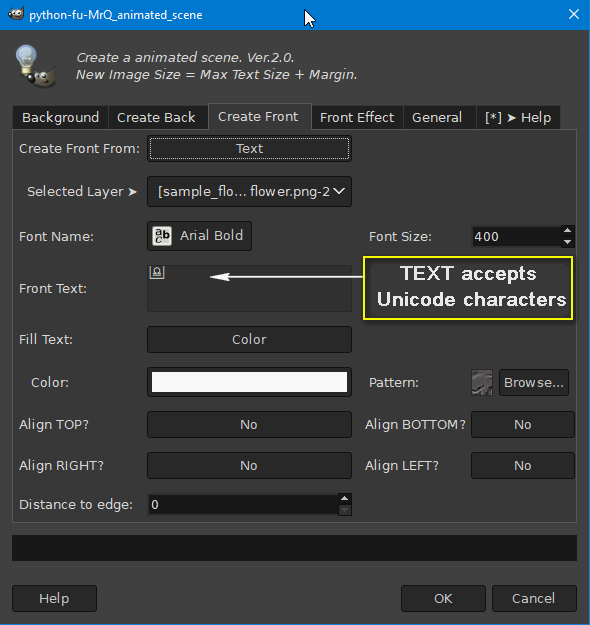
For the purposes of this plugin I used the older Paint_Paths_in_Steps.py (ver.2) because Animated Scene only works with a path automatically created from text (but you can use countless Unicode characters).

Image

Image


@Issabella
Your animation in post #19 is amazing.


Attachments:
MrQ Animated Scene Ver.2.1.zip [25.19 KiB]
Downloaded 67 times

_________________
Image
Top
 Post subject: Re: Animated Scene
PostPosted: Mon Feb 17, 2025 3:19 am  (#22) 
Offline
GimpChat Member
User avatar

Joined: Mar 01, 2014
Posts: 14219
Location: Spain, Aragón
@Issabella
Your animation in post #19 is amazing.
Thank you MareroQ. :)
I need to understand how you did your new awesome outcomes.
I have those plug-ins installed.
I'll need your guide again. :oops:
Thanks a lot.

_________________
Image

Gimp 2.10.36 (samj) portable _ OS Windows 10 Home_ 64bits
Don’t be afraid to start over. It’s a new chance to rebuild what you want.


Top
 Post subject: Re: Animated Scene
PostPosted: Mon Feb 17, 2025 5:57 am  (#23) 
Offline
GimpChat Member
User avatar

Joined: Jan 13, 2011
Posts: 2648
Location: Poland
This new effect does not need additional plugins (the TT and Ofnust code fragments are already in this plugin).

However, it works completely differently (I think it is simpler). :roll:

1. Select the layer before starting the plugin (it has to be active)
2. In the "Front Effect" tab, select Type of animation: Paint Paths in Steps... (the remaining options are inactive).
Image

3. In the Create Front tab, select Create Front From:Text, Font Name, Size, Fill Text: Color and Align...
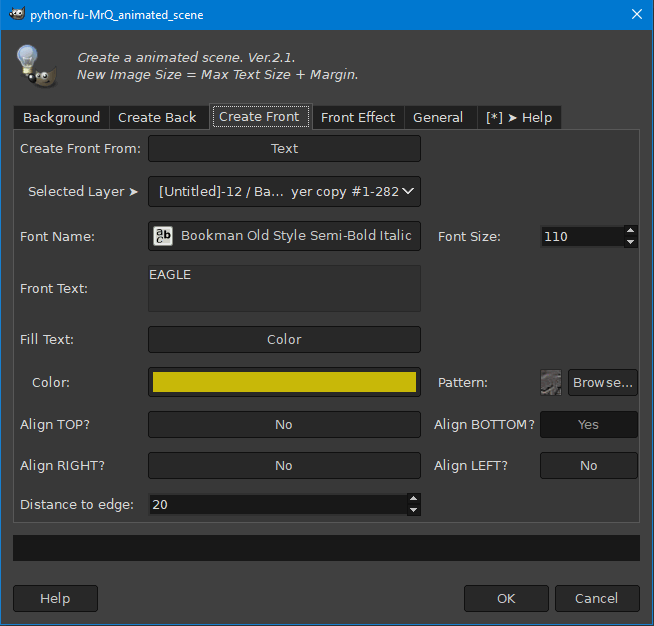
Image

4. Number of frames - recommended minimum 50 for smooth animation

You can select the brush and its size here:
Image

Image

Another source for animating are Dingbats fonts
Here is the ArmadaPirata font, letter: Y, size 310

Image

If I explained something wrong - ask. :)

_________________
Image


Top
 Post subject: Re: Animated Scene
PostPosted: Tue Feb 18, 2025 3:17 am  (#24) 
Offline
GimpChat Member
User avatar

Joined: Mar 01, 2014
Posts: 14219
Location: Spain, Aragón
Thank you so much, MareroQ. :hi5
You explained it perfect. :clap
My first ones in this style. :)


Attachments:
Roses-MareroQ.gif
Roses-MareroQ.gif [ 156.3 KiB | Viewed 2099 times ]
ship-MareroQ.gif
ship-MareroQ.gif [ 58.5 KiB | Viewed 2099 times ]

_________________
Image

Gimp 2.10.36 (samj) portable _ OS Windows 10 Home_ 64bits
Don’t be afraid to start over. It’s a new chance to rebuild what you want.
Top
Post new topic Reply to topic  [ 24 posts ]  Go to page Previous  1, 2

All times are UTC - 5 hours [ DST ]


* Login  


Powered by phpBB3 © phpBB Group