It is currently Sun Jun 14, 2026 12:44 pm


All times are UTC - 5 hours [ DST ]


Post new topic Reply to topic  [ 4 posts ] 
Author Message
 Post subject: Confirmed working Beaver's GEGL plugins for Windows GIMP 3.2+
PostPosted: Sat Mar 21, 2026 6:21 pm  (#1) 
Offline
GimpChat Member
User avatar

Joined: Oct 31, 2020
Posts: 2012
This is not another test. I confirmed these GEGL/GIMP plugins work for Windows 10 and 11 on GIMP 3.08+. Though they are 100s of megabytes larger because they static link GETTEXT and the source code now has an exclusive branch for Windows that static links gettext.

The Github is updated to reflect these changes
https://github.com/LinuxBeaver/LinuxBeaver/releases/


Attachment:
preview.png
preview.png [ 702.21 KiB | Viewed 1791 times ]


Binaries for Windows 3.0.8 +
https://github.com/LinuxBeaver/LinuxBea ... lugins.zip


Source Code For Windows GIMP 3.0.8+
https://github.com/LinuxBeaver/LinuxBea ... lugins.zip

Compile with
windows_master_build.sh : and do not disrupt the gettext folder hierarchy and it will work.

140+ GEGL plugins for GIMP have fun

Attachment:
preview2.png
preview2.png [ 861.21 KiB | Viewed 1791 times ]


and nothing can be done about the extremely large file size, that is the consequence of needing to static link gettext. Thank you Mr. Q/MareroQ

LOCATION TO PUT GEGL PLUGIN BINARIES

Windows

C:\Users\(USERNAME)\AppData\Local\gegl-0.4\plug-ins


then restart GIMP and go to "GEGL operation" to find the new plugins
or look in

filters>text styling

filters>render>fun


---

and if you are looking for Linux

The download and source code is here

https://github.com/LinuxBeaver/LinuxBeaver/releases/


Linux
~/.local/share/gegl-0.4/plug-ins


Linux(Flatpak includes Chromebook)

~/.var/app/org.gimp.GIMP/data/gegl-0.4/plug-ins


:gimp


Share on Facebook Share on Twitter Share on Orkut Share on Digg Share on MySpace Share on Delicious Share on Technorati
Top
 Post subject: Re: Confirmed working Beaver's GEGL plugins for Windows GIMP 3.2+
PostPosted: Sat Mar 21, 2026 7:02 pm  (#2) 
Offline
Global Moderator
User avatar

Joined: May 16, 2010
Posts: 16028
Yes i can confirm a new install straight from the Gimp website (Gimp-3.2), all your plugins work for Gimp-3.2 and Windows 11 pro. :)

_________________
Image


Top
 Post subject: Re: Confirmed working Beaver's GEGL plugins for Windows GIMP 3.2+
PostPosted: Sat Jun 13, 2026 11:31 pm  (#3) 
Offline
GimpChat Member
User avatar

Joined: Oct 31, 2020
Posts: 2012
Download to all 140 native GEGL plugins on their latest version

New 2026 Plugins - Radiance and Grainy Print included !

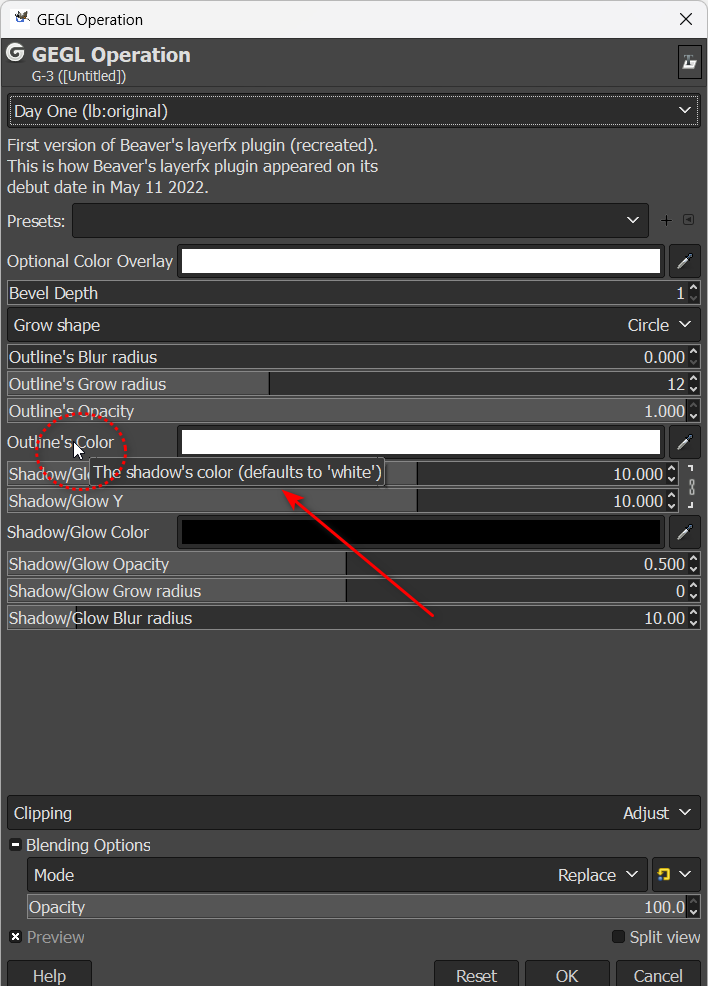
The most important change is a simple fix for descriptions, description apostrophes were changed to a similar looking character to prevent a bug that mistranslates apostrophes as words in GEGL 4.64+ The fix is so "outline's color" doesn't look like "outline%amos's color" when reading a hover description


Can someone test to confirm this works on Windows 11 without needing to disable signature stuff? That's what I need to know... and yes Windows Binaries are orders of magnitude larger because they static link gettext.

Attachment:
gegliaa.png
gegliaa.png [ 1.47 MiB | Viewed 51 times ]


Attachment:
geglia2.png
geglia2.png [ 1.32 MiB | Viewed 51 times ]


Attachment:
2025-07-17_01-23.png
2025-07-17_01-23.png [ 825.8 KiB | Viewed 51 times ]


Windows Binaries
https://github.com/LinuxBeaver/LinuxBea ... lugins.zip

Windows Source Code
https://github.com/LinuxBeaver/LinuxBea ... lugins.zip


Location to put binaries
C:\Users\USERNAME\AppData\Local\gegl-0.4\plug-ins


Binaries for Linux
https://github.com/LinuxBeaver/LinuxBea ... lugins.zip


Source Code Download for Linux

https://github.com/LinuxBeaver/LinuxBea ... lugins.zip


Enjoy, and let me have feedback if they work on Windows 11 in default


Top
 Post subject: Re: Confirmed working Beaver's GEGL plugins for Windows GIMP 3.2+
PostPosted: Sun Jun 14, 2026 10:53 am  (#4) 
Offline
Global Moderator
User avatar

Joined: May 16, 2010
Posts: 16028
Thanks for the update contrast.

I can confirm normal text on hover in Windows 11, if that is your meaning.

Image

_________________
Image


Top
Post new topic Reply to topic  [ 4 posts ] 

All times are UTC - 5 hours [ DST ]


* Login  


Powered by phpBB3 © phpBB Group