It is currently Tue Sep 15, 2026 6:56 pm


All times are UTC - 5 hours [ DST ]


Post new topic Reply to topic  [ 38 posts ]  Go to page Previous  1, 2
Author Message
 Post subject: Re: MathMap-1.3.5-Full for Gimp 2.6 & 2.7(32 bit) -Win
PostPosted: Wed Sep 28, 2011 9:06 am  (#21) 
Offline
GimpChat Member

Joined: Apr 12, 2010
Posts: 5870
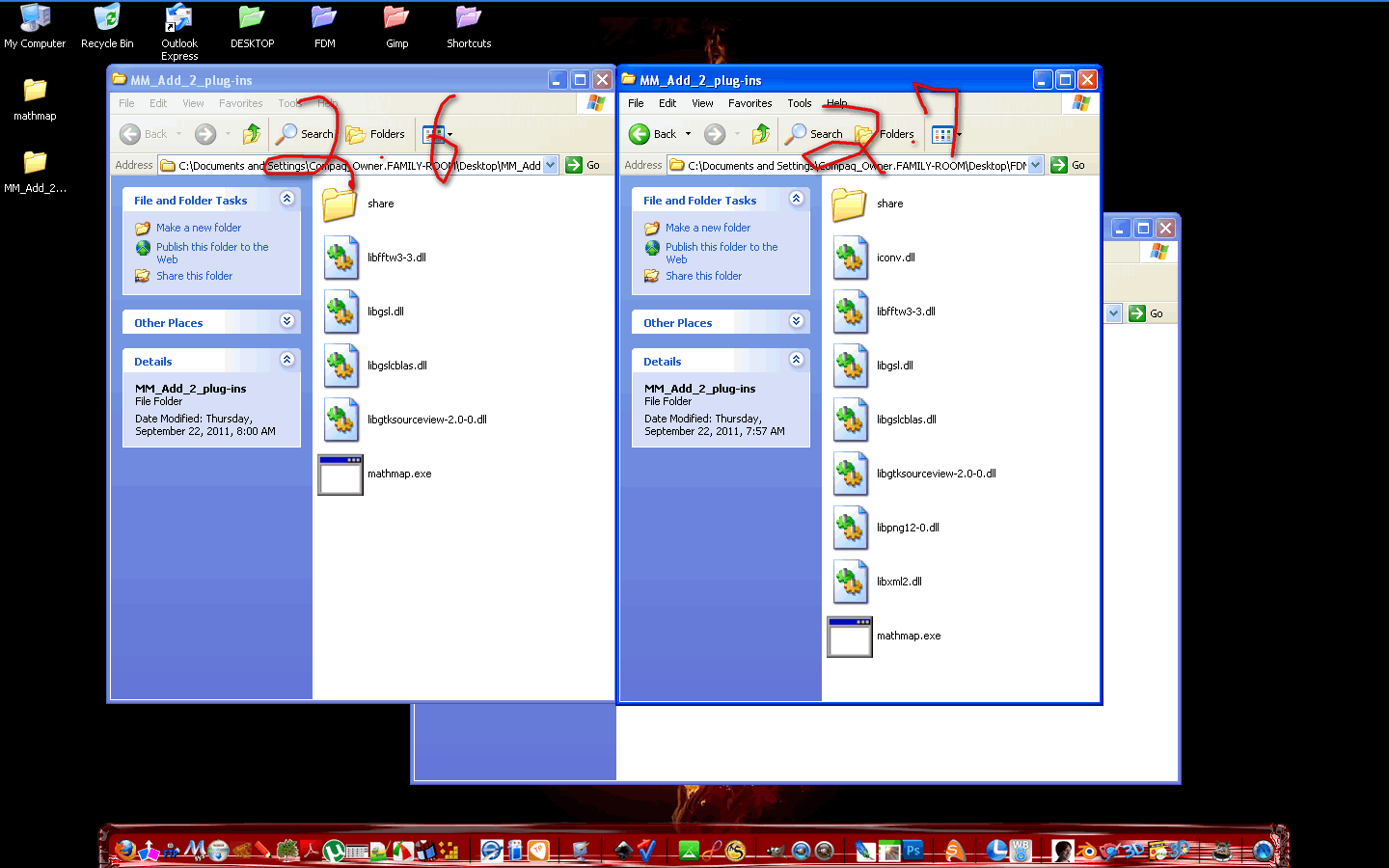
from the screenshot i may see 3 dll present only in the 2.7 version
In 2.6 are clones..clones are no good , luckily in that position they can't create conflicts.

But it was pure luck the same error but with different dll could make gimp abort at loading time

_________________
My 3D Gallery on Deviantart http://photocomix2.deviantart.com/
Main gallery http://www.flickriver.com/photos/photocomix-mandala/
Mandala and simmetry http://www.flickriver.com/photos/photocomix_mandala/

Image

Mrs Wilbress


Top
 Post subject: Re: MathMap-1.3.5-Full for Gimp 2.6 & 2.7(32 bit) -Win
PostPosted: Wed Sep 28, 2011 10:01 am  (#22) 
Offline
GimpChat Member
User avatar

Joined: Aug 24, 2011
Posts: 1785
Location: Dallas, TX
[quote="PhotoComix"]from the screenshot i may see 3 dll present only in the 2.7 version

Which ones? do I need to delete them?

_________________
Image


Top
 Post subject: Re: MathMap-1.3.5-Full for Gimp 2.6 & 2.7(32 bit) -Win
PostPosted: Wed Sep 28, 2011 10:11 am  (#23) 
Offline
GimpChat Member

Joined: Apr 12, 2010
Posts: 5870
as i said no, in this case are not a problem

The problem is mine , 1 zip was called MM-2.6 the other MM.2.7 and i can't understand how you can have done twice the same error:
i believed that you fixed the first time i warned you about, than i saw you used again the content of the wrong zip

_________________
My 3D Gallery on Deviantart http://photocomix2.deviantart.com/
Main gallery http://www.flickriver.com/photos/photocomix-mandala/
Mandala and simmetry http://www.flickriver.com/photos/photocomix_mandala/

Image

Mrs Wilbress


Top
 Post subject: Re: MathMap-1.3.5-Full for Gimp 2.6 & 2.7(32 bit) -Win
PostPosted: Sun Dec 18, 2011 1:20 pm  (#24) 
Offline
GimpChat Member

Joined: Dec 15, 2011
Posts: 129
Finally it works. I get a lot of errors, (with the Christmas script) but still the same it's working. :yes :coolthup
I found the video very confusing and just opened my C:\users\slide\.gimp-2.7 placed the mathmap in the root dir and the for the Christmas script followed the install. Now to figure how to make the bulb transparent. I know with phpbb there is a XML that is in the zip for a new MOD to show how and where to place everything as far as the MODs are concerned and maybe less confusing. Is there any one here that might be able to do that? The programmers here amaze me!
Anyway thank all of you that had something to do with getting mathmap up and running. :hi5
Thanks again!


Last edited by Slide on Sun Dec 18, 2011 2:40 pm, edited 1 time in total.

Top
 Post subject: Re: MathMap-1.3.5-Full for Gimp 2.6 & 2.7(32 bit) -Win
PostPosted: Sun Dec 18, 2011 2:19 pm  (#25) 
Offline
Global Moderator
User avatar

Joined: May 16, 2010
Posts: 16173
Glad to hear you got it working Slide.

@ Draconian - Have you tried clicking the preview button in Mathmaps dialog?
I have to do that to update the filter i am using.

_________________
Image


Top
 Post subject: Re: MathMap-1.3.5-Full for Gimp 2.6 & 2.7(32 bit) -Win
PostPosted: Sun Dec 18, 2011 6:05 pm  (#26) 
Offline
GimpChat Member
User avatar

Joined: Aug 24, 2011
Posts: 1785
Location: Dallas, TX
Rod wrote:
Glad to hear you got it working Slide.

@ Draconian - Have you tried clicking the preview button in Mathmaps dialog?
I have to do that to update the filter i am using.


Oh yes! Many times. I'm not sure why it took three months to get a response but I'm just glad to see you are willing to give this one more shot. I never could get PC to tell me which dll files associated with 2.7 that I needed to delete. I took everything out and started over. Here are several screen shots of where I am now.

MM_1 shows folder contents & preferences in gimp pointing to the MM.... folder and the plug-ins folder just like the instructions say on the first post of this thread.

In the MM_2 shot, it shows that mathmap is loading and I can go to Drost, for instance. The dialog window that comes up is completely black and has nothing but squares instead of text for controls as you can see.

In shot MM_3, I go to Map>Sphere and I still get a black screen. I add an alpha channel to my image, then all I get in the preview window is the alpha channel. I click on the preview window and the preview button, no change. I can at least see some text for the controls this time instead of little squares, so I went into "User Values" tab and tried to change the color of the background and still nothing.

I'm at your mercy....


Attachments:
MM_1.jpg
MM_1.jpg [ 126.31 KiB | Viewed 1723 times ]
MM_2.jpg
MM_2.jpg [ 183.64 KiB | Viewed 1723 times ]
MM_3.jpg
MM_3.jpg [ 49.12 KiB | Viewed 1723 times ]

_________________
Image
Top
 Post subject: Re: MathMap-1.3.5-Full for Gimp 2.6 & 2.7(32 bit) -Win
PostPosted: Sun Dec 18, 2011 6:40 pm  (#27) 
Offline
Global Moderator
User avatar

Joined: May 16, 2010
Posts: 16173
I see one problem already.Your mathmap folder can NOT be in the plug-ins folder.It has to be in the gimp-2.6 folder.

Follow these directions precisely
mathmap folder -place in gimp-2.6 folder
everything else - place in gimp-2.6/plugin folder
no need to create a edit>pref>plugin path at all

_________________
Image


Top
 Post subject: Re: MathMap-1.3.5-Full for Gimp 2.6 & 2.7(32 bit) -Win
PostPosted: Sun Dec 18, 2011 10:47 pm  (#28) 
Offline
GimpChat Member

Joined: Dec 15, 2011
Posts: 129
Two videos to show Draconian how to do it. Click on the links below.
Link 1> Install. Where to place the files.
Link 2> Test Mathmap.
Thanks


Top
 Post subject: Re: MathMap-1.3.5-Full for Gimp 2.6 & 2.7(32 bit) -Win
PostPosted: Mon Dec 19, 2011 7:34 am  (#29) 
Offline
GimpChat Member
User avatar

Joined: Aug 24, 2011
Posts: 1785
Location: Dallas, TX
OOPS! My bad. I grabbed the old screenshots of the folders. This is the current setup....Sorry.


Attachments:
2.6 folder.jpg
2.6 folder.jpg [ 161.77 KiB | Viewed 1704 times ]
plug-ins folder.jpg
plug-ins folder.jpg [ 144.23 KiB | Viewed 1704 times ]
Preferences.jpg
Preferences.jpg [ 73 KiB | Viewed 1704 times ]

_________________
Image
Top
 Post subject: Re: MathMap-1.3.5-Full for Gimp 2.6 & 2.7(32 bit) -Win
PostPosted: Tue Dec 20, 2011 5:07 am  (#30) 
Offline
Global Moderator
User avatar

Joined: May 16, 2010
Posts: 16173
Looks fine too me Draconian.Everything seems to be where it's supposed to be.

_________________
Image


Top
 Post subject: Re: MathMap-1.3.5-Full for Gimp 2.6 & 2.7(32 bit) -Win
PostPosted: Tue Dec 20, 2011 8:56 am  (#31) 
Offline
GimpChat Member
User avatar

Joined: Aug 24, 2011
Posts: 1785
Location: Dallas, TX
PhotoComix wrote:
from the screenshot i may see 3 dll present only in the 2.7 version...... but with different dll could make gimp abort at loading time


Rod - can you tell me which dll files are from 2.7 so I can delete them? I don't know if there is any problem with them being in there but If I don't need them. I would at least like to clean it up.

Maybe i just don't know how to use mathmap?

_________________
Image


Top
 Post subject: Re: MathMap-1.3.5-Full for Gimp 2.6 & 2.7(32 bit) -Win
PostPosted: Tue Dec 20, 2011 9:39 am  (#32) 
Offline
GimpChat Member

Joined: Dec 15, 2011
Posts: 129
Draconian wrote:
Maybe i just don't know how to use mathmap?

I couldn't figure why either, so I went and looked at one of the reasons for the app.
Short video
Thanks


Top
 Post subject: Re: MathMap-1.3.5-Full for Gimp 2.6 & 2.7(32 bit) -Win
PostPosted: Tue Dec 20, 2011 11:09 am  (#33) 
Offline
GimpChat Member

Joined: Apr 12, 2010
Posts: 5870
actually i have no copy of the zip in my HD to see which are the dll i should download both , unzip and check the differences, the dll that are only in the pack for mm-2.7 are that to delete.

I may see when i will be back home i doubt that may be that the problem (in case should be some error message about missing dll ) but sure better delete them

i don't know a better way to find them than confront the content of the 2 version because that is the only difference

Is the format used for number in your PC in english ?
i mean 1 million and 12 cents is written as 1,000,000.15 and not as 1.000.000,15 ?

MM need the first format
1 million and 12 cents must be written as 1,000,000.15 (that correspond to english, american and german format, french and italian use the other )

_________________
My 3D Gallery on Deviantart http://photocomix2.deviantart.com/
Main gallery http://www.flickriver.com/photos/photocomix-mandala/
Mandala and simmetry http://www.flickriver.com/photos/photocomix_mandala/

Image

Mrs Wilbress


Top
 Post subject: Re: MathMap-1.3.5-Full for Gimp 2.6 & 2.7(32 bit) -Win
PostPosted: Wed Dec 21, 2011 4:59 am  (#34) 
Offline
Global Moderator
User avatar

Joined: May 16, 2010
Posts: 16173
Draconian i am guessing you have replaced some of the 2.6 dll files with 2.7 dlls with the same name but they are not the same dll (they have different calls)
See here some of the dll files have the same name and you just need to completely remove everything and just install the 2.6 package.2.6 needs it's own dll files even though they have the same name.For instance if i take the libgimp-2.0.0.dll out of gimp-2.7, and replace it with the gimp-2.6 dll with the same name, it will not run.
They need to have the dll files that were compiled with the execute file.

Image

_________________
Image


Top
 Post subject: Re: MathMap-1.3.5-Full for Gimp 2.6 & 2.7(32 bit) -Win
PostPosted: Wed Dec 21, 2011 6:21 am  (#35) 
Offline
GimpChat Member
User avatar

Joined: Aug 24, 2011
Posts: 1785
Location: Dallas, TX
PhotoComix wrote:
Is the format used for number in your PC in english ?
i mean 1 million and 12 cents is written as 1,000,000.15 and not as 1.000.000,15 ?

MM need the first format
1 million and 12 cents must be written as 1,000,000.15 (that correspond to english, american and german format, french and italian use the other )


I don't understand what you are asking. Where do I look to check. As far as I know, everything on my computer is in English.

_________________
Image


Top
 Post subject: Re: MathMap-1.3.5-Full for Gimp 2.6 & 2.7(32 bit) -Win
PostPosted: Wed Dec 21, 2011 6:29 am  (#36) 
Offline
GimpChat Member
User avatar

Joined: Aug 24, 2011
Posts: 1785
Location: Dallas, TX
Rod wrote:
Draconian i am guessing you have replaced some of the 2.6 dll files with 2.7 dlls with the same name but they are not the same dll (they have different calls)
See here some of the dll files have the same name and you just need to completely remove everything and just install the 2.6 package.2.6 needs it's own dll files even though they have the same name.For instance if i take the libgimp-2.0.0.dll out of gimp-2.7, and replace it with the gimp-2.6 dll with the same name, it will not run.
They need to have the dll files that were compiled with the execute file.


Good to know. I made sure that every dll file was straight from the MM 2.6 zip file.

I'm also getting assertion errors now.


Attachments:
assertion failure.jpg
assertion failure.jpg [ 73.73 KiB | Viewed 1710 times ]

_________________
Image
Top
 Post subject: Re: MathMap-1.3.5-Full for Gimp 2.6 & 2.7(32 bit) -Win
PostPosted: Wed Dec 21, 2011 8:26 am  (#37) 
Offline
GimpChat Member

Joined: Apr 12, 2010
Posts: 5870
Rod
actually MM for 2.7 don't require the new version of the dll present in 2.6, on the contrary it can't use the new dll at all
so it need a copy of the older ,that in 2.6 that in this lucky case have all different names and version numbers so there are no conflict

But that for 2.7, in 2.6 that are clones of analog dll in gimp-2.6/bin

that why i did 2 different packs

_________________
My 3D Gallery on Deviantart http://photocomix2.deviantart.com/
Main gallery http://www.flickriver.com/photos/photocomix-mandala/
Mandala and simmetry http://www.flickriver.com/photos/photocomix_mandala/

Image

Mrs Wilbress


Top
 Post subject: Re: MathMap-1.3.5-Full for Gimp 2.6 & 2.7(32 bit) -Win
PostPosted: Wed Dec 21, 2011 8:34 am  (#38) 
Offline
GimpChat Member

Joined: Apr 12, 2010
Posts: 5870
About the option for the number it is in My Computer/language option (even if do not change language if not for the number)

But you may just notice how the computer display numbers in the message:
if use a dot before the decimal as $ 1.60 is fine,
if use a comma as for E 1,60 that may be the culprit

_________________
My 3D Gallery on Deviantart http://photocomix2.deviantart.com/
Main gallery http://www.flickriver.com/photos/photocomix-mandala/
Mandala and simmetry http://www.flickriver.com/photos/photocomix_mandala/

Image

Mrs Wilbress


Top
Post new topic Reply to topic  [ 38 posts ]  Go to page Previous  1, 2

All times are UTC - 5 hours [ DST ]


* Login  


Powered by phpBB3 © phpBB Group