It is currently Sat Jun 13, 2026 5:45 pm


All times are UTC - 5 hours [ DST ]


Post new topic Reply to topic  [ 6 posts ] 
Author Message
 Post subject: Rename, Resize and Export Plug-in
PostPosted: Tue Dec 10, 2024 10:34 am  (#1) 
Offline
GimpChat Member
User avatar

Joined: Nov 15, 2014
Posts: 875
I had a large number of images to process for my websites and because it is not possible to rename an image after it has been imported into GIMP, I created the attached plug-in.

Running this plug-in, after the image has been modified, allows it to be exported as three different sizes of .jpg - fullsize, large (webpage size) and small (thumbnail).
Export is to a named folder with sub-folders for the three sizes. This allows me to have a structured file system for these files with meaningful names.
The first time it is used on an image, a name is entered. The plug-in adds a suffix of _1 and a suffix of _f, _l or _s for each of the output sizes.
If the plug-in is run on an image with the same base-name the numeric suffix is incremented.

I always use thumbnails of the same width, irrespective of the original being landscape or portrait. However the code is partially available to permit modification.

The plug-in is proving useful for me and prevents me misnaming files!

I hope it will be useful for others, either in it's original form or with modification. I would appreciate feedback, suggestions or criticism.

Tested in Linux Ubuntu 20.04 with GIMP 2.10.38. Requires Python 2.7.

David.


Attachments:
website_photos1.py.zip [2.82 KiB]
Downloaded 51 times
Share on Facebook Share on Twitter Share on Orkut Share on Digg Share on MySpace Share on Delicious Share on Technorati
Top
 Post subject: Re: Rename, Resize and Export Plug-in
PostPosted: Tue Dec 10, 2024 11:23 am  (#2) 
Offline
GimpChat Member
User avatar

Joined: Jan 06, 2020
Posts: 397
Location: The Netherlands
Works well in Windows... a nice addition.Thank you!


Top
 Post subject: Re: Rename, Resize and Export Plug-in
PostPosted: Thu Dec 19, 2024 10:22 am  (#3) 
Offline
GimpChat Member
User avatar

Joined: Nov 15, 2014
Posts: 875
Jappaloe63,
Thanks for your reply.

The plug-in has now been updated.
It makes it possible so select one or more of the sizes to output.
The scaling now uses the maximum dimension of the original image to scale in both portrait and landscape.
Below is the new User Interface.

Attachment:
GIMP_UI.jpg
GIMP_UI.jpg [ 34.8 KiB | Viewed 1453 times ]


Attachment:
website_photos1.zip [2.96 KiB]
Downloaded 52 times


The script is fully commented.
If you modify the script or have any comments or criticisms, please let me know.
I wish to make it as useful as possible and it is also part of my learning process!

As with the previous version it requires Python 2.7 and has been tested in GIMP 2.10.38 and Ubuntu 20.04.

David.


Top
 Post subject: Re: Rename, Resize and Export Plug-in
PostPosted: Fri Dec 20, 2024 12:52 am  (#4) 
Offline
GimpChat Member
User avatar

Joined: Jan 13, 2011
Posts: 2639
Location: Poland
Hi.
I'm a bit surprised by the discrepancy in the names in the Gui and the created directories:
Large saves in the Full-size directory (which is the original size)
Thumbnail saves in the Small directory
Small saves in the Large directory.

And the suggested location in the menu:
Image

_________________
Image


Top
 Post subject: Re: Rename, Resize and Export Plug-in
PostPosted: Fri Dec 20, 2024 8:56 am  (#5) 
Offline
GimpChat Member
User avatar

Joined: Nov 15, 2014
Posts: 875
MareroQ,
Thank you for your reply.
You are correct, the naming is totally illogical!

The names of the folders was to fit with the system I have been using for the file names with the suffixes of "_f", "_l" and "_s" for my websites.
Original size jpg files are saved so that those for whom I created the websites can use them for other purposes.

I will think about revising the GUI to something more sensible.

teapot in Gimp-Forum.net has suggested various ways in which I can improve the layout of gimp GUI's.

David.


Top
 Post subject: Re: Rename, Resize and Export Plug-in
PostPosted: Sun Dec 22, 2024 10:20 am  (#6) 
Offline
GimpChat Member
User avatar

Joined: Nov 15, 2014
Posts: 875
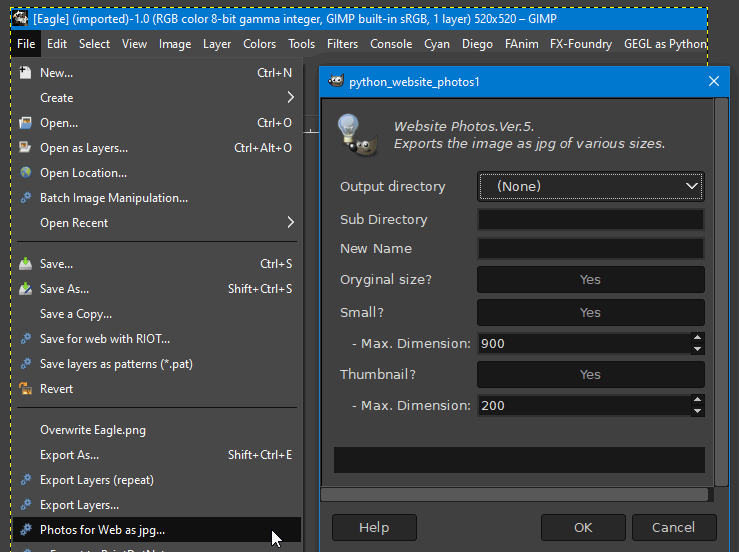
I have updated the plug-in to Version 5.

It now checks for missing entries for Sub Directory and New Name.
The GUI has changed - see below.
The directory names for the three image sizes now correspond to the GUI field names.

David.

Attachment:
GUI.jpg
GUI.jpg [ 45.12 KiB | Viewed 1349 times ]


Attachment:
website_photos1.zip [3.15 KiB]
Downloaded 58 times


Top
Post new topic Reply to topic  [ 6 posts ] 

All times are UTC - 5 hours [ DST ]


* Login  


Powered by phpBB3 © phpBB Group