It is currently Mon Jun 15, 2026 10:35 am


All times are UTC - 5 hours [ DST ]


Post new topic Reply to topic  [ 19 posts ] 
Author Message
 Post subject: I compiled the new toy plugin for Windows 32 bit Gimp-2.7.4
PostPosted: Sat Nov 12, 2011 3:20 am  (#1) 
Offline
Global Moderator
User avatar

Joined: May 16, 2010
Posts: 16028
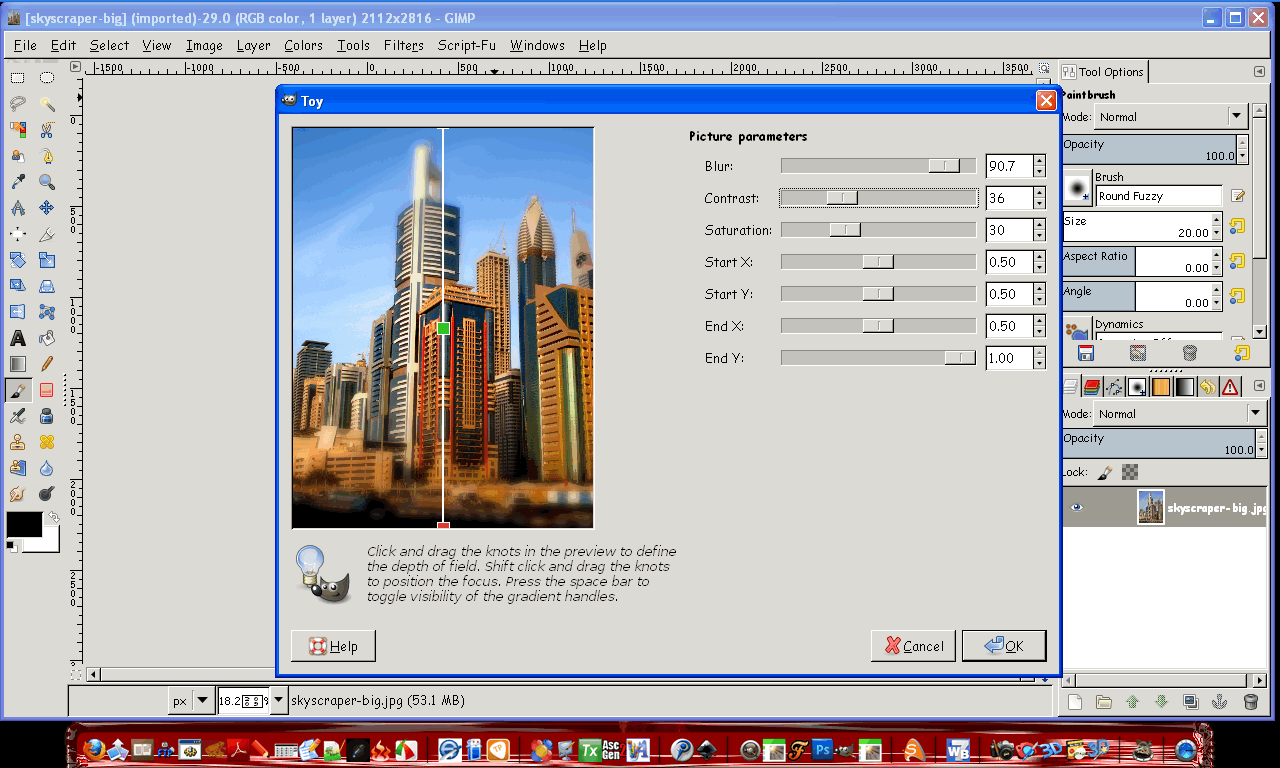
works great on Windows xp and Gimp-2.7.4 :)
attached

Just throw it in your plugins folder and you will find it in Filters/Blur/Toy

Enjoy!

Image

Attachment:
gimp-plugin-toy.zip [63.56 KiB]
Downloaded 3916 times

_________________
Image


Share on Facebook Share on Twitter Share on Orkut Share on Digg Share on MySpace Share on Delicious Share on Technorati
Top
 Post subject: Re: I compiled the new toy plugin
PostPosted: Sat Nov 12, 2011 3:28 am  (#2) 
Offline
GimpChat Member
User avatar

Joined: Apr 07, 2010
Posts: 14182
thanks Rod, what exactly does it do
I put it in my user plug-ins and it just comes up with error messages when I boot up Gimp. It doesn't show in the menu. Should it be in the program files plug-ins?

_________________
Image


Last edited by molly on Sat Nov 12, 2011 3:33 am, edited 1 time in total.

Top
 Post subject: Re: I compiled the new toy plugin
PostPosted: Sat Nov 12, 2011 3:32 am  (#3) 
Offline
Global Moderator
User avatar

Joined: May 16, 2010
Posts: 16028
It makes toy models. :)

Here is my trivial attempt to get one right. :lol

Image

Has anyone tested it in Gimp-2.6.11 yet?

:ninja

_________________
Image


Top
 Post subject: Re: I compiled the new toy plugin
PostPosted: Sat Nov 12, 2011 3:34 am  (#4) 
Offline
Script Coder
User avatar

Joined: Apr 23, 2010
Posts: 1553
Location: not from Guildford after all
molly wrote:
thanks Rod, what exactly does it do

I think it facilitates the effect described in this thread.

_________________
Any sufficiently primitive technology is indistinguishable from a rock.


Top
 Post subject: Re: I compiled the new toy plugin
PostPosted: Sat Nov 12, 2011 3:39 am  (#5) 
Offline
GimpChat Member
User avatar

Joined: Apr 07, 2010
Posts: 14182
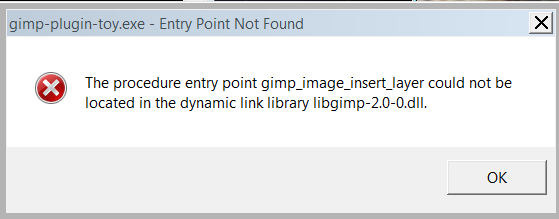
I get this message when I open Gimp.
I tried it in my user plug-in folder and also in the programs gimp-plug-ins
Image


that is a cool effect Saul, I like it

_________________
Image


Top
 Post subject: Re: I compiled the new toy plugin
PostPosted: Sat Nov 12, 2011 5:23 am  (#6) 
Offline
Global Moderator
User avatar

Joined: May 16, 2010
Posts: 16028
Quote:
thanks Rod, what exactly does it do
I put it in my user plug-ins and it just comes up with error messages when I boot up Gimp. It doesn't show in the menu. Should it be in the program files plug-ins?


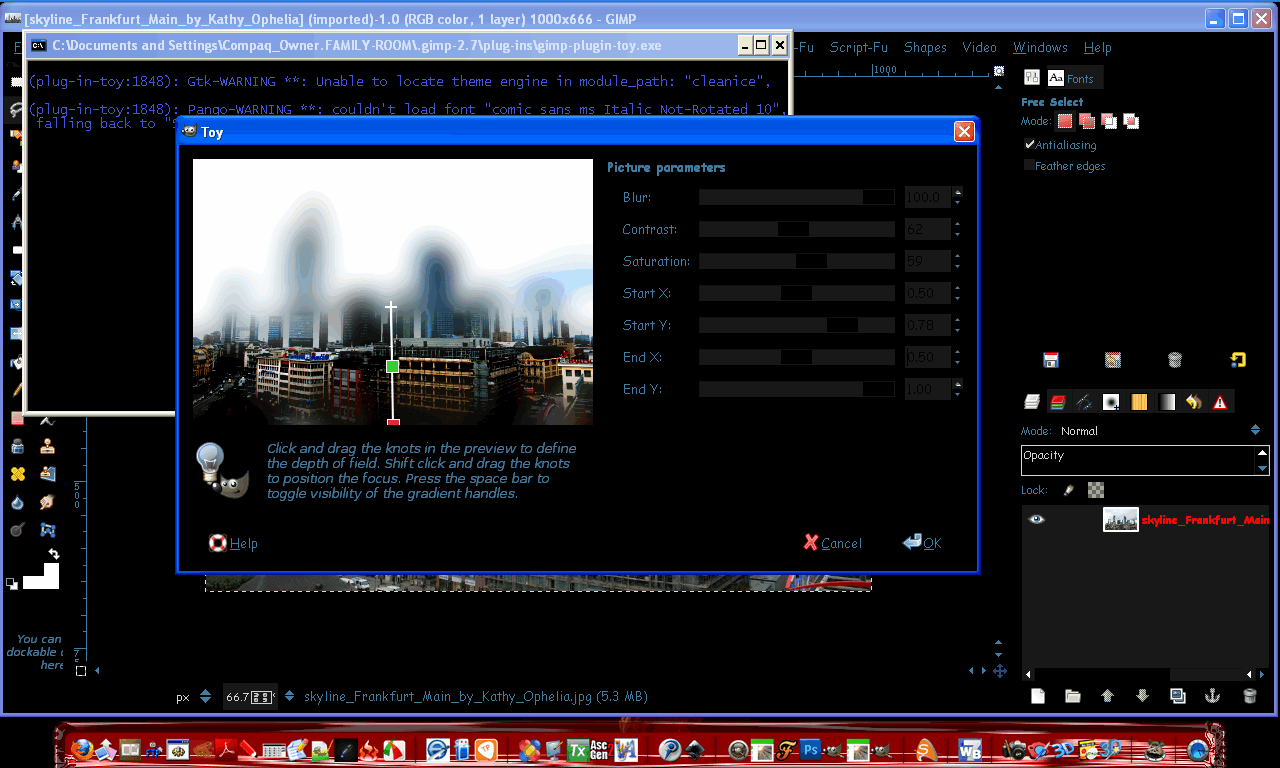
Yes apparently it throws errors in Gimp-2.6.11 due to cairo issues (and the libintl-8.dll file)
Here it is in Parthas installed version of Gimp-2.7.4

Image
Image
If you install Gimp-2.7.4 place the plugin in the user/.gimp-2.7/plug-ins folder.
If you use portable place it in the YourDirectory/Gimp-2.7.4\.gimp-2.7\plug-ins folder

_________________
Image


Top
 Post subject: Re: I compiled the new toy plugin
PostPosted: Sat Nov 12, 2011 5:35 am  (#7) 
Offline
GimpChat Member
User avatar

Joined: Apr 07, 2010
Posts: 14182
okay, thanks Rod.
So you are saying it doesn't work in Gimp-2.6.11. As long as I know that I won't blame it on me or my pc. I will remove it for now.

_________________
Image


Top
 Post subject: Re: I compiled the new toy plugin
PostPosted: Sat Nov 12, 2011 5:45 am  (#8) 
Offline
Global Moderator
User avatar

Joined: May 16, 2010
Posts: 16028
Yes that's correct Molly.It will not work in Gimp-2.6.11
I tried another one.This time i did a redo on the filter and it turned out better i think. :)

Image

_________________
Image


Top
 Post subject: Re: I compiled the new toy plugin
PostPosted: Sat Nov 12, 2011 6:18 am  (#9) 
Offline
GimpChat Member
User avatar

Joined: Apr 07, 2010
Posts: 14182
that is cool. I like the look of things fading out so that leaves the focal point as the main attraction.
I like the effect when you take a picture with a camera and all the objects around the focal point are blurred.

_________________
Image


Top
 Post subject: Re: I compiled the new toy plugin
PostPosted: Sat Nov 12, 2011 7:48 am  (#10) 
Offline
GimpChat Member
User avatar

Joined: Aug 24, 2011
Posts: 1785
Location: Dallas, TX
Looks like an easy way to get a diorama effect. Sweet!

_________________
Image


Top
 Post subject: Re: I compiled the new toy plugin
PostPosted: Sat Nov 12, 2011 9:14 am  (#11) 
Offline
GimpChat Member
User avatar

Joined: Sep 24, 2010
Posts: 12775
I was hoping this one would get compiled; hope your's is for 32-bit GIMP too. Thanks regardless Rod. :)

_________________
Lyle

Psalm 109:8

Image


Top
 Post subject: Re: I compiled the new toy plugin
PostPosted: Sat Nov 12, 2011 10:15 am  (#12) 
Offline
GimpChat Member

Joined: Apr 12, 2010
Posts: 5870
It is the first plugin you compiled ?
I found the effect hard to control, i don't use often and if i do i prefer use focus blur with , but this has the advantage to be more simple

I didn't nothing worth a upload but i found how to control more the effect:
First create a duplicate apply the filter then edit/ fade (no too much )
And as last touch add a layer mask and paint over to locally fade even more where needed

_________________
My 3D Gallery on Deviantart http://photocomix2.deviantart.com/
Main gallery http://www.flickriver.com/photos/photocomix-mandala/
Mandala and simmetry http://www.flickriver.com/photos/photocomix_mandala/

Image

Mrs Wilbress


Top
 Post subject: Re: I compiled the new toy plugin
PostPosted: Sat Nov 12, 2011 1:58 pm  (#13) 
Offline
GimpChat Member
User avatar

Joined: Oct 06, 2010
Posts: 4050
I agree, PC. I use Rob's method, it's just more elegant for me using Focus Blur.

It's still fun to play with.

_________________
"In order to attain the impossible, one must attempt the absurd."
~ Miguel de Cervantes


Top
 Post subject: Re: I compiled the new toy plugin
PostPosted: Sat Nov 12, 2011 2:06 pm  (#14) 
Offline
Global Moderator
User avatar

Joined: May 16, 2010
Posts: 16028
Yes it's my first one PC i just got the compile environment set up yesterday.Took me about 14 hours, and then i grabbed this one to test it. :)

I was thinking as soon as i get my pc fixed i could go through the Gimp plugin src codes and see if i can create bigger previews for some more of them.

About my computer problem ... off topic
It's making a beeping sound when i start it.Battery perhaps?
I have no idea.Maybe one of you pc wizards can help me troubleshoot it?
Both fans work.There are no video or keyboard information sent from the hard drive.
I am afraid it may be the mother board and that would suck.

It happened once last week and i unplugged everything and re-plugged and it worked.Now that doesn't even fix it. ...sadly. :\

Just when i got a working compile environment working too. :lol

I did call Aspen my area company, but their closed Saturdays. :)


Fixed :) ... Thank God


Thanks

_________________
Image


Top
 Post subject: Re: I compiled the new toy plugin
PostPosted: Sat Nov 12, 2011 3:57 pm  (#15) 
Offline
Global Moderator
User avatar

Joined: May 16, 2010
Posts: 16028
lylejk wrote:
I was hoping this one would get compiled; hope your's is for 32-bit GIMP too. Thanks regardless Rod. :)

Yes 32 bit.I do not have a 64 bit environment so i will let Samj or someone else take care of that. :)

_________________
Image


Top
 Post subject: Re: I compiled the new toy plugin
PostPosted: Sat Nov 12, 2011 4:54 pm  (#16) 
Offline
GimpChat Member

Joined: Mar 14, 2011
Posts: 998
Rod wrote:
lylejk wrote:
I was hoping this one would get compiled; hope your's is for 32-bit GIMP too. Thanks regardless Rod. :)

Yes 32 bit.I do not have a 64 bit environment so i will let Samj or someone else take care of that. :)

Rod,

Happy to compile it for you if I have the source code.

Thanks,
Partha


Top
 Post subject: Re: I compiled the new toy plugin
PostPosted: Sat Nov 12, 2011 5:18 pm  (#17) 
Offline
Global Moderator
User avatar

Joined: May 16, 2010
Posts: 16028
partha wrote:
Rod wrote:
lylejk wrote:
I was hoping this one would get compiled; hope your's is for 32-bit GIMP too. Thanks regardless Rod. :)

Yes 32 bit.I do not have a 64 bit environment so i will let Samj or someone else take care of that. :)

Rod,

Happy to compile it for you if I have the source code.

Thanks,
Partha


Thanks Partha.
The src can be found here
http://registry.gimp.org/files/gimp-plu ... 0.1.tar.gz

This src (1.0.1), takes care of the layer issue error.
gimp_image_add_layer(tmpvals.tmpimg_id,new_ID,-1);

becomes

gimp_image_insert_layer(tmpvals.tmpimg_id,new_ID,0,-1);

as prokoudine fixed it

_________________
Image


Top
 Post subject: Re: I compiled the new toy plugin
PostPosted: Sat Nov 12, 2011 6:10 pm  (#18) 
Offline
GimpChat Member

Joined: Mar 14, 2011
Posts: 998
Rod wrote:
...

Thanks Partha.
The src can be found here
http://registry.gimp.org/files/gimp-plu ... 0.1.tar.gz

This src (1.0.1), takes care of the layer issue error.
gimp_image_add_layer(tmpvals.tmpimg_id,new_ID,-1);

becomes

gimp_image_insert_layer(tmpvals.tmpimg_id,new_ID,0,-1);

as prokoudine fixed it

Here you go. :)


Attachments:
File comment: gimp-toy plugin 64-bit
gimp-plugin-toy.7z [63.94 KiB]
Downloaded 356 times
Top
 Post subject: Re: I compiled the new toy plugin
PostPosted: Wed Nov 16, 2011 1:36 pm  (#19) 
Offline
Global Moderator
User avatar

Joined: May 16, 2010
Posts: 16028
partha wrote:
Rod wrote:
...

Thanks Partha.
The src can be found here
http://registry.gimp.org/files/gimp-plu ... 0.1.tar.gz

This src (1.0.1), takes care of the layer issue error.
gimp_image_add_layer(tmpvals.tmpimg_id,new_ID,-1);

becomes

gimp_image_insert_layer(tmpvals.tmpimg_id,new_ID,0,-1);

as prokoudine fixed it

Here you go. :)


Thanks Partha. :)

_________________
Image


Top
Post new topic Reply to topic  [ 19 posts ] 

All times are UTC - 5 hours [ DST ]


* Login  


Powered by phpBB3 © phpBB Group