It is currently Mon Jun 08, 2026 2:38 pm


All times are UTC - 5 hours [ DST ]


Post new topic Reply to topic  [ 32 posts ]  Go to page 1, 2  Next
Author Message
 Post subject: (SOLVED) PSPI in portable gimp-2.8.4
PostPosted: Thu Apr 04, 2013 8:45 am  (#1) 
Offline
Global Moderator
User avatar

Joined: May 16, 2010
Posts: 16019
I could not get my Photoshop plugins to work in portable (no pspirc file was written), so i downloaded the installer version of Gimp-2.8 , copied all the user folders from portable to the installers gimp-2.8 folder, ran the installed version and setup pspi's plugin folder.Then i copied that pspirc file to the portable .gimp-2.8 folder.


It still will not show any photoshop filters in the menus.Portable keeps deleting everything in the pspirc file on start.
Weird.

I suppose i could just use shellout with xnview , or just use the installed version, but i like running my filters through gimps menus, and i like using portable.
Can anyone help? :)

Thanks.

EDIT: Here is the fix
http://registry.gimp.org/node/26268

Thank you Lyle and Partha. :)

_________________
Image


Last edited by Rod on Sat Apr 06, 2013 3:13 pm, edited 2 times in total.

Share on Facebook Share on Twitter Share on Orkut Share on Digg Share on MySpace Share on Delicious Share on Technorati
Top
 Post subject: Re: PSPI in portable gimp-2.8.4
PostPosted: Thu Apr 04, 2013 11:01 am  (#2) 
Offline
GimpChat Member
User avatar

Joined: Sep 22, 2012
Posts: 2089
Location: US
I'm not 100% sure but you might need to install and run PSPI Manager plugin and specify folders for PSPI filters on your portable installment (if you haven't done this already)It will add necessary pspi-related lines to pluginrc config file. I don't have a portable right now but some time ago i'd managed to get it working somehow.


Top
 Post subject: Re: PSPI in portable gimp-2.8.4
PostPosted: Thu Apr 04, 2013 12:07 pm  (#3) 
Offline
Global Moderator
User avatar

Joined: May 16, 2010
Posts: 16019
K1TesseraEna wrote:
I'm not 100% sure but you might need to install and run PSPI Manager plugin and specify folders for PSPI filters on your portable installment (if you haven't done this already)It will add necessary pspi-related lines to pluginrc config file. I don't have a portable right now but some time ago i'd managed to get it working somehow.


Thanks K1TesseraEna

I did this first.It has also added the correct lines in the gimprc file.
(pspi-path "C:\\Users\\rod\\Desktop\\Gimp-Files\\Photoshop-plugins-4-gimp\\8BF")

The weird thing is i open pspi manager in the gimp menus and add the folder path.I restart gimp portable and it erases or rather overwrites the entire pspirc file which it is supposed to do.But it just erases every line in the pspi file.

Partha this is your portable gimp-2.8.4 version.Do you think you could check it out for me? The pspi manager plugin works in your install version.I have a feeling it has to do with the gimp-2.8/pspirc path in the portable version. :)

This used to work in every other portable i have run so it should be fixable.

_________________
Image


Top
 Post subject: Re: PSPI in portable gimp-2.8.4
PostPosted: Thu Apr 04, 2013 12:29 pm  (#4) 
Offline
GimpChat Member
User avatar

Joined: Sep 22, 2012
Posts: 2089
Location: US
You can try one more thing just to check out if the issue is really with pspirc file. After you have the path added to pspirc, go to the properties and and change the permissions, make this file as 'Read_Only" and see if this helps.


Top
 Post subject: Re: PSPI in portable gimp-2.8.4
PostPosted: Thu Apr 04, 2013 1:26 pm  (#5) 
Offline
Global Moderator
User avatar

Joined: May 16, 2010
Posts: 16019
K1TesseraEna wrote:
You can try one more thing just to check out if the issue is really with pspirc file. After you have the path added to pspirc, go to the properties and and change the permissions, make this file as 'Read_Only" and see if this helps.


Tried that and Gimp created a file named pspirc.bak read only.
It also created another blank pspirc file. lol :)

_________________
Image


Top
 Post subject: Re: PSPI in portable gimp-2.8.4
PostPosted: Thu Apr 04, 2013 1:57 pm  (#6) 
Offline
GimpChat Member
User avatar

Joined: Sep 22, 2012
Posts: 2089
Location: US
Rod wrote:
K1TesseraEna wrote:
You can try one more thing just to check out if the issue is really with pspirc file. After you have the path added to pspirc, go to the properties and and change the permissions, make this file as 'Read_Only" and see if this helps.


Tried that and Gimp created a file named pspirc.bak read only.
It also created another blank pspirc file. lol :)


:hehe I give up! There must be some command in one of the config files (not excluding GTK) that overwrites changes to other cr files in portable versions. Maybe Partha knows the answer?


Top
 Post subject: Re: PSPI in portable gimp-2.8.4
PostPosted: Thu Apr 04, 2013 2:13 pm  (#7) 
Offline
Global Moderator
User avatar

Joined: May 16, 2010
Posts: 16019
K1TesseraEna wrote:
Rod wrote:
K1TesseraEna wrote:
You can try one more thing just to check out if the issue is really with pspirc file. After you have the path added to pspirc, go to the properties and and change the permissions, make this file as 'Read_Only" and see if this helps.


Tried that and Gimp created a file named pspirc.bak read only.
It also created another blank pspirc file. lol :)


:hehe I give up! There must be some command in one of the config files (not excluding GTK) that overwrites changes to other cr files in portable versions. Maybe Partha knows the answer?


I think it has something to do with the portable .gimp-2.8 user folder location. :)
The plugin is creating the pspirc file but isn't configuring , and listing any of the paths i create.I have tried moving the 8BF folder around also.

Hrmmm...are there any other rc files besides gimprc and pspirc that gimp is supposed to write the photoshop plugins paths to?

_________________
Image


Top
 Post subject: Re: PSPI in portable gimp-2.8.4
PostPosted: Thu Apr 04, 2013 2:20 pm  (#8) 
Offline
GimpChat Member
User avatar

Joined: Sep 22, 2012
Posts: 2089
Location: US
Rod wrote:

I think it has something to do with the portable .gimp-2.8 user folder location. :)
The plugin is creating the pspirc file but isn't configuring , and listing any of the paths i create.I have tried moving the 8BF folder around also.

Hrmmm...are there any other rc files besides gimprc and pspirc that gimp is supposed to write the photoshop plugins paths to?


it's in plugincr file also


Top
 Post subject: Re: PSPI in portable gimp-2.8.4
PostPosted: Thu Apr 04, 2013 2:39 pm  (#9) 
Offline
Global Moderator
User avatar

Joined: May 16, 2010
Posts: 16019
K1TesseraEna wrote:
Rod wrote:

I think it has something to do with the portable .gimp-2.8 user folder location. :)
The plugin is creating the pspirc file but isn't configuring , and listing any of the paths i create.I have tried moving the 8BF folder around also.

Hrmmm...are there any other rc files besides gimprc and pspirc that gimp is supposed to write the photoshop plugins paths to?


it's in plugincr file also


I checked that file and all the pspi path information is there.So hopefully Partha can figure it out. :)

_________________
Image


Top
 Post subject: Re: PSPI in portable gimp-2.8.4
PostPosted: Thu Apr 04, 2013 5:24 pm  (#10) 
Offline
GimpChat Member

Joined: Mar 14, 2011
Posts: 998
Rod wrote:
...
Partha this is your portable gimp-2.8.4 version.Do you think you could check it out for me? The pspi manager plugin works in your install version.I have a feeling it has to do with the gimp-2.8/pspirc path in the portable version. :)

This used to work in every other portable i have run so it should be fixable.

Hey Rod!! Long time no see/hear! What happened to you? :)

Can you drop me a line to let me know exactly what the issue is?

I would have missed this thread if I had not been just passing by and seeing your name here again! :)

Partha


Top
 Post subject: Re: PSPI in portable gimp-2.8.4
PostPosted: Thu Apr 04, 2013 11:20 pm  (#11) 
Offline
Global Moderator
User avatar

Joined: May 16, 2010
Posts: 16019
partha wrote:
Rod wrote:
...
Partha this is your portable gimp-2.8.4 version.Do you think you could check it out for me? The pspi manager plugin works in your install version.I have a feeling it has to do with the gimp-2.8/pspirc path in the portable version. :)

This used to work in every other portable i have run so it should be fixable.

Hey Rod!! Long time no see/hear! What happened to you? :)

Can you drop me a line to let me know exactly what the issue is?

I would have missed this thread if I had not been just passing by and seeing your name here again! :)

Partha

Great to see you again my friend!
PM is sent, and thanks for looking into it for me.It's nothing critical i just like running everything i can through gimp, lol.I also love your portable versions.

I probably will be seen rummaging through your website for all those gimp dependencies. :rofl
More than likely i will begin compiling Gimp C plugins again.Well hopefully anyways.I sure wish someone would write a script to compile a version of gimp on windows. :hehe
Wouldn't be a problem compiling plugins for windows then!Ah well i can hope.

Then again half the fun is knowing you built the environment on windows yourself.

Take care buddy, and hope to hear from you soon.You remember my email. ;)

_________________
Image


Top
 Post subject: Re: PSPI in portable gimp-2.8.4
PostPosted: Fri Apr 05, 2013 12:08 am  (#12) 
Offline
Script Coder
User avatar

Joined: Feb 18, 2011
Posts: 4826
Location: Bendigo Vic. Australia
Rod I don't have problems with pspi in portables and i have several installed, here is a copy of my pspirc file from the one I have open at the moment

<pspi-settings>
  <ps-plug-in path="C:\GIMP-PC_Lab-2.8.2-32bits\pref_1\plug-ins\Photoshop Plugins\WaterRipples.8bf" timestamp="1354410179">
    <entrypoint menu-path="<Image>/Filters/Redfield/Water Ripples" image-types="RGB* " entrypoint="ENTRYPOINT"/>
  </ps-plug-in>
  <ps-plug-in path="C:\GIMP-PC_Lab-2.8.2-32bits\pref_1\plug-ins\Photoshop Plugins\Jama3d.8bf" timestamp="1354410179">
    <entrypoint menu-path="<Image>/Filters/Redfield/Jama 3D" image-types="RGB* " entrypoint="ENTRYPOINT"/>
  </ps-plug-in>
  <ps-plug-in path="C:\GIMP-PC_Lab-2.8.2-32bits\pref_1\plug-ins\Photoshop Plugins\Photofont Start.8BF" timestamp="1187777352">
    <entrypoint menu-path="<Image>/Filters/Fontlab/Photofont Start..." image-types="GRAY* RGB* " entrypoint="PluginMain"/>
  </ps-plug-in>
  <ps-plug-in path="C:\GIMP-PC_Lab-2.8.2-32bits\pref_1\plug-ins\Photoshop Plugins\LatticeComposer.8bf" timestamp="1354410179">
    <entrypoint menu-path="<Image>/Filters/Redfield/Lattice Composer" image-types="RGB* " entrypoint="ENTRYPOINT"/>
  </ps-plug-in>
  <ps-plug-in path="C:\GIMP-PC_Lab-2.8.2-32bits\pref_1\plug-ins\Photoshop Plugins\Iridescent\Iridescent1.4.8bf" timestamp="1266889068">
    <entrypoint menu-path="<Image>/Filters/Artshop/Iridescent..." image-types="GRAY* RGB* " entrypoint="ENTRYPOINT"/>
  </ps-plug-in>
  <ps-plug-in path="C:\GIMP-PC_Lab-2.8.2-32bits\pref_1\plug-ins\Photoshop Plugins\Craquelure3d.8bf" timestamp="1354410179">
    <entrypoint menu-path="<Image>/Filters/Redfield/Craquelure 3D" image-types="RGB* " entrypoint="ENTRYPOINT"/>
  </ps-plug-in>
  <ps-plug-in path="C:\GIMP-PC_Lab-2.8.2-32bits\pref_1\plug-ins\Photoshop Plugins\SeamlessWorkshop.8bf" timestamp="1354410179">
    <entrypoint menu-path="<Image>/Filters/Redfield/Seamless Workshop" image-types="RGB* " entrypoint="ENTRYPOINT"/>
  </ps-plug-in>
  <ps-plug-in path="C:\GIMP-PC_Lab-2.8.2-32bits\pref_1\plug-ins\Photoshop Plugins\FineTouch(X32).8bf" timestamp="1354413087">
    <entrypoint menu-path="<Image>/Filters/Redfield/Fine Touch" image-types="RGB* " entrypoint="ENTRYPOINT"/>
  </ps-plug-in>
  <ps-plug-in path="C:\GIMP-PC_Lab-2.8.2-32bits\pref_1\plug-ins\Photoshop Plugins\Flood-140.8bf" timestamp="1260560267">
    <entrypoint menu-path="<Image>/Filters/Flaming Pear/Flood..." image-types="GRAY* RGB* " entrypoint="ENTRYPOINT"/>
  </ps-plug-in>
</pspi-settings>

_________________
Image
No matter how much you push the envelope, it'll still be stationery.


Top
 Post subject: Re: PSPI in portable gimp-2.8.4
PostPosted: Fri Apr 05, 2013 12:25 am  (#13) 
Offline
Global Moderator
User avatar

Joined: May 16, 2010
Posts: 16019
If you notice though Graechan i am using a different portable.Looks like you are using Sam and PC's?
So instead of a .gimp-2.8 folder and sub folders you have pref_1 folder and sub folders correct?

Do you have Parthas portable from his website on your machine?

_________________
Image


Top
 Post subject: Re: PSPI in portable gimp-2.8.4
PostPosted: Fri Apr 05, 2013 12:53 am  (#14) 
Offline
Script Coder
User avatar

Joined: Feb 18, 2011
Posts: 4826
Location: Bendigo Vic. Australia
try this one from partha's portable 2.8.4

<pspi-settings>
  <ps-plug-in path="C:\gimp-2.8.4\.gimp-2.8\plug-ins\Photoshop Plugins\Iridescent\Iridescent1.4.8bf" timestamp="1266889068">
    <entrypoint menu-path="<Image>/Filters/Artshop/Iridescent..." image-types="GRAY* RGB* " entrypoint="ENTRYPOINT"/>
  </ps-plug-in>
  <ps-plug-in path="C:\gimp-2.8.4\.gimp-2.8\plug-ins\Photoshop Plugins\Flood-140.8bf" timestamp="1260560267">
    <entrypoint menu-path="<Image>/Filters/Flaming Pear/Flood..." image-types="GRAY* RGB* " entrypoint="ENTRYPOINT"/>
  </ps-plug-in>
  <ps-plug-in path="C:\gimp-2.8.4\.gimp-2.8\plug-ins\Photoshop Plugins\SeamlessWorkshop.8bf" timestamp="1354410179">
    <entrypoint menu-path="<Image>/Filters/Redfield/Seamless Workshop" image-types="RGB* " entrypoint="ENTRYPOINT"/>
  </ps-plug-in>
  <ps-plug-in path="C:\gimp-2.8.4\.gimp-2.8\plug-ins\Photoshop Plugins\WaterRipples.8bf" timestamp="1354410179">
    <entrypoint menu-path="<Image>/Filters/Redfield/Water Ripples" image-types="RGB* " entrypoint="ENTRYPOINT"/>
  </ps-plug-in>
  <ps-plug-in path="C:\gimp-2.8.4\.gimp-2.8\plug-ins\Photoshop Plugins\FineTouch(X32).8bf" timestamp="1354413087">
    <entrypoint menu-path="<Image>/Filters/Redfield/Fine Touch" image-types="RGB* " entrypoint="ENTRYPOINT"/>
  </ps-plug-in>
  <ps-plug-in path="C:\gimp-2.8.4\.gimp-2.8\plug-ins\Photoshop Plugins\LatticeComposer.8bf" timestamp="1354410179">
    <entrypoint menu-path="<Image>/Filters/Redfield/Lattice Composer" image-types="RGB* " entrypoint="ENTRYPOINT"/>
  </ps-plug-in>
  <ps-plug-in path="C:\gimp-2.8.4\.gimp-2.8\plug-ins\Photoshop Plugins\Photofont Start.8BF" timestamp="1187777352">
    <entrypoint menu-path="<Image>/Filters/Fontlab/Photofont Start..." image-types="GRAY* RGB* " entrypoint="PluginMain"/>
  </ps-plug-in>
  <ps-plug-in path="C:\gimp-2.8.4\.gimp-2.8\plug-ins\Photoshop Plugins\Jama3d.8bf" timestamp="1354410179">
    <entrypoint menu-path="<Image>/Filters/Redfield/Jama 3D" image-types="RGB* " entrypoint="ENTRYPOINT"/>
  </ps-plug-in>
  <ps-plug-in path="C:\gimp-2.8.4\.gimp-2.8\plug-ins\Photoshop Plugins\Craquelure3d.8bf" timestamp="1354410179">
    <entrypoint menu-path="<Image>/Filters/Redfield/Craquelure 3D" image-types="RGB* " entrypoint="ENTRYPOINT"/>
  </ps-plug-in>
</pspi-settings>

_________________
Image
No matter how much you push the envelope, it'll still be stationery.


Top
 Post subject: Re: PSPI in portable gimp-2.8.4
PostPosted: Fri Apr 05, 2013 1:25 am  (#15) 
Offline
Global Moderator
User avatar

Joined: May 16, 2010
Posts: 16019
Interesting.My Gimp-2.8 portable may need to either be moved to the C directory OR possibly moving the 8BF folder into the plugins folder will work.I will try both tomorrow.

Thanks Graechan!

_________________
Image


Top
 Post subject: Re: PSPI in portable gimp-2.8.4
PostPosted: Fri Apr 05, 2013 1:31 am  (#16) 
Offline
GimpChat Member
User avatar

Joined: Nov 16, 2011
Posts: 5127
Location: Metro Vancouver, BC
I don't know if this of any help.
I had a portable version installed in the past here was the user folder path for pspirc.
C:\Users\Odin\AppData\Roaming\GIMP\2.9\pspirc

_________________
Image
Gimp 2.8.18, Linux, median user
Gimp Chat Tutorials Index
Spirit Bear (Kermode)


Top
 Post subject: Re: PSPI in portable gimp-2.8.4
PostPosted: Fri Apr 05, 2013 1:38 am  (#17) 
Offline
Script Coder
User avatar

Joined: Feb 18, 2011
Posts: 4826
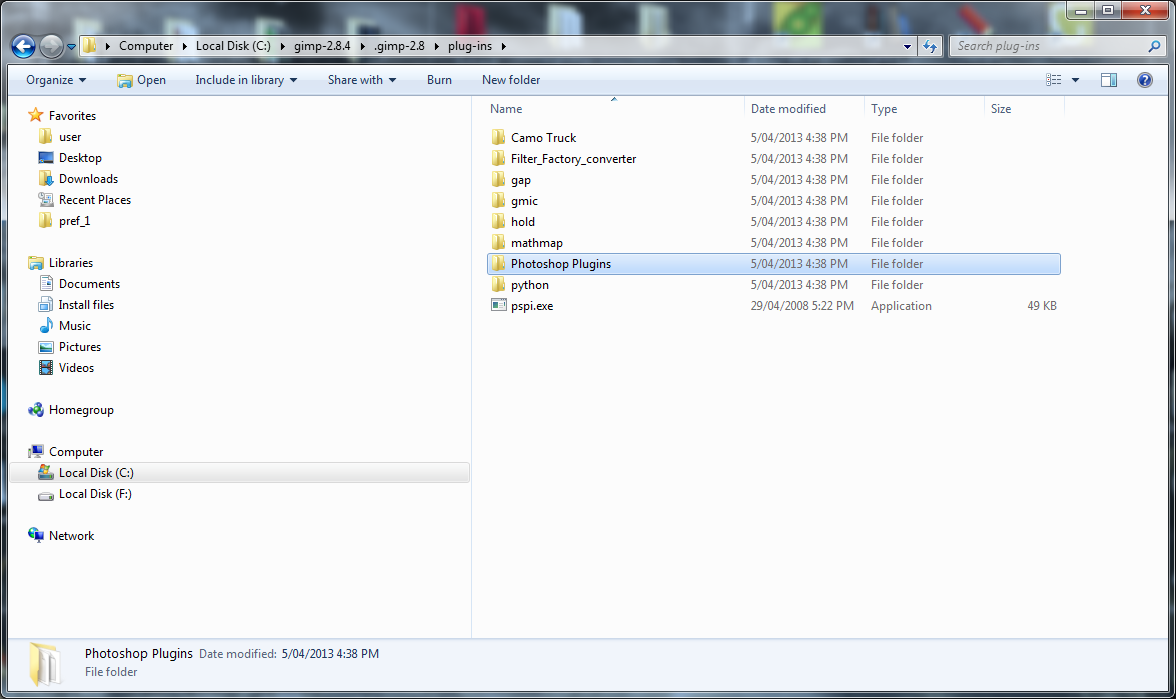
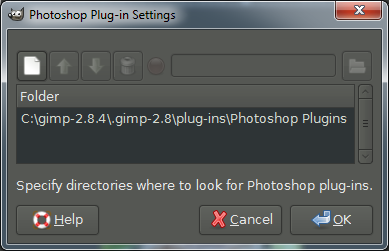
Location: Bendigo Vic. Australia
It does not give problems if you install your photoshop folder and pspi in a particular way

Place your photoshop folder and pspi in your plugins folder

Image

Do not point to the photoshop folder in preferences

Image

Point to your photoshop folder here

Image

_________________
Image
No matter how much you push the envelope, it'll still be stationery.


Top
 Post subject: Re: PSPI in portable gimp-2.8.4
PostPosted: Fri Apr 05, 2013 11:24 am  (#18) 
Offline
Global Moderator
User avatar

Joined: May 16, 2010
Posts: 16019
Graechan wrote:
It does not give problems if you install your photoshop folder and pspi in a particular way

Place your photoshop folder and pspi in your plugins folder

Image

Do not point to the photoshop folder in preferences

Image

Point to your photoshop folder here

Image


Thanks Odin and Graechan.

Graechan i will give that a whirl. I always thought having folders in your gimp-2.8/plugins folder caused problems with linking. :) But i will give it a go.

_________________
Image


Top
 Post subject: Re: (SOLVED) PSPI in portable gimp-2.8.4
PostPosted: Sat Apr 06, 2013 3:15 pm  (#19) 
Offline
Global Moderator
User avatar

Joined: May 16, 2010
Posts: 16019
Solved see first post.

_________________
Image


Top
 Post subject: Re: (SOLVED) PSPI in portable gimp-2.8.4
PostPosted: Sat Apr 06, 2013 8:20 pm  (#20) 
Offline
GimpChat Member
User avatar

Joined: Sep 24, 2010
Posts: 12775
The thing is, this was actually fixed in 2.8.2 Rod. I will shortly post at that thread at the Registry since the developers finally did fix the PSPI/ User filter incompatibility issue. Not sure why the portable version would still have this bug though. :)

_________________
Lyle

Psalm 109:8

Image


Top
Post new topic Reply to topic  [ 32 posts ]  Go to page 1, 2  Next

All times are UTC - 5 hours [ DST ]


* Login  


Powered by phpBB3 © phpBB Group