It is currently Fri Nov 13, 2026 12:48 pm


All times are UTC - 5 hours [ DST ]


Post new topic Reply to topic  [ 190 posts ]  Go to page Previous  1 ... 3, 4, 5, 6, 7, 8, 9, 10  Next
Author Message
 Post subject: Re: Arakne-path-shape-creator6b[added star and polygon ellipse+ bricks
PostPosted: Thu Jun 26, 2014 7:34 pm  (#101) 
Offline
GimpChat Member
User avatar

Joined: Apr 07, 2010
Posts: 14182
My shape folder didn't need the permissions, that one was already done. Anyway, yes I am the problem child and Graechan what would you do if you didn't have me to pick on.
Image

_________________
Image


Top
 Post subject: Re: Arakne-path-shape-creator6b[added star and polygon ellipse+ bricks
PostPosted: Thu Jun 26, 2014 7:40 pm  (#102) 
Offline
GimpChat Founder
User avatar

Joined: May 22, 2008
Posts: 5241
Location: Gimpville
Molly, if you start GIMP from terminal, you should see what the problem is.

GIMP is seeing the /shapes folder as a plugin and tries to run it. It doesn't affect the plug-in's execution, though. See below..

GIMP-Error: Unable to run plug-in "shapes"
(.gimp-2.8/plug-ins/shapes)

Failed to execute child process ".gimp-2.8/plug-ins/shapes" (Permission denied)

_________________
“If you reach for the stars, you just might land on a decently sized hill.” - Stuart Hill


Top
 Post subject: Re: Arakne-path-shape-creator6b[added star and polygon ellipse+ bricks
PostPosted: Thu Jun 26, 2014 7:42 pm  (#103) 
Offline
GimpChat Member
User avatar

Joined: Apr 07, 2010
Posts: 14182
Thanks Tux, the problem is solved now but I will try to remember to do that the next time.

_________________
Image


Top
 Post subject: Re: Arakne-path-shape-creator6b[added star and polygon ellipse+ bricks
PostPosted: Thu Jun 26, 2014 7:47 pm  (#104) 
Offline
Script Coder
User avatar

Joined: Feb 18, 2011
Posts: 4826
Location: Bendigo Vic. Australia
Ah but but your OK Molly my friend :yup

_________________
Image
No matter how much you push the envelope, it'll still be stationery.


Top
 Post subject: Re: Arakne-path-shape-creator6b[added star and polygon ellipse+ bricks
PostPosted: Thu Jun 26, 2014 7:54 pm  (#105) 
Offline
GimpChat Member
User avatar

Joined: Apr 07, 2010
Posts: 14182
:hehe :oops:

_________________
Image


Top
 Post subject: Re: Arakne-path-shape-creator6b[added star and polygon ellipse+ bricks
PostPosted: Thu Jun 26, 2014 8:54 pm  (#106) 
Offline
Script Coder
User avatar

Joined: Feb 18, 2011
Posts: 4826
Location: Bendigo Vic. Australia
I've changed the initial post to indicate that in Linux you need to set permissions for all 18 files

_________________
Image
No matter how much you push the envelope, it'll still be stationery.


Top
 Post subject: Re: Arakne-path-shape-creator6b[added star and polygon ellipse+ bricks
PostPosted: Fri Jun 27, 2014 4:08 am  (#107) 
Offline
GimpChat Member
User avatar

Joined: Apr 07, 2010
Posts: 14182
thank you Graechan

_________________
Image


Top
 Post subject: Re: Arakne-path-shape-creator6b[added star and polygon ellipse+ bricks
PostPosted: Tue Jul 01, 2014 6:01 am  (#108) 
Offline
Global Moderator
User avatar

Joined: May 16, 2010
Posts: 16261
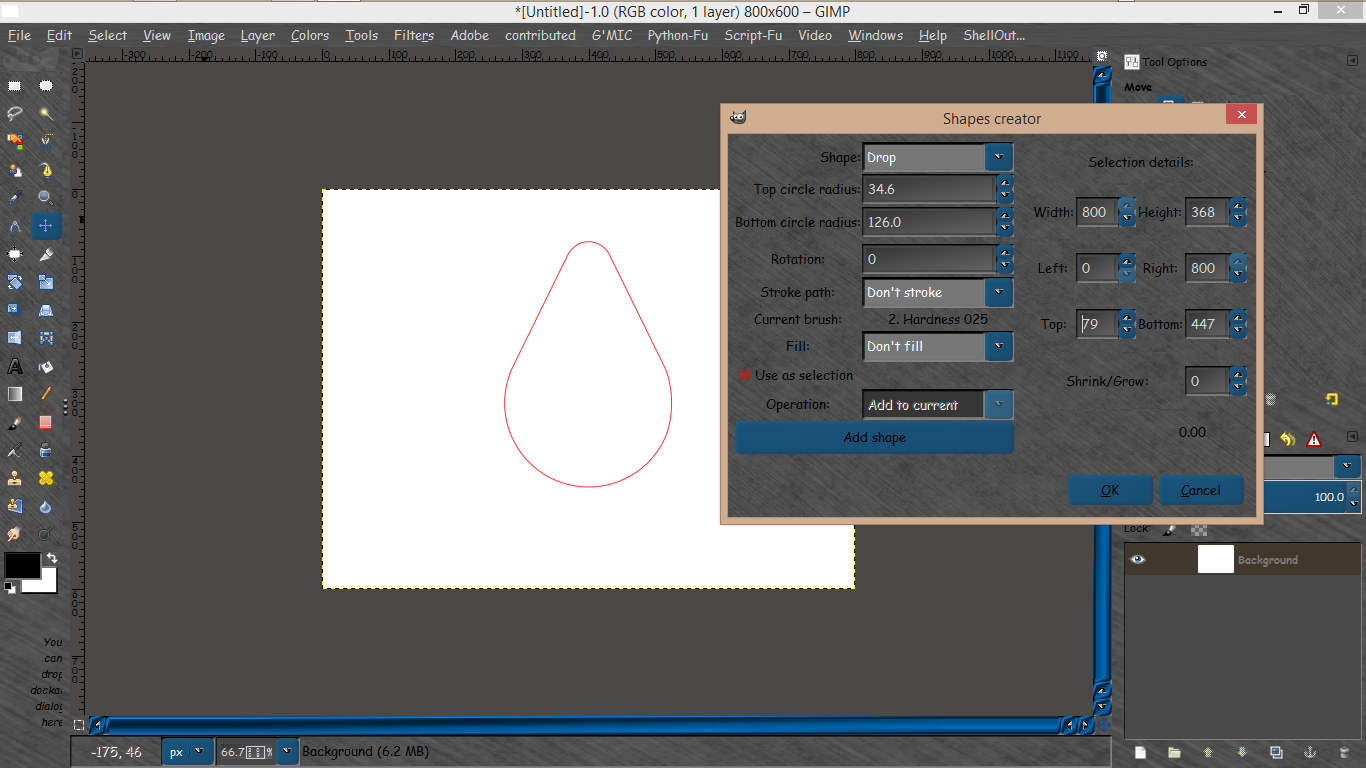
A new shape is available "Drop"
http://registry.gimp.org/node/32128

The file needs to have permissions and added to the plug-ins/shapes folder.

You will then restart GIMP and find it under Filters>Paths>and in the dialog under shape>drop.
Image

_________________
Image


Top
 Post subject: Re: Arakne-path-shape-creator6b[added star and polygon ellipse+ bricks
PostPosted: Tue Jul 01, 2014 7:06 am  (#109) 
Offline
GimpChat Member
User avatar

Joined: May 17, 2014
Posts: 1575
:tyspin Rod, I will place it in the shape folder.

_________________
Ella's gallery - YouTube


Top
 Post subject: Re: Arakne-path-shape-creator6b[added star and polygon ellipse+ bricks
PostPosted: Tue Jul 01, 2014 7:38 am  (#110) 
Offline
GimpChat Member
User avatar

Joined: Mar 10, 2014
Posts: 845
It's working well the drop, thank Rod ( and Arakne)


Top
 Post subject: Re: Arakne-path-shape-creator6b[added star and polygon ellipse+ bricks
PostPosted: Wed Jul 02, 2014 8:28 am  (#111) 
Offline
Global Moderator
User avatar

Joined: May 16, 2010
Posts: 16261
Another update "fill with pattern" has been released.
Also some interface changes.

Image
http://registry.gimp.org/node/32128
http://www.arakne.es/wp-content/uploads ... ator6c.zip

_________________
Image


Top
 Post subject: Re: Arakne-path-shape-creator6c[added new interface changes and fill w
PostPosted: Wed Jul 02, 2014 9:36 am  (#112) 
Offline
GimpChat Member
User avatar

Joined: Apr 07, 2010
Posts: 14182
Rod, are we supposed to remove the old py file and put in the new one, OR just the shape folder and leave the rest?

_________________
Image


Top
 Post subject: Re: Arakne-path-shape-creator6c[added new interface changes and fill w
PostPosted: Wed Jul 02, 2014 5:46 pm  (#113) 
Offline
Global Moderator
User avatar

Joined: May 16, 2010
Posts: 16261
molly wrote:
Rod, are we supposed to remove the old py file and put in the new one, OR just the shape folder and leave the rest?

Unzip to the plug-ins folder and overwrite the files already there.
Restart GIMP. :bigthup

_________________
Image


Top
 Post subject: Re: Arakne-path-shape-creator6c[added new interface changes and fill w
PostPosted: Wed Jul 02, 2014 5:49 pm  (#114) 
Offline
GimpChat Member
User avatar

Joined: Apr 07, 2010
Posts: 14182
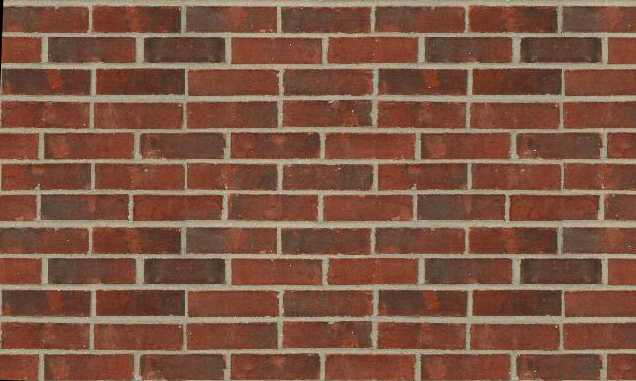
Bricks

Image

_________________
Image


Top
 Post subject: Re: Arakne-path-shape-creator6c[interface changes and fill with patter
PostPosted: Wed Jul 02, 2014 8:43 pm  (#115) 
Offline
Script Coder
User avatar

Joined: Feb 18, 2011
Posts: 4826
Location: Bendigo Vic. Australia
Arakne has been busy again and as usual this new release is fantastic, but be informed this release is an update
It does not have all the files necessary to to install from new, to install from new first install 6b then overwright with 6c files

This new revision separates various sections by tabs to make the interface clearer.
Added to the filling and edge section is the option of creating a new layer to which the selected values of filling and edge will be applied, and the option to use as a fill Pattern. also a new shape Teardrop

_________________
Image
No matter how much you push the envelope, it'll still be stationery.


Top
 Post subject: Re: Arakne-path-shape-creator6c[interface changes and fill with patter
PostPosted: Wed Jul 23, 2014 6:05 am  (#116) 
Offline
Global Moderator
User avatar

Joined: May 16, 2010
Posts: 16261
Another shape "Rays" is available.Download and unzip to the plug-ins/shapes folder.
http://www.arakne.es/en/dessign/gimp-py ... or-shapes/
Image

_________________
Image


Top
 Post subject: Re: Arakne-path-shape-creator6c[interface changes and fill with patter
PostPosted: Wed Jul 23, 2014 8:12 am  (#117) 
Offline
GimpChat Member
User avatar

Joined: Jan 20, 2013
Posts: 590
Thanks, Rod.

_________________
Image


Top
 Post subject: Re: Arakne-path-shape-creator6c[interface changes and fill with patter
PostPosted: Wed Jul 23, 2014 8:53 am  (#118) 
Offline
GimpChat Member
User avatar

Joined: Mar 10, 2014
Posts: 845
Rod, many thanks for telling us the new shape


Top
 Post subject: Re: Arakne-path-shape-creator6c[interface changes and fill with patter
PostPosted: Tue Jul 29, 2014 1:16 am  (#119) 
Offline
Script Coder
User avatar

Joined: Feb 18, 2011
Posts: 4826
Location: Bendigo Vic. Australia
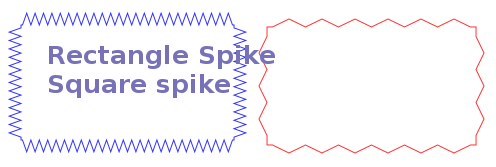
New shape RectSpikes now available
Image
RectSpikes

_________________
Image
No matter how much you push the envelope, it'll still be stationery.


Last edited by Graechan on Tue Jul 29, 2014 1:20 am, edited 1 time in total.

Top
 Post subject: Re: Arakne-path-shape-creator6c[interface changes and fill with patter
PostPosted: Tue Jul 29, 2014 1:17 am  (#120) 
Offline
GimpChat Member
User avatar

Joined: Dec 08, 2013
Posts: 1088
Thanks Graechan

_________________
Image


Top
Post new topic Reply to topic  [ 190 posts ]  Go to page Previous  1 ... 3, 4, 5, 6, 7, 8, 9, 10  Next

All times are UTC - 5 hours [ DST ]


* Login  


Powered by phpBB3 © phpBB Group