It is currently Sun Jul 26, 2026 10:04 am


All times are UTC - 5 hours [ DST ]


Post new topic Reply to topic  [ 150 posts ]  Go to page Previous  1 ... 3, 4, 5, 6, 7, 8  Next
Author Message
 Post subject: Re: The return of the revenge on the son of Slinky, reloaded
PostPosted: Mon Jul 04, 2011 7:11 am  (#101) 
Offline
GimpChat Member
User avatar

Joined: Apr 09, 2011
Posts: 1764
Thanks for the enlightenment there Lyle...its been bugging me for days that I might be the only one having this problem...GIMP seems to over ride any new python that I add in any case...and goes back to the one it came with.


Top
 Post subject: Re: The return of the revenge on the son of Slinky, reloaded
PostPosted: Mon Jul 04, 2011 7:18 am  (#102) 
Offline
GimpChat Member
User avatar

Joined: Apr 07, 2010
Posts: 14182
Lyle, I took out 2.7 and installed 2.6 and also the Cairo, pyglobject and pygtk, I changed the scrn shot in the above post to what I have now. I still get the error when I try to install those three. It says Python 2.6 required. Not found in registry.

_________________
Image


Top
 Post subject: Re: The return of the revenge on the son of Slinky, reloaded
PostPosted: Mon Jul 04, 2011 7:31 am  (#103) 
Offline
Global Moderator
User avatar

Joined: May 16, 2010
Posts: 16133
Molly you need to still add the path variable for python. :)
Go to your systems variable dialog and add it to the path variable (the path to Python26 install)

You have Windows 7?

_________________
Image


Top
 Post subject: Re: The return of the revenge on the son of Slinky, reloaded
PostPosted: Mon Jul 04, 2011 9:43 am  (#104) 
Offline
GimpChat Member
User avatar

Joined: Apr 07, 2010
Posts: 14182
Yes but I can't find that path :oops: :oops:
Isn't this it.....
Image

_________________
Image


Top
 Post subject: Re: The return of the revenge on the son of Slinky, reloaded
PostPosted: Mon Jul 04, 2011 10:16 am  (#105) 
Offline
Global Moderator
User avatar

Joined: May 16, 2010
Posts: 16133
Yes that's it but variable name should just read "Path" (without the quotes, and variable value is where you add on the python stuff i showed you.Do not replace it just add the C:\Python26 stuff to it. :)

I think you got it in the other post but just in case someone reads this one first i added the information here too.

TO ANYONE READING THIS! IMPORTANT!

I really should add also that if you are NOT comfortable playing with system variables you should have another more experienced user do it for you.I do not want someone to take this information and royally screw up their variable value list.It could cause windows to not be able to find certain things it needs to run your programs if you do it wrong.

_________________
Image


Top
 Post subject: Re: The return of the revenge on the son of Slinky, reloaded
PostPosted: Mon Jul 04, 2011 10:22 am  (#106) 
Offline
GimpChat Member
User avatar

Joined: Apr 07, 2010
Posts: 14182
I am so confused now, I don't know if I am coming or going. I did what you said, I added what you posted at the end of the line and rebooted but when I went back there, it doesn't show at the end of the line unless I click edit, then it is there, but the installs still give me the same message
I can't find an install for 2.6 for windows, it keeps sending me to 2.7....

_________________
Image


Top
 Post subject: Re: The return of the revenge on the son of Slinky, reloaded
PostPosted: Mon Jul 04, 2011 10:31 am  (#107) 
Offline
Global Moderator
User avatar

Joined: May 16, 2010
Posts: 16133
Okay do this
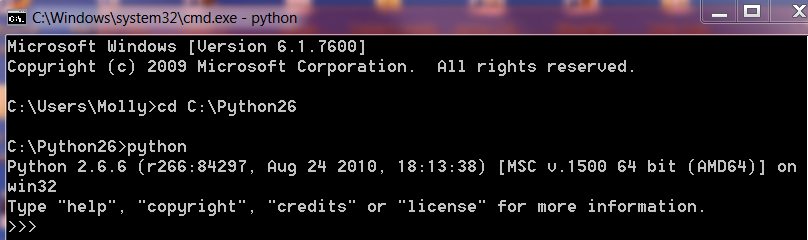
go to Start/Run type cmd and click ok
you should get a command dos window to pop up type cd C:\Python26
If it goes there type python
you should have a screen that looks something like this

C:\Python26>python
Python 2.6 (r26:66721, Oct  2 2008, 11:35:03) [MSC v.1500 32 bit (Intel)] on win
32
Type "help", "copyright", "credits" or "license" for more information.
>>>

If you do not you need to re-install python 26 into C: directory.

_________________
Image


Top
 Post subject: Re: The return of the revenge on the son of Slinky, reloaded
PostPosted: Mon Jul 04, 2011 10:32 am  (#108) 
Offline
Global Moderator
User avatar

Joined: May 16, 2010
Posts: 16133
Do me a favor and copy and paste here what you get in your dos window please.

_________________
Image


Top
 Post subject: Re: The return of the revenge on the son of Slinky, reloaded
PostPosted: Mon Jul 04, 2011 10:34 am  (#109) 
Offline
Global Moderator
User avatar

Joined: May 16, 2010
Posts: 16133
Where exactly was Python25 installed before you un installed it?

_________________
Image


Top
 Post subject: Re: The return of the revenge on the son of Slinky, reloaded
PostPosted: Mon Jul 04, 2011 10:40 am  (#110) 
Offline
GimpChat Member
User avatar

Joined: Apr 07, 2010
Posts: 14182
Image

_________________
Image


Top
 Post subject: Re: The return of the revenge on the son of Slinky, reloaded
PostPosted: Mon Jul 04, 2011 10:41 am  (#111) 
Offline
GimpChat Member
User avatar

Joined: Apr 07, 2010
Posts: 14182
Python was installed in a directory called python in Programs

_________________
Image


Top
 Post subject: Re: The return of the revenge on the son of Slinky, reloaded
PostPosted: Mon Jul 04, 2011 10:43 am  (#112) 
Offline
Global Moderator
User avatar

Joined: May 16, 2010
Posts: 16133
Ok i gave you the wrong variable value then.Thats why it isnt working.
Change the path i gave you to reflect the correct location of python26 and you should be okay. :)

_________________
Image


Top
 Post subject: Re: The return of the revenge on the son of Slinky, reloaded
PostPosted: Mon Jul 04, 2011 10:49 am  (#113) 
Offline
Global Moderator
User avatar

Joined: May 16, 2010
Posts: 16133
Too be safe do what i said before with the command window terminal.
Type in cd and then the path to the python folder.
See if that comes up if it does just type python and you should get a windows version number and python info.
If not something else is still amiss.

_________________
Image


Top
 Post subject: Re: The return of the revenge on the son of Slinky, reloaded
PostPosted: Mon Jul 04, 2011 10:55 am  (#114) 
Offline
GimpChat Member
User avatar

Joined: Apr 07, 2010
Posts: 14182
Where do I look for the path? you mean this?
Image

_________________
Image


Top
 Post subject: Re: The return of the revenge on the son of Slinky, reloaded
PostPosted: Mon Jul 04, 2011 11:01 am  (#115) 
Offline
Global Moderator
User avatar

Joined: May 16, 2010
Posts: 16133
You are not stupid Molly just curious and learning. :)

ProgramFiles(x86) directory will probably be the correct one.
Go to my computer or C and look for the folder there.Inside should be the folder python26 or something like that.

Either way you should only need to add ProgramFiles(x86) to that line like this
Remove what you pasted in path variable values (just the python stuff and type this instead

;C:\ProgramFiles(x86)\then add here whatever the name of the python directory is called (probably python26)

Do this
Find that folder in C directory named ProgramFiles(x86) or something like that and paste the exact name of that folder here.

_________________
Image


Top
 Post subject: Re: The return of the revenge on the son of Slinky, reloaded
PostPosted: Mon Jul 04, 2011 11:08 am  (#116) 
Offline
GimpChat Member
User avatar

Joined: Apr 07, 2010
Posts: 14182
I just looked in C: program files and it isn't there. How could that be when it shows in control panel... Maybe that is the problem.

_________________
Image


Top
 Post subject: Re: The return of the revenge on the son of Slinky, reloaded
PostPosted: Mon Jul 04, 2011 11:15 am  (#117) 
Offline
Global Moderator
User avatar

Joined: May 16, 2010
Posts: 16133
There are two different program folders in Windows 7 64 bit.
C:\Program Files
and
C:\ProgramFiles(x86)

Python26 probably got installed in ProgramFiles(x86)
Though from your example image it seems to show it in C:\Python26
That is Python26 in that dialog you showed in your image.

Try the command window terminal i showed you.
Start/Run/ type in cmd click ok
The terminal will open type in cd C:\Python26 - hit enter
Tell me what happens.

_________________
Image


Top
 Post subject: Re: The return of the revenge on the son of Slinky, reloaded
PostPosted: Mon Jul 04, 2011 11:21 am  (#118) 
Offline
GimpChat Member
User avatar

Joined: Apr 07, 2010
Posts: 14182
It just comes up C:\Python26>

_________________
Image


Top
 Post subject: Re: The return of the revenge on the son of Slinky, reloaded
PostPosted: Mon Jul 04, 2011 11:26 am  (#119) 
Offline
Global Moderator
User avatar

Joined: May 16, 2010
Posts: 16133
now type python and hit enter - tell me what happens

_________________
Image


Top
 Post subject: Re: The return of the revenge on the son of Slinky, reloaded
PostPosted: Mon Jul 04, 2011 11:30 am  (#120) 
Offline
GimpChat Member
User avatar

Joined: Apr 07, 2010
Posts: 14182
Image

_________________
Image


Top
Post new topic Reply to topic  [ 150 posts ]  Go to page Previous  1 ... 3, 4, 5, 6, 7, 8  Next

All times are UTC - 5 hours [ DST ]


* Login  


Powered by phpBB3 © phpBB Group