It is currently Mon Nov 09, 2026 1:34 pm


All times are UTC - 5 hours [ DST ]


Post new topic Reply to topic  [ 270 posts ]  Go to page Previous  1 ... 7, 8, 9, 10, 11, 12, 13, 14  Next
Author Message
 Post subject: Re: Beautify Plug-in
PostPosted: Fri Aug 28, 2020 6:26 pm  (#191) 
Offline
GimpChat Member
User avatar

Joined: Jul 06, 2013
Posts: 2666
Location: California
mahvin wrote:
Yes. I managed to resolve the images/masks problem, so it was simple border that wasn't working. Shame, however, borders are EASY PEASY to use independently.


I agree, they are easy to use on their own. The simple-border.exe file fails right out of the gate.. if I knew how to fix it I would but my windows defender popped up saying the file could harm my computer.


Top
 Post subject: Re: Beautify Plug-in
PostPosted: Sat Aug 29, 2020 1:37 am  (#192) 
Offline
GimpChat Member
User avatar

Joined: Oct 06, 2010
Posts: 4050
Rich did drop another version of Beautify in his Dropbox account that has Simple Borders working. Post #167. I'm just looking for a plugin (like this one) to apply any of the 3,000 masks in my inventory to a photo, so I can whittle them down to small number (less than 50) that I will use. I need to free up space on my HD.

_________________
"In order to attain the impossible, one must attempt the absurd."
~ Miguel de Cervantes


Top
 Post subject: Re: Beautify Plug-in
PostPosted: Sat Aug 29, 2020 1:53 am  (#193) 
Offline
GimpChat Member
User avatar

Joined: Jul 06, 2013
Posts: 2666
Location: California
mahvin wrote:
Rich did drop another version of Beautify in his Dropbox account that has Simple Borders working. Post #167. I'm just looking for a plugin (like this one) to apply any of the 3,000 masks in my inventory to a photo, so I can whittle them down to small number (less than 50) that I will use. I need to free up space on my HD.


I'll try it out. I tried it out and the textures work. I also kept Beautify, rip-border, and Skin Whitening as well.

The new beautify is now here: https://www.gimp-forum.net/Thread-Plug- ... 1#pid17151 (post 7)

Also some of the simple borders are too faint or they just don't work.


Top
 Post subject: Re: Beautify Plug-in
PostPosted: Sat Aug 29, 2020 12:20 pm  (#194) 
Offline
GimpChat Member
User avatar

Joined: Oct 06, 2010
Posts: 4050
mackenzieh wrote:
mahvin wrote:
Rich did drop another version of Beautify in his Dropbox account that has Simple Borders working. Post #167. I'm just looking for a plugin (like this one) to apply any of the 3,000 masks in my inventory to a photo, so I can whittle them down to small number (less than 50) that I will use. I need to free up space on my HD.


I'll try it out. I tried it out and the textures work. I also kept Beautify, rip-border, and Skin Whitening as well.

The new beautify is now here: https://www.gimp-forum.net/Thread-Plug- ... 1#pid17151 (post 7)

Also some of the simple borders are too faint or they just don't work.


Yep. I get it. I've reserved myself to manually checking the image border/frames. Beautify works great for masks.

_________________
"In order to attain the impossible, one must attempt the absurd."
~ Miguel de Cervantes


Top
 Post subject: Re: Beautify Plug-in
PostPosted: Mon Aug 31, 2020 12:11 am  (#195) 
Offline
Script Coder
User avatar

Joined: Feb 18, 2011
Posts: 4826
Location: Bendigo Vic. Australia
I found among the scripts I wrote simply to occupy myself years ago this
Image
Menu↑
Image
Image↑
Image
Mask↑
Image

Output↑

Maybe it could be of use to some

_________________
Image
No matter how much you push the envelope, it'll still be stationery.


Last edited by Graechan on Mon Aug 31, 2020 12:16 am, edited 1 time in total.

Top
 Post subject: Re: Beautify Plug-in
PostPosted: Mon Aug 31, 2020 12:15 am  (#196) 
Offline
GimpChat Member
User avatar

Joined: Oct 06, 2010
Posts: 4050
Where's the link? I'll try it.

_________________
"In order to attain the impossible, one must attempt the absurd."
~ Miguel de Cervantes


Top
 Post subject: Re: Beautify Plug-in
PostPosted: Mon Aug 31, 2020 1:58 am  (#197) 
Offline
Script Coder
User avatar

Joined: Feb 18, 2011
Posts: 4826
Location: Bendigo Vic. Australia
Just posted as 'Fast Mask'

_________________
Image
No matter how much you push the envelope, it'll still be stationery.


Top
 Post subject: Re: Beautify Plug-in
PostPosted: Tue Sep 01, 2020 6:40 am  (#198) 
Offline
GimpChat Member
User avatar

Joined: Jan 13, 2011
Posts: 2648
Location: Poland
While no one was interested in the mini version (the Rip Border equivalent with no built-in textures) for Linux - it's attached here.
In the menu: Filters/Decor/Beautify Texture & Border ...


Attachments:
Beautify Texture & Border Gimp-2.10.20 Ubuntu 20.04_64bit.7z [2.36 MiB]
Downloaded 210 times

_________________
Image
Top
 Post subject: Re: Beautify Plug-in
PostPosted: Tue Sep 01, 2020 7:07 am  (#199) 
Offline
GimpChat Member

Joined: Mar 04, 2011
Posts: 2629
Works ok on older setup kubuntu 18.04 / Gimp 2.10.14


Top
 Post subject: Re: Beautify Plug-in
PostPosted: Tue Sep 08, 2020 9:17 pm  (#200) 
Offline
GimpChat Member
User avatar

Joined: Jul 06, 2013
Posts: 2666
Location: California
With the Beautify plugin, I have noticed that when you use it, it doesn't cover the entire image.
Why is that? I am using the latest version of gimp and I have windows 64 bit.

Here's an example:
Image


Top
 Post subject: Re: Beautify Plug-in
PostPosted: Thu Sep 10, 2020 1:49 pm  (#201) 
Offline
GimpChat Member
User avatar

Joined: Jul 06, 2013
Posts: 2666
Location: California
I would like an answer my post about the the Beautify issue please. My post is on page 20 (#200). I had raised this issue in the gimp facebook group: https://www.facebook.com/groups/TheGIMP ... &ref=notif
and I was told that Gimp could be corrupted and that I should re-install it. I doubt that Gimp is corrupted because the original version of beautify has been cutting off the image and not enhancing the entire image since I've been using it and this isn't the first time it's happened.

Both plugins:
One dated 2014 and the other dated 2018:
Image
Image

The one I'm using is the 2018 file


Top
 Post subject: Re: Beautify Plug-in
PostPosted: Fri Sep 11, 2020 1:30 am  (#202) 
Offline
Administrator
User avatar

Joined: Aug 10, 2012
Posts: 14266
Location: Native to NYC living in Arizona, Gimp 2.8 - 3.0, Win 11 PC.
mackenzieh wrote:
I would like an answer my post about the the Beautify issue please. My post is on page 20 (#200). I had raised this issue in the gimp facebook group: https://www.facebook.com/groups/TheGIMP ... &ref=notif
and I was told that Gimp could be corrupted and that I should re-install it. I doubt that Gimp is corrupted because the original version of beautify has been cutting off the image and not enhancing the entire image since I've been using it and this isn't the first time it's happened.

Both plugins:
One dated 2014 and the other dated 2018:
[ Image ]
[ Image ]

The one I'm using is the 2018 file

You could create a new GIMP User Profile and test the plugin with the new profile,
to see if it works correctly.

_________________
Image
"A wise man learns more from a foolish question than a fool can learn from a wise answer"
Image


Top
 Post subject: Re: Beautify Plug-in
PostPosted: Fri Sep 11, 2020 1:59 am  (#203) 
Offline
GimpChat Member
User avatar

Joined: Jul 06, 2013
Posts: 2666
Location: California
Wallace wrote:
mackenzieh wrote:
I would like an answer my post about the the Beautify issue please. My post is on page 20 (#200). I had raised this issue in the gimp facebook group: https://www.facebook.com/groups/TheGIMP ... &ref=notif
and I was told that Gimp could be corrupted and that I should re-install it. I doubt that Gimp is corrupted because the original version of beautify has been cutting off the image and not enhancing the entire image since I've been using it and this isn't the first time it's happened.

Both plugins:
One dated 2014 and the other dated 2018:
[ Image ]
[ Image ]

The one I'm using is the 2018 file

You could create a new GIMP User Profile and test the plugin with the new profile,
to see if it works correctly.

How would I do that?


Top
 Post subject: Re: Beautify Plug-in
PostPosted: Fri Sep 11, 2020 10:01 am  (#204) 
Offline
Administrator
User avatar

Joined: Aug 10, 2012
Posts: 14266
Location: Native to NYC living in Arizona, Gimp 2.8 - 3.0, Win 11 PC.
mackenzieh wrote:
Wallace wrote:
mackenzieh wrote:
I would like an answer my post about the the Beautify issue please. My post is on page 20 (#200). I had raised this issue in the gimp facebook group: https://www.facebook.com/groups/TheGIMP ... &ref=notif
and I was told that Gimp could be corrupted and that I should re-install it. I doubt that Gimp is corrupted because the original version of beautify has been cutting off the image and not enhancing the entire image since I've been using it and this isn't the first time it's happened.

Both plugins:
One dated 2014 and the other dated 2018:
[ Image ]
[ Image ]

The one I'm using is the 2018 file

You could create a new GIMP User Profile and test the plugin with the new profile,
to see if it works correctly.

How would I do that?

Change the name of the current profile.
Launch Gimp and it will create a new profile.

_________________
Image
"A wise man learns more from a foolish question than a fool can learn from a wise answer"
Image


Top
 Post subject: Re: Beautify Plug-in
PostPosted: Fri Sep 11, 2020 11:00 am  (#205) 
Offline
GimpChat Member
User avatar

Joined: Jul 06, 2013
Posts: 2666
Location: California
Wallace,
I've never created a gimp profile before. I need a bit more info about how to create a new gimp profile.


Top
 Post subject: Re: Beautify Plug-in
PostPosted: Fri Sep 11, 2020 11:13 am  (#206) 
Offline
GimpChat Member
User avatar

Joined: Jan 13, 2011
Posts: 2648
Location: Poland
I can confirm the Beautify error - some effects (Gradient & Fashion) work only on the active visible part of the image.
An intermediate solution - use Image-> Fit canvas to Layers first and then run Beautify.
Only author Hejian could fix the code.


Attachments:
Beautify error.png
Beautify error.png [ 568.48 KiB | Viewed 5626 times ]

_________________
Image
Top
 Post subject: Re: Beautify Plug-in
PostPosted: Fri Sep 11, 2020 11:29 am  (#207) 
Offline
Administrator
User avatar

Joined: Aug 10, 2012
Posts: 14266
Location: Native to NYC living in Arizona, Gimp 2.8 - 3.0, Win 11 PC.
mackenzieh wrote:
Wallace,
I've never created a gimp profile before. I need a bit more info about how to create a new gimp profile.

Change the name of the 2.10 folder.
I usually add the word old to the folders name,
so that the folder reads as 2.10_old.

Launch GIMP and it should create a new 2.10 folder.
Check that a new 2.10 folder has been created.
Close GIMP and place the plugin into the new 2.10 plugins folder.

Launch GIMP to see if the plugin works.

_________________
Image
"A wise man learns more from a foolish question than a fool can learn from a wise answer"
Image


Top
 Post subject: Re: Beautify Plug-in
PostPosted: Fri Sep 11, 2020 11:33 am  (#208) 
Offline
GimpChat Member
User avatar

Joined: Jul 06, 2013
Posts: 2666
Location: California
Wallace wrote:
mackenzieh wrote:
Wallace,
I've never created a gimp profile before. I need a bit more info about how to create a new gimp profile.

Change the name of the 2.10 folder.
I usually add the word old to the folders name,
so that the folder reads as 2.10_old.

Launch GIMP and it should create a new 2.10 folder.
Check that a new 2.10 folder has been created.
Close GIMP and place the plugin into the new 2.10 plugins folder.

Launch GIMP to see if the plugin works.

Turns out, there is an error and only Hejian (the creator of Beautify) can fix the code.


Top
 Post subject: Re: Beautify Plug-in
PostPosted: Fri Sep 11, 2020 11:44 am  (#209) 
Offline
GimpChat Member
User avatar

Joined: Jul 06, 2013
Posts: 2666
Location: California
MareroQ wrote:
I can confirm the Beautify error - some effects (Gradient & Fashion) work only on the active visible part of the image.
An intermediate solution - use Image-> Fit canvas to Layers first and then run Beautify.
Only author Hejian could fix the code.

I guess, the intermediate solution will have to work for now until the code is fixed and who knows if it will ever be fixed.


Top
 Post subject: Re: Beautify Plug-in
PostPosted: Thu May 20, 2021 8:05 pm  (#210) 
Offline
GimpChat Member
User avatar

Joined: Jul 06, 2013
Posts: 2666
Location: California
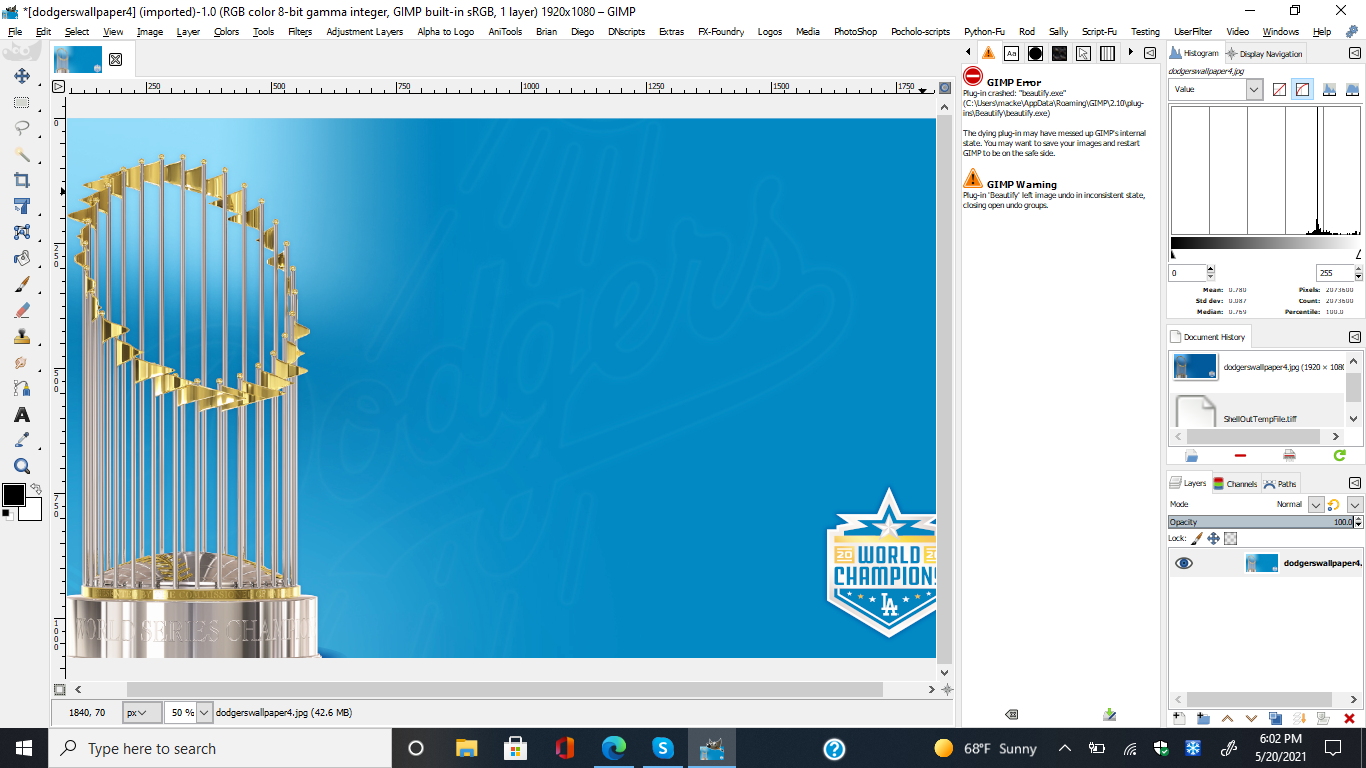
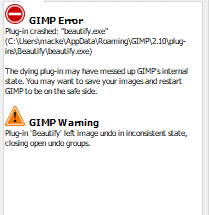
Beautify crashes in Gimp 2.10.24 for Windows 10 64Bit.
Image

Image

This is a first for me. Is anyone else having this problem?


Top
Post new topic Reply to topic  [ 270 posts ]  Go to page Previous  1 ... 7, 8, 9, 10, 11, 12, 13, 14  Next

All times are UTC - 5 hours [ DST ]


* Login  


Powered by phpBB3 © phpBB Group