It is currently Sun Jul 05, 2026 10:23 am


All times are UTC - 5 hours [ DST ]


Post new topic Reply to topic  [ 235 posts ]  Go to page Previous  1 ... 7, 8, 9, 10, 11, 12  Next
Author Message
 Post subject: Re: Script-Fu Interface Scrolling Modification V1.0 Official Release
PostPosted: Thu Mar 13, 2014 12:41 am  (#191) 
Offline
GimpChat Member
User avatar

Joined: Jul 06, 2013
Posts: 2662
Location: California
Ok, I reinstalled Gimp to 2.8.10 and the scroll application doesn't work. how and where do I add it/


Top
 Post subject: Re: Script-Fu Interface Scrolling Modification V1.0 Official Release
PostPosted: Thu Mar 13, 2014 12:54 am  (#192) 
Offline
Script Coder
User avatar

Joined: Feb 18, 2011
Posts: 4826
Location: Bendigo Vic. Australia
Mackenzieh please refresh my memory first
What operating system are you using (e.g. Windows 64bit) and which gimp version are you using (e.g. 2.8)

_________________
Image
No matter how much you push the envelope, it'll still be stationery.


Top
 Post subject: Re: Script-Fu Interface Scrolling Modification V1.0 Official Release
PostPosted: Thu Mar 13, 2014 1:06 am  (#193) 
Offline
GimpChat Member
User avatar

Joined: Jul 06, 2013
Posts: 2662
Location: California
Graechan wrote:
Mackenzieh please refresh my memory first
What operating system are you using (e.g. Windows 64bit) and which gimp version are you using (e.g. 2.8)


I'm using windows 7 64 bit and the version of gimp I'm using is the latest one 2.8.10.. at least I think that's the latest version.


Top
 Post subject: Re: Script-Fu Interface Scrolling Modification V1.0 Official Release
PostPosted: Thu Mar 13, 2014 1:27 am  (#194) 
Offline
Script Coder
User avatar

Joined: Feb 18, 2011
Posts: 4826
Location: Bendigo Vic. Australia
search for lib/gimp/2.0/plugins/script-fu.exe and copy and paste it somewhere outside of gimp
then copy and paste the modified win64bit script-fu.exe into your lib/gimp/2.0/plugins folder,replacing the existing script-fu.exe
restart gimp and your new script-fu.exe will be functional

_________________
Image
No matter how much you push the envelope, it'll still be stationery.


Top
 Post subject: Re: Script-Fu Interface Scrolling Modification V1.0 Official Release
PostPosted: Thu Mar 13, 2014 1:43 am  (#195) 
Offline
GimpChat Member
User avatar

Joined: Jul 06, 2013
Posts: 2662
Location: California
Graechan wrote:
search for lib/gimp/2.0/plugins/script-fu.exe and copy and paste it somewhere outside of gimp
then copy and paste the modified win64bit script-fu.exe into your lib/gimp/2.0/plugins folder,replacing the existing script-fu.exe
restart gimp and your new script-fu.exe will be functional


I only see the interface file.. not the file. The one I downloaded was script fu interface c... when I unzipped it, I only saw that file.. I didn't see the script-fu.exe file.


Top
 Post subject: Re: Script-Fu Interface Scrolling Modification V1.0 Official Release
PostPosted: Thu Mar 13, 2014 2:12 am  (#196) 
Offline
Script Coder
User avatar

Joined: Feb 18, 2011
Posts: 4826
Location: Bendigo Vic. Australia
There should be a plugin script-fu.exe file unless you downloaded the wrong one
this is the right file Win X64
just delete the 'c' file it's only the plugin we want

_________________
Image
No matter how much you push the envelope, it'll still be stationery.


Top
 Post subject: Re: Script-Fu Interface Scrolling Modification V1.0 Official Release
PostPosted: Thu Mar 13, 2014 7:16 am  (#197) 
Offline
GimpChat Founder
User avatar

Joined: May 22, 2008
Posts: 5241
Location: Gimpville
You can just copy the script-fu.exe into your standard plug-ins folder (where you put all your other plug-ins) and it will be used instead the one in lib/gimp/2.0/plugins. In this case, it's actually OK to have both. GIMP will just use the first one it finds.

_________________
“If you reach for the stars, you just might land on a decently sized hill.” - Stuart Hill


Top
 Post subject: Re: Script-Fu Interface Scrolling Modification V1.0 Official Release
PostPosted: Sat Mar 15, 2014 12:56 pm  (#198) 
Offline
GimpChat Member
User avatar

Joined: Nov 16, 2011
Posts: 5127
Location: Metro Vancouver, BC
I just gave this Gimp mod a go, it works flawlessly (Ubuntu 13.10, Gimp 2.8.6 & 2.8.10, user plug-ins folder).

Image

_________________
Image
Gimp 2.8.18, Linux, median user
Gimp Chat Tutorials Index
Spirit Bear (Kermode)


Top
 Post subject: Re: Script-Fu Interface Scrolling Modification V1.0 Official Release
PostPosted: Sun Mar 23, 2014 3:57 pm  (#199) 
Offline
GimpChat Member
User avatar

Joined: Apr 08, 2010
Posts: 5420
Location: Northwest Ohio
THis works great on my pc, anyone know if either version will work on OSX?


Top
 Post subject: Re: Script-Fu Interface Scrolling Modification V1.0 Official Release
PostPosted: Sun Mar 23, 2014 10:55 pm  (#200) 
Offline
GimpChat Founder
User avatar

Joined: May 22, 2008
Posts: 5241
Location: Gimpville
Looks great, Odin! :bigthup

@2-ton - Partha didn't provide a compiled version of the scrolling Script-Fu interface for MAC. He did state that he would include it in the next version of McGIMP. I think GIMP 2.8.12 is slated to be released soon.

In Linux, Alt-Click will allow the user to drag the window around. Is there a way to do this on a MAC? Perhaps a 3rd party utility? If not, you can still run the script by clicking in a numeric entry field pressing enter. You might not be able to access those last few options, but they are for generating custom emaps and don't change much anyway.

_________________
“If you reach for the stars, you just might land on a decently sized hill.” - Stuart Hill


Top
 Post subject: Re: Script-Fu Interface Scrolling Modification V1.0 Official Release
PostPosted: Mon Mar 24, 2014 5:48 am  (#201) 
Offline
GimpChat Member
User avatar

Joined: Apr 07, 2010
Posts: 14182
Odinbc wrote:
I just gave this Gimp mod a go, it works flawlessly (Ubuntu 13.10, Gimp 2.8.6 & 2.8.10, user plug-ins folder).

[ Image ]

Very nice Odin... I love the chrome and blue combination.

_________________
Image


Top
 Post subject: Re: Script-Fu Interface Scrolling Modification V1.0 Official Release
PostPosted: Fri Apr 04, 2014 1:42 pm  (#202) 
Offline
GimpChat Member
User avatar

Joined: Nov 16, 2011
Posts: 5127
Location: Metro Vancouver, BC
I'm curious if there has been any feedback from Gimp dev about the Script-Fu Interface Scrolling mod?

_________________
Image
Gimp 2.8.18, Linux, median user
Gimp Chat Tutorials Index
Spirit Bear (Kermode)


Top
 Post subject: Re: Script-Fu Interface Scrolling Modification V1.0 Official Release
PostPosted: Fri Apr 04, 2014 6:23 pm  (#203) 
Offline
GimpChat Member
User avatar

Joined: Sep 24, 2010
Posts: 12788
You're a coding genius Tux; works in 64-bit GIMP for sure. I guess I must have been sleeping or something and didn't see the thread. lol

Yes, the GIMP developers need to add this one as a needed update. Not all script-fus have enough options for needing this, but there are some that I occasionally use (and they are from you; guess necessity is the mother of invention; lol) that would make this a very useful feature indeed. :)

_________________
Lyle

Psalm 109:8

Image


Top
 Post subject: Re: Script-Fu Interface Scrolling Modification V1.0 Official Release
PostPosted: Sat Apr 05, 2014 5:43 am  (#204) 
Offline
GimpChat Founder
User avatar

Joined: May 22, 2008
Posts: 5241
Location: Gimpville
GIMP's core devs are aware of the scrolling enhancement. I submitted a patch over a month ago.

I have no idea if they have plans to add this enhancement to GIMP. Whatever the case, we will continue to offer the enhanced module here.

_________________
“If you reach for the stars, you just might land on a decently sized hill.” - Stuart Hill


Top
 Post subject: Re: Script-Fu Interface Scrolling Modification V1.0 Official Release
PostPosted: Sun Apr 06, 2014 11:08 pm  (#205) 
Offline
Administrator
User avatar

Joined: Aug 10, 2012
Posts: 14115
Location: Native to NYC living in Arizona, Gimp 2.8 - 3.0, Win 11 PC.
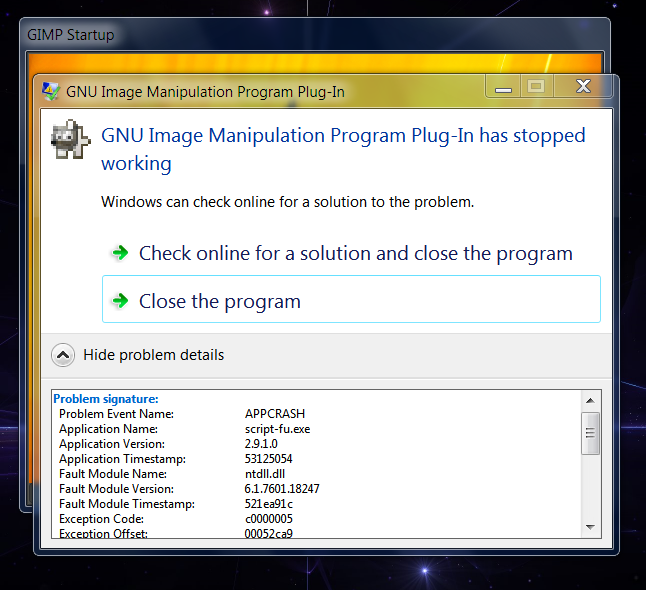
I installed the "Scrolling Modification" .exe and my Script-Fu crashed. My Gimp install is the latest Partha 2.8.10, and I'e only been running it for a few weeks now.
I uninstalled it and now everything is as it was. My Script-Fu is OK now.
I have yet to reinstall this script to try and recreate that event.


I have reinstalled the "Scrolling Modification.exe plugin" and this occurred.
Image
This is the same crash that occurred before.
However, Gimp still opens, but all Script-Fu is disabled/not functioning.

_________________
Image
"A wise man learns more from a foolish question than a fool can learn from a wise answer"
Image


Top
 Post subject: Re: Script-Fu Interface Scrolling Modification V1.0 Official Release
PostPosted: Mon Apr 07, 2014 3:18 am  (#206) 
Offline
GimpChat Member
User avatar

Joined: Apr 22, 2010
Posts: 126
Hi Wallace!:)
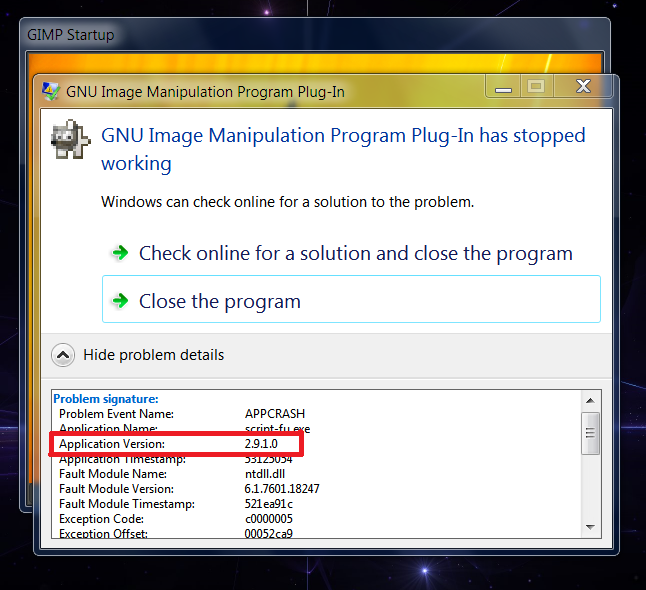
You downloaded the wrong version,this is for Gimp 2.9.1
Download plugin for the version 2.8 and try again,should be all ok.
script-fu.exe_win32-Gimp 2.8

I greet.

Image

_________________
Image


Top
 Post subject: Re: Script-Fu Interface Scrolling Modification V1.0 Official Release
PostPosted: Mon Apr 07, 2014 5:59 am  (#207) 
Offline
Administrator
User avatar

Joined: Aug 10, 2012
Posts: 14115
Location: Native to NYC living in Arizona, Gimp 2.8 - 3.0, Win 11 PC.
pogogogo wrote:
Hi Wallace!:)
You downloaded the wrong version,this is for Gimp 2.9.1
Download plugin for the version 2.8 and try again,should be all ok.
script-fu.exe_win32-Gimp 2.8

I greet.

[ Image ]

Oh... :oops:
That would explain it. Although it did work, but eventually it crashed my Script-Fu.
Thanks Pogogogo for pointing this out.

_________________
Image
"A wise man learns more from a foolish question than a fool can learn from a wise answer"
Image


Top
 Post subject: Re: Script-Fu Interface Scrolling Modification V1.0 Official Release
PostPosted: Mon Apr 07, 2014 7:32 am  (#208) 
Offline
GimpChat Founder
User avatar

Joined: May 22, 2008
Posts: 5241
Location: Gimpville
I didn't realize there was a Windows executable in this thread for GIMP 2.9.x.

Where is it located? We need to ensure it's clearly labeled as such (or removed).

_________________
“If you reach for the stars, you just might land on a decently sized hill.” - Stuart Hill


Top
 Post subject: Re: Script-Fu Interface Scrolling Modification V1.0 Official Release
PostPosted: Mon Apr 07, 2014 8:11 am  (#209) 
Offline
GimpChat Founder
User avatar

Joined: May 22, 2008
Posts: 5241
Location: Gimpville
Ok. I found and removed the 2.9.x version, with the link on 1st page updated to point to the GIMP 2.8.10 version.

_________________
“If you reach for the stars, you just might land on a decently sized hill.” - Stuart Hill


Top
 Post subject: Re: Script-Fu Interface Scrolling Modification V1.0 Official Release
PostPosted: Mon Apr 07, 2014 8:18 am  (#210) 
Offline
Administrator
User avatar

Joined: Aug 10, 2012
Posts: 14115
Location: Native to NYC living in Arizona, Gimp 2.8 - 3.0, Win 11 PC.
GnuTux wrote:
Ok. I found and removed the 2.9.x version with the link on 1st page updated to point to the GIMP 2.8.10 version.

Good! :bigthup
If I had known this was the incorrect version. I wouldn't have downloaded it and installed it.

_________________
Image
"A wise man learns more from a foolish question than a fool can learn from a wise answer"
Image


Top
Post new topic Reply to topic  [ 235 posts ]  Go to page Previous  1 ... 7, 8, 9, 10, 11, 12  Next

All times are UTC - 5 hours [ DST ]


* Login  


Powered by phpBB3 © phpBB Group