It is currently Thu Nov 05, 2026 4:45 pm


All times are UTC - 5 hours [ DST ]


Post new topic Reply to topic  [ 134 posts ]  Go to page Previous  1, 2, 3, 4, 5 ... 7  Next
Author Message
 Post subject: Re: Line Nova GT
PostPosted: Mon Oct 06, 2014 8:41 pm  (#21) 
Offline
GimpChat Founder
User avatar

Joined: May 22, 2008
Posts: 5241
Location: Gimpville
That looks good, Graechan. I never considered changing anything else in the script. I just figured the user could drag the layer to whatever position was needed.

If you already have the mods done, we can certainly update the script. :bigthup

_________________
“If you reach for the stars, you just might land on a decently sized hill.” - Stuart Hill


Top
 Post subject: Re: Line Nova GT
PostPosted: Mon Oct 06, 2014 9:15 pm  (#22) 
Offline
Script Coder
User avatar

Joined: Feb 18, 2011
Posts: 4826
Location: Bendigo Vic. Australia
GnuTux I've sent the modification to you in a PM

_________________
Image
No matter how much you push the envelope, it'll still be stationery.


Top
 Post subject: Re: Line Nova GT
PostPosted: Mon Oct 06, 2014 11:38 pm  (#23) 
Offline
GimpChat Member
User avatar

Joined: Jan 20, 2013
Posts: 14835
Location: roma, italy
GnuTux wrote:
dinasset wrote:
if I'm not wrong, one has to play with "randomness" to get longer rays;
couldn't it be nicer to have somehow/somewhere the words "rays length"?

There is GIMP documentation on how those options work...

http://docs.gimp.org/en/script-fu-line-nova.html

The only difference is that the new version allows for color selection and inversion in the dialog.

Thanks GT.
I read the documentation, which says (among all the rest)
The Line Nova filter fills a layer with rays emanating outward from the center of the layer using the foreground color shown in the Toolbox. The rays starts as one pixel and grew broader towards the edges of the layer.
Thus, I change my observation:
- I can't see "rays grewing towards the edges", I get a sort of star with very limited rays lenght:

Attachment:
nova_dft.JPG
nova_dft.JPG [ 926.17 KiB | Viewed 2224 times ]


this is my result, launching the filter with default parameters: what's wrong?

(image courtesy of Issabella)

_________________
"Where am I ?"


Top
 Post subject: Re: Line Nova GT
PostPosted: Tue Oct 07, 2014 12:10 am  (#24) 
Offline
Script Coder
User avatar

Joined: Feb 18, 2011
Posts: 4826
Location: Bendigo Vic. Australia
Dinasset the ray length is best controlled by the 'Sharpness (degrees):' setting, the smaller the setting the longer the rays
Sharpness 2
Image
Sharpness 1.5
Image
Sharpness 1
Image

_________________
Image
No matter how much you push the envelope, it'll still be stationery.


Last edited by Graechan on Tue Oct 07, 2014 12:24 am, edited 1 time in total.

Top
 Post subject: Re: Line Nova GT
PostPosted: Tue Oct 07, 2014 12:21 am  (#25) 
Offline
GimpChat Member
User avatar

Joined: Jan 20, 2013
Posts: 14835
Location: roma, italy
Graechan wrote:
Dinasset the ray length is best controlled by the 'Sharpness (degrees):' setting, the smaller the setting the longer the rays

thanks, Graechan
got it

Attachment:
nova_0.5.JPG
nova_0.5.JPG [ 2.47 MiB | Viewed 2223 times ]


but now my comments are:
- default should be reduced to get always what the documentation says
- with value 0.5 (1 didn't work enough) the elapsed time is looooong
- personally I would like to have a "star" with rays more -let me say- "natural"

_________________
"Where am I ?"


Top
 Post subject: Re: Line Nova GT
PostPosted: Tue Oct 07, 2014 12:34 am  (#26) 
Offline
Script Coder
User avatar

Joined: Feb 18, 2011
Posts: 4826
Location: Bendigo Vic. Australia
try sharpness 0.8 and offset radius 60

_________________
Image
No matter how much you push the envelope, it'll still be stationery.


Top
 Post subject: Re: Line Nova GT
PostPosted: Tue Oct 07, 2014 12:36 am  (#27) 
Offline
GimpChat Member
User avatar

Joined: Jan 20, 2013
Posts: 14835
Location: roma, italy
to explain with an image what I mean
result of using gradient flare

Attachment:
DSCN5404-gradientflare.JPG
DSCN5404-gradientflare.JPG [ 908.27 KiB | Viewed 2222 times ]

_________________
"Where am I ?"


Top
 Post subject: Re: Line Nova GT
PostPosted: Tue Oct 07, 2014 12:41 am  (#28) 
Offline
GimpChat Member
User avatar

Joined: Jan 20, 2013
Posts: 14835
Location: roma, italy
when I put the result with 0.5 I said that parameter setting to 1 wasn't enough
here what I got with 1

Attachment:
nova_1.JPG
nova_1.JPG [ 971.75 KiB | Viewed 2222 times ]

_________________
"Where am I ?"


Top
 Post subject: Re: Line Nova GT
PostPosted: Tue Oct 07, 2014 12:47 am  (#29) 
Offline
GimpChat Member
User avatar

Joined: Jan 20, 2013
Posts: 14835
Location: roma, italy
Graechan wrote:
try sharpness 0.8 and offset radius 60

tried, good suggestion, much better

Attachment:
nova-graechan.JPG
nova-graechan.JPG [ 2.25 MiB | Viewed 2223 times ]


don't you think the script should somehow take care of the image size?

_________________
"Where am I ?"


Top
 Post subject: Re: Line Nova GT
PostPosted: Tue Oct 07, 2014 1:05 am  (#30) 
Offline
Script Coder
User avatar

Joined: Feb 18, 2011
Posts: 4826
Location: Bendigo Vic. Australia
no the script returns the same size Nova regardless off image size, as designed

_________________
Image
No matter how much you push the envelope, it'll still be stationery.


Top
 Post subject: Re: Line Nova GT
PostPosted: Tue Oct 07, 2014 1:27 am  (#31) 
Offline
Script Coder
User avatar

Joined: Feb 18, 2011
Posts: 4826
Location: Bendigo Vic. Australia
Dinasset this is a fiery sun
Image

_________________
Image
No matter how much you push the envelope, it'll still be stationery.


Top
 Post subject: Re: Line Nova GT
PostPosted: Tue Oct 07, 2014 3:58 am  (#32) 
Offline
GimpChat Member
User avatar

Joined: Jan 20, 2013
Posts: 14835
Location: roma, italy
Graechan wrote:
no the script returns the same size Nova regardless off image size, as designed


you are a magician of script
can't you improve it? sure you can!...

_________________
"Where am I ?"


Top
 Post subject: Re: Line Nova GT
PostPosted: Tue Oct 07, 2014 3:58 am  (#33) 
Offline
GimpChat Member
User avatar

Joined: Jan 20, 2013
Posts: 14835
Location: roma, italy
Graechan wrote:
Dinasset this is a fiery sun
[ Image ]

this is really nice!!!

_________________
"Where am I ?"


Top
 Post subject: Re: Line Nova GT
PostPosted: Wed Oct 08, 2014 8:40 pm  (#34) 
Offline
Script Coder
User avatar

Joined: Feb 18, 2011
Posts: 4826
Location: Bendigo Vic. Australia
Dinasset GnuTux and myself are working out a couple of Ideas at the moment

_________________
Image
No matter how much you push the envelope, it'll still be stationery.


Top
 Post subject: Re: Line Nova GT
PostPosted: Thu Oct 09, 2014 10:40 pm  (#35) 
Offline
Script Coder
User avatar

Joined: Feb 18, 2011
Posts: 4826
Location: Bendigo Vic. Australia
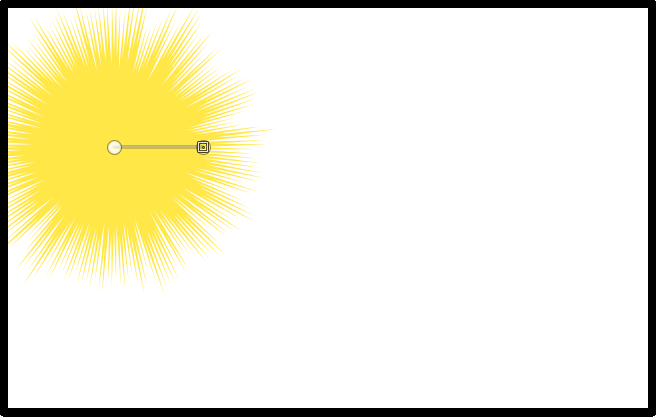
the script is going great, If a path is present then it uses the paths initial point to set the centre of the nova and the path length to set the offset.
if no path is present then the location reverts to the centre and the offset reverts to the menu setting.
in either case the nova is drawn on a new transparent layer above the image.
the example below displays the result from a 640x400 image with path
Image

_________________
Image
No matter how much you push the envelope, it'll still be stationery.


Top
 Post subject: Re: Line Nova GT
PostPosted: Sat Oct 11, 2014 8:25 pm  (#36) 
Offline
Script Coder
User avatar

Joined: Feb 18, 2011
Posts: 4826
Location: Bendigo Vic. Australia
The new default has a feathered curved edge rather than a hard edge to layer boundary
Image
By adding a path you can set the nova 'center location' and 'center size'
Image

Image

_________________
Image
No matter how much you push the envelope, it'll still be stationery.


Top
 Post subject: Re: Line Nova GT
PostPosted: Sat Oct 11, 2014 9:18 pm  (#37) 
Offline
Retired Staff
User avatar

Joined: May 22, 2008
Posts: 6946
Location: Somewhere in GIMP
I'm really excited to see the new, finished product. Who'd ever guess you guys would take a broken script and make a wonder script out of it. WTG, guys. Whoa! :jumpclap :wow :yr :funnyball

_________________
Image
World War IV will be fought with sticks and stones. - Albert Einstein


Top
 Post subject: Re: Line Nova GT
PostPosted: Sat Oct 11, 2014 9:49 pm  (#38) 
Offline
Script Coder
User avatar

Joined: Feb 18, 2011
Posts: 4826
Location: Bendigo Vic. Australia
Thanks 'O', the script actually seemed useless before so we twiddled it a bit to give a useable effect for lighting e.t.c.,
but not without a lot of groaning and moaning

_________________
Image
No matter how much you push the envelope, it'll still be stationery.


Top
 Post subject: Re: Line Nova GT
PostPosted: Sun Oct 12, 2014 12:13 am  (#39) 
Offline
Retired Staff
User avatar

Joined: May 22, 2008
Posts: 6946
Location: Somewhere in GIMP
Graechan wrote:
groaning and moaning
That's what makes it work and gives it substance. :hehe

_________________
Image
World War IV will be fought with sticks and stones. - Albert Einstein


Top
 Post subject: Re: Line Nova GT
PostPosted: Sun Oct 12, 2014 2:20 am  (#40) 
Offline
GimpChat Member
User avatar

Joined: Jan 20, 2013
Posts: 14835
Location: roma, italy
Graechan, were is the new version (I mean, the one you worked with when showing last examples, with path etc)?
Under Gimp-script I find always the version dated October 6: just to be sure I redownloaded it, but the path I entered is ignored...
Is it still "work-in-progress"?

_________________
"Where am I ?"


Top
Post new topic Reply to topic  [ 134 posts ]  Go to page Previous  1, 2, 3, 4, 5 ... 7  Next

All times are UTC - 5 hours [ DST ]


* Login  


Powered by phpBB3 © phpBB Group