It is currently Fri Jul 31, 2026 7:06 pm


All times are UTC - 5 hours [ DST ]


Post new topic Reply to topic  [ 408 posts ]  Go to page Previous  1, 2, 3, 4, 5 ... 21  Next
Author Message
 Post subject: Re: Custom Font script (spawned from Wallace's PhotoFont topic).
PostPosted: Sat May 07, 2016 5:58 pm  (#21) 
Offline
Administrator
User avatar

Joined: Aug 10, 2012
Posts: 14142
Location: Native to NYC living in Arizona, Gimp 2.8 - 3.0, Win 11 PC.
Good job you guys!
:jumpclap
So long FontLab...
:seeya

_________________
Image
"A wise man learns more from a foolish question than a fool can learn from a wise answer"
Image


Top
 Post subject: Re: Custom Font script (spawned from Wallace's PhotoFont topic).
PostPosted: Sat May 07, 2016 6:03 pm  (#22) 
Offline
GimpChat Member
User avatar

Joined: Sep 24, 2010
Posts: 12822
I'm in the process of creating my font via a stitch image font. How do you represent period, right parenthesis, left parenthesis, etc.? If you cannot, I understand. :)

_________________
Lyle

Psalm 109:8

Image


Top
 Post subject: Re: Custom Font script (spawned from Wallace's PhotoFont topic).
PostPosted: Sat May 07, 2016 6:14 pm  (#23) 
Offline
Script Coder
User avatar

Joined: May 07, 2014
Posts: 4526
Location: Canada
lylejk wrote:
I'm in the process of creating my font via a stitch image font. How do you represent period, right parenthesis, left parenthesis, etc.? If you cannot, I understand. :)


I either have to define these in the script like if i run into a period i look for 'period.png' which isn't done yet....
or however as it is right now if you name your layer "..png" it'll work with period....or "(.png" it'll work for parenthesis because gimp doesn't restrict special characters then a . then png. Does that makes sense?

_________________
TinT


Top
 Post subject: Re: Custom Font script (spawned from Wallace's PhotoFont topic).
PostPosted: Sat May 07, 2016 6:15 pm  (#24) 
Offline
Script Coder
User avatar

Joined: May 07, 2014
Posts: 4526
Location: Canada
This latest version has "FILLED" Justification option.

Image


Attachments:
custom_font.scm [7.4 KiB]
Downloaded 480 times

_________________
TinT
Top
 Post subject: Re: Custom Font script (spawned from Wallace's PhotoFont topic).
PostPosted: Sat May 07, 2016 6:45 pm  (#25) 
Offline
Script Coder
User avatar

Joined: May 07, 2014
Posts: 4526
Location: Canada
Wallace wrote:
Good job you guys!
:jumpclap
So long FontLab...
:seeya

PhotoFont is still useful in that it's still text on html pages so their text is searchable. I just don't know if i'd pay.

_________________
TinT


Top
 Post subject: Re: Custom Font script (spawned from Wallace's PhotoFont topic).
PostPosted: Sat May 07, 2016 7:03 pm  (#26) 
Offline
Administrator
User avatar

Joined: Aug 10, 2012
Posts: 14142
Location: Native to NYC living in Arizona, Gimp 2.8 - 3.0, Win 11 PC.
trandoductin wrote:
PhotoFont is still useful in that it's still text on html pages so their text is searchable.
I just don't know if i'd pay.

Yes I understand.
I was just joking.

_________________
Image
"A wise man learns more from a foolish question than a fool can learn from a wise answer"
Image


Top
 Post subject: Re: Custom Font script (spawned from Wallace's PhotoFont topic).
PostPosted: Sat May 07, 2016 7:30 pm  (#27) 
Offline
GimpChat Member
User avatar

Joined: Sep 24, 2010
Posts: 12822
Still need to work out how to align the layer so lower case fonts will align, but here's my try (lot's of work and I'm a lazy filter guy so I may not bother to fix the font; lol). :)


Attachments:
atest.png
atest.png [ 56.71 KiB | Viewed 3532 times ]
stitch_font.xcf [659.14 KiB]
Downloaded 688 times

_________________
Lyle

Psalm 109:8

Image
Top
 Post subject: Re: Custom Font script (spawned from Wallace's PhotoFont topic).
PostPosted: Sat May 07, 2016 7:32 pm  (#28) 
Offline
GimpChat Member
User avatar

Joined: Sep 24, 2010
Posts: 12822
trandoductin wrote:
lylejk wrote:
I'm in the process of creating my font via a stitch image font. How do you represent period, right parenthesis, left parenthesis, etc.? If you cannot, I understand. :)


I either have to define these in the script like if i run into a period i look for 'period.png' which isn't done yet....
or however as it is right now if you name your layer "..png" it'll work with period....or "(.png" it'll work for parenthesis because gimp doesn't restrict special characters then a . then png. Does that makes sense?


Ah; may try to add those characters. Still, need to figure out how to align the characters proper I suppose. lol

:)

_________________
Lyle

Psalm 109:8

Image


Top
 Post subject: Re: Custom Font script (spawned from Wallace's PhotoFont topic).
PostPosted: Sat May 07, 2016 8:17 pm  (#29) 
Offline
Script Coder
User avatar

Joined: May 07, 2014
Posts: 4526
Location: Canada
Wallace wrote:
trandoductin wrote:
PhotoFont is still useful in that it's still text on html pages so their text is searchable.
I just don't know if i'd pay.

Yes I understand.
I was just joking.

Well in that case SO LONG FONTLAB! :hehe

_________________
TinT


Top
 Post subject: Re: Custom Font script (spawned from Wallace's PhotoFont topic).
PostPosted: Sat May 07, 2016 8:19 pm  (#30) 
Offline
Script Coder
User avatar

Joined: May 07, 2014
Posts: 4526
Location: Canada
lylejk wrote:
Still need to work out how to align the layer so lower case fonts will align, but here's my try (lot's of work and I'm a lazy filter guy so I may not bother to fix the font; lol). :)

looks pretty nice the way it is right now.
Attachment:
gimpchatcustomfontisawesomeness.png
gimpchatcustomfontisawesomeness.png [ 54.74 KiB | Viewed 3522 times ]

_________________
TinT


Top
 Post subject: Re: Custom Font script (spawned from Wallace's PhotoFont topic).
PostPosted: Sat May 07, 2016 9:19 pm  (#31) 
Offline
GimpChat Member
User avatar

Joined: Jul 06, 2013
Posts: 2662
Location: California
I like the font but I'm confused. Do you have to use the font to layers script in order to get the custom font script to work OR is the font to layers script a completely separate script?


Top
 Post subject: Re: Custom Font script (spawned from Wallace's PhotoFont topic).
PostPosted: Sat May 07, 2016 9:58 pm  (#32) 
Offline
Script Coder
User avatar

Joined: May 07, 2014
Posts: 4526
Location: Canada
custom_font script is a separate script on its own.

I think the font to layers script only facilitates you in designing your font like creating layers with those named layers and then you can edit each layer to your own liking (I can't get it to work for me either).

However, you do not need it, you can just start creating your own layers and name them accordingly for example "a.png" "b.png" "c.png" for letters a, b and c and so on for other characters and use the custom_font.scm.

_________________
TinT


Top
 Post subject: Re: Custom Font script (spawned from Wallace's PhotoFont topic).
PostPosted: Sat May 07, 2016 11:09 pm  (#33) 
Offline
GimpChat Member
User avatar

Joined: Jul 06, 2013
Posts: 2662
Location: California
trandoductin wrote:
custom_font script is a separate script on its own.

I think the font to layers script only facilitates you in designing your font like creating layers with those named layers and then you can edit each layer to your own liking (I can't get it to work for me either).

However, you do not need it, you can just start creating your own layers and name them accordingly for example "a.png" "b.png" "c.png" for letters a, b and c and so on for other characters and use the custom_font.scm.


Thanks for the explanation. :)


Top
 Post subject: Re: Custom Font script (spawned from Wallace's PhotoFont topic).
PostPosted: Sun May 08, 2016 12:46 am  (#34) 
Offline
Script Coder
User avatar

Joined: May 07, 2014
Posts: 4526
Location: Canada
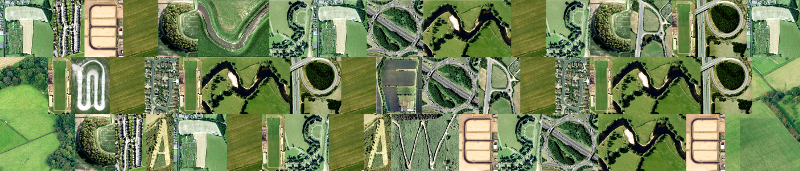
I grabbed images from this link http://www.telegraph.co.uk/technology/picture-galleries/5757548/The-Google-Maps-alphabet-UK-an-A-to-Z-of-the-British-Isles.html?image=25
and cropped them into a capitals only font
Attachment:
googlemapfont.xcf [1.11 MiB]
Downloaded 1191 times

some samples
Image


Image

Image

_________________
TinT


Top
 Post subject: Re: Custom Font script (spawned from Wallace's PhotoFont topic).
PostPosted: Sun May 08, 2016 2:05 am  (#35) 
Offline
GimpChat Member
User avatar

Joined: Sep 24, 2010
Posts: 12822
Now that's just too cool, Tran. lol

:)


Attachments:
cool_beans.png
cool_beans.png [ 301.15 KiB | Viewed 3454 times ]

_________________
Lyle

Psalm 109:8

Image
Top
 Post subject: Re: Custom Font script (spawned from Wallace's PhotoFont topic).
PostPosted: Sun May 08, 2016 3:43 am  (#36) 
Offline
GimpChat Member
User avatar

Joined: Jan 13, 2011
Posts: 2646
Location: Poland
Hi Trandoductin.
Thank You for the new options: Justification § Spacing.
It is a pity that font-to-layers does not work for You (for me works in Gimp versions 2.8 and 2.9)
You can try the new version (without gtk message)?


Attachments:
FTL.png
FTL.png [ 38.76 KiB | Viewed 3448 times ]
Font-to-layers.zip [1.67 KiB]
Downloaded 663 times

_________________
Image
Top
 Post subject: Re: Custom Font script (spawned from Wallace's PhotoFont topic).
PostPosted: Sun May 08, 2016 4:13 am  (#37) 
Offline
Administrator
User avatar

Joined: Aug 10, 2012
Posts: 14142
Location: Native to NYC living in Arizona, Gimp 2.8 - 3.0, Win 11 PC.
Attachment:
Preview image.png
Preview image.png [ 263.61 KiB | Viewed 3445 times ]

Attachment:
Preview image II.png
Preview image II.png [ 635.23 KiB | Viewed 3445 times ]

Attachment:
purple polygon font.xcf [591.21 KiB]
Downloaded 702 times

_________________
Image
"A wise man learns more from a foolish question than a fool can learn from a wise answer"
Image


Top
 Post subject: Re: Custom Font script (spawned from Wallace's PhotoFont topic).
PostPosted: Sun May 08, 2016 4:23 am  (#38) 
Offline
GimpChat Member
User avatar

Joined: Sep 24, 2010
Posts: 12822
ref: http://windnstorm.deviantart.com/art/An ... -330661610

Still having fun. :)

Image


Attachments:
animistic_alphabet.7z [3.09 MiB]
Downloaded 720 times

_________________
Lyle

Psalm 109:8

Image
Top
 Post subject: Re: Custom Font script (spawned from Wallace's PhotoFont topic).
PostPosted: Sun May 08, 2016 9:48 am  (#39) 
Offline
Script Coder
User avatar

Joined: May 07, 2014
Posts: 4526
Location: Canada
nice Wallace!
Lylejk - I can't make out what your image says.

I have added all the fonts in this thread so far at bottom of 1st post of this thread

so that it's easy to find (Just using links) but if people download from these links, the download count will still update on the post where the original files are attached.

_________________
TinT


Top
 Post subject: Re: Custom Font script (spawned from Wallace's PhotoFont topic).
PostPosted: Sun May 08, 2016 9:53 am  (#40) 
Offline
Script Coder
User avatar

Joined: May 07, 2014
Posts: 4526
Location: Canada
MareroQ wrote:
Hi Trandoductin.
Thank You for the new options: Justification § Spacing.
It is a pity that font-to-layers does not work for You (for me works in Gimp versions 2.8 and 2.9)
You can try the new version (without gtk message)?


This version worked great for me! Great job!

I'll add a link to this version in my first post of thread so it's easy to find for people.

_________________
TinT


Top
Post new topic Reply to topic  [ 408 posts ]  Go to page Previous  1, 2, 3, 4, 5 ... 21  Next

All times are UTC - 5 hours [ DST ]


* Login  


Powered by phpBB3 © phpBB Group