|
| Script Coder |
 |
Joined: May 07, 2014
Posts: 4527
Location: Canada
|
@David, Hi, with some help of ChatGPT I noticed that the gobject.timeout_add() function works well with time.time() calls here's the code I guess you play with time values if you wished but this worked pretty speedy to change settings on mine. changed from code from Post #21#!/usr/bin/env python
#grow-shrink-live_dm.py
# Creator: TT
# This should allow user to adjust grow/shrink current selection with live preview
# Open Source
# 09/12/2023 Modified DM to make sliders sensitive to image size.
# Minimum slider value reduces selection to small value without destruction.
# If run without selection, selects all so slider only enables reduction.
# 15/12/2023 Changed colour mask opacity to 50%.
# 16/12/2023 Corrected lower limits.
#
# 09/12/2023 Revision 1 by DM.
# 15/12/2023 Revision 2 by DM.
# 16/12/2023 Revision 3 by DM.
# 25/12/2023 Revision 4 by TT Change code to use gobjet along time time library for speedy reaction time when user is dragging and changing settings
from gimpfu import *
import gtk,gobject
import math
import time ##########
# Global variables to store the parameters used for our effect/work to show preview or actual layer when user OK it
global_param1 = 0 #in this example it's shrinkgrow radius
global_param2 = 0 #in this example it's feather_radius
global_param3 = 10 #in this example it's iterations
global_param4 = 0 #in this example it's enhance_shadows
image = 0 #we'll set these when dialog() is called so that we can access them later
drawable = 0
has_preview = False
preview_layer = 0
#for this operation
selection_channel = 0
def apply_effect(layer): #function to do work on either preview layer or actual drawable when user clicks OK
global image
radius = global_param1
feather_radius = global_param2
pdb.gimp_image_select_item(image,CHANNEL_OP_REPLACE,selection_channel) #first we selected the original saved channel
if radius < 0:
pdb.gimp_selection_shrink(image,-radius)
else:
pdb.gimp_selection_grow(image,radius)
pdb.gimp_selection_feather(image,feather_radius)
#do something to it to show it's effect so that user can distinguish between selected area or not
pdb.gimp_drawable_edit_fill(layer,FILL_FOREGROUND)
gimp.displays_flush()
def apply_final(layer): #wrapper to apply effect on final and remove preview_layer meant to be called by on_ok_button_clicked
global preview_layer
#pdb.gimp_image_undo_group_start(image) #so it's undone in Ctrl+Z
pdb.gimp_image_undo_enable(image) #so that user can undo this next step
apply_effect(preview_layer)
#pdb.gimp_image_undo_group_end(image)
if has_preview:
pdb.gimp_image_remove_channel(image,selection_channel) #so that we don't leave a saved channel laying around
pdb.gimp_image_remove_layer(image,preview_layer)
pdb.gimp_image_set_active_layer(image,drawable)
pdb.gimp_context_set_foreground(save_foreground)
gimp.displays_flush()
# Function to update the live preview
def update_live_preview(): #this is called everytime some parameter changes
global global_param1, global_param2, global_param3, global_param4
global image,drawable
global has_preview,preview_layer #deal with preview layer
global selection_channel #this will save our current selection
# Apply your plugin's effect using the current parameters
# Use global_param1 and global_param2 to access the user's inputs
if not has_preview: #create a preview layer
#pdb.gimp_message("Creating preview")
preview_layer = pdb.gimp_layer_new(image,image.width,image.height,RGBA_IMAGE,"preview",50,LAYER_MODE_NORMAL)
pdb.gimp_image_insert_layer(image,preview_layer,None,0) #insert top most so we see it
non_empty,x1,y1,x2,y2 = pdb.gimp_selection_bounds(image)
if non_empty == TRUE:
pass #there's already a selection
else:
pdb.gimp_selection_all(image) #if there's no selection we just select the whole image and work with that
selection_channel = pdb.gimp_selection_save(image)
has_preview = True #now set it true so we can deal with existing layer in later calls
else: # already have preview layer
pass
#pdb.gimp_message("Removing existing and creating new Preview")
pdb.gimp_image_remove_layer(image,preview_layer) #remove it to create a new one to work on
preview_layer = pdb.gimp_layer_new(image,image.width,image.height,RGBA_IMAGE,"preview",50,LAYER_MODE_NORMAL)
pdb.gimp_image_insert_layer(image,preview_layer,None,0) #insert top most so we see it
pdb.gimp_image_set_active_layer(image,preview_layer)
apply_effect(preview_layer)
# Update the live preview layer with the modified image
save_foreground = 0
hilightcolor = (255,0,0)
def dialog(image_, drawable_):
global image, drawable, save_foreground
non_empty,x1,y1,x2,y2=pdb.gimp_selection_bounds(image_) # get limits of selection bounding box
h_box = x2-x1 # horizontal width of bounding box
v_box = y2-y1 # vertical height of bounding box
width = image_.width
height = image_.height
if h_box == width and v_box == height:
h1_slider_lower = (min((h_box/2),(v_box/2))) - 2 # corrected - revision 3 later found an error changed back to -2
h1_slider_limit = 0
h2_slider_lower = 0
h2_slider_limit = min((height*0.5),(width*0.5))
else:
h1_slider_limit = min((height*0.5),(width*0.5))
h1_slider_lower = (min((h_box/2),(v_box/2))) - 2 # corrected - revision 3 later found an error changed back to -2
h2_slider_lower = 0
h2_slider_limit = min((height*0.5),(width*0.5))
#save these for updates
image = image_
pdb.gimp_image_undo_disable(image) #for speed and also when user undo it doesn't see our preview creations/deletions
drawable = drawable_
save_foreground = pdb.gimp_context_get_foreground()
pdb.gimp_context_set_foreground(hilightcolor)
dialog = gtk.Dialog("Shrink/Grow Feather Selection Live Preview", None, gtk.DIALOG_MODAL | gtk.DIALOG_DESTROY_WITH_PARENT)
dialog.set_default_size(600, 100)
# Create an HBox to hold the label and slider -------------------------------------------------------------
hbox = gtk.HBox()
dialog.vbox.pack_start(hbox, expand=True, fill=True)
# Create a label on the left-hand side
label1 = gtk.Label("Shrink/Grow Radius:")
hbox.pack_start(label1, expand=False, fill=False, padding=5)
# Create an adjustment for the HScale (slider)
adjustment1 = gtk.Adjustment(value=0, lower=-(h1_slider_lower), upper=h1_slider_limit, step_incr=1, page_incr=0) # set slider lower & upper limits
param1_scale = gtk.HScale(adjustment=adjustment1)
param1_scale.set_digits(0) # Display only integers
hbox.pack_start(param1_scale, expand=True, fill=True, padding=5)
# Connect callback functions for user interaction
param1_scale.connect("value-changed", on_param1_changed)
# # Create an HBox to hold the label and slider -------------------------------------------------------------
hbox2 = gtk.HBox()
dialog.vbox.pack_start(hbox2, expand=True, fill=True)
# Create a label on the left-hand side
label2 = gtk.Label("Feather Radius:")
hbox2.pack_start(label2, expand=False, fill=False, padding=5)
# Create an adjustment for the HScale (slider)
adjustment2 = gtk.Adjustment(value=0, lower=h2_slider_lower, upper=h2_slider_limit, step_incr=1, page_incr=0) # set feather slider upper limit
param2_scale = gtk.HScale(adjustment=adjustment2)
param2_scale.set_digits(0) # Display only integers
hbox2.pack_start(param2_scale, expand=True, fill=True, padding=5)
# Connect callback functions for user interaction
param2_scale.connect("value-changed", on_param2_changed)
# Add an OK button
ok_button = dialog.add_button(gtk.STOCK_OK, gtk.RESPONSE_OK)
ok_button.connect("clicked", on_ok_button_clicked)
# Show the dialog
dialog.show_all()
update_live_preview() #call this once so we see effect
dialog.run()
lasttime = time.time()
def actual_update():
global lasttime
thistime = time.time()
elapsedtime = thistime - lasttime
# try:
# a = elapsedtime
# except:
# pass
if elapsedtime < 0.1: #this should be less time for example 0.25 is 250/1000 is less than the
# gobject.timeout_add(150, actual_update) in try_call_update call so that it kicks in for sure after that much time
pass
else:
update_live_preview()
lasttime = time.time()
def try_call_update():
global lasttime
lasttime = time.time()
gobject.timeout_add(150, actual_update)
# Schedule a new timeout to update after 0.1 seconds
# Callback function for updating the live preview when param1 changes
def on_param1_changed(scale):
global global_param1
global_param1 = scale.get_value()
try_call_update()
# Callback function for updating the live preview when param2 changes
def on_param2_changed(scale):
global global_param2
global_param2 = scale.get_value()
try_call_update()
def on_param3_changed(scale):
global global_param3
global_param3 = scale.get_value()
try_call_update()
# Callback function for the OK button
def on_ok_button_clicked(button, data=None):
global drawable
apply_final(preview_layer) #preview layer because we don't want to apply the invert to final layer it's just for viewing
button.get_toplevel().destroy() #destroys the gtk dialog window
# Register the Python-Fu plugin
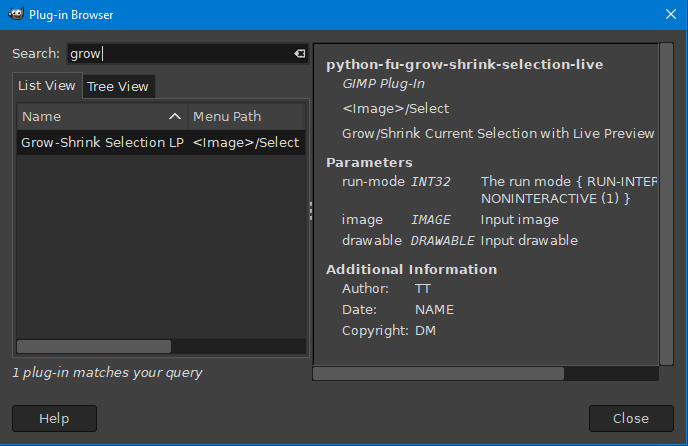
register(
"python_fu_grow_shrink_live_dm",
"Grow/Shrink Current Selection with Live Preview",
"Grow/Shrink Current Selection with Live Preview",
"TT",
"DM",
"NAME",
"<Image>/Python-Fu/Live Preview/Grow-Shrink Live DM", # Menu location
"*", # Image type
[],
[],
dialog
)
main()
_________________
TinT
|
|
 Login
Login Register
 Tweets
 FAQ
FAQ Advanced Search