It is currently Thu Sep 24, 2026 4:22 am


All times are UTC - 5 hours [ DST ]


Post new topic Reply to topic  [ 24 posts ]  Go to page Previous  1, 2
Author Message
 Post subject: Re: Free Form Bokeh
PostPosted: Thu Apr 18, 2013 11:29 pm  (#21) 
Offline
Administrator
User avatar

Joined: Aug 10, 2012
Posts: 14207
Location: Native to NYC living in Arizona, Gimp 2.8 - 3.0, Win 11 PC.
Quote:
If you are running 2.6 that is probably the reason for the error.If that is the case you will have to fix the deprecations in the script itself.Run Gimp-2.6 and open the procedure browser.Type in
You will probably see only gimp-image-add-layer in Gimp-2.6 and the PDB call in Gimp-2.8 is INSERT not ADD.
Changing that in every instance may help you.I am not positive it is gimp-image-add-layer because i don't have gimp-2.6.11 installed right now.But it will be something similar. :)

I will install gimp-2.6 and make sure.

@Rod,

I know little about editing scripts, I did however look at the script in 'wordpad', but can't find where I should make the change. It does say the the script is for 2.8 though.

I didn't find any match using 'procedure browser' for 'gimp-image-insert-layer' or 'gimp-image-add-layer' for this script.

_________________
Image
"A wise man learns more from a foolish question than a fool can learn from a wise answer"
Image


Top
 Post subject: Re: Free Form Bokeh
PostPosted: Fri Apr 19, 2013 12:33 am  (#22) 
Offline
Global Moderator
User avatar

Joined: May 16, 2010
Posts: 16174
Wallace wrote:
Quote:
If you are running 2.6 that is probably the reason for the error.If that is the case you will have to fix the deprecations in the script itself.Run Gimp-2.6 and open the procedure browser.Type in
You will probably see only gimp-image-add-layer in Gimp-2.6 and the PDB call in Gimp-2.8 is INSERT not ADD.
Changing that in every instance may help you.I am not positive it is gimp-image-add-layer because i don't have gimp-2.6.11 installed right now.But it will be something similar. :)

I will install gimp-2.6 and make sure.

@Rod,

I know little about editing scripts, I did however look at the script in 'wordpad', but can't find where I should make the change. It does say the the script is for 2.8 though.

I didn't find any match using 'procedure browser' for 'gimp-image-insert-layer' or 'gimp-image-add-layer' for this script.


It is there
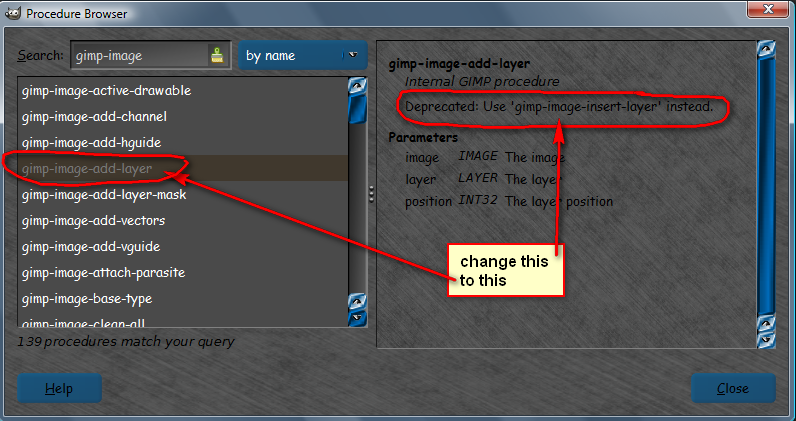
I couldn't get gimp-2.6 to run correctly so i typed in gimp-image-add-layer and got the deprecation entry.
Image
The call in the script would look like this
(gimp-image-insert-layer img bokeh-layer 0 pos) because it takes 3 parameters
image
layer
and layer position

You want to change all instances of gimp-image-insert-layer with gimp-image-add-layer.
DO NOT change the parameters. :)

I can almost guarantee you will get a different error after though.Then you will have to do it again for the next deprecation.It could go on and on and on and on.... :)
Then again it may work right off the bat.


Top
 Post subject: Re: Free Form Bokeh
PostPosted: Fri Apr 19, 2013 10:03 am  (#23) 
Offline
Administrator
User avatar

Joined: Aug 10, 2012
Posts: 14207
Location: Native to NYC living in Arizona, Gimp 2.8 - 3.0, Win 11 PC.
Quote:
It is there
I couldn't get gimp-2.6 to run correctly so i typed in gimp-image-add-layer and got the deprecation entry.
The call in the script would look like this
(gimp-image-insert-layer img bokeh-layer 0 pos) because it takes 3 parameters
image
layer
and layer position

You want to change all instances of gimp-image-insert-layer with gimp-image-add-layer.
DO NOT change the parameters. :)

I can almost guarantee you will get a different error after though.Then you will have to do it again for the next deprecation.It could go on and on and on and on.... :)
Then again it may work right off the bat.


I only found 'one' instance of 'gimp-image-insert-layer' in each script and changed them to 'gimp-image-add-layer'.
I ran the script again using 'free-form-auto-bokeh' on an image with a few minor selections and this is the error I now get.
Anyway... I have a feeling no matter how I edit this script, I'm going to have issues with it. Thanks Rod for helping out as much as you did, but I think I'm going to pack it in and remove this script altogether.

_________________
Image
"A wise man learns more from a foolish question than a fool can learn from a wise answer"
Image


Top
 Post subject: Re: Free Form Bokeh
PostPosted: Sat Apr 20, 2013 7:51 pm  (#24) 
Offline
Global Moderator
User avatar

Joined: May 16, 2010
Posts: 16174
Wallace wrote:
Quote:
It is there
I couldn't get gimp-2.6 to run correctly so i typed in gimp-image-add-layer and got the deprecation entry.
The call in the script would look like this
(gimp-image-insert-layer img bokeh-layer 0 pos) because it takes 3 parameters
image
layer
and layer position

You want to change all instances of gimp-image-insert-layer with gimp-image-add-layer.
DO NOT change the parameters. :)

I can almost guarantee you will get a different error after though.Then you will have to do it again for the next deprecation.It could go on and on and on and on.... :)
Then again it may work right off the bat.


I only found 'one' instance of 'gimp-image-insert-layer' in each script and changed them to 'gimp-image-add-layer'.
I ran the script again using 'free-form-auto-bokeh' on an image with a few minor selections and this is the error I now get.
Anyway... I have a feeling no matter how I edit this script, I'm going to have issues with it. Thanks Rod for helping out as much as you did, but I think I'm going to pack it in and remove this script altogether.


You could contact the author via the registry and ask for a 2.6.11 version.He is a pretty cool guy and would probably help you out. :bigthup
Many scripts are now being updated to , and written for Gimp-2.8 and gimp-2.6 is quickly becoming obsolete.Updating to Gimp-2.8.4 may be your best bet.Authors running Gimp-2.8 are going to most likely use that PDB for their filters.You wouldn't want to miss out on any new filters that may be coming up. ;)
Many folks still seem to want to hold on to 2.6 because of it's stability, but i find Parthas 2.8 version very, very stable.Too each his own i guess. :)


Top
Post new topic Reply to topic  [ 24 posts ]  Go to page Previous  1, 2

All times are UTC - 5 hours [ DST ]


* Login  


Powered by phpBB3 © phpBB Group


