It is currently Tue Sep 01, 2026 9:08 pm


All times are UTC - 5 hours [ DST ]


Post new topic Reply to topic  [ 142 posts ]  Go to page Previous  1, 2, 3, 4, 5 ... 8  Next
Author Message
 Post subject: Re: MLBevelReflect plugin (re-discovered)
PostPosted: Wed Jan 01, 2014 10:51 pm  (#21) 
Offline
Script Coder
User avatar

Joined: Feb 18, 2011
Posts: 4826
Location: Bendigo Vic. Australia
On this image I used Enviroment map on a square Image with these settings on a white image with transparency and selection
Image
Image
Map
Image
Settings
Image
Result
Image

_________________
Image
No matter how much you push the envelope, it'll still be stationery.


Top
 Post subject: Re: MLBevelReflect plugin (re-discovered)
PostPosted: Wed Jan 01, 2014 11:19 pm  (#22) 
Offline
GimpChat Founder
User avatar

Joined: May 22, 2008
Posts: 5241
Location: Gimpville
:ninja

We think alike Graechan. :lol

Thanks for the makefile, dd.

I made a small edit to the makefile to allow compiling under Fedora 64bit.
From this..
$(CC) $(CFLAGS) -o $@ $^ $(LIBS)

To this..
$(CC) $(CFLAGS) -lm -o $@ $^ $(LIBS)

I'll attach the source & binary. As the docs says, just copy the MLBevelReflect executable to the GIMP plug-ins folder and it will register appear under Filters/Map/MLBevelReflect.

I was able to get some nice results with a spherical environment map. Used EnviroMap to create a 1024x1024 square environment map, then mapped that to a sphere.

Golden Spherical EnviroMap
Image

Image

Multi-Hue Spherical EnviroMap
Image

Image

Added a little anisotropic smoothing, saturation and contrast tweaks to get to the final result. :cool

Thanks for bringing this one out of the mothballs, K1. I'll bet a little education can be had by studying the source code. :hehe


Attachments:
File comment: MLBevelReflect Source & Binary Fedora x64
MLBevelReflect-master-Fedora_x64.zip [195.33 KiB]
Downloaded 160 times

_________________
“If you reach for the stars, you just might land on a decently sized hill.” - Stuart Hill
Top
 Post subject: Re: MLBevelReflect plugin (re-discovered)
PostPosted: Wed Jan 01, 2014 11:44 pm  (#23) 
Offline
GimpChat Member
User avatar

Joined: Sep 22, 2012
Posts: 2089
Location: US
Awesome results, Graechan and GnuTux!

I have actually done a couple of runs yesterday with your EnviroMap script generated maps GnuTux.
Looked nice too :bigthup

@kimppi you're right it's better not to have a white blank or transparent layer selected before starting plugin.

My workflow: create a black BG, new transparent layer with shapes or text layer (white color),
gaussian blur 4-5 pixels, merge layers, run the script. If this creates extensive outline, make a selection and shrink 2-3 px,
like dd suggested.

From the author notes - it takes more time to render thicker spherical slopes, hence, if you had chosen super bold font,
expect longer render time.
I've noticed that the transparency may increase computation time, you might want to avoid unnecessary
transparent areas in your image.

Also tried to run the plugin on desaturated pattern fills, works great when you increase the contrast, blur and use one of the
light probes or EnviroMap generated maps.

THanks for the new maps GnuTux!


Top
 Post subject: Re: MLBevelReflect plugin (re-discovered)
PostPosted: Wed Jan 01, 2014 11:58 pm  (#24) 
Offline
Script Coder

Joined: Apr 10, 2011
Posts: 532
Quote:
make a selection and shrink 2-3 px, like dd suggested.


No, I suggested making the initial shape 2x or 3x size (you know... 200-300%, not 2-3 pixels), then running the plugin, then shrinking the result back to the intended size.

I mean, that's sort of how antialiasing works in the first place...


Top
 Post subject: Re: MLBevelReflect plugin (re-discovered)
PostPosted: Thu Jan 02, 2014 12:19 am  (#25) 
Offline
GimpChat Member
User avatar

Joined: Sep 22, 2012
Posts: 2089
Location: US
@dd I see what you mean now

I also played with blur values, it gives interesting variability to the rendered image

this one blurred at 25px (path outline shows the original size)
and then path select, invert and cut

Image
Image


Top
 Post subject: Re: MLBevelReflect plugin (re-discovered)
PostPosted: Thu Jan 02, 2014 12:37 am  (#26) 
Offline
GimpChat Founder
User avatar

Joined: May 22, 2008
Posts: 5241
Location: Gimpville
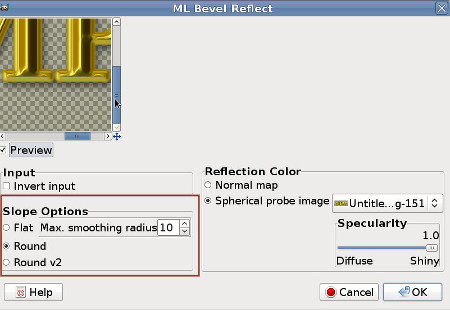
I noticed that I have an additional slope option in my menu than what's in the menus previously posted .

Image

_________________
“If you reach for the stars, you just might land on a decently sized hill.” - Stuart Hill


Top
 Post subject: Re: MLBevelReflect plugin (re-discovered)
PostPosted: Thu Jan 02, 2014 12:50 am  (#27) 
Offline
GimpChat Member
User avatar

Joined: Sep 22, 2012
Posts: 2089
Location: US
GnuTux wrote:
I noticed that I have an additional slope option in my menu than what's in the menus previously posted .

[ Image ]


You're right, windows version has only one (mine and Graechan's)
How does this extra option work?


Top
 Post subject: Re: MLBevelReflect plugin (re-discovered)
PostPosted: Thu Jan 02, 2014 9:19 am  (#28) 
Offline
GimpChat Member
User avatar

Joined: Nov 09, 2011
Posts: 726
@K1TesseraEna, thanks for sharing this!
@dd, thanks for sharing the 32bit binary (I can not build the plugin, even with "#include <stdlib.h>")
And thanks to Marcel for the plugin!

Linux users can use Luminance HDR to open Light Probe HDR images and export them to jpg.
http://qtpfsgui.sourceforge.net/

_________________
Image
Be patient, English is not my language.


Top
 Post subject: Re: MLBevelReflect plugin (re-discovered)
PostPosted: Thu Jan 02, 2014 9:38 am  (#29) 
Offline
GimpChat Member
User avatar

Joined: Apr 07, 2010
Posts: 14182
GnuTux wrote:
:ninja

We think alike Graechan. :lol

Thanks for the makefile, dd.

I made a small edit to the makefile to allow compiling under Fedora 64bit.
From this..
$(CC) $(CFLAGS) -o $@ $^ $(LIBS)

To this..
$(CC) $(CFLAGS) -lm -o $@ $^ $(LIBS)

I'll attach the source & binary. As the docs says, just copy the MLBevelReflect executable to the GIMP plug-ins folder and it will register appear under Filters/Map/MLBevelReflect.

I was able to get some nice results with a spherical environment map. Used EnviroMap to creating a 1024x1024 square environment map, then mapped that to a sphere.

Golden Spherical EnviroMap
Image

[ Image ]

Multi-Hue Spherical EnviroMap
Image

[ Image ]

Added a little anisotropic smoothing, saturation and contrast tweaks to get to the final result. :cool

Thanks for bringing this one out of the mothballs, K1. I'll bet a little education can be had by studying the source code. :hehe


wow, these are awesome. This is the best text I have seen so far in gimp..There are no jagged edges what so ever. :bigthup :clap :coolthup

_________________
Image


Top
 Post subject: Re: MLBevelReflect plugin (re-discovered)
PostPosted: Thu Jan 02, 2014 10:04 am  (#30) 
Offline
GimpChat Member
User avatar

Joined: Sep 22, 2012
Posts: 2089
Location: US
You're welcome YAFU!
Yeah, I forgot about Luminance, thanks for reminding.
Has dd's compilation worked for you?


Top
 Post subject: Re: MLBevelReflect plugin (re-discovered)
PostPosted: Thu Jan 02, 2014 10:19 am  (#31) 
Offline
GimpChat Member

Joined: Apr 12, 2010
Posts: 5870
YAFU wrote:
@K1TesseraEna, thanks for sharing this!
@dd, thanks for sharing the 32bit binary (I can not build the plugin, even with "#include <stdlib.h>")
And thanks to Marcel for the plugin!

Linux users can use Luminance HDR to open Light Probe HDR images and export them to jpg.
http://qtpfsgui.sourceforge.net/


OHH ..WHY only Linux users ? Luminance HDR is multiplatform works well also in win

_________________
My 3D Gallery on Deviantart http://photocomix2.deviantart.com/
Main gallery http://www.flickriver.com/photos/photocomix-mandala/
Mandala and simmetry http://www.flickriver.com/photos/photocomix_mandala/

Image

Mrs Wilbress


Top
 Post subject: Re: MLBevelReflect plugin (re-discovered)
PostPosted: Thu Jan 02, 2014 10:43 am  (#32) 
Offline
GimpChat Member
User avatar

Joined: Nov 09, 2011
Posts: 726
@K1TesseraEna: Yes, it is working on a 32bit machine :bigthup

@PhotoComix: Sorry, you are right. It happens that K1TesseraEna had mentioned PhotoShop for Windows users :mrgreen:

_________________
Image
Be patient, English is not my language.


Top
 Post subject: Re: MLBevelReflect plugin (re-discovered)
PostPosted: Thu Jan 02, 2014 11:03 am  (#33) 
Offline
GimpChat Member
User avatar

Joined: Apr 07, 2010
Posts: 14182
Is there a dummy how to do app to run this plugin. :oops:
I downloaded the linux plug-in and placed it myname plugins. I get the dialog and I uploaded an image with a transparent BG. All it does is put an orange bg around an outline of my image.
I also downloaded luminance HDR and now I don't don't what I do with that. :oops:

_________________
Image


Top
 Post subject: Re: MLBevelReflect plugin (re-discovered)
PostPosted: Thu Jan 02, 2014 11:18 am  (#34) 
Offline
GimpChat Founder
User avatar

Joined: May 22, 2008
Posts: 5241
Location: Gimpville
@K1te - Here are samples of the two slopes. They are slightly different.

Slope1
Image
Slope2
Image

@YAFU - The Linux 64bit binary is in the zip I posted.

@Molly - You need a run the plug-in on an image (basically a bump map) with a black background and a white foreground. Like this..

Image

Then select your Spherical probe image in the dropdown. You can test on a couple of the spherical environment maps I posted, download one or create your own using the EviroMap script. You can create a 1024x1024 (or larger) EnviroMap then map it to a sphere (make the sphere full size).

_________________
“If you reach for the stars, you just might land on a decently sized hill.” - Stuart Hill


Top
 Post subject: Re: MLBevelReflect plugin (re-discovered)
PostPosted: Thu Jan 02, 2014 11:24 am  (#35) 
Offline
GimpChat Member
User avatar

Joined: Apr 07, 2010
Posts: 14182
Thank you tux, I will try that. BTW, I think slope 1 is more vibrant.

_________________
Image


Top
 Post subject: Re: MLBevelReflect plugin (re-discovered)
PostPosted: Thu Jan 02, 2014 11:42 am  (#36) 
Offline
GimpChat Member
User avatar

Joined: Sep 22, 2012
Posts: 2089
Location: US
Thanks GnuTux, I can see now.
Slope #2 is intermediate between the Slope #1 (U-type curve, Round 1)
and the Flat slope (V-type curve)
Still baffles me why Round 2 option is not in the Windows binaries.

@molly start with smaller images molly 640x400 and disable preview at firs as Graechan suggested.
Even preview renders on invalid input can loop plugin forever, so you might want to have preview disabled at the
start and then select the right layer (as per Tux's explanation) and go.


Top
 Post subject: Re: MLBevelReflect plugin (re-discovered)
PostPosted: Thu Jan 02, 2014 11:47 am  (#37) 
Offline
GimpChat Founder
User avatar

Joined: May 22, 2008
Posts: 5241
Location: Gimpville
Maybe the Windows binary is an older version and you just need a new compile. When using the text & map example I previously posted, the Linux 64bit binary is really fast and only took like 2-3 seconds to complete.

_________________
“If you reach for the stars, you just might land on a decently sized hill.” - Stuart Hill


Top
 Post subject: Re: MLBevelReflect plugin (re-discovered)
PostPosted: Thu Jan 02, 2014 11:48 am  (#38) 
Offline
GimpChat Member
User avatar

Joined: Sep 22, 2012
Posts: 2089
Location: US
GnuTux wrote:
Maybe the Windows binary is an older version and you just need a new compile. When using the text & map example I previously posted, the Linux 64bit binary is really fast and only took like 2-3 seconds to complete.


Already checked out, there's only 1 win version dated 03-10-2013, that's what I have.
Will have to ask samj or Lyle to compile 64-bit version


Top
 Post subject: Re: MLBevelReflect plugin (re-discovered)
PostPosted: Thu Jan 02, 2014 11:55 am  (#39) 
Offline
GimpChat Member
User avatar

Joined: Apr 07, 2010
Posts: 14182
Okay Kit... I didn't get very good results from first try, I might have done everything backward. I ran the light effects first on the blurred white layer, then ran your plug-in... this is what I ended up with. I will try it without the preview and see what happens. I would love to be able to have one turn out the way Tux's did, they are beautiful.
Image

_________________
Image


Top
 Post subject: Re: MLBevelReflect plugin (re-discovered)
PostPosted: Thu Jan 02, 2014 12:03 pm  (#40) 
Offline
GimpChat Member
User avatar

Joined: Sep 22, 2012
Posts: 2089
Location: US
very good molly! :bigthup
like the reflections, what map have you used here?

i think it works better on bold fonts with more straight lines maybe

not my plugin molly :) can't take any credit for that


Top
Post new topic Reply to topic  [ 142 posts ]  Go to page Previous  1, 2, 3, 4, 5 ... 8  Next

All times are UTC - 5 hours [ DST ]


* Login  


Powered by phpBB3 © phpBB Group