It is currently Thu Jul 30, 2026 7:11 pm


All times are UTC - 5 hours [ DST ]


Post new topic Reply to topic  [ 230 posts ]  Go to page Previous  1 ... 8, 9, 10, 11, 12  Next
Author Message
 Post subject: Re: 'Extrude from Path' Rel2.2 [with Fadeout Effect]
PostPosted: Fri Sep 30, 2016 8:06 am  (#201) 
Offline
Global Moderator
User avatar

Joined: May 16, 2010
Posts: 16139
sallyanne wrote:
Am going through my scripts as Rod suggested and downloaded the 2.2 again. It worked this time. Yours did not work before but it may have been that I had something in my scripts folder that was either broken or shouldn't be there. I am trying them all out as I put each one in. Fidgity as I have to refresh the scripts after each add but I guess it is about time.
[ Image ]

I find that is usually the case. :) Glad to hear you got it working now. It is an excellent addition to GIMPs filter arsenal. :bigthup

_________________
Image


Top
 Post subject: Re: 'Extrude from Path' Rel2.3 [fill cap with gradient color]
PostPosted: Sat Nov 05, 2016 11:48 pm  (#202) 
Offline
Script Coder
User avatar

Joined: Feb 18, 2011
Posts: 4826
Location: Bendigo Vic. Australia
'Extrude from Path' Rel2.3 is now on GimpScripts see initial post for details
Image

_________________
Image
No matter how much you push the envelope, it'll still be stationery.


Top
 Post subject: Re: 'Extrude from Path' Rel2.3 [fill cap with gradient color]
PostPosted: Sun Nov 06, 2016 12:44 am  (#203) 
Offline
Script Coder
User avatar

Joined: May 07, 2014
Posts: 4526
Location: Canada
hey what do you know i wrote something that already exists. :hehe

_________________
TinT


Top
 Post subject: Re: 'Extrude from Path' Rel2.3 [fill cap with gradient color]
PostPosted: Sun Nov 06, 2016 1:09 am  (#204) 
Offline
Script Coder
User avatar

Joined: Feb 18, 2011
Posts: 4826
Location: Bendigo Vic. Australia
But trandoductin they are very different in how they work

_________________
Image
No matter how much you push the envelope, it'll still be stationery.


Top
 Post subject: Re: 'Extrude from Path' Rel2.3 [fill cap with gradient color]
PostPosted: Sun Nov 06, 2016 2:29 am  (#205) 
Offline
Script Coder
User avatar

Joined: May 07, 2014
Posts: 4526
Location: Canada
similar but yeah very different

_________________
TinT


Top
 Post subject: Re: 'Extrude from Path' Rel2.3 [fill cap with gradient color]
PostPosted: Sun Nov 06, 2016 6:05 am  (#206) 
Offline
Script Coder
User avatar

Joined: Feb 18, 2011
Posts: 4826
Location: Bendigo Vic. Australia
after creating a path around the image it would be a lot faster to move and stroke that path than use the colorify plugin
I was just checking how I did it when I noticed my version was different to that on GimpScrips, hence the update

_________________
Image
No matter how much you push the envelope, it'll still be stationery.


Top
 Post subject: Re: 'Extrude from Path' Rel2.3 [fill cap with gradient color]
PostPosted: Sun Nov 06, 2016 9:49 am  (#207) 
Offline
GimpChat Member
User avatar

Joined: Apr 09, 2016
Posts: 580
Location: Sheffield UK
It's all Rock n Roll, thank you Graechan
Image

_________________
Image


Top
 Post subject: Re: 'Extrude from Path' Rel2.4 [fill cap with gradient color 'bugfix']
PostPosted: Sun Nov 06, 2016 5:57 pm  (#208) 
Offline
Script Coder
User avatar

Joined: Feb 18, 2011
Posts: 4826
Location: Bendigo Vic. Australia
'Extrude from Path' Rel2.4 is now on GimpScripts see initial post for details
Image

_________________
Image
No matter how much you push the envelope, it'll still be stationery.


Top
 Post subject: Re: 'Extrude from Path' Rel2.4 [fill cap with gradient color 'bugfix']
PostPosted: Mon Nov 07, 2016 8:39 am  (#209) 
Offline
Global Moderator
User avatar

Joined: May 16, 2010
Posts: 16139
Image

_________________
Image


Top
 Post subject: Re: 'Extrude from Path' Rel2.4 [fill cap with gradient color 'bugfix']
PostPosted: Mon Nov 07, 2016 9:05 pm  (#210) 
Offline
Script Coder
User avatar

Joined: Feb 18, 2011
Posts: 4826
Location: Bendigo Vic. Australia
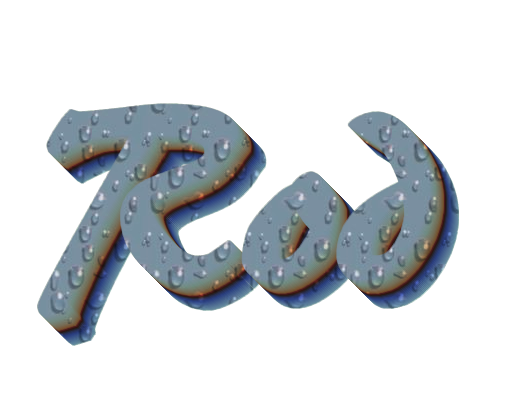
Rod your 3D text wasn't done with 'Extrude from Path', the sides of the text are not smooth enough
Image

_________________
Image
No matter how much you push the envelope, it'll still be stationery.


Top
 Post subject: Re: 'Extrude from Path' Rel2.4 [fill cap with gradient color 'bugfix']
PostPosted: Tue Nov 08, 2016 6:14 am  (#211) 
Offline
Global Moderator
User avatar

Joined: May 16, 2010
Posts: 16139
I was wondering why it wasn't working when I selected the path. LOL. Well I will try it out again a little later. Stuff to do today. Thanks for the heads up.

_________________
Image


Top
 Post subject: Re: 'Extrude from Path' Rel2.4 [OK for 2-10 & 2-8]
PostPosted: Sat Sep 19, 2020 2:58 am  (#212) 
Offline
Script Coder
User avatar

Joined: Feb 18, 2011
Posts: 4826
Location: Bendigo Vic. Australia
Script is now at original post and is fully functional in 2-10

_________________
Image
No matter how much you push the envelope, it'll still be stationery.


Top
 Post subject: Re: 'Extrude from Path' Rel2.4 [OK for 2-10 & 2-8]
PostPosted: Sat Sep 19, 2020 5:57 am  (#213) 
Offline
Global Moderator
User avatar

Joined: Apr 01, 2012
Posts: 8442
Location: On the other side of your screen
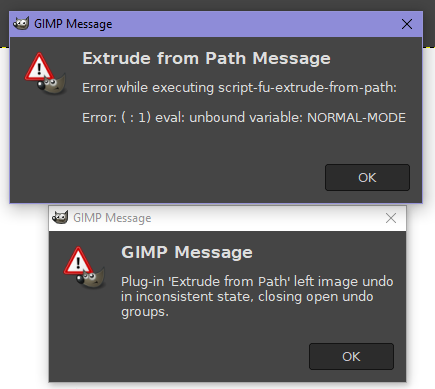
This one doesn't work for me :( I'm pretty sure I didn't already have it. I can however do the one that doesn't have as many option fom the paths menu - decorate (of nuts)


Image
I might have to Download another gimp. Your scripts have always worked for me before. :( Either my Gimp or computer

_________________
Image
Free Fun Photo Editing & resources
Poems from the Lord
Gimp Newby
Gimp version 3.2.4 and GMIC-Qt 4.2.0 OS :- Windows 10 Home 64


Top
 Post subject: Re: 'Extrude from Path' Rel2.4 [OK for 2-10 & 2-8]
PostPosted: Sat Sep 19, 2020 6:40 am  (#214) 
Offline
GimpChat Member
User avatar

Joined: Mar 23, 2012
Posts: 7388
Location: Göteborg at last!
I don't know how I have missed this script all these years! A quickie using the default settings:-

Image

Thank you Graechan - much appreciated. :bigthup


Top
 Post subject: Re: 'Extrude from Path' Rel2.4 [OK for 2-10 & 2-8]
PostPosted: Sat Sep 19, 2020 8:28 pm  (#215) 
Offline
Script Coder
User avatar

Joined: Feb 18, 2011
Posts: 4826
Location: Bendigo Vic. Australia
My bad posted script from wrong place Please download now :oops:

_________________
Image
No matter how much you push the envelope, it'll still be stationery.


Top
 Post subject: Re: 'Extrude from Path' Rel2.4 [OK for 2-10 & 2-8]
PostPosted: Sun Sep 20, 2020 1:37 am  (#216) 
Offline
GimpChat Member
User avatar

Joined: Oct 06, 2010
Posts: 4050
Good stuff, especially FreeType. Powerful and useful information.

_________________
"In order to attain the impossible, one must attempt the absurd."
~ Miguel de Cervantes


Top
 Post subject: Re: 'Extrude from Path' Rel2.4 [OK for 2-10 & 2-8]
PostPosted: Sun Sep 20, 2020 4:56 am  (#217) 
Offline
Global Moderator
User avatar

Joined: Apr 01, 2012
Posts: 8442
Location: On the other side of your screen
dO YOU need Free Type for it to work? I am getting a different error message now. By the way it is starting tp do something now but will not finish.

_________________
Image
Free Fun Photo Editing & resources
Poems from the Lord
Gimp Newby
Gimp version 3.2.4 and GMIC-Qt 4.2.0 OS :- Windows 10 Home 64


Top
 Post subject: Re: 'Extrude from Path' Rel2.4 [OK for 2-10 & 2-8]
PostPosted: Sun Sep 20, 2020 8:25 pm  (#218) 
Offline
Script Coder
User avatar

Joined: Feb 18, 2011
Posts: 4826
Location: Bendigo Vic. Australia
No Sallyanne you don't need 'freetype' it's just convenient for getting a path.
Did you download the latest version of script on initial post and if you are having problems please explain

Image

_________________
Image
No matter how much you push the envelope, it'll still be stationery.


Top
 Post subject: Re: 'Extrude from Path' Rel2.4 [OK for 2-10 & 2-8]
PostPosted: Sun Sep 20, 2020 10:45 pm  (#219) 
Offline
Global Moderator
User avatar

Joined: Apr 01, 2012
Posts: 8442
Location: On the other side of your screen
I did, when there was only a couple downloads on it.
I have tried it a couple times now too. After I found the extra one in my scripts and deleted it too.
Is now asking for one argument?
As you can see it starts to work but stops before it reaches the end. Oh and I didn't change any settings. I was doing the default.
Image

_________________
Image
Free Fun Photo Editing & resources
Poems from the Lord
Gimp Newby
Gimp version 3.2.4 and GMIC-Qt 4.2.0 OS :- Windows 10 Home 64


Top
 Post subject: Re: 'Extrude from Path' Rel2.4 [OK for 2-10 & 2-8]
PostPosted: Mon Sep 21, 2020 2:20 am  (#220) 
Offline
Script Coder
User avatar

Joined: Feb 18, 2011
Posts: 4826
Location: Bendigo Vic. Australia
Sallyanne please check your preferences/scripts to make sure you have only 1 copy of script

download and install the script on the initial post
open in text editor and at the top it should read 'Created by Graechan-checked by Sallyanne

_________________
Image
No matter how much you push the envelope, it'll still be stationery.


Top
Post new topic Reply to topic  [ 230 posts ]  Go to page Previous  1 ... 8, 9, 10, 11, 12  Next

All times are UTC - 5 hours [ DST ]


* Login  


Powered by phpBB3 © phpBB Group