It is currently Mon Aug 24, 2026 12:49 pm


All times are UTC - 5 hours [ DST ]


Post new topic Reply to topic  [ 625 posts ]  Go to page Previous  1 ... 11, 12, 13, 14, 15, 16, 17 ... 32  Next
Author Message
 Post subject: Re: new filter "TexturizeByColourArea"
PostPosted: Sat Jul 23, 2016 5:20 pm  (#261) 
Offline
GimpChat Member
User avatar

Joined: Jun 06, 2016
Posts: 1033
Here (from the "failure pattern" set) is a converted from black and white
using only texturizebycolorarea filter and COLORS>Brightness & Saturation to
prepare the photo of a friend Garry Tabbert who lives and rocks in California now.


Attachments:
Gary Tabbert 2016.png
Gary Tabbert 2016.png [ 1.16 MiB | Viewed 1363 times ]
Top
 Post subject: Re: new filter "TexturizeByColourArea"
PostPosted: Sat Jul 23, 2016 5:24 pm  (#262) 
Offline
GimpChat Member
User avatar

Joined: Jun 06, 2016
Posts: 1033
And fireworks from Nasa photograph on my birthday -
and it is nearly time for the cake!


Attachments:
nasa072116_552.png
nasa072116_552.png [ 1.39 MiB | Viewed 1363 times ]
Top
 Post subject: Re: new filter "TexturizeByColourArea"
PostPosted: Sat Jul 23, 2016 5:50 pm  (#263) 
Offline
GimpChat Member
User avatar

Joined: Dec 10, 2013
Posts: 1004
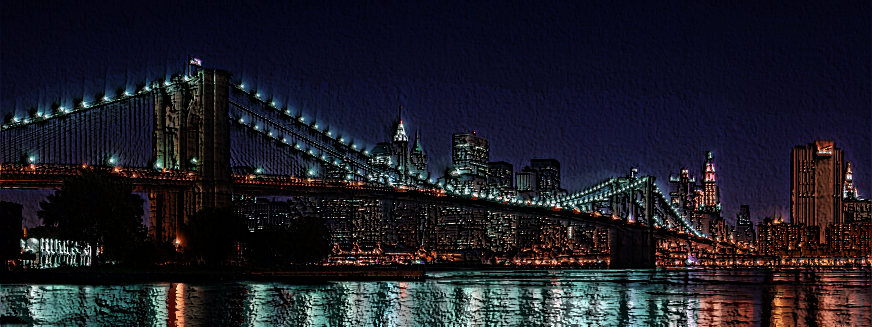
Participating - on Mac without GMIC. Ran dinasset's TexturizeByColor then on one of the layers applied Distorts>Emboss. My hometown ;)

Image

_________________
Image
Macbook Air - MacOS Sierra 10.12
McGimp 2.8.14
G'mic 1.6.5


Top
 Post subject: Re: new filter "TexturizeByColourArea"
PostPosted: Sat Jul 23, 2016 5:54 pm  (#264) 
Offline
GimpChat Member
User avatar

Joined: Jun 06, 2016
Posts: 1033
Nice photo and I like that effect Dalia!


Top
 Post subject: Re: new filter "TexturizeByColourArea"
PostPosted: Sat Jul 23, 2016 7:15 pm  (#265) 
Offline
Administrator
User avatar

Joined: Aug 10, 2012
Posts: 14172
Location: Native to NYC living in Arizona, Gimp 2.8 - 3.0, Win 11 PC.
Dalia wrote:
Participating - on Mac without GMIC. Ran dinasset's TexturizeByColor then on one of the layers applied Distorts>Emboss. My hometown ;)

[ Image ]

:wh
The Brooklyn Bridge!

_________________
Image
"A wise man learns more from a foolish question than a fool can learn from a wise answer"
Image


Top
 Post subject: Re: new filter "TexturizeByColourArea"
PostPosted: Sat Jul 23, 2016 10:32 pm  (#266) 
Offline
GimpChat Member
User avatar

Joined: Apr 08, 2010
Posts: 5420
Location: Northwest Ohio
I will be near Brooklyn for a day, in August.


Top
 Post subject: Re: new filter "TexturizeByColourArea"
PostPosted: Sat Jul 23, 2016 10:41 pm  (#267) 
Offline
Administrator
User avatar

Joined: Aug 10, 2012
Posts: 14172
Location: Native to NYC living in Arizona, Gimp 2.8 - 3.0, Win 11 PC.
2-ton wrote:
I will be near Brooklyn for a day, in August.

How near? :mrgreen:

_________________
Image
"A wise man learns more from a foolish question than a fool can learn from a wise answer"
Image


Top
 Post subject: Re: new filter "TexturizeByColourArea"
PostPosted: Sun Jul 24, 2016 12:42 pm  (#268) 
Offline
GimpChat Member
User avatar

Joined: Jun 06, 2016
Posts: 1033
Dalia, I tried one with the SE version,
very different play with layers for this outcome.
Attachment:
Nashville for Mac xcf.7z [2.43 MiB]
Downloaded 73 times
Attachment:
Nashville for mac patterns.7z [12 KiB]
Downloaded 68 times


Attachments:
Nashville for Mac outcome.png
Nashville for Mac outcome.png [ 660.86 KiB | Viewed 1325 times ]
Top
 Post subject: Re: new filter "TexturizeByColourArea"
PostPosted: Sun Jul 24, 2016 12:46 pm  (#269) 
Offline
GimpChat Member
User avatar

Joined: Jun 06, 2016
Posts: 1033
This is the outcome that I tried to match from the non-SE version


Attachments:
skyline_synthpats_L13567.png
skyline_synthpats_L13567.png [ 653.28 KiB | Viewed 1325 times ]
Top
 Post subject: Re: new filter "TexturizeByColourArea"
PostPosted: Sun Jul 24, 2016 12:55 pm  (#270) 
Offline
GimpChat Member
User avatar

Joined: Jun 06, 2016
Posts: 1033
I enjoy bright colors


Attachments:
swimmingpoolbyocean.png
swimmingpoolbyocean.png [ 3.96 MiB | Viewed 1325 times ]
sunsetwsynthpats.png
sunsetwsynthpats.png [ 786.06 KiB | Viewed 1325 times ]
Top
 Post subject: Re: new filter "TexturizeByColourArea"
PostPosted: Sun Jul 24, 2016 12:58 pm  (#271) 
Offline
GimpChat Member
User avatar

Joined: Jun 06, 2016
Posts: 1033
And the darker ones can turn out nice also


Attachments:
nasa072116gray.png
nasa072116gray.png [ 1.19 MiB | Viewed 1540 times ]
milkywaygalaxy.png
milkywaygalaxy.png [ 1.83 MiB | Viewed 1540 times ]
Top
 Post subject: Re: new filter "TexturizeByColourArea"
PostPosted: Sun Jul 24, 2016 1:16 pm  (#272) 
Offline
GimpChat Member
User avatar

Joined: Apr 08, 2010
Posts: 5420
Location: Northwest Ohio
Wallace wrote:
2-ton wrote:
I will be near Brooklyn for a day, in August.

How near? :mrgreen:

Flying into LaGuardia very early, probably will go into Manhattan, might try to get to the Brooklyn Botanical Garden or even the Coney Sand Sculpture festival. Then at night I will be in Woodside, Queens until the wee hours, then back to La Guardia to catch a morning flight home. I have a list of things I can do during the day, but what I do depends on if the friend I meet in queens will be working that day or not. I had not planned on walking the Brooklyn Bridge as I have done that before.


Top
 Post subject: Re: new filter "TexturizeByColourArea"
PostPosted: Mon Jul 25, 2016 8:31 am  (#273) 
Offline
GimpChat Member
User avatar

Joined: Jun 06, 2016
Posts: 1033
Here are some new images for your enjoyment.


Attachments:
bluepool.png
bluepool.png [ 1.76 MiB | Viewed 1526 times ]
beachcave.png
beachcave.png [ 1.48 MiB | Viewed 1526 times ]
abbey.jpg
abbey.jpg [ 1.68 MiB | Viewed 1526 times ]
Top
 Post subject: Re: new filter "TexturizeByColourArea"
PostPosted: Mon Jul 25, 2016 8:33 am  (#274) 
Offline
GimpChat Member
User avatar

Joined: Jun 06, 2016
Posts: 1033
I was impressed by this one, but as .png is was 18meg


Attachments:
candystore.jpg
candystore.jpg [ 2.82 MiB | Viewed 1526 times ]
Top
 Post subject: Re: new filter "TexturizeByColourArea"
PostPosted: Mon Jul 25, 2016 11:47 am  (#275) 
Offline
GimpChat Member

Joined: May 12, 2015
Posts: 4693
Those are all very nice, Animicule. It is amazing the clarity of the candy store.


Top
 Post subject: Re: new filter "TexturizeByColourArea"
PostPosted: Mon Jul 25, 2016 4:48 pm  (#276) 
Offline
GimpChat Member
User avatar

Joined: Jun 06, 2016
Posts: 1033
gradients on a Manhattan building, was there once in 1968 or so.


Attachments:
flatirongradient.png
flatirongradient.png [ 3.35 MiB | Viewed 1504 times ]
Top
 Post subject: Re: new filter "TexturizeByColourArea"
PostPosted: Tue Jul 26, 2016 12:14 pm  (#277) 
Offline
GimpChat Member
User avatar

Joined: Jun 06, 2016
Posts: 1033
Three for Tuesday!


Attachments:
charlies rock.jpg
charlies rock.jpg [ 108.19 KiB | Viewed 1482 times ]
bacon_tbc_nb_L1234567_552p.png
bacon_tbc_nb_L1234567_552p.png [ 2.91 MiB | Viewed 1482 times ]
waterbird.png
waterbird.png [ 4.51 MiB | Viewed 1482 times ]
Top
 Post subject: Re: new filter "TexturizeByColourArea"
PostPosted: Tue Jul 26, 2016 12:18 pm  (#278) 
Offline
GimpChat Member
User avatar

Joined: Jan 20, 2013
Posts: 14831
Location: roma, italy
I like specially the waterbird, even if the texture (which is nice per se) is not the most appropriate to the water, which becomes somehow "solid"

_________________
"Where am I ?"


Top
 Post subject: Re: new filter "TexturizeByColourArea"
PostPosted: Wed Jul 27, 2016 8:09 am  (#279) 
Offline
GimpChat Member
User avatar

Joined: Jun 06, 2016
Posts: 1033
Perhaps this one is more liquid?


Attachments:
waterbirdm3.jpg
waterbirdm3.jpg [ 179.84 KiB | Viewed 1460 times ]
Top
 Post subject: Re: new filter "TexturizeByColourArea"
PostPosted: Wed Jul 27, 2016 8:18 am  (#280) 
Offline
GimpChat Member
User avatar

Joined: Jan 20, 2013
Posts: 14831
Location: roma, italy
surely it is, better transformation IMO

_________________
"Where am I ?"


Top
Post new topic Reply to topic  [ 625 posts ]  Go to page Previous  1 ... 11, 12, 13, 14, 15, 16, 17 ... 32  Next

All times are UTC - 5 hours [ DST ]


* Login  


Powered by phpBB3 © phpBB Group