It is currently Wed Aug 19, 2026 3:14 pm


All times are UTC - 5 hours [ DST ]


Post new topic Reply to topic  [ 93 posts ]  Go to page Previous  1, 2, 3, 4, 5  Next
Author Message
 Post subject: Re: Silhouette (Issabella's tutorial) Script
PostPosted: Sat Sep 10, 2016 4:54 pm  (#41) 
Offline
Script Coder
User avatar

Joined: May 07, 2014
Posts: 4527
Location: Canada
RJKD - which version of Gimp are you running?
The called that failed on your machine is such a basic call that i don't know why it's failing.

_________________
TinT


Top
 Post subject: Re: Silhouette (Issabella's tutorial) Script
PostPosted: Sat Sep 10, 2016 5:11 pm  (#42) 
Offline
GimpChat Member
User avatar

Joined: Apr 09, 2016
Posts: 580
Location: Sheffield UK
T - I'm using 2.8

_________________
Image


Top
 Post subject: Re: Silhouette (Issabella's tutorial) Script
PostPosted: Sat Sep 10, 2016 5:19 pm  (#43) 
Offline
GimpChat Member

Joined: Aug 10, 2016
Posts: 29
Well, I installed it (like many others scripts) and it doesn't show up in my menu. Can't find it. Weird.


Top
 Post subject: Re: Silhouette (Issabella's tutorial) Script
PostPosted: Sat Sep 10, 2016 6:49 pm  (#44) 
Offline
Administrator
User avatar

Joined: Aug 10, 2012
Posts: 14158
Location: Native to NYC living in Arizona, Gimp 2.8 - 3.0, Win 11 PC.
havilson wrote:
Well,
I installed it (like many others scripts) and it doesn't show up in my menu.
Can't find it.
Weird.

Did you look here?
Image

_________________
Image
"A wise man learns more from a foolish question than a fool can learn from a wise answer"
Image


Top
 Post subject: Re: Silhouette (Issabella's tutorial) Script
PostPosted: Sat Sep 10, 2016 7:56 pm  (#45) 
Offline
GimpChat Member

Joined: Aug 10, 2016
Posts: 29
Yes, not showing at all. The first thing I usually do is to look inside the source code to where it will be located.


Top
 Post subject: Re: Silhouette (Issabella's tutorial) Script
PostPosted: Sat Sep 10, 2016 8:10 pm  (#46) 
Offline
GimpChat Member
User avatar

Joined: Oct 06, 2010
Posts: 4050
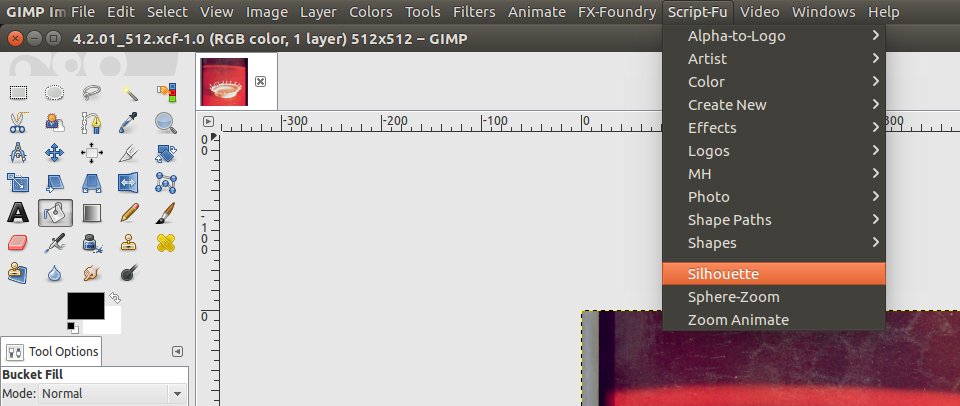
There is more than one Script-Fu location in menus, in case you did not know that it might be in the secondary menu.

_________________
"In order to attain the impossible, one must attempt the absurd."
~ Miguel de Cervantes


Top
 Post subject: Re: Silhouette (Issabella's tutorial) Script
PostPosted: Sat Sep 10, 2016 8:35 pm  (#47) 
Offline
GimpChat Member

Joined: Aug 10, 2016
Posts: 29
Checked everything Mahvin. At last checked at plug-in browser and found nothing.


Attachments:
No Silhouete.png
No Silhouete.png [ 85.73 KiB | Viewed 2992 times ]
Top
 Post subject: Re: Silhouette (Issabella's tutorial) Script
PostPosted: Sat Sep 10, 2016 9:04 pm  (#48) 
Offline
GimpChat Member
User avatar

Joined: Nov 16, 2011
Posts: 5127
Location: Metro Vancouver, BC
What is the path to the script (scm)?

_________________
Image
Gimp 2.8.18, Linux, median user
Gimp Chat Tutorials Index
Spirit Bear (Kermode)


Top
 Post subject: Re: Silhouette (Issabella's tutorial) Script
PostPosted: Sat Sep 10, 2016 9:11 pm  (#49) 
Offline
GimpChat Member

Joined: Aug 10, 2016
Posts: 29
I put it into C:\Users\Havilson\.gimp-2.8\scripts like others, odinbc.


Top
 Post subject: Re: Silhouette (Issabella's tutorial) Script
PostPosted: Sat Sep 10, 2016 9:18 pm  (#50) 
Offline
GimpChat Member
User avatar

Joined: Oct 06, 2010
Posts: 4050
I recall some FU scripts blocking original scripts before, but in this case, the Silhouette script is fairly new and shouldn't have a "faker" script out there to block it. Most FU scripts are several years old. Weird!

I tried loading the script to see where it led me to, and it sent the script to my secondary Script-Fu menu (not within Filters, but on its own on the menu bar) and then ran the script and got these errors:

Image

_________________
"In order to attain the impossible, one must attempt the absurd."
~ Miguel de Cervantes


Top
 Post subject: Re: Silhouette (Issabella's tutorial) Script
PostPosted: Sat Sep 10, 2016 9:29 pm  (#51) 
Offline
GimpChat Member
User avatar

Joined: Nov 16, 2011
Posts: 5127
Location: Metro Vancouver, BC
havilson wrote:
I put it into C:\Users\Havilson\.gimp-2.8\scripts like others, odinbc.
That's is good. Now what is your path to GIMP? Also name one other scm that's in user scripts folder that works for you.

_________________
Image
Gimp 2.8.18, Linux, median user
Gimp Chat Tutorials Index
Spirit Bear (Kermode)


Top
 Post subject: Re: Silhouette (Issabella's tutorial) Script
PostPosted: Sat Sep 10, 2016 10:58 pm  (#52) 
Offline
GimpChat Member

Joined: May 12, 2015
Posts: 4693
Thank you Issabella, the script works well.
Tran: It occurs to me that Havilson's problem might be that he has a blank transparency chosen above his text layer and that does not work for me. I must have the text layer chosen, with the black wording still visable and selected.
Attachment:
Silhuette Thanks.jpg
Silhuette Thanks.jpg [ 384.59 KiB | Viewed 4986 times ]


Top
 Post subject: Re: Silhouette (Issabella's tutorial) Script
PostPosted: Sat Sep 10, 2016 11:38 pm  (#53) 
Offline
GimpChat Member

Joined: Aug 10, 2016
Posts: 29
odinbc, my path to GIMP: C:\Program Files\GIMP 2\bin (you asked where the executable is located right?) I'm using Windows 10 Home and GIMP 2.8.18 (x64).
I have gc-shadow.scm working ok.


Top
 Post subject: Re: Silhouette (Issabella's tutorial) Script
PostPosted: Sat Sep 10, 2016 11:56 pm  (#54) 
Offline
GimpChat Member

Joined: May 12, 2015
Posts: 4693
Just playing around with this filter this evening. This one looked nice to me. A complete surprise as I was just typing any word and choosing line art at random.
Attachment:
America.png
America.png [ 1.16 MiB | Viewed 4975 times ]


Top
 Post subject: Re: Silhouette (Issabella's tutorial) Script
PostPosted: Sun Sep 11, 2016 12:17 am  (#55) 
Offline
GimpChat Member
User avatar

Joined: Nov 16, 2011
Posts: 5127
Location: Metro Vancouver, BC
havilson wrote:
odinbc, my path to GIMP: C:\Program Files\GIMP 2\bin (you asked where the executable is located right?) I'm using Windows 10 Home and GIMP 2.8.18 (x64).
I have gc-shadow.scm working ok.
It works for me and you seem to have everything in place, so I'm stump.
Here's my menu location, Linux, GIMP 2.8.18.
Image

_________________
Image
Gimp 2.8.18, Linux, median user
Gimp Chat Tutorials Index
Spirit Bear (Kermode)


Top
 Post subject: Re: Silhouette (Issabella's tutorial) Script
PostPosted: Sun Sep 11, 2016 12:57 am  (#56) 
Offline
Global Moderator
User avatar

Joined: May 16, 2010
Posts: 16164
GIMP-2.8.16

Image

If i select the bg layer (not the text layer)

Image

That was with curves and no curves selected.

_________________
Image


Top
 Post subject: Re: Silhouette (Issabella's tutorial) Script
PostPosted: Sun Sep 11, 2016 1:03 am  (#57) 
Offline
Global Moderator
User avatar

Joined: May 16, 2010
Posts: 16164
Here i selected the bg layer and made a few rectangles on it. Then i added an alpha channel and removed the white color. I then ran the filter and got cool looking boxes. Then i selected the text layer and ran the filter again. The filter created the below image. Cool! :)

Image

_________________
Image


Top
 Post subject: Re: Silhouette (Issabella's tutorial) Script
PostPosted: Sun Sep 11, 2016 1:18 am  (#58) 
Offline
Global Moderator
User avatar

Joined: May 16, 2010
Posts: 16164
Pretty cool filter Tran! :)
Here i added some gloss to make it look like clear plastic, or glass.

Image

_________________
Image


Top
 Post subject: Re: Silhouette (Issabella's tutorial) Script
PostPosted: Sun Sep 11, 2016 1:29 am  (#59) 
Offline
Global Moderator
User avatar

Joined: May 16, 2010
Posts: 16164
havilson wrote:
odinbc, my path to GIMP: C:\Program Files\GIMP 2\bin (you asked where the executable is located right?) I'm using Windows 10 Home and GIMP 2.8.18 (x64).
I have gc-shadow.scm working ok.

Does GIMP-2.8.18 have different gimp-image-select-item parameters?

Scratch that i see Odin uses linux version GIMP-2.8.18 and it works for him.
I am using GIMP-2.8.16 with Windows 10 64 bit.

_________________
Image


Top
 Post subject: Re: Silhouette (Issabella's tutorial) Script
PostPosted: Sun Sep 11, 2016 1:31 am  (#60) 
Offline
GimpChat Member
User avatar

Joined: Oct 06, 2010
Posts: 4050
I'm beginning to think it does have deprecated code parameters, because 3 of his scripts, I can't use at all.

_________________
"In order to attain the impossible, one must attempt the absurd."
~ Miguel de Cervantes


Top
Post new topic Reply to topic  [ 93 posts ]  Go to page Previous  1, 2, 3, 4, 5  Next

All times are UTC - 5 hours [ DST ]


* Login  


Powered by phpBB3 © phpBB Group