It is currently Thu Aug 13, 2026 8:14 am


All times are UTC - 5 hours [ DST ]


Post new topic Reply to topic  [ 774 posts ]  Go to page Previous  1, 2, 3, 4, 5, 6 ... 39  Next
Author Message
 Post subject: Re: small ancillary filters
PostPosted: Wed Jun 14, 2017 8:19 am  (#41) 
Offline
GimpChat Member
User avatar

Joined: Jan 20, 2013
Posts: 14831
Location: roma, italy
RJKD wrote:
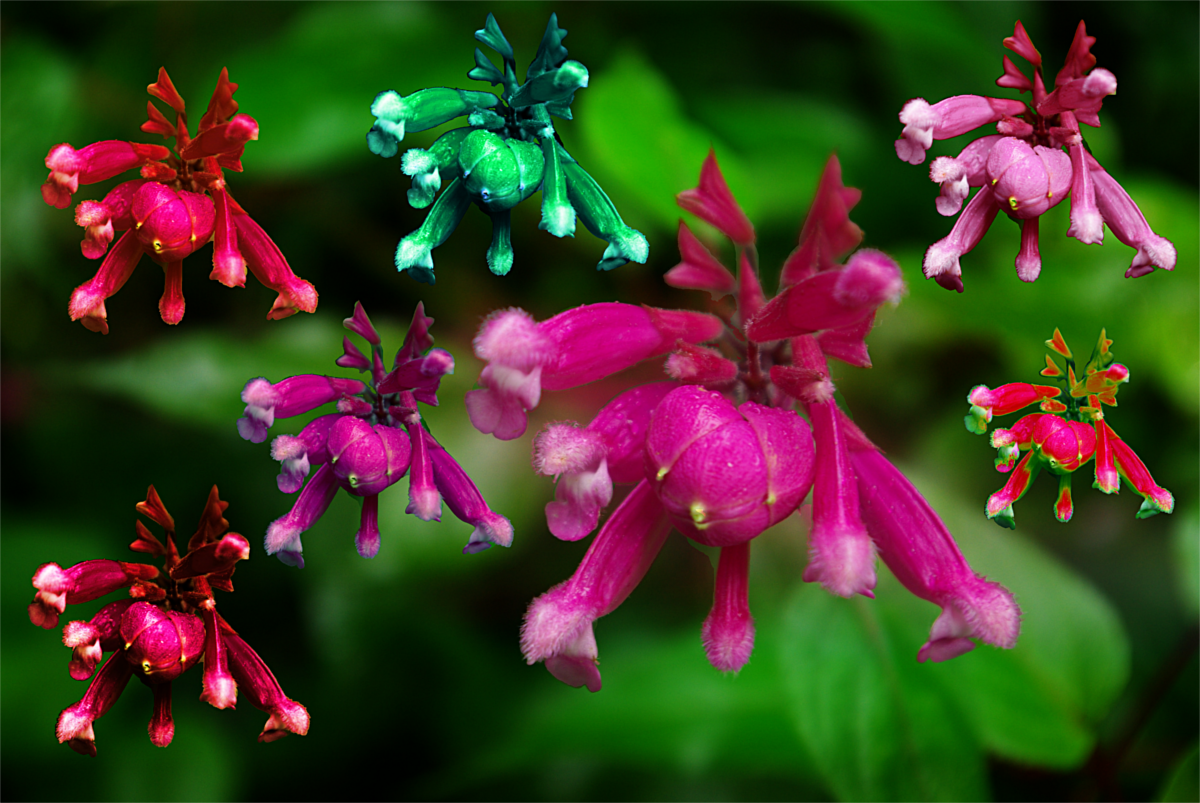
Love your roses dinasset, thankyou for another great filter :coolthup
Attachment:
's blood tree_ RotatingRGBColour.jpg

Thanks!
Nice idea the "montage" to have a panoramic look.

_________________
"Where am I ?"


Top
 Post subject: Re: small ancillary filters
PostPosted: Thu Jun 15, 2017 12:28 am  (#42) 
Offline
Global Moderator
User avatar

Joined: Oct 02, 2014
Posts: 5017
Location: Sydney Australia
Diego - thank you for clarification, but oh dear it means I am embarrassed again - should have better read the posting comments :oops: :oops:

I have just downloaded 'Rotating Colours', but it now explains why I was having problems emulating your rose results. :roll:

Whatever, I had a play with nuances (plus tweaks) and a close up photo I took at Monet's Garden at Giverny -

Image

Now to try out rotating colours!!

_________________
Image

Respect should be offered freely but hard earned


Top
 Post subject: Re: small ancillary filters
PostPosted: Thu Jun 15, 2017 12:53 am  (#43) 
Offline
GimpChat Member
User avatar

Joined: Jan 20, 2013
Posts: 14831
Location: roma, italy
Nice outcome, OMG.
When you'll play with "Rotating" I'm sure you'll get good results acting on opacity and/or combining.

_________________
"Where am I ?"


Top
 Post subject: Re: small ancillary filters
PostPosted: Thu Jun 15, 2017 8:17 pm  (#44) 
Offline
Global Moderator
User avatar

Joined: Oct 02, 2014
Posts: 5017
Location: Sydney Australia
Diego - Rotating RBG - probably your best filter yet as far as 'ease of use and quick outcome satisfaction' goes; love it and have not yet done much tweaking.

Using a collage of close up photos of hibiscus geranioides, a correa and an orchid from my Aussie native garden, the first results are in oder

- ORIGINAL
Image

- then GBR
Image

- then BRG
Image

- then BGR
Image

_________________
Image

Respect should be offered freely but hard earned


Top
 Post subject: Re: small ancillary filters
PostPosted: Thu Jun 15, 2017 10:53 pm  (#45) 
Offline
GimpChat Member
User avatar

Joined: Jan 20, 2013
Posts: 14831
Location: roma, italy
You have now a multi-colored garden, even more then what nature provides you !
Very good outcome, and with an interesting frame around which enriches the look.
Thanks!

_________________
"Where am I ?"


Top
 Post subject: Re: small ancillary filters
PostPosted: Fri Jun 16, 2017 12:33 am  (#46) 
Offline
GimpChat Member
User avatar

Joined: Jan 20, 2013
Posts: 14831
Location: roma, italy
A new toy to play with, also from my personal attempts.
This filter has been inspired by the one already available under GL:
"Picture to Line Art", written by Tin Tran on the basis of a Mahvin's tutorial.
My aim is to get a stronger look in terms of "graphica", which implies -alas!-less
"cleanliness".
A bit of tweaking is provided by the parameter "strength" (default is my taste).
So, if you have both filters downloaded and installed, my advice would be:
- try first TT's filter, and if you get a nice result stop (it's what you like)
- if the result is not enough nice for your taste
or you like to get a more "graphical" outcome,
then try this one and choose.
TT's one is really a very good line art filter.
This one aims to look as a graphic printing, like a lithograph.
It's named
GraphicaABC

Here it is:
Attachment:
DIEGO_GraphicaABC.zip [831 Bytes]
Downloaded 386 times

_________________
"Where am I ?"


Top
 Post subject: Re: small ancillary filters
PostPosted: Fri Jun 16, 2017 12:43 am  (#47) 
Offline
GimpChat Member
User avatar

Joined: Jan 20, 2013
Posts: 14831
Location: roma, italy
Some examples:
strength = "cleaner"
Attachment:
woman-2178893_960_720-graphica227.jpg
woman-2178893_960_720-graphica227.jpg [ 297.61 KiB | Viewed 4864 times ]

strength = "standard"
Attachment:
woman-2178893_960_720-graphica231.jpg
woman-2178893_960_720-graphica231.jpg [ 294.98 KiB | Viewed 4864 times ]

strength = "stronger"
Attachment:
woman-2178893_960_720-graphica235.jpg
woman-2178893_960_720-graphica235.jpg [ 302.17 KiB | Viewed 4864 times ]

You can see the (limited) graphical differences

_________________
"Where am I ?"


Top
 Post subject: Re: small ancillary filters
PostPosted: Fri Jun 16, 2017 12:45 am  (#48) 
Offline
GimpChat Member
User avatar

Joined: Jan 20, 2013
Posts: 14831
Location: roma, italy
A landscape.
Attachment:
africa-944465_960_720-graphica227.jpg
africa-944465_960_720-graphica227.jpg [ 213.62 KiB | Viewed 4864 times ]

Attachment:
africa-944465_960_720-graphica231.jpg
africa-944465_960_720-graphica231.jpg [ 226.92 KiB | Viewed 4864 times ]

Attachment:
africa-944465_960_720-graphica235.jpg
africa-944465_960_720-graphica235.jpg [ 245.98 KiB | Viewed 4864 times ]

_________________
"Where am I ?"


Top
 Post subject: Re: small ancillary filters
PostPosted: Fri Jun 16, 2017 12:49 am  (#49) 
Offline
GimpChat Member
User avatar

Joined: Jan 20, 2013
Posts: 14831
Location: roma, italy
Third one (a close-up portrait).
Attachment:
smile-2040553_960_720-graphica227.jpg
smile-2040553_960_720-graphica227.jpg [ 149.39 KiB | Viewed 4864 times ]

Attachment:
smile-2040553_960_720-graphica231.jpg
smile-2040553_960_720-graphica231.jpg [ 165.05 KiB | Viewed 4864 times ]

Attachment:
smile-2040553_960_720-graphica235.jpg
smile-2040553_960_720-graphica235.jpg [ 183.22 KiB | Viewed 4864 times ]


here the graphical details are more evident.

Warning: not the best source for this filter, just to show.

_________________
"Where am I ?"


Top
 Post subject: Re: small ancillary filters
PostPosted: Fri Jun 16, 2017 12:56 am  (#50) 
Offline
GimpChat Member
User avatar

Joined: Jan 20, 2013
Posts: 14831
Location: roma, italy
Another close-up, the 2 "extremes" choices (cleanest, strongest).
Attachment:
5624-close-up-portrait-of-a-beautiful-brunette-pv_graphica223.jpg
5624-close-up-portrait-of-a-beautiful-brunette-pv_graphica223.jpg [ 768.62 KiB | Viewed 4864 times ]

Attachment:
5624-close-up-portrait-of-a-beautiful-brunette-pv_graphica239.jpg
5624-close-up-portrait-of-a-beautiful-brunette-pv_graphica239.jpg [ 891.66 KiB | Viewed 4864 times ]

_________________
"Where am I ?"


Top
 Post subject: Re: small ancillary filters
PostPosted: Fri Jun 16, 2017 12:53 pm  (#51) 
Offline
GimpChat Member
User avatar

Joined: Mar 01, 2014
Posts: 14124
Location: Spain, Aragón
Dinasset Congrats for so many awesome filters! I knew you were on a roll producing those filters and the results are very alluring. I'll try them on my photos. Thanks for sharing them. :clap :tyspin
Beautiful results in this thread from you all. :coolthup :)

_________________
Image

Gimp 2.10.30(samj) portable _ OS Windows 10 Home_ 64bits
Don’t be afraid to start over. It’s a new chance to rebuild what you want.


Top
 Post subject: Re: small ancillary filters
PostPosted: Sat Jun 17, 2017 1:49 am  (#52) 
Offline
GimpChat Member
User avatar

Joined: Mar 01, 2014
Posts: 14124
Location: Spain, Aragón
Started to apply some of your nice filters, Dinasset. I love the results. Thank you so much. :yes


Attachments:
IMG_5486-DN_Rotating Colours-RBG.JPG
IMG_5486-DN_Rotating Colours-RBG.JPG [ 1.77 MiB | Viewed 2926 times ]
IMG_5450_EvidenceOfSelectedArea_DN.JPG
IMG_5450_EvidenceOfSelectedArea_DN.JPG [ 1.48 MiB | Viewed 2926 times ]

_________________
Image

Gimp 2.10.30(samj) portable _ OS Windows 10 Home_ 64bits
Don’t be afraid to start over. It’s a new chance to rebuild what you want.
Top
 Post subject: Re: small ancillary filters
PostPosted: Sat Jun 17, 2017 2:06 am  (#53) 
Offline
GimpChat Member
User avatar

Joined: Mar 01, 2014
Posts: 14124
Location: Spain, Aragón
Enjoying these nice filters. :bigthup


Attachments:
IMG_5485_Casa las cuatro torres_DN_ColourColour.jpg
IMG_5485_Casa las cuatro torres_DN_ColourColour.jpg [ 304.05 KiB | Viewed 2923 times ]
IMG_5445_DN_MaxPixelColour.JPG
IMG_5445_DN_MaxPixelColour.JPG [ 1.7 MiB | Viewed 2923 times ]
IMG_5459_DN_GraphicaABC_standard.JPG
IMG_5459_DN_GraphicaABC_standard.JPG [ 2.69 MiB | Viewed 2923 times ]

_________________
Image

Gimp 2.10.30(samj) portable _ OS Windows 10 Home_ 64bits
Don’t be afraid to start over. It’s a new chance to rebuild what you want.
Top
 Post subject: Re: small ancillary filters
PostPosted: Sat Jun 17, 2017 2:57 am  (#54) 
Offline
GimpChat Member
User avatar

Joined: Jan 20, 2013
Posts: 14831
Location: roma, italy
Thank you Isabella !
And welcome back to GC, we all missed you...

_________________
"Where am I ?"


Top
 Post subject: Re: small ancillary filters
PostPosted: Sat Jun 17, 2017 7:27 am  (#55) 
Offline
GimpChat Member
User avatar

Joined: Mar 01, 2014
Posts: 14124
Location: Spain, Aragón
Thank you my friend. :) :coolthup


Attachments:
IMG_5654_DN_MaxPixelColour.JPG
IMG_5654_DN_MaxPixelColour.JPG [ 2.24 MiB | Viewed 2916 times ]
IMG_5654_DN_ColourColour+EvidenceOfSelection.JPG
IMG_5654_DN_ColourColour+EvidenceOfSelection.JPG [ 1.94 MiB | Viewed 2916 times ]

_________________
Image

Gimp 2.10.30(samj) portable _ OS Windows 10 Home_ 64bits
Don’t be afraid to start over. It’s a new chance to rebuild what you want.
Top
 Post subject: Re: small ancillary filters
PostPosted: Sun Jun 18, 2017 1:43 am  (#56) 
Offline
GimpChat Member
User avatar

Joined: Jan 20, 2013
Posts: 14831
Location: roma, italy
LookAtAllModes
Also this one has been already posted under GL, 3 weeks ago.
Inspired by an existing script, which is able to show the effects of all possible layers mode over an input layer using a medium gray as a second layer.
My filter allows the user to decide which layer should be used on top of the base one, not necessarily a medium gray: you may set the same image, another image, a gradient, a texture, ...whatever.
This filter shows in a montage the effects of all layers modes applied to the "modifying" layer on top of the "base" layer, which is set to NORMAL_MODE. All possible modes are used - including those available only in the pdb interface and not online, hence it could be used also by script coders.
There are 2 small differences with respect to the one previously posted under GL:
- the menu is now "<Image>/Diego/Ancillary", as for all those posted here
- the user decides the level of opacity to apply, from 5.0 to 95.0 (default 50.0)
The reason for not having the top extreme to 100.0 is to see in any case a modifying effect.
Whoever interested can download the filter here:
Attachment:
DIEGO_MONTAGE_LookAtAllModes.zip [1.98 KiB]
Downloaded 138 times


The user should start the filter with an image with 2 layers:
- the base layer
- the modifying layer on top

_________________
"Where am I ?"


Top
 Post subject: Re: small ancillary filters
PostPosted: Sun Jun 18, 2017 1:59 am  (#57) 
Offline
GimpChat Member
User avatar

Joined: Jan 20, 2013
Posts: 14831
Location: roma, italy
Just an example, using a (radial) Gradient as modifying layer.
Attachment:
vienna-1529324_960_720_Montage.jpg
vienna-1529324_960_720_Montage.jpg [ 5.14 MiB | Viewed 2882 times ]


(outcome scaled down, montage has been produced with dimension 9000x6000)

_________________
"Where am I ?"


Top
 Post subject: Re: small ancillary filters
PostPosted: Mon Jun 19, 2017 9:23 am  (#58) 
Offline
GimpChat Member
User avatar

Joined: Mar 01, 2014
Posts: 14124
Location: Spain, Aragón
Very interesting this filter, Dinasset. I like to have previous effects to choose the best on each image. Thanks again for another useful filter.

_________________
Image

Gimp 2.10.30(samj) portable _ OS Windows 10 Home_ 64bits
Don’t be afraid to start over. It’s a new chance to rebuild what you want.


Top
 Post subject: Re: small ancillary filters
PostPosted: Mon Jun 19, 2017 11:38 am  (#59) 
Offline
GimpChat Member
User avatar

Joined: Jan 20, 2013
Posts: 14831
Location: roma, italy
ChildishPaint
Also this one has been already posted under GL, 4 weeks ago.
It aims to create from a photo a painting looking as if it was painted by a child:
- simplified
- saturated
Here it is:
Attachment:
DIEGO_ANCILLARY_ChildishPaint.zip [1.18 KiB]
Downloaded 362 times


Note for those who already downloaded it from GL:
there is some changes, so maybe you will redownload it

_________________
"Where am I ?"


Top
 Post subject: Re: small ancillary filters
PostPosted: Mon Jun 19, 2017 11:45 am  (#60) 
Offline
GimpChat Member
User avatar

Joined: Jan 20, 2013
Posts: 14831
Location: roma, italy
Some examples:
Attachment:
weronika_by_rchrupek-d5imd98 as a childish paint.jpg
weronika_by_rchrupek-d5imd98 as a childish paint.jpg [ 168.94 KiB | Viewed 2837 times ]

Attachment:
medusa_by_artviveslidia-d6ods7a as a childish paint.jpg
medusa_by_artviveslidia-d6ods7a as a childish paint.jpg [ 90.31 KiB | Viewed 2837 times ]

_________________
"Where am I ?"


Top
Post new topic Reply to topic  [ 774 posts ]  Go to page Previous  1, 2, 3, 4, 5, 6 ... 39  Next

All times are UTC - 5 hours [ DST ]


* Login  


Powered by phpBB3 © phpBB Group