It is currently Thu Nov 12, 2026 6:19 pm


All times are UTC - 5 hours [ DST ]


Post new topic Reply to topic  [ 70 posts ]  Go to page Previous  1, 2, 3, 4  Next
Author Message
 Post subject: Re: Script-Fu User Entry Screen Scroll-bars (Yes!)
PostPosted: Sat Feb 22, 2014 8:40 pm  (#51) 
Offline
Script Coder
User avatar

Joined: Feb 18, 2011
Posts: 4826
Location: Bendigo Vic. Australia
Monkey see,Monkey do is how i learn anything also i agree Gimp is only interested in their pet GEGL project at the moment.
(so I don't think any response would be forthcoming)
Also i don't understand why this wouldn't affect any previous scripts

_________________
Image
No matter how much you push the envelope, it'll still be stationery.


Top
 Post subject: Re: Script-Fu User Entry Screen Scroll-bars (Yes!)
PostPosted: Sat Feb 22, 2014 9:08 pm  (#52) 
Offline
GimpChat Founder
User avatar

Joined: May 22, 2008
Posts: 5241
Location: Gimpville
Graechan wrote:
Also i don't understand why this wouldn't affect any previous scripts

I'm not sure what you mean. The new scrolling interface would be used by all Scheme scripts.

Depending on how tabbed support was implemented, I suppose you could code the interface to split up various input fields into categories or simple columns, which should work on all the older scripts as well.

_________________
“If you reach for the stars, you just might land on a decently sized hill.” - Stuart Hill


Top
 Post subject: Re: Script-Fu User Entry Screen Scroll-bars (Yes!)
PostPosted: Sat Feb 22, 2014 9:30 pm  (#53) 
Offline
Script Coder
User avatar

Joined: Feb 18, 2011
Posts: 4826
Location: Bendigo Vic. Australia
Quote:
I'm not sure what you mean. The new scrolling interface would be used by all Scheme scripts.

that was just my mind wandering (it happens) :rofl :rofl

_________________
Image
No matter how much you push the envelope, it'll still be stationery.


Top
 Post subject: Re: Script-Fu User Entry Screen Scroll-bars (Yes!)
PostPosted: Sun Feb 23, 2014 1:30 am  (#54) 
Offline
GimpChat Member
User avatar

Joined: Jan 13, 2011
Posts: 2648
Location: Poland
Thank you for adding new features.
I can not wait to start testing for Windows.

_________________
Image


Top
 Post subject: Re: Script-Fu User Entry Screen Scroll-bars (Yes!)
PostPosted: Sun Feb 23, 2014 5:32 am  (#55) 
Offline
Global Moderator
User avatar

Joined: May 16, 2010
Posts: 16261
This implementation should cause all previously installed scripts to incorporate a scroll bar if the interface is too long or the monitor screen too short. I think because all previously installed scripts would not have to be re written to accept the code it is a beautiful step in the right direction. Tux i believe you will make it into the script fu history books. If you need a tester just holler.

_________________
Image


Top
 Post subject: Re: Script-Fu User Entry Screen Scroll-bars (Yes!)
PostPosted: Sun Feb 23, 2014 6:05 am  (#56) 
Offline
Script Coder
User avatar

Joined: Feb 18, 2011
Posts: 4826
Location: Bendigo Vic. Australia
Rod I think we are all drooling over the possible changes to script-fu scripts this may enable

_________________
Image
No matter how much you push the envelope, it'll still be stationery.


Top
 Post subject: Re: Script-Fu User Entry Screen Scroll-bars (Yes!)
PostPosted: Sun Feb 23, 2014 10:46 am  (#57) 
Offline
GimpChat Founder
User avatar

Joined: May 22, 2008
Posts: 5241
Location: Gimpville
Rod wrote:
This implementation should cause all previously installed scripts to incorporate a scroll bar if the interface is too long or the monitor screen too short. I think because all previously installed scripts would not have to be re written to accept the code it is a beautiful step in the right direction. Tux i believe you will make it into the script fu history books. If you need a tester just holler.

Yeah, well, with my weak GTK skills, this project could go down in history ...as an epic fail. :hehe :gaah

The main problem is, I can place the list of Script-Fu input widgets in a resizeable, scrolling box, but it doesn't automatically size the box to initial height & width of the list of input widgets. By default, it sets the width to the size of the action buttons at the bottom and the height to (what appears to be) the minimum size of the vertical scroll bar. So, every time I run a script, I have to manually resize the box, which is a pain. I can manually set the initial size of the box, but since every script's input screen has different widths and heights, setting it manually doesn't really help much.

The behavior we need is as you describe above. I'm sure it can be done, but I can't find any examples and it's not obvious by reading through the docs. :(

_________________
“If you reach for the stars, you just might land on a decently sized hill.” - Stuart Hill


Top
 Post subject: Re: Script-Fu User Entry Screen Scroll-bars (Yes!)
PostPosted: Sun Feb 23, 2014 5:44 pm  (#58) 
Offline
Global Moderator
User avatar

Joined: May 16, 2010
Posts: 16261
GnuTux wrote:
Rod wrote:
This implementation should cause all previously installed scripts to incorporate a scroll bar if the interface is too long or the monitor screen too short. I think because all previously installed scripts would not have to be re written to accept the code it is a beautiful step in the right direction. Tux i believe you will make it into the script fu history books. If you need a tester just holler.

Yeah, well, with my weak GTK skills, this project could go down in history ...as an epic fail. :hehe :gaah

The main problem is, I can place the list of Script-Fu input widgets in a resizeable, scrolling box, but it doesn't automatically size the box to initial height & width of the list of input widgets. By default, it sets the width to the size of the action buttons at the bottom and the height to (what appears to be) the minimum size of the vertical scroll bar. So, every time I run a script, I have to manually resize the box, which is a pain. I can manually set the initial size of the box, but since every script's input screen has different widths and heights, setting it manually doesn't really help much.

The behavior we need is as you describe above. I'm sure it can be done, but I can't find any examples and it's not obvious by reading through the docs. :(

Not sure i get you about re sizing each dialog box. Do you mean dragging out the corner of the dialog to make it wider? I don't think the width according to the buttons at the bottom will be an issue. And if i have to scroll in every dialog that is no big deal either. Maybe you could show a screenshot of the problem? Thanks Tux.

_________________
Image


Top
 Post subject: Re: Script-Fu User Entry Screen Scroll-bars (Yes!)
PostPosted: Sun Feb 23, 2014 7:26 pm  (#59) 
Offline
GimpChat Founder
User avatar

Joined: May 22, 2008
Posts: 5241
Location: Gimpville
Yes, that what is happening. As it stands now, you have to grab the corner of each script's dialog and drag to expand it, because it always starts at the minimum size. Setting the height to 200px is an OK compromise, I suppose.

Image

Surely, this is an issue than can be resolved and it's just that I haven't figured it out. If I could determine the size of a widget I might be able to just use that. Perhaps saulgoode or someone else here will be able to help out. I did subscribe to the GIMP devel list, so if all else fails, I guess can always ask there. :mrgreen:

_________________
“If you reach for the stars, you just might land on a decently sized hill.” - Stuart Hill


Top
 Post subject: Re: Script-Fu User Entry Screen Scroll-bars (Yes!)
PostPosted: Mon Feb 24, 2014 5:25 am  (#60) 
Offline
Script Coder
User avatar

Joined: Jun 22, 2010
Posts: 1171
Location: Here and there
To me it sounds like you have packing problems

In PyGTK you get to specify if boxes can expand to fill the available space, or just use just enough space to contain their contents. http://www.pygtk.org/docs/pygtk/class-gtkbox.html

In TCL/TK you can specify the horizontal and vertical behaviour separately, so hopefully GTK will allow you something similar.

You do have a conundrum with the vertical size - are you going to create a dialog that is bigger than the user's display, then when they manually re-size it the scroll-bar appears? Or fix the dialog size from the outset? If so what happens to dialogs that are naturally smaller than your fixed size?

Kevin


Top
 Post subject: Re: Script-Fu User Entry Screen Scroll-bars (Yes!)
PostPosted: Mon Feb 24, 2014 6:49 am  (#61) 
Offline
GimpChat Founder
User avatar

Joined: May 22, 2008
Posts: 5241
Location: Gimpville
paynekj wrote:
To me it sounds like you have packing problems

In PyGTK you get to specify if boxes can expand to fill the available space, or just use just enough space to contain their contents. http://www.pygtk.org/docs/pygtk/class-gtkbox.html

In TCL/TK you can specify the horizontal and vertical behaviour separately, so hopefully GTK will allow you something similar.

You do have a conundrum with the vertical size - are you going to create a dialog that is bigger than the user's display, then when they manually re-size it the scroll-bar appears? Or fix the dialog size from the outset? If so what happens to dialogs that are naturally smaller than your fixed size?

Kevin

Thanks for the suggestions. I do have the pack arguments set to expand=true but it might be related to packing. I'm working within the constraints of script-fu-interface.c module so what I have is this..

Top Level GIMP dialog
---- GTK_Box (packed into dialog)
--------- Frame (packed into GTK-Box)
------------ GTK_Scrolled_window (container added to Frame)
----------------- Table of widgets added to container via scrolled_window_add_with_viewport

When I manually expand the dialog, it stops at the bottom of the screen and I can use my scroll bar to scroll down through the table of input widgets. After further testing, If I set the vertical height larger than the screen screen size within the sf-interface, it stops at the bottom as well. :bigthup

This is how the dialog currently looks when I manually drag from the corner to the bottom of the screen or manually set the values larger than the screen size in the sf-interface code.
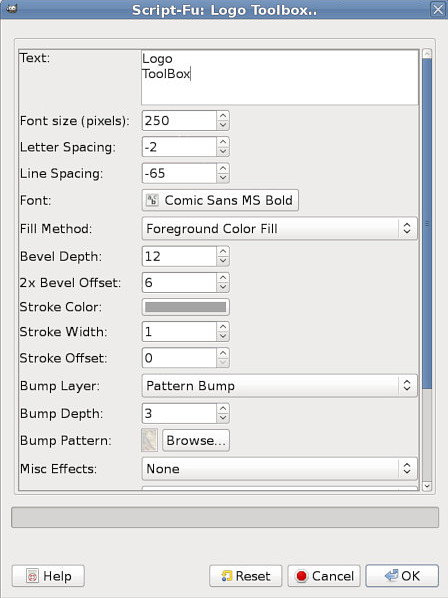
Image

_________________
“If you reach for the stars, you just might land on a decently sized hill.” - Stuart Hill


Top
 Post subject: Re: Script-Fu User Entry Screen Scroll-bars (Yes!)
PostPosted: Mon Feb 24, 2014 7:53 am  (#62) 
Offline
Script Coder
User avatar

Joined: Jun 22, 2010
Posts: 1171
Location: Here and there
Correct me if I'm wrong, but in this post: viewtopic.php?f=9&t=9363&start=50#p128118 it looks like your scrolled window container for the widgets is getting the horizontal width correct - ie. all the widgets are fully revealed, but vertically you're getting a minimum size?

I have to say it doesn't make sense for it to automatically expand vertically because that would make having the scroll bar redundant. Can you set the minimum height for the scrolled window container?


Top
 Post subject: Re: Script-Fu User Entry Screen Scroll-bars (Yes!)
PostPosted: Mon Feb 24, 2014 8:21 am  (#63) 
Offline
GimpChat Founder
User avatar

Joined: May 22, 2008
Posts: 5241
Location: Gimpville
paynekj wrote:
Correct me if I'm wrong, but in this post: viewtopic.php?f=9&t=9363&start=50#p128118 it looks like your scrolled window container for the widgets is getting the horizontal width correct - ie. all the widgets are fully revealed, but vertically you're getting a minimum size?

Actually, the only reason it's that width is because of the action buttons. It maintains that minimum horizontal width to reveal those buttons.

paynekj wrote:
I have to say it doesn't make sense for it to automatically expand vertically because that would make having the scroll bar redundant. Can you set the minimum height for the scrolled window container?

Yes, you can set a minimum height and width for the dialog.

For this particular application, I think it would be optimal if the scroll bars only appeared when the screen size was too small to display the complete table of input widgets, which I've now determined is exactly happens when I set the vertical height to a size larger than the screen.

So basically, all I need to do is calculate the size of the table of input widgets and size the dialog accordingly. I'm finally starting to get excited about this new interface. :yes

_________________
“If you reach for the stars, you just might land on a decently sized hill.” - Stuart Hill


Top
 Post subject: Re: Script-Fu User Entry Screen Scroll-bars (Yes!)
PostPosted: Mon Feb 24, 2014 9:44 am  (#64) 
Offline
Script Coder
User avatar

Joined: Apr 13, 2010
Posts: 244
Well, I've only been trolling lately and haven't had the chance to read through the entire thread, but this sounds great, Tux! Nice work and looking forward to seeing where it ends up.

_________________
I'd rate you as an upper-middle-lower-mod with pro-novice-inter tendencies.....and a twist of lime! Of course, my rating scale is completely objectively subjective, but ALWAYS consistently inconsistent.


Top
 Post subject: Re: Script-Fu User Entry Screen Scroll-bars (Yes!)
PostPosted: Mon Feb 24, 2014 12:21 pm  (#65) 
Offline
GimpChat Member
User avatar

Joined: Jan 13, 2011
Posts: 2648
Location: Poland
I'm not a programmer - but a lot of people - users - yes :yes
Only for new solutions and ideas - you can share the current code - for a new solution?
For Python plugins - this is also a problem - the lack of a scroll bar - just a lot of cards :geek

_________________
Image


Top
 Post subject: Re: Script-Fu User Entry Screen Scroll-bars (Yes!)
PostPosted: Mon Feb 24, 2014 12:56 pm  (#66) 
Offline
GimpChat Founder
User avatar

Joined: May 22, 2008
Posts: 5241
Location: Gimpville
Thnaks, Guys. I'm very close now. Hopefully, by tomorrow, I'll be able to post something usable.

MareroQ, do you have a development environment setup to compile & test with?

_________________
“If you reach for the stars, you just might land on a decently sized hill.” - Stuart Hill


Top
 Post subject: Re: Script-Fu User Entry Screen Scroll-bars (Yes!)
PostPosted: Mon Feb 24, 2014 1:47 pm  (#67) 
Offline
GimpChat Member
User avatar

Joined: Jan 13, 2011
Posts: 2648
Location: Poland
Who does not have a laptop - do not understand what the problem is.
To try to build for windows - is in this forum - many takers.
I hope - that if you give suggestions to change the code - this will be the first step for the further development and discussion ..

_________________
Image


Top
 Post subject: Re: Script-Fu User Entry Screen Scroll-bars (Yes!)
PostPosted: Mon Feb 24, 2014 2:39 pm  (#68) 
Offline
GimpChat Member
User avatar

Joined: Jan 20, 2013
Posts: 14835
Location: roma, italy
MareroQ wrote:
I'm not a programmer - but a lot of people - users - yes :yes
Only for new solutions and ideas - you can share the current code - for a new solution?
For Python plugins - this is also a problem - the lack of a scroll bar - just a lot of cards :geek


for python plugin someone may try/test to use gimpfu2 (not very popular, so far...)
see post made by PhotoComix http://gimpchat.com/viewtopic.php?f=9&t ... u2#p121833

_________________
"Where am I ?"


Top
 Post subject: Re: Script-Fu User Entry Screen Scroll-bars (Yes!)
PostPosted: Mon Feb 24, 2014 2:48 pm  (#69) 
Offline
GimpChat Founder
User avatar

Joined: May 22, 2008
Posts: 5241
Location: Gimpville
MareroQ wrote:
Who does not have a laptop - do not understand what the problem is.
To try to build for windows - is in this forum - many takers.
I hope - that if you give suggestions to change the code - this will be the first step for the further development and discussion ..

Well, I do have a laptop. It has Linux on it too. :)

There is no problem. I just wanted to get the code in a little better shape before posting it publicly.

_________________
“If you reach for the stars, you just might land on a decently sized hill.” - Stuart Hill


Top
 Post subject: Re: Script-Fu User Entry Screen Scroll-bars (Yes!)
PostPosted: Tue Feb 25, 2014 7:18 am  (#70) 
Offline
Global Moderator
User avatar

Joined: May 16, 2010
Posts: 16261
Tux i am all set for compiling on my new machine for 32 bit 64 bit soon as well (Windows only). So send me a link to the src file you edited and i will give it a go.

Never mind i found it. :) :bigthup

Nicely done.

_________________
Image


Top
Post new topic Reply to topic  [ 70 posts ]  Go to page Previous  1, 2, 3, 4  Next

All times are UTC - 5 hours [ DST ]


* Login  


Powered by phpBB3 © phpBB Group