It is currently Wed Aug 19, 2026 3:07 pm


All times are UTC - 5 hours [ DST ]


Post new topic Reply to topic  [ 93 posts ]  Go to page Previous  1, 2, 3, 4, 5  Next
Author Message
 Post subject: Re: Silhouette (Issabella's tutorial) Script
PostPosted: Sun Sep 11, 2016 1:49 am  (#61) 
Offline
Global Moderator
User avatar

Joined: May 16, 2010
Posts: 16164
mahvin wrote:
I'm beginning to think it does have deprecated code parameters, because 3 of his scripts, I can't use at all.

Easy way to check. Just have someone using GIMP-2.8.18 open the procedure browser and search for gimp-image-select-item and check it against GIMP-2.8.16's parameters.

GIMP-2.8.16 Parameters
Image

_________________
Image


Top
 Post subject: Re: Silhouette (Issabella's tutorial) Script
PostPosted: Sun Sep 11, 2016 1:52 am  (#62) 
Offline
Global Moderator
User avatar

Joined: May 16, 2010
Posts: 16164
This is 2.9.5 parameters and they have not changed.

Image

_________________
Image


Top
 Post subject: Re: Silhouette (Issabella's tutorial) Script
PostPosted: Sun Sep 11, 2016 2:10 am  (#63) 
Offline
GimpChat Member
User avatar

Joined: Mar 01, 2014
Posts: 14137
Location: Spain, Aragón
RJKD, you asked me about the procedure to it. I open a new image, then I write the text or you open an image. After that set it in the centre of the canvas and layer to image size. Selected image/text layer, run the script. You can change the back layer with other colour or pattern, gradient etc...
Thanks Rod for your research and help. :)
Pat, you are getting great results in so many fields. Good! :hi5 :coolthup


Attachments:
Dancer-Silhouette.JPG
Dancer-Silhouette.JPG [ 191.83 KiB | Viewed 6853 times ]

_________________
Image

Gimp 2.10.30(samj) portable _ OS Windows 10 Home_ 64bits
Don’t be afraid to start over. It’s a new chance to rebuild what you want.
Top
 Post subject: Re: Silhouette (Issabella's tutorial) Script
PostPosted: Sun Sep 11, 2016 7:27 am  (#64) 
Offline
GimpChat Member
User avatar

Joined: Apr 09, 2016
Posts: 580
Location: Sheffield UK
Thank you Issabella, tried and tried it with the script but keep getting error messages. I'm happy to stick with your original tut for now (it doesn't take long). I think I need to take a complete inventory of my GIMP because I installed a lot of filters and stuff when I first started and didn't have a single clue what I was doing ( I thought that the more I installed the better things would be and thought that if I didn't 'grab' scripts and plug-ins they may vanish somehow?!?!) Then I found GimpChat, here I learned about Gimp Scripts site and what community really means. You live and learn - in Peace.

_________________
Image


Top
 Post subject: Re: Silhouette (Issabella's tutorial) Script
PostPosted: Sun Sep 11, 2016 8:55 am  (#65) 
Offline
GimpChat Member
User avatar

Joined: Oct 06, 2010
Posts: 4050
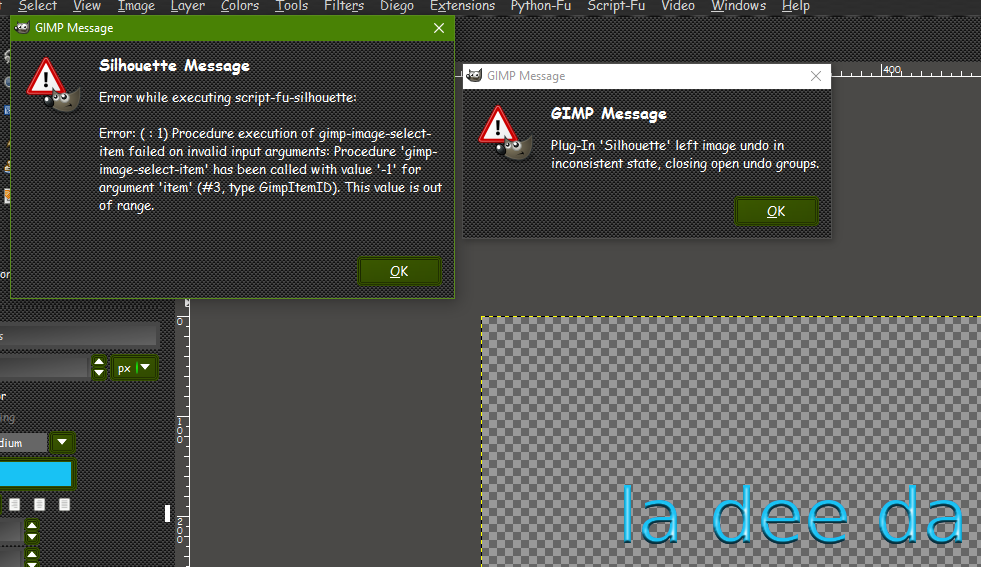
Rod, I clearly have the script in the right location and regardless of which layer I select or run the script on, it throws those errors I posted earlier. FWIW, it's not that hard for me to do manually, so I'm not overly concerned about it.

_________________
"In order to attain the impossible, one must attempt the absurd."
~ Miguel de Cervantes


Top
 Post subject: Re: Silhouette (Issabella's tutorial) Script
PostPosted: Sun Sep 11, 2016 10:24 am  (#66) 
Offline
GimpChat Member

Joined: May 12, 2015
Posts: 4693
Thank you Issabella.


Top
 Post subject: Re: Silhouette (Issabella's tutorial) Script
PostPosted: Sun Sep 11, 2016 10:45 am  (#67) 
Offline
GimpChat Member
User avatar

Joined: Oct 06, 2010
Posts: 4050
Issabella, thank you for sharing your Silhouette tutorial. It will work great with my raindrop font, once I perfect the font.

Image

_________________
"In order to attain the impossible, one must attempt the absurd."
~ Miguel de Cervantes


Top
 Post subject: Re: Silhouette (Issabella's tutorial) Script
PostPosted: Sun Sep 11, 2016 3:42 pm  (#68) 
Offline
GimpChat Member

Joined: May 12, 2015
Posts: 4693
Attachment:
Silhuette Horses.jpg
Silhuette Horses.jpg [ 991.88 KiB | Viewed 6808 times ]


Top
 Post subject: Re: Silhouette (Issabella's tutorial) Script
PostPosted: Fri Sep 16, 2016 8:13 am  (#69) 
Offline
GimpChat Member

Joined: Aug 10, 2016
Posts: 29
Well after a little folder cleanup I figured out what was causing my problem with this script. Another one had a null char in it and was causing the weirdness. Cleaned up and the script appears on my menus. :)

But now I can't use it since I have the same problem as RJKD and Mahvin.

Is there a way to debug a script-fu script?


Top
 Post subject: Re: Silhouette (Issabella's tutorial) Script
PostPosted: Fri Sep 16, 2016 8:36 am  (#70) 
Offline
GimpChat Member
User avatar

Joined: Jan 20, 2013
Posts: 14831
Location: roma, italy
well, it looks strange that so many people encounters problems with that script
I just downloaded it from the first page and installed and tried using it with all defaults.
What I did before calling the filter was:
- new image
- select text
- enter my sentence

this is the outcome
Attachment:
test-silhouette.png
test-silhouette.png [ 227.95 KiB | Viewed 6778 times ]


error messages: none

_________________
"Where am I ?"


Top
 Post subject: Re: Silhouette (Issabella's tutorial) Script
PostPosted: Fri Sep 16, 2016 8:44 am  (#71) 
Offline
GimpChat Member
User avatar

Joined: Jan 20, 2013
Posts: 14831
Location: roma, italy
second test with a drawing (on trasparent) over a flat colored BG
again default values
Attachment:
test2-silhouette.png
test2-silhouette.png [ 767 KiB | Viewed 5590 times ]

_________________
"Where am I ?"


Top
 Post subject: Re: Silhouette (Issabella's tutorial) Script
PostPosted: Fri Sep 16, 2016 8:59 am  (#72) 
Offline
GimpChat Member
User avatar

Joined: Oct 06, 2010
Posts: 4050
Image

The same steps on my PC

_________________
"In order to attain the impossible, one must attempt the absurd."
~ Miguel de Cervantes


Top
 Post subject: Re: Silhouette (Issabella's tutorial) Script
PostPosted: Fri Sep 16, 2016 9:02 am  (#73) 
Offline
GimpChat Member
User avatar

Joined: Jan 20, 2013
Posts: 14831
Location: roma, italy
my environment is:
Windows 10 (up to date)
gimp 2.8.18

_________________
"Where am I ?"


Top
 Post subject: Re: Silhouette (Issabella's tutorial) Script
PostPosted: Fri Sep 16, 2016 9:04 am  (#74) 
Offline
GimpChat Member
User avatar

Joined: Jan 20, 2013
Posts: 14831
Location: roma, italy
just for fun: post here your input .xcf (before calling the script)

_________________
"Where am I ?"


Top
 Post subject: Re: Silhouette (Issabella's tutorial) Script
PostPosted: Fri Sep 16, 2016 9:05 am  (#75) 
Offline
GimpChat Member
User avatar

Joined: Oct 06, 2010
Posts: 4050
dinasset wrote:
my environment is:
Windows 10 (up to date)
gimp 2.8.18


Same.

_________________
"In order to attain the impossible, one must attempt the absurd."
~ Miguel de Cervantes


Top
 Post subject: Re: Silhouette (Issabella's tutorial) Script
PostPosted: Fri Sep 16, 2016 9:13 am  (#76) 
Offline
GimpChat Member
User avatar

Joined: Jan 20, 2013
Posts: 14831
Location: roma, italy
my .xcf before and after (1st test)
Attachment:
test-silhouette_INPUT.7z [19.43 KiB]
Downloaded 84 times

Attachment:
test-silhouette_OUTPUT.7z [234.22 KiB]
Downloaded 82 times

_________________
"Where am I ?"


Top
 Post subject: Re: Silhouette (Issabella's tutorial) Script
PostPosted: Fri Sep 16, 2016 9:21 am  (#77) 
Offline
GimpChat Member
User avatar

Joined: Oct 06, 2010
Posts: 4050
Couldn't open either file. It's not in xcf format. Just data files.

_________________
"In order to attain the impossible, one must attempt the absurd."
~ Miguel de Cervantes


Top
 Post subject: Re: Silhouette (Issabella's tutorial) Script
PostPosted: Fri Sep 16, 2016 9:27 am  (#78) 
Offline
GimpChat Member

Joined: Aug 10, 2016
Posts: 29
Hi dinasset.

my environment is:
Windows 10 (up to date)
gimp 2.8.18

Used your input .xcf

Results:


Attachments:
Trying to use silhouette.png
Trying to use silhouette.png [ 195.51 KiB | Viewed 5581 times ]
Top
 Post subject: Re: Silhouette (Issabella's tutorial) Script
PostPosted: Fri Sep 16, 2016 9:28 am  (#79) 
Offline
GimpChat Member

Joined: Aug 10, 2016
Posts: 29
mahvin you need to unpack it with 7-Zip.


Top
 Post subject: Re: Silhouette (Issabella's tutorial) Script
PostPosted: Fri Sep 16, 2016 9:31 am  (#80) 
Offline
GimpChat Member
User avatar

Joined: Oct 06, 2010
Posts: 4050
I just got the same results as you havilson, with the input file.

I did unpack it with 7-zip, and it dumped the file into appdata, so I extracted it my download folder, viola.

_________________
"In order to attain the impossible, one must attempt the absurd."
~ Miguel de Cervantes


Top
Post new topic Reply to topic  [ 93 posts ]  Go to page Previous  1, 2, 3, 4, 5  Next

All times are UTC - 5 hours [ DST ]


* Login  


Powered by phpBB3 © phpBB Group