It is currently Wed Sep 16, 2026 12:42 am


All times are UTC - 5 hours [ DST ]


Post new topic Reply to topic  [ 87 posts ]  Go to page Previous  1, 2, 3, 4, 5
Author Message
 Post subject: Re: Download all 90 GEGL plugins of mine to prevent a GIMP 3 crash
PostPosted: Sun Jan 18, 2026 8:42 am  (#81) 
Offline
GimpChat Member
User avatar

Joined: Jan 01, 2026
Posts: 751
Attachment:
Image3..jpg
Image3..jpg [ 93.61 KiB | Viewed 2709 times ]


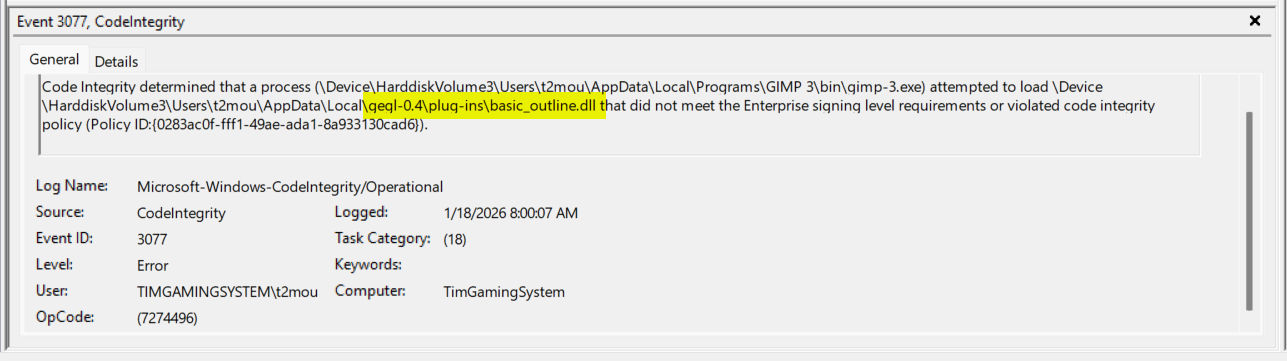
Here the complete list of files Windows 11 blocked

gegl-0.4\plug-ins\bqremovebycolor.dll
gegl-0.4\plug-ins\bokeh.dll
gegl-0.4\plug-ins\brushed_metal_wood.dll
gegl-0.4\plug-ins\blendassistant.dll
gegl-0.4\plug-ins\bloody_ice.dll
gegl-0.4\plug-ins\basic_outline.dll


Not for sure what to make of all this.
I cleared all the event log information and restarted windows and started Gimp 3 again
and checked and everything is okay now. I tried the bloody ice, and it seem to
work okay. It maybe my system and not anything to do with the files themselves.

_________________
Image
Gimp 3.2.4 with Nik Collection and G'mic-QT
Windows 11 Pro with 32 Gigs of RAM
Intel(R) Core(TM) Ultra 7
Previous Paint Shop Pro User v9 - 2023


Top
 Post subject: Re: Download all 90 GEGL plugins of mine to prevent a GIMP 3 crash
PostPosted: Sun Jan 18, 2026 11:40 pm  (#82) 
Offline
GimpChat Member
User avatar

Joined: Oct 31, 2020
Posts: 2014
I can't update them on Windows because my Windows compilation config is stuck on ancient setting.


Last edited by contrast_ on Sun Jan 18, 2026 11:42 pm, edited 1 time in total.

Top
 Post subject: Re: Download all 90 GEGL plugins of mine to prevent a GIMP 3 crash
PostPosted: Sun Jan 18, 2026 11:41 pm  (#83) 
Offline
GimpChat Member
User avatar

Joined: Oct 31, 2020
Posts: 2014
Someone confirm what Linux GIMP 3RC2 does? It should work but I can't test it now


Top
 Post subject: Re: Download all 90 GEGL plugins of mine to prevent a GIMP 3 crash
PostPosted: Mon Jan 19, 2026 3:34 am  (#84) 
Offline
GimpChat Member
User avatar

Joined: Oct 31, 2020
Posts: 2014
I just did test with diff/vimdiff, the plugins are officially the same no API change.

This means its either a new folder like gegl-05, or they need to be compiled with GEGL 0.4.67 or all plugins for everyone is broke including Flatscrew


Top
 Post subject: Re: Download all 90 GEGL plugins of mine to prevent a GIMP 3 crash
PostPosted: Mon Jan 19, 2026 5:24 am  (#85) 
Offline
GimpChat Member
User avatar

Joined: Oct 31, 2020
Posts: 2014
MareroQ wrote:
For me, Gimp 3.2 RC2 is definitely the fastest.

However, there's a problem:
https://discuss.pixls.us/t/plugins-beav ... 2rc1/54301

Those 90 plugins compiled for RasterFlow work.


If his compiled plugins work it is almost certainly my outdated version of GEGL and all we have to do is figure out how to recompile them.


Top
 Post subject: Re: Download all 90 GEGL plugins of mine to prevent a GIMP 3 crash
PostPosted: Mon Feb 02, 2026 12:25 am  (#86) 
Offline
GimpChat Member

Joined: Sep 05, 2025
Posts: 13
Hi contrast, I found the problem of crash when loading any image by gegl plugin. The problem is gpu related. Somehow gimp playground was activated in my gimp. So i have to deactivate gimp playground. Now it works. Thanks for your support and works.


Top
 Post subject: Re: Download all 90 GEGL plugins of mine to prevent a GIMP 3 crash
PostPosted: Sat Mar 21, 2026 6:53 pm  (#87) 
Offline
GimpChat Member
User avatar

Joined: Oct 31, 2020
Posts: 2014
Download here

(Windows download is working on GIMP 3.2+ but its 100s of MB larger because it needs to static link libraries to work)

Attachment:
preview.png
preview.png [ 861.21 KiB | Viewed 1432 times ]


Linux Binaries

Attachment:
LinuxBinaries_all_plugins.zip [3.23 MiB]
Downloaded 32 times


Linux exclusive Source Code

Attachment:
source_code_of_all_GEGL_plugins.zip [2.47 MiB]
Downloaded 33 times


Windows Binaries

https://github.com/LinuxBeaver/LinuxBea ... lugins.zip

Windows Source Code that requires the enormous gettext stuff to compile successfully

https://github.com/LinuxBeaver/LinuxBea ... lugins.zip

LOCATION TO PUT GEGL PLUGIN BINARIES

Windows

C:\Users\(USERNAME)\AppData\Local\gegl-0.4\plug-ins


Linux
~/.local/share/gegl-0.4/plug-ins


Linux(Flatpak includes Chromebook)

~/.var/app/org.gimp.GIMP/data/gegl-0.4/plug-ins


then restart GIMP and go to "GEGL operation" to find the new plugins


---

That was a lot of work. Glad we are up to date


Whats new?

new plugins:

Wood Text

-
updates for existing plugins:

lb:neon has a higher median grow radius
lb:innerglow has a new mode named innershade

Enjoy! :tyspin


Top
Post new topic Reply to topic  [ 87 posts ]  Go to page Previous  1, 2, 3, 4, 5

All times are UTC - 5 hours [ DST ]


* Login  


Powered by phpBB3 © phpBB Group