It is currently Mon Jul 13, 2026 12:16 am


All times are UTC - 5 hours [ DST ]


Post new topic Reply to topic  [ 66 posts ]  Go to page 1, 2, 3, 4  Next
Author Message
 Post subject: script request
PostPosted: Tue Jul 15, 2014 1:56 pm  (#1) 
Offline
GimpChat Member
User avatar

Joined: Sep 22, 2012
Posts: 2089
Location: US
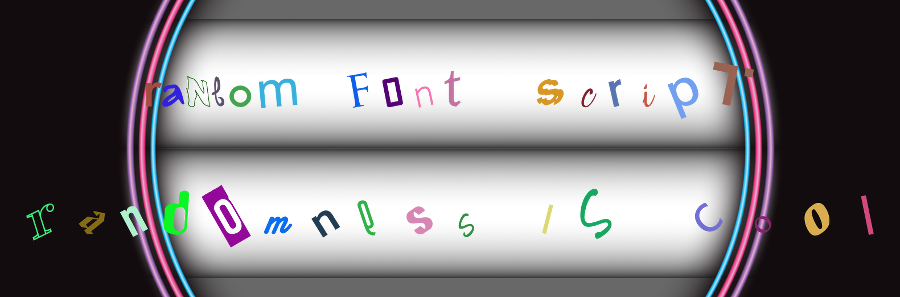
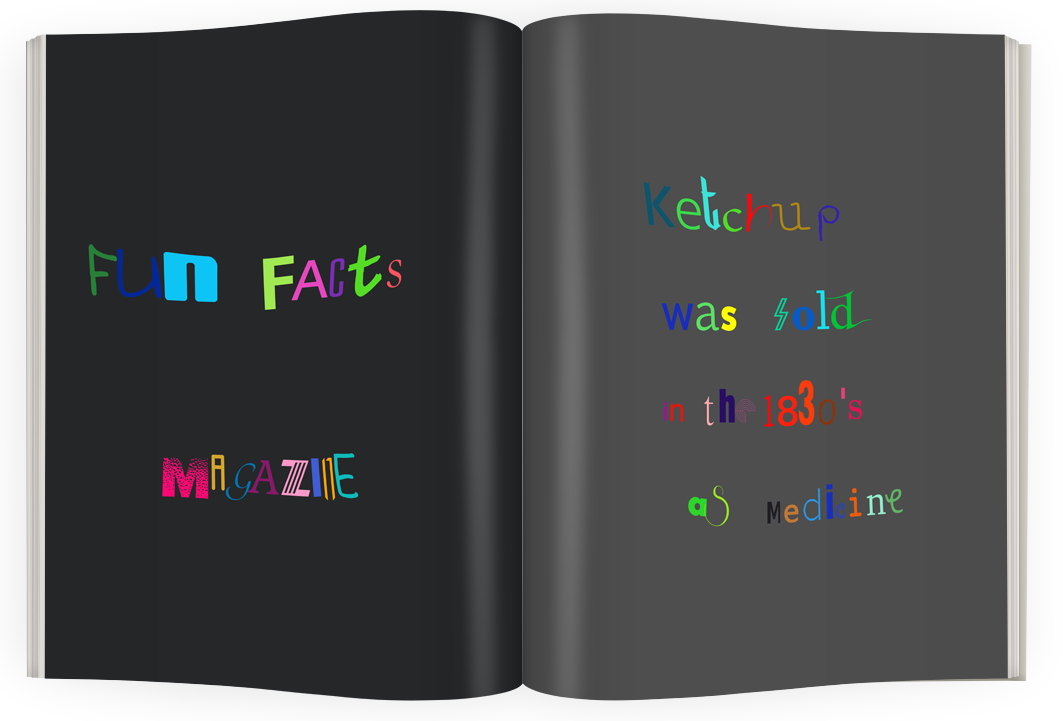
I think it would be cool to have a Random Font script

To create something like this

Image

Type a text of any arbitrary font and size.
Script chooses a different font from the system font directory for each letter in text layer.
Additional functions:
random size - % of the initial size
random color - based on chosen color palette
random rotation - 0-60 degrees

What do you guys think?

If you have the ability and willingness to write such a script it would be greatly appreciated.
Any other ideas to make it even more interesting script are welcome.
Thanks in advance


Share on Facebook Share on Twitter Share on Orkut Share on Digg Share on MySpace Share on Delicious Share on Technorati
Top
 Post subject: Re: script request
PostPosted: Tue Jul 15, 2014 2:48 pm  (#2) 
Offline
Script Coder
User avatar

Joined: Oct 25, 2010
Posts: 4812
Color could also be sampled at random in a gradient...

One problem you have is that the font list is likely encumbered with useless fonts for this (non-English fonts for most people reading this, English fonts in other parts of the world). You may need some way to list the fonts you allow ("Times*,Comic*,Arial*').

_________________
Image


Top
 Post subject: Re: script request
PostPosted: Tue Jul 15, 2014 6:22 pm  (#3) 
Offline
GimpChat Member
User avatar

Joined: Sep 22, 2012
Posts: 2089
Location: US
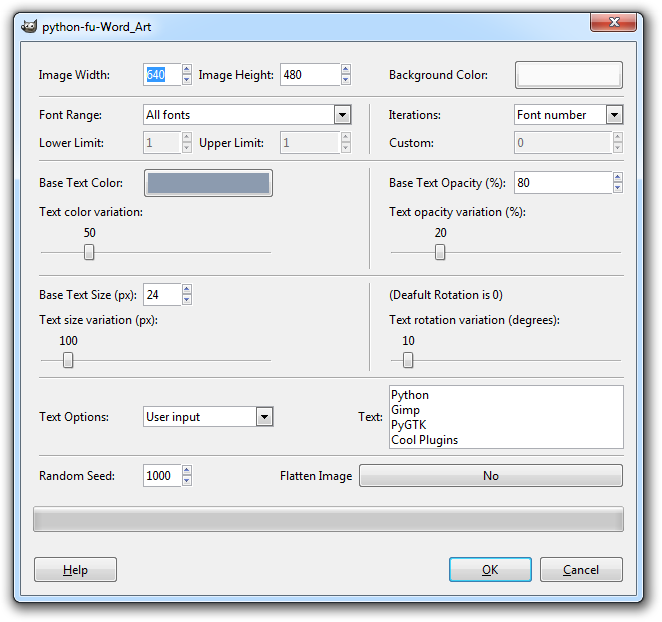
B&P plugin Word Art http://registry.gimp.org/node/24974

Image

script could also be set to a directory with favorite fonts, I know a lot of folks here keep their fav fonts in .gimp2.8 folder.


Top
 Post subject: Re: script request
PostPosted: Tue Jul 15, 2014 11:35 pm  (#4) 
Offline
Script Coder
User avatar

Joined: Feb 18, 2011
Posts: 4826
Location: Bendigo Vic. Australia
A couple of things that may help
for a random color use
(set! random-color (car (gimp-palette-entry-get-color "Default" (random  (car (gimp-palette-get-colors  "Default"))))))

for a random font use
(set! random-font (list-ref (cadr (gimp-fonts-get-list "")) (round (random (car (gimp-fonts-get-list ""))))))

still thinking about how to extract text one letter at a time :roll:

K1TesseraEna Are you sure your not putting together a 'Ransom Note' :rofl

_________________
Image
No matter how much you push the envelope, it'll still be stationery.


Top
 Post subject: Re: script request
PostPosted: Wed Jul 16, 2014 10:10 am  (#5) 
Offline
GimpChat Member
User avatar

Joined: May 10, 2013
Posts: 1430
Location: FInland
This script is so Sex, even without pistols!


Top
 Post subject: Re: script request
PostPosted: Wed Jul 16, 2014 3:10 pm  (#6) 
Offline
GimpChat Member
User avatar

Joined: May 27, 2011
Posts: 707
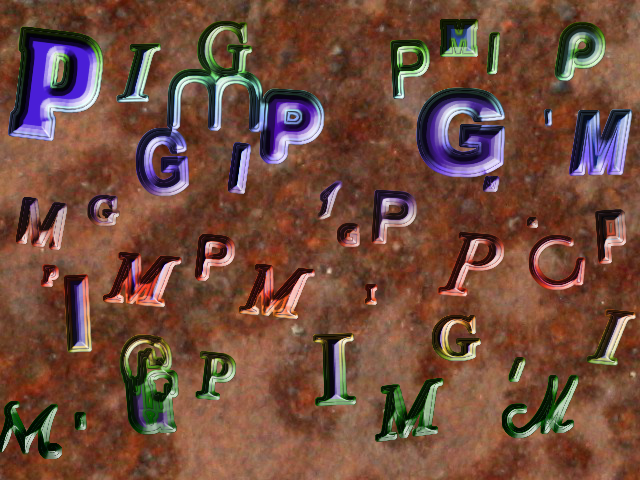
Here's a test ,added stepped chisel


Image

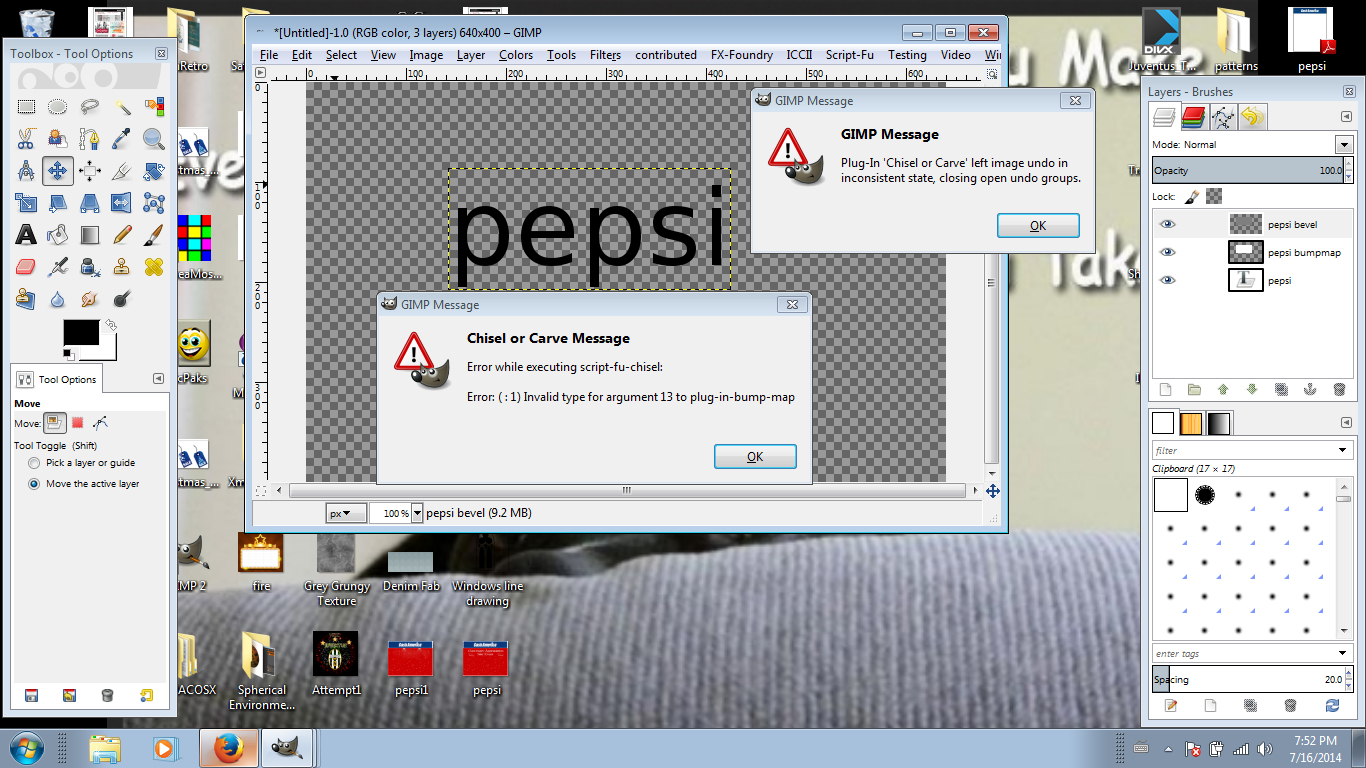
By the way,I can't remember which topic mentioned it,but chisel/carve does not work for me at all.


Top
 Post subject: Re: script request
PostPosted: Wed Jul 16, 2014 3:29 pm  (#7) 
Offline
GimpChat Member
User avatar

Joined: Mar 01, 2014
Posts: 14053
Location: Spain, Aragón
Pirate, good try, and good idea. But have you made the layout? It gives an idea about how it would be. :clap

_________________
Image

Gimp 2.10.30(samj) portable _ OS Windows 10 Home_ 64bits
Don’t be afraid to start over. It’s a new chance to rebuild what you want.


Top
 Post subject: Re: script request
PostPosted: Wed Jul 16, 2014 3:37 pm  (#8) 
Offline
GimpChat Member
User avatar

Joined: May 27, 2011
Posts: 707
Issabella

Thank You..If you run the script and keep layers on,You can place the letters anywhere You want,if that's what You mean by layout.


Top
 Post subject: Re: script request
PostPosted: Wed Jul 16, 2014 3:41 pm  (#9) 
Offline
GimpChat Member
User avatar

Joined: Mar 01, 2014
Posts: 14053
Location: Spain, Aragón
Thank you so much for your explanation, I'll try it. I've checked the script chisel or carved and It runs ok for me. Do you select the text before running it?
:tyspin

_________________
Image

Gimp 2.10.30(samj) portable _ OS Windows 10 Home_ 64bits
Don’t be afraid to start over. It’s a new chance to rebuild what you want.


Top
 Post subject: Re: script request
PostPosted: Wed Jul 16, 2014 3:54 pm  (#10) 
Offline
GimpChat Member
User avatar

Joined: May 27, 2011
Posts: 707
Issabella
Si Senora
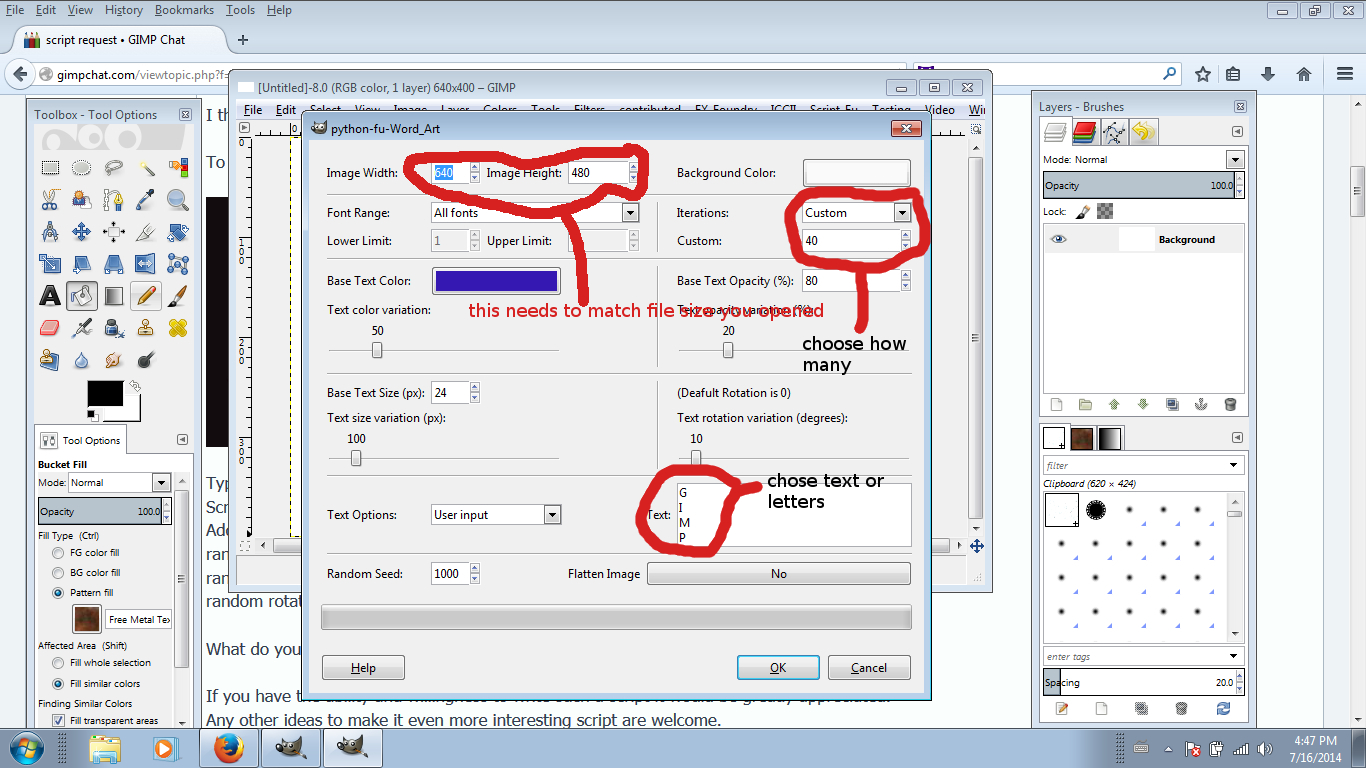
Here's a snapshot of what I did,I hope it helps

Image


Top
 Post subject: Re: script request
PostPosted: Wed Jul 16, 2014 6:29 pm  (#11) 
Offline
Script Coder
User avatar

Joined: Feb 18, 2011
Posts: 4826
Location: Bendigo Vic. Australia
Pirate541 stepped chisel actually uses the chisel/carve code so chisel/carve should work for you

_________________
Image
No matter how much you push the envelope, it'll still be stationery.


Top
 Post subject: Re: script request
PostPosted: Wed Jul 16, 2014 6:54 pm  (#12) 
Offline
GimpChat Member
User avatar

Joined: May 27, 2011
Posts: 707
Graechen

this is what I get,with or without alpha selection


Image


Top
 Post subject: Re: script request
PostPosted: Thu Jul 17, 2014 2:49 am  (#13) 
Offline
GimpChat Member
User avatar

Joined: Mar 01, 2014
Posts: 14053
Location: Spain, Aragón
Pirate, your screen capture helps a lot. Thank you so much. :tyspin :)
I hope you to solve your chisel / carve script, if not , remove the wrong it and download a right one. :)

_________________
Image

Gimp 2.10.30(samj) portable _ OS Windows 10 Home_ 64bits
Don’t be afraid to start over. It’s a new chance to rebuild what you want.


Top
 Post subject: Re: script request
PostPosted: Thu Jul 17, 2014 8:48 am  (#14) 
Offline
GimpChat Member
User avatar

Joined: May 27, 2011
Posts: 707
Issabella

I can't find where to reupload the script..unless it is under a different name.Did a search for chisel,carve..nothing came up


Top
 Post subject: Re: script request
PostPosted: Thu Jul 17, 2014 8:54 am  (#15) 
Offline
GimpChat Member
User avatar

Joined: Aug 30, 2012
Posts: 2174
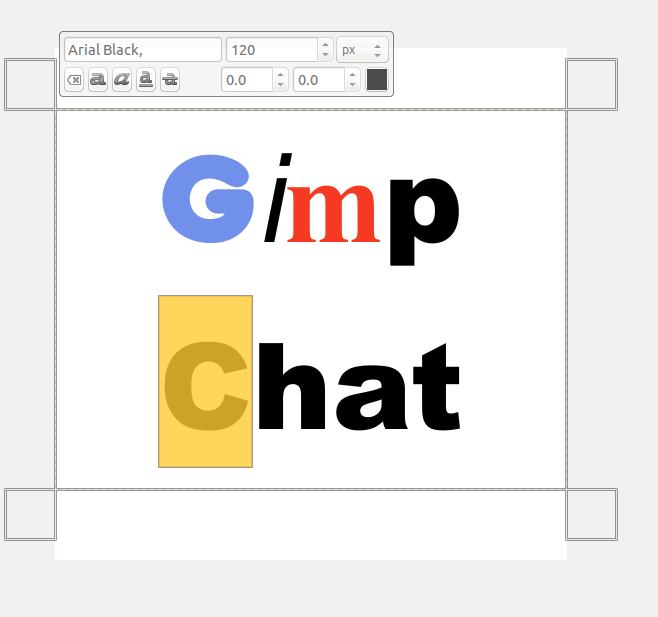
Nice idea for a script, don't know if this helps....

When you start to enter text in gimp and you have the second text dialogue opens (The one located above your text box), you can highlight individual letters as you would in a word document and change all the settings from font, size colour etc.

Image

The above example was created in just a minute.

_________________
Image


Top
 Post subject: Re: script request
PostPosted: Thu Jul 17, 2014 9:03 am  (#16) 
Offline
GimpChat Member
User avatar

Joined: Sep 22, 2012
Posts: 2089
Location: US
thanks he4rty, that's exactly how i did it in OP example but.... more letters means more time

Yesterday i found a font randomizing java script for Illustrator called Font Rythm which can do more than I can ask for.
I do all my topography stuff in vectors anyways.

Image


Just thought it would be nice for gimp users who don't use vector editors to have it in gimp.
Oh well....
Thank you Graechan for your codes, I wish I could write scripts


Top
 Post subject: Re: script request
PostPosted: Thu Jul 17, 2014 9:16 am  (#17) 
Offline
Script Coder
User avatar

Joined: Apr 23, 2010
Posts: 1553
Location: not from Guildford after all
he4rty wrote:
Nice idea for a script, don't know if this helps....

When you start to enter text in gimp and you have the second text dialogue opens (The one located above your text box), you can highlight individual letters as you would in a word document and change all the settings from font, size colour etc.

There is currently no way for a script to change the text markup which supports text attributes for individual letters. Until such support is added to the PDB, the best a "random font" script could hope to achieve is a separate text layer (or path) for each character.

_________________
Any sufficiently primitive technology is indistinguishable from a rock.


Top
 Post subject: Re: script request
PostPosted: Thu Jul 17, 2014 9:21 am  (#18) 
Offline
GimpChat Member
User avatar

Joined: Mar 01, 2014
Posts: 14053
Location: Spain, Aragón
Sorry Pirate as I didn't see your question before, I send you what I have. I don't have in one only script but I think that they are. Then you will find it in Script-Fu - Effects Selection - Chisel or Carve. I hope it to be useful. :)


Attachments:
Chisel-Carve.zip [4.12 KiB]
Downloaded 90 times

_________________
Image

Gimp 2.10.30(samj) portable _ OS Windows 10 Home_ 64bits
Don’t be afraid to start over. It’s a new chance to rebuild what you want.
Top
 Post subject: Re: script request
PostPosted: Thu Jul 17, 2014 9:49 am  (#19) 
Offline
GimpChat Member
User avatar

Joined: Sep 22, 2012
Posts: 2089
Location: US
saulgoode wrote:
There is currently no way for a script to change the text markup which supports text attributes for individual letters. Until such support is added to the PDB, the best a "random font" script could hope to achieve is a separate text layer (or path) for each character.


I see now, thanks for the explanation saul!


Top
 Post subject: Re: script request
PostPosted: Thu Jul 17, 2014 7:03 pm  (#20) 
Offline
Script Coder
User avatar

Joined: Feb 18, 2011
Posts: 4826
Location: Bendigo Vic. Australia
Saulgoode I've been held up with one problem for this script
It's how to change a string "text" to a list (t e x t), this doesn't mean I've given up, maybe you can weave some of your magic with this :mrgreen:

Then I'm sure the rest of the 'Ransom Text' script will fall together

_________________
Image
No matter how much you push the envelope, it'll still be stationery.


Top
Post new topic Reply to topic  [ 66 posts ]  Go to page 1, 2, 3, 4  Next

All times are UTC - 5 hours [ DST ]


* Login  


Powered by phpBB3 © phpBB Group