It is currently Sat Jun 20, 2026 3:34 pm


All times are UTC - 5 hours [ DST ]


Post new topic Reply to topic  [ 110 posts ]  Go to page 1, 2, 3, 4, 5, 6  Next
Author Message
 Post subject: Slinky
PostPosted: Sun Mar 13, 2011 9:50 am  (#1) 
Offline
Script Coder
User avatar

Joined: Oct 25, 2010
Posts: 4812
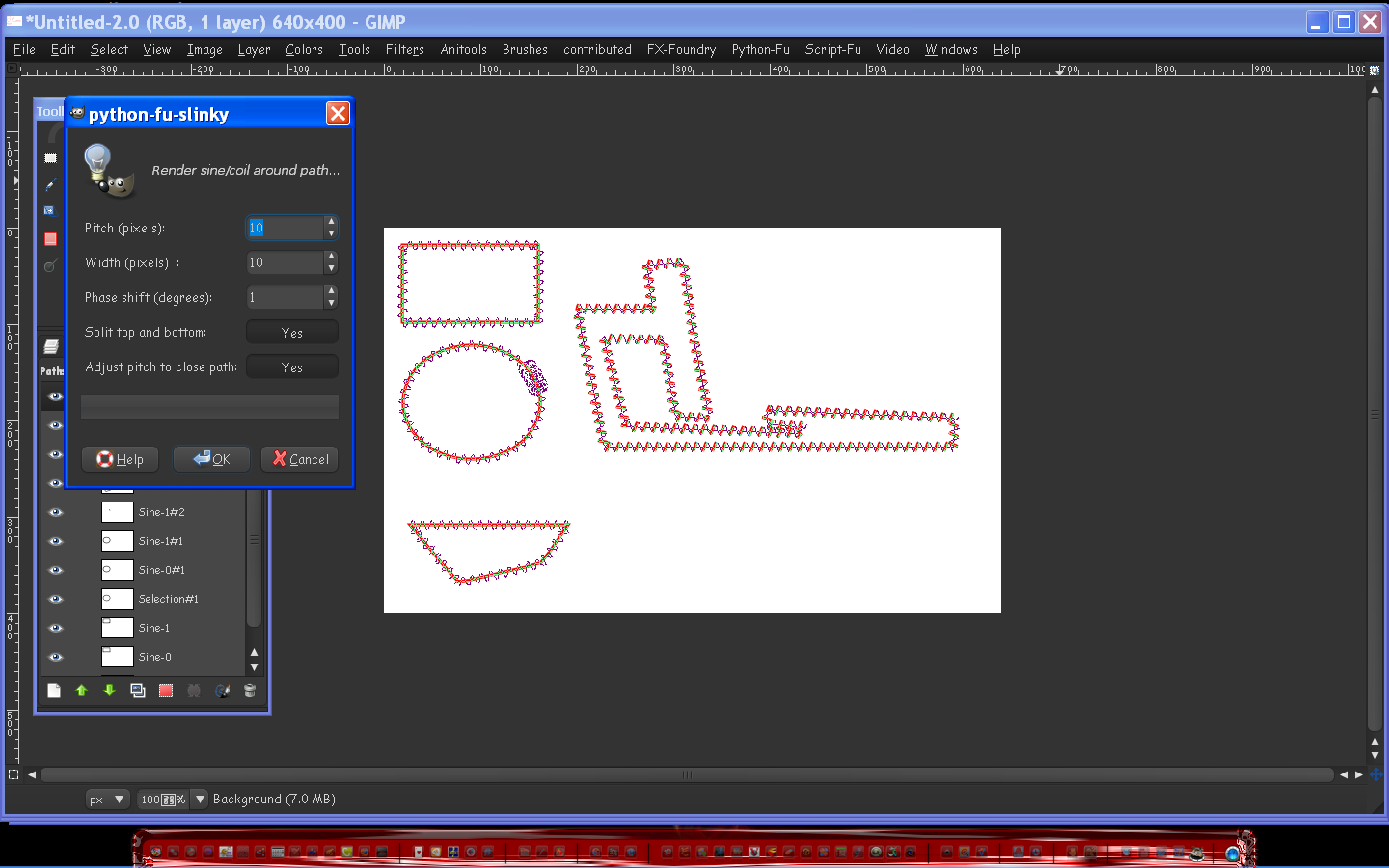
Due to the intense raindance sessions from the cheering crowd, the

Attachment:
Slinky.png
Slinky.png [ 93.88 KiB | Viewed 5527 times ]


plugin is now available at http://gimp-slinky.sourceforge.net/

Have fun.
Attachment:
Slinky.png
Slinky.png [ 93.88 KiB | Viewed 5527 times ]

_________________
Image


Share on Facebook Share on Twitter Share on Orkut Share on Digg Share on MySpace Share on Delicious Share on Technorati
Top
 Post subject: Re: Slinky
PostPosted: Sun Mar 13, 2011 10:03 am  (#2) 
Offline
GimpChat Member
User avatar

Joined: Jul 04, 2010
Posts: 2253
Location: Retired Moderator Slowly Returning to the Living.
Awesome! I'm going to get it right now!!

_________________
Artists aren't crazy! We're eccentric! ~G.M. Ross

Image

My Sigs = My Photos
Check out my work at http://www.flickr.com/photos/photomastergreg.


Top
 Post subject: Re: Slinky
PostPosted: Sun Mar 13, 2011 10:26 am  (#3) 
Offline
GimpChat Member
User avatar

Joined: Sep 24, 2010
Posts: 12776
A few errors Ofnut and you have to use simple paths (I tried a text path that I thined with G'MIC's Skeletonize and it went haywire; not showing that result. lol). See the screenshot. Not sure the issue; might be related to Windows Python. Stilll pretty cool plugin though. :)


Attachments:
workwitherrors.png
workwitherrors.png [ 114.74 KiB | Viewed 5502 times ]

_________________
Lyle

Psalm 109:8

Image
Top
 Post subject: Re: Slinky
PostPosted: Sun Mar 13, 2011 10:33 am  (#4) 
Offline
GimpChat Member
User avatar

Joined: Sep 24, 2010
Posts: 12776
Maybe premature. Just closed GIMP and re-opened it again and, at least for the circle, the error didn't show. Will play more and let you know if any other issues happen. Again a heap of thanks to you. :)

_________________
Lyle

Psalm 109:8

Image


Top
 Post subject: Re: Slinky
PostPosted: Sun Mar 13, 2011 10:35 am  (#5) 
Offline
GimpChat Member
User avatar

Joined: Jul 04, 2010
Posts: 2253
Location: Retired Moderator Slowly Returning to the Living.
I'm getting the same error sometimes. On the 'S' it gave me the error. On the rest of the letters it was fine.


Attachments:
Slinky Sweet.jpg
Slinky Sweet.jpg [ 123.83 KiB | Viewed 5498 times ]

_________________
Artists aren't crazy! We're eccentric! ~G.M. Ross

Image

My Sigs = My Photos
Check out my work at http://www.flickr.com/photos/photomastergreg.
Top
 Post subject: Re: Slinky
PostPosted: Sun Mar 13, 2011 10:36 am  (#6) 
Offline
Global Moderator
User avatar

Joined: May 16, 2010
Posts: 16037
Sure leave it to Lyle to break it. :lol

_________________
Image


Top
 Post subject: Re: Slinky
PostPosted: Sun Mar 13, 2011 10:40 am  (#7) 
Offline
Script Coder
User avatar

Joined: Oct 25, 2010
Posts: 4812
lylejk wrote:
A few errors Ofnut and you have to use simple paths (I tried a text path that I thined with G'MIC's Skeletonize and it went haywire; not showing that result. lol). See the screenshot. Not sure the issue; might be related to Windows Python. Stilll pretty cool plugin though. :)

Slinky ought to work on "pure" text paths (see my opening post)... paths obtained from selections may be another matter. If you get error popups check the plugin message console. You can also start gimp-console and see if it says anything there. My error processing is still a bit rough, it would have taken another day to clean everything properly, and I didn't want the dancers to get exhausted.

_________________
Image


Top
 Post subject: Re: Slinky
PostPosted: Sun Mar 13, 2011 10:47 am  (#8) 
Offline
Script Coder
User avatar

Joined: Oct 25, 2010
Posts: 4812
PhotoMaster wrote:
I'm getting the same error sometimes. On the 'S' it gave me the error. On the rest of the letters it was fine.
I know there is a bug that occurs because of a roundoff error when computing the length of a stroke. gimp-console (or you console output if you started it from bash in Linux) will say either
  • Unable to compute quadrant at dist nnn.nn
  • No point at dist nnn.nn
If you can find one instance where it fails please post an XCF with the path here.

_________________
Image


Top
 Post subject: Re: Slinky
PostPosted: Sun Mar 13, 2011 10:51 am  (#9) 
Offline
GimpChat Member
User avatar

Joined: Sep 24, 2010
Posts: 12776
Just tried Kozuka Gothic Pro Heavy font path (just random; saw a think text and went with it; lol) and also it crashes midway. Might be the transitioning of sharp edges that might be giving a conundrum. Maybe, for the text, if you break up the text in separate paths per character, there might be a better chance at success too (haven't tried that yet). :)

Below is just for the charater "A" using the Kozuka Gothic Pro Heavy font:

  GIMP Error
Plug-in crashed: "slinky-0.0.py"
(C:\Users\Lyle\.gimp-2.6\plug-ins\slinky-0.0.py)

The dying plug-in may have messed up GIMP's internal state. You may want to save your images and restart GIMP to be on the safe side.

  GIMP Error
Unable to run GimpPdbProgress callback. The corresponding plug-in may have crashed.


Attachments:
slinkerror.png
slinkerror.png [ 25.88 KiB | Viewed 5494 times ]

_________________
Lyle

Psalm 109:8

Image
Top
 Post subject: Re: Slinky
PostPosted: Sun Mar 13, 2011 11:03 am  (#10) 
Offline
Script Coder
User avatar

Joined: Oct 25, 2010
Posts: 4812
lylejk wrote:
Just tried Kozuka Gothic Pro Heavy font path (just random; saw a think text and went with it; lol) and also it crashes midway. Might be the transitioning of sharp edges that might be giving a conundrum. Maybe, for the text, if you break up the text in separate paths per character, there might be a better chance at success too (haven't tried that yet). :)

Below is just for the charater "A" using the Kozuka Gothic Pro Heavy font:

  GIMP Error
Plug-in crashed: "slinky-0.0.py"
(C:\Users\Lyle\.gimp-2.6\plug-ins\slinky-0.0.py)

The dying plug-in may have messed up GIMP's internal state. You may want to save your images and restart GIMP to be on the safe side.

  GIMP Error
Unable to run GimpPdbProgress callback. The corresponding plug-in may have crashed.
Ifs the font on Dafont or available elsewhere? What font size are you using?

_________________
Image


Top
 Post subject: Re: Slinky
PostPosted: Sun Mar 13, 2011 11:10 am  (#11) 
Offline
GimpChat Member
User avatar

Joined: Sep 24, 2010
Posts: 12776
Don't know where I got the font (it was in my GIMP arsenol). Below's the settings ofnuts. Just as a side note, I did try to blur the text and did selection from transparent and then selection to path to create a smoother path and the problem became worse. Maybe the anti-aliasing of the text is the issue or just smooth paths since PM did say he had an issue with the S which is a smooth path, but still that doe not really make since since A has sharp edges. :)


Attachments:
A.png
A.png [ 34.68 KiB | Viewed 2344 times ]

_________________
Lyle

Psalm 109:8

Image
Top
 Post subject: Re: Slinky
PostPosted: Sun Mar 13, 2011 11:23 am  (#12) 
Offline
Retired Staff
User avatar

Joined: May 22, 2008
Posts: 6946
Location: Somewhere in GIMP
I got several error messages. It didn't line up and there are breaks in the strokes but I like it anyway.

You guys call off your rain dances. I had to use a windshield wiper on my computer screen.

Image

_________________
Image
World War IV will be fought with sticks and stones. - Albert Einstein


Top
 Post subject: Re: Slinky
PostPosted: Sun Mar 13, 2011 11:27 am  (#13) 
Offline
Global Moderator
User avatar

Joined: May 16, 2010
Posts: 16037
It seems to crash when you have more than one path.
I can run it on any one letter but not more than 1.
That makes sense to me actually as the plug-in is setup to run with one path right ofnuts?

_________________
Image


Top
 Post subject: Re: Slinky
PostPosted: Sun Mar 13, 2011 11:29 am  (#14) 
Offline
Retired Staff
User avatar

Joined: May 22, 2008
Posts: 6946
Location: Somewhere in GIMP
I only had one path. I used the selection tool and selected the outside of my O, inverted, shrank the selection 10 and made it a path.

_________________
Image
World War IV will be fought with sticks and stones. - Albert Einstein


Top
 Post subject: Re: Slinky
PostPosted: Sun Mar 13, 2011 11:30 am  (#15) 
Offline
Global Moderator
User avatar

Joined: May 16, 2010
Posts: 16037
Thanks for the wonderful plug-in ofnuts.
It runs excellent on
Free select to path - open
Free select to path - closed
rectangle select to path
circular select to path
and any font as long as you do not run any more than one letter at once.
If you do it gets tangled into a knot looking for the direction it needs to go i am thinking - lol

Rain-dance off - thanks O!

_________________
Image


Top
 Post subject: Re: Slinky
PostPosted: Sun Mar 13, 2011 11:48 am  (#16) 
Offline
Global Moderator
User avatar

Joined: May 16, 2010
Posts: 16037
hah - now i got some funky stuff going on when i changed the values to these.
The circle selection to path kinda went haywire on me.I got the same error as you guys gimppdb - but the script ran through anyways. :clap

Image

_________________
Image


Top
 Post subject: Re: Slinky
PostPosted: Sun Mar 13, 2011 12:08 pm  (#17) 
Offline
GimpChat Member
User avatar

Joined: Mar 02, 2011
Posts: 1850
Location: Michigan
What am I supposed to open this with? WindowsRar doesn't recognize the file type and it didn't default to anything

_________________
Image
I'm back I think


Top
 Post subject: Re: Slinky
PostPosted: Sun Mar 13, 2011 12:15 pm  (#18) 
Offline
Retired Staff
User avatar

Joined: May 22, 2008
Posts: 6946
Location: Somewhere in GIMP
Willy wrote:
What am I supposed to open this with? WindowsRar doesn't recognize the file type and it didn't default to anything

It needs to be placed as is into your GIMP plug-ins folder - it's not a zipped file. You need Python installed to use it.

I tried this using the Ellipse tool and got no error messages.

Image

_________________
Image
World War IV will be fought with sticks and stones. - Albert Einstein


Top
 Post subject: Re: Slinky
PostPosted: Sun Mar 13, 2011 12:17 pm  (#19) 
Offline
GimpChat Member
User avatar

Joined: Mar 02, 2011
Posts: 1850
Location: Michigan
Well I don't have Python installed... Could this be converted to ZIP? Or Where do I get Python

_________________
Image
I'm back I think


Top
 Post subject: Re: Slinky
PostPosted: Sun Mar 13, 2011 12:23 pm  (#20) 
Offline
Global Moderator
User avatar

Joined: May 16, 2010
Posts: 16037
You would have to install the entire python-fu package
http://www.gimpusers.com/tutorials/inst ... -6-windows
Then you would have to un-install and re-install Gimp to get the use Python selection when installing Gimp.

_________________
Image


Top
Post new topic Reply to topic  [ 110 posts ]  Go to page 1, 2, 3, 4, 5, 6  Next

All times are UTC - 5 hours [ DST ]


* Login  


Powered by phpBB3 © phpBB Group