It is currently Sat Jun 20, 2026 5:20 pm


All times are UTC - 5 hours [ DST ]


Post new topic Reply to topic  [ 5 posts ] 
Author Message
 Post subject: help with automatic cropping and merging of photos
PostPosted: Tue Mar 29, 2011 10:31 am  (#1) 
Offline
New Member

Joined: Mar 29, 2011
Posts: 1
Hi, new to the forum and casual user of gimp.

I want to make two scripts that will automatically work on my pictures.
I have pictures generated by a program, the pictures are composed of mostly black background with a colored figure in it.
As you can see, it has a large white boundary, that boundary is added by the matlab save mechanism and I don't want it.
to remove it manually, what I do is click with the fuzzy select tool (magic wand) and Threshold 0 on the black background and then Image->Fit canvas to selection.
since I have many pictures of that type, I want a script that will do it automatically for me (and automatically save the result).

Secondly, I want a script that will take two existing images of the same dimensions and put them one along the other perfectly, again I have many pictures, so there are a lot of "couples" to combine and I can't align them perfectly straight with my hand.

*all the images are in .tif format, using gimp 2.6 under win 7 or win xp (have two machines).

All help will be appreciated.


Share on Facebook Share on Twitter Share on Orkut Share on Digg Share on MySpace Share on Delicious Share on Technorati
Top
 Post subject: Re: help with automatic cropping and merging of photos
PostPosted: Tue Mar 29, 2011 3:51 pm  (#2) 
Offline
Script Coder
User avatar

Joined: Oct 25, 2010
Posts: 4812
You should investigate using the Imagemagick toolbox instead. Very powerful!

_________________
Image


Top
 Post subject: Re: help with automatic cropping and merging of photos
PostPosted: Wed Mar 30, 2011 3:07 am  (#3) 
Offline
Script Coder
User avatar

Joined: Jun 22, 2010
Posts: 1171
Location: Here and there
I think I understand the first part of your problem - removal of the white border, but can you confirm that doing Image>Autocrop Image does what you require? This should be quite straightforward to script using the plug-in-autocrop function.

Let's see if I understand your second requirement. You want to put two identically sized images side-by-side:

   ----------|----------
  |          |          |
  |     1    |     2    |
  |          |          |
   ----------|----------


or do you mean vertically:
   ----------
  |          |
  |     1    |
  |          |
   ----------
  |          |
  |     2    |
  |          |
   ----------


If I've understood that correctly, how do want to choose your pairs to join together?

Kevin


Top
 Post subject: Re: help with automatic cropping and merging of photos
PostPosted: Wed Mar 30, 2011 4:26 am  (#4) 
Offline
Script Coder
User avatar

Joined: Oct 25, 2010
Posts: 4812
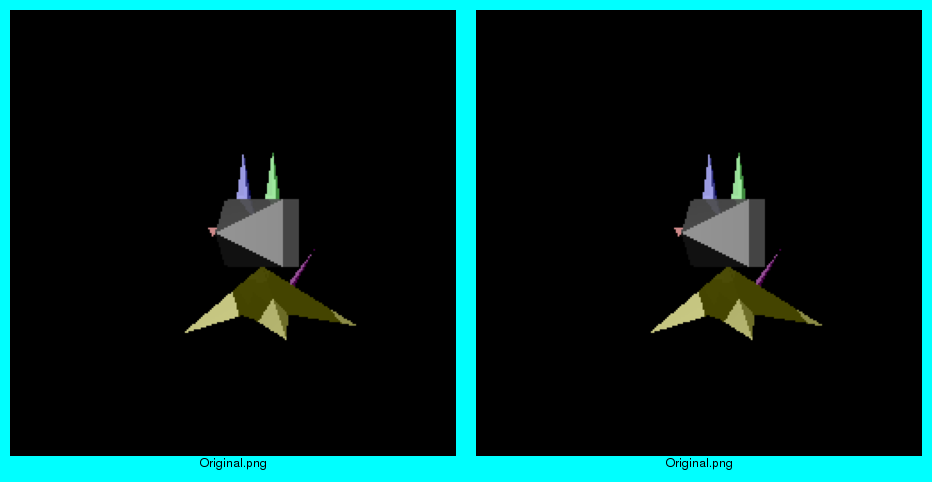
Three uses of ImageMagick "montage" command with the outputs.

montage -geometry '+0+0' -trim Original.png Original.png Montage.png
montage -geometry '+0+0' -trim -resize 20% Original.png Original.png MontageSmall.png
montage -geometry '+10+10' -background '#00FFFF' -label '%f' -trim -resize 20% Original.png Original.png MontageFancy.png

Original.png is you original image, with white border and all.

When your only tool is a hammer, all your problems look like nails. :)

Attachment:
MontageFancy.png
MontageFancy.png [ 38.3 KiB | Viewed 2908 times ]


Attachments:
MontageSmall.png
MontageSmall.png [ 31.75 KiB | Viewed 2908 times ]
Montage.png
Montage.png [ 64.89 KiB | Viewed 2908 times ]

_________________
Image
Top
 Post subject: Re: help with automatic cropping and merging of photos
PostPosted: Wed Mar 30, 2011 11:45 am  (#5) 
Offline
Script Coder
User avatar

Joined: Jul 14, 2010
Posts: 697
Cross-eye stereo-grams rule!

-Rob A>

_________________
Image
Fantasy Cartography and Mapping by RobA


Top
Post new topic Reply to topic  [ 5 posts ] 

All times are UTC - 5 hours [ DST ]


* Login  


Powered by phpBB3 © phpBB Group