It is currently Tue Jul 28, 2026 2:21 pm


All times are UTC - 5 hours [ DST ]


Post new topic Reply to topic  [ 9 posts ] 
Author Message
 Post subject: TinyPNG Plugin for Gimp
PostPosted: Mon Sep 12, 2016 1:40 pm  (#1) 
Offline
GimpChat Member
User avatar

Joined: Sep 10, 2016
Posts: 9
So all of Photoshop buddies brag about how great the TinyPNG plugin is. I recently used their demo on the homepagee, and was amazed by how much it compressed my files. Anyway, I was wondering if you peeps know of an equivalent plugin for Gimp. I'd like to be able to automate the process on my website, Website Beaver, as it is a pain to have to manually do this for my designs.

Please let me know if there are any custom tools to help me out. I did a search, but couldn't find anything useful. Please don't recommend using the default png compression. Yes, .png is excellent for lossless compression, but I'm looking for a "pseudo-lossy" compression if that makes sense. I'm surprised that no one else has asked this before.


Share on Facebook Share on Twitter Share on Orkut Share on Digg Share on MySpace Share on Delicious Share on Technorati
Top
 Post subject: Re: TinyPNG Plugin for Gimp
PostPosted: Mon Sep 12, 2016 2:40 pm  (#2) 
Offline
GimpChat Member

Joined: Mar 04, 2011
Posts: 2610
gimpshrimp wrote:
....snip.... Yes, .png is excellent for lossless compression, but I'm looking for a "pseudo-lossy" compression if that makes sense. I'm surprised that no one else has asked this before.

Your problem will be a 'universal' format so first sticking with png.

This is from the tinypng web page
Quote:
..24-bit PNG files can be converted to much smaller 8-bit indexed color images.

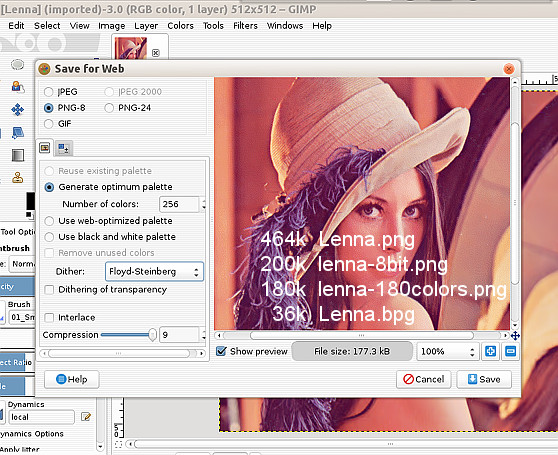
and you can do that with Gimp manually or use the old Gimp save-for-web plugin
http://registry.gimp.org/node/33

save-for-web looks like this with some file sizes for comparison.
the original Lenna.png,
256 colour indexed png,
the number of colours reduced a little to 180.

Attachment:
comparison.jpg
comparison.jpg [ 111.11 KiB | Viewed 6666 times ]


Then of course there are much better new (and unpopular) formats such as better portable graphics (bpg) which beats indexed hands down for size and quality.
http://bellard.org/bpg/ and a gimp plugin that opens them. http://www.mikropunto.org/?p=71

And there is jpeg2000, gimp will open but not create. You could use something like XnView to make them.


Top
 Post subject: Re: TinyPNG Plugin for Gimp
PostPosted: Mon Sep 12, 2016 3:19 pm  (#3) 
Offline
GimpChat Member
User avatar

Joined: Sep 10, 2016
Posts: 9
I've actually never heard of .bpg, but just looked it up and it seems to be so much better than jpeg. I'm surprised why no browser supports it. I just followed your tutorial, which was excellent with the screenshots. While it did reduce the size my photos in png-8, there was something extra TinyPNG did to compress it much more. I think I read that they use something called pngquant to power their service.


Top
 Post subject: Re: TinyPNG Plugin for Gimp
PostPosted: Mon Sep 12, 2016 3:20 pm  (#4) 
Offline
GimpChat Member
User avatar

Joined: Nov 16, 2011
Posts: 5127
Location: Metro Vancouver, BC
rich2005 wrote:
And there is jpeg2000, gimp will open but not create. You could use something like XnView to make them.

:ninja I was going to mention XnConvert (by XnView).

In GIMP I always use save-for-web (Rich mentioned). The file size difference between PNG-24 & PNG-8 is impressive.
A few command line tools, optipng, advpng, pngcrush.

_________________
Image
Gimp 2.8.18, Linux, median user
Gimp Chat Tutorials Index
Spirit Bear (Kermode)


Top
 Post subject: Re: TinyPNG Plugin for Gimp
PostPosted: Mon Sep 12, 2016 5:05 pm  (#5) 
Offline
GimpChat Member
User avatar

Joined: Sep 24, 2010
Posts: 12818
You can always try RIOT plugin too. Have had issues trying to get the new version to work with the GIMP though. The version that comes with Irfanview still works great fortunately. :)

http://luci.criosweb.ro/riot/

_________________
Lyle

Psalm 109:8

Image


Top
 Post subject: Re: TinyPNG Plugin for Gimp
PostPosted: Mon Sep 12, 2016 6:34 pm  (#6) 
Offline
GimpChat Member
User avatar

Joined: Nov 16, 2011
Posts: 5127
Location: Metro Vancouver, BC
lylejk wrote:
You can always try RIOT plugin too. Have had issues trying to get the new version to work with the GIMP though. The version that comes with Irfanview still works great fortunately. :)

http://luci.criosweb.ro/riot/
RIOT is good but be aware the installer contains Opencandy. Take care during the install.

_________________
Image
Gimp 2.8.18, Linux, median user
Gimp Chat Tutorials Index
Spirit Bear (Kermode)


Top
 Post subject: Re: TinyPNG Plugin for Gimp
PostPosted: Mon Sep 12, 2016 11:25 pm  (#7) 
Offline
GimpChat Member
User avatar

Joined: Sep 24, 2010
Posts: 12818
I couldn't get it to work for GIMP like the older version. I now just depend on Irfanview when I actually need to use RIOT (RIOT comes with Irfanview when you install the plugins with it as well). :)

_________________
Lyle

Psalm 109:8

Image


Top
 Post subject: Re: TinyPNG Plugin for Gimp
PostPosted: Tue Sep 13, 2016 12:44 am  (#8) 
Offline
GimpChat Member
User avatar

Joined: Jan 20, 2013
Posts: 14831
Location: roma, italy
IMO indexed does not keep TRANSPARENCY, while png does, thus converting the image to indexed does not fullfilling the initial requirement

_________________
"Where am I ?"


Top
 Post subject: Re: TinyPNG Plugin for Gimp
PostPosted: Tue Sep 13, 2016 12:31 pm  (#9) 
Offline
Global Moderator
User avatar

Joined: May 16, 2010
Posts: 16136
lylejk wrote:
I couldn't get it to work for GIMP like the older version. I now just depend on Irfanview when I actually need to use RIOT (RIOT comes with Irfanview when you install the plugins with it as well). :)


Yeah it's weird how the RIOT plug-in no longer works in GIMP. Just keeps loading the plug-in. Until it crashes with a message it cannot find the riot.dll file.

I downloaded the stand alone from here. Just unzip and double click the executable. Allow the installer to install into the 32 bit programs folder and it will give you options for further gimp plug-in directory searches for install.
http://luci.criosweb.ro/riot/thank-you- ... -installer

The stand alone works really well for me. I just downloaded the gimp plug-in version and installed everything then deleted the riot executable and dll file from the plug-ins folder.

Easy enough to open the image in RIOT through Rob A's glorious shellout filter i think.
Image

Just make sure you re-name and save the new image on the desktop instead of the tmp folder.

Image

_________________
Image


Top
Post new topic Reply to topic  [ 9 posts ] 

All times are UTC - 5 hours [ DST ]


* Login  


Powered by phpBB3 © phpBB Group




