It is currently Tue Jun 09, 2026 11:35 pm


All times are UTC - 5 hours [ DST ]


Post new topic Reply to topic  [ 16 posts ] 
Author Message
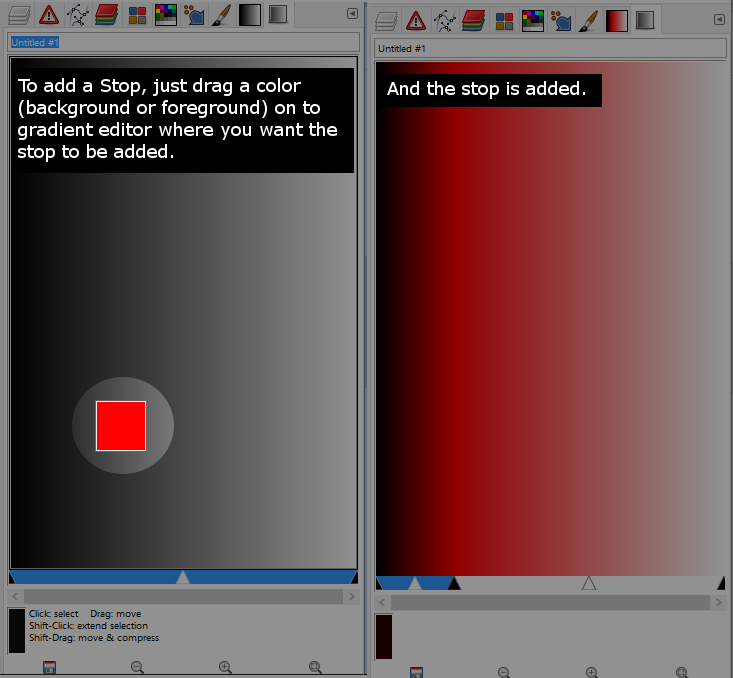
 Post subject: How to quickly add a Stop or change a Stop's color in Gradient Editor
PostPosted: Wed Sep 21, 2016 4:27 pm  (#1) 
Offline
Script Coder
User avatar

Joined: May 07, 2014
Posts: 4469
Location: Canada
SOLUTION --> click here (It's already built-in, no need for a script)
------------------------------------------
I want to register a menu using .py fu
like I know about <Image>/ and <Gradients>/
But what if i want to register one under Gradient Editor while user has a gradient segment selected.

basically I want to be able to add a function called "Add Stop" or something similar
that it'll
1) add split segment at midpoint
2) set right color of left segment to a chosen color
3) set left color of right segment to same chosen color...
as like a short cut instead of having to manually do 3 steps.

I think this will make the gradient editor much friendlier
I am guessing that gradient and segment is automatically passed in some how ...
like if I register <Gradients>/ it shows up when right clicking gradient and that gradient is automatically passed into the first parameter if parameter is defined as string.... so I hoping when user right clicks the segment, if i had my menu registered in the right place with the right string inside <> ... the gradient and segment is passed in somehow

does any one know? any pointers would be much appreciated.

_________________
TinT
My GIMP 2.10 plug-in writer Fiverr Gig
Plaid Community Forum
Imageplaid-patterns.com


Last edited by trandoductin on Wed Sep 21, 2016 10:24 pm, edited 4 times in total.

Share on Facebook Share on Twitter Share on Orkut Share on Digg Share on MySpace Share on Delicious Share on Technorati
Top
 Post subject: Re: Gradient Script technical help.
PostPosted: Wed Sep 21, 2016 4:51 pm  (#2) 
Offline
Script Coder
User avatar

Joined: May 07, 2014
Posts: 4469
Location: Canada
Is there a documentation on these <Image> or <Gradients>
and other possible menu registers?

_________________
TinT
My GIMP 2.10 plug-in writer Fiverr Gig
Plaid Community Forum
Imageplaid-patterns.com


Top
 Post subject: Re: Gradient Script technical help.
PostPosted: Wed Sep 21, 2016 5:22 pm  (#3) 
Offline
Script Coder
User avatar

Joined: May 07, 2014
Posts: 4469
Location: Canada
If I can do this it'll cut down the work of adding a stop to 6 clicks instead of 12 clicks ...
I really want to be able to do it.

_________________
TinT
My GIMP 2.10 plug-in writer Fiverr Gig
Plaid Community Forum
Imageplaid-patterns.com


Top
 Post subject: Re: Gradient Script technical help.
PostPosted: Wed Sep 21, 2016 7:15 pm  (#4) 
Offline
Script Coder
User avatar

Joined: May 07, 2014
Posts: 4469
Location: Canada
I guess the Gradient Editor is unreachable. oh well

_________________
TinT
My GIMP 2.10 plug-in writer Fiverr Gig
Plaid Community Forum
Imageplaid-patterns.com


Top
 Post subject: Re: Gradient Script technical help.
PostPosted: Wed Sep 21, 2016 7:46 pm  (#5) 
Offline
Script Coder
User avatar

Joined: Feb 18, 2011
Posts: 4826
Location: Bendigo Vic. Australia
Why not rename this thread 'The thoughts of trandoductin' :hehe

_________________
Image
No matter how much you push the envelope, it'll still be stationery.


Top
 Post subject: Re: Gradient Script technical help.
PostPosted: Wed Sep 21, 2016 8:44 pm  (#6) 
Offline
GimpChat Member
User avatar

Joined: Nov 16, 2011
Posts: 5127
Location: Metro Vancouver, BC
trandoductin wrote:
I guess the Gradient Editor is unreachable. oh well
Try GIMP Developers Mailing Lists.

_________________
Image
Gimp 2.8.18, Linux, median user
Gimp Chat Tutorials Index
Spirit Bear (Kermode)


Top
 Post subject: Re: Gradient Script technical help.
PostPosted: Wed Sep 21, 2016 8:46 pm  (#7) 
Offline
Script Coder
User avatar

Joined: May 07, 2014
Posts: 4469
Location: Canada
Not sure what to do with mailing lists.
Email people and ask them?

Edit: I subscribed to developers mailing list.

_________________
TinT
My GIMP 2.10 plug-in writer Fiverr Gig
Plaid Community Forum
Imageplaid-patterns.com


Last edited by trandoductin on Wed Sep 21, 2016 9:03 pm, edited 1 time in total.

Top
 Post subject: Re: Gradient Script technical help.
PostPosted: Wed Sep 21, 2016 8:50 pm  (#8) 
Offline
Script Coder
User avatar

Joined: May 07, 2014
Posts: 4469
Location: Canada
Graechan wrote:
Why not rename this thread 'The thoughts of trandoductin' :hehe

LOL

_________________
TinT
My GIMP 2.10 plug-in writer Fiverr Gig
Plaid Community Forum
Imageplaid-patterns.com


Top
 Post subject: Re: Gradient Script technical help.
PostPosted: Wed Sep 21, 2016 8:58 pm  (#9) 
Offline
GimpChat Member
User avatar

Joined: Nov 16, 2011
Posts: 5127
Location: Metro Vancouver, BC
trandoductin wrote:
Not sure what to do with mailing lists.
Email people and ask them?
There is an archive.

_________________
Image
Gimp 2.8.18, Linux, median user
Gimp Chat Tutorials Index
Spirit Bear (Kermode)


Top
 Post subject: Re: Gradient Script technical help.
PostPosted: Wed Sep 21, 2016 9:05 pm  (#10) 
Offline
Script Coder
User avatar

Joined: May 07, 2014
Posts: 4469
Location: Canada
Odinbc wrote:
trandoductin wrote:
Not sure what to do with mailing lists.
Email people and ask them?
There is an archive.

I see it now thanks I'll search that and see ;)

_________________
TinT
My GIMP 2.10 plug-in writer Fiverr Gig
Plaid Community Forum
Imageplaid-patterns.com


Top
 Post subject: Re: Gradient Script technical help (Solved HA It's already built in)
PostPosted: Wed Sep 21, 2016 9:50 pm  (#11) 
Offline
Script Coder
User avatar

Joined: May 07, 2014
Posts: 4469
Location: Canada
Working with gradients.
So I wonder how many people know about this?
It saves a ton of manual work trying to change Left/Right Colors of gradient segments.
Quickly add a Stop to a gradient while editing it in Gradient Editor.
Image

Quickly change a Stop's color while editing it in Gradient Editor.
Image

Playing with gradients should be a breeze now ;)

_________________
TinT
My GIMP 2.10 plug-in writer Fiverr Gig
Plaid Community Forum
Imageplaid-patterns.com


Top
 Post subject: Re: Gradient Script technical help (Solved HA It's already built in)
PostPosted: Wed Sep 21, 2016 10:02 pm  (#12) 
Offline
GimpChat Member
User avatar

Joined: Nov 16, 2011
Posts: 5127
Location: Metro Vancouver, BC
GIMP Gradient Editor info is always good. :bigthup
I'm a total newb with it. :oops:

_________________
Image
Gimp 2.8.18, Linux, median user
Gimp Chat Tutorials Index
Spirit Bear (Kermode)


Top
 Post subject: Re: Gradient Script technical help (Solved HA It's already built in)
PostPosted: Wed Sep 21, 2016 10:06 pm  (#13) 
Offline
Script Coder
User avatar

Joined: May 07, 2014
Posts: 4469
Location: Canada
Odinbc wrote:
GIMP Gradient Editor info is always good. :bigthup
I'm a total newb with it. :oops:

So instead of a 12 click to add stop of certain color, with the above solution i can be done in 3 clicks (well more like 2 clicks and a single drag and drop).
Much friendlier I think.

_________________
TinT
My GIMP 2.10 plug-in writer Fiverr Gig
Plaid Community Forum
Imageplaid-patterns.com


Top
 Post subject: Re: Gradient Script technical help (Solved HA It's already built in)
PostPosted: Wed Sep 21, 2016 10:28 pm  (#14) 
Offline
GimpChat Member
User avatar

Joined: Oct 06, 2010
Posts: 4050
That is so awesome, lol! I never read the gradient editor info, just naturally thought the native files were the only ones that worked. Good find, Tin!

_________________
"In order to attain the impossible, one must attempt the absurd."
~ Miguel de Cervantes


Top
 Post subject: Re: How to quickly add a Stop or change a Stop's color in Gradient Edi
PostPosted: Thu Sep 22, 2016 7:24 am  (#15) 
Offline
Global Moderator
User avatar

Joined: May 16, 2010
Posts: 16023
Excellent. This will be much quicker. :)

_________________
Image


Top
 Post subject: Re: Gradient Script technical help.
PostPosted: Thu Sep 22, 2016 7:25 am  (#16) 
Offline
Global Moderator
User avatar

Joined: May 16, 2010
Posts: 16023
Graechan wrote:
Why not rename this thread 'The thoughts of trandoductin' :hehe

:rofl

_________________
Image


Top
Post new topic Reply to topic  [ 16 posts ] 

All times are UTC - 5 hours [ DST ]


* Login  


Powered by phpBB3 © phpBB Group