It is currently Mon Jun 15, 2026 10:34 am


All times are UTC - 5 hours [ DST ]


Post new topic Reply to topic  [ 8 posts ] 
Author Message
 Post subject: The new Follow Path filter
PostPosted: Mon Dec 02, 2013 12:30 pm  (#1) 
Offline
Global Moderator
User avatar

Joined: May 16, 2010
Posts: 16028
This is a pretty interesting filter as you can place objects along any path.
Get Follow Path Here
More info here
http://registry.gimp.org/node/28647
I have asked the author to include BLUR along a path which the author has added.Thanks!
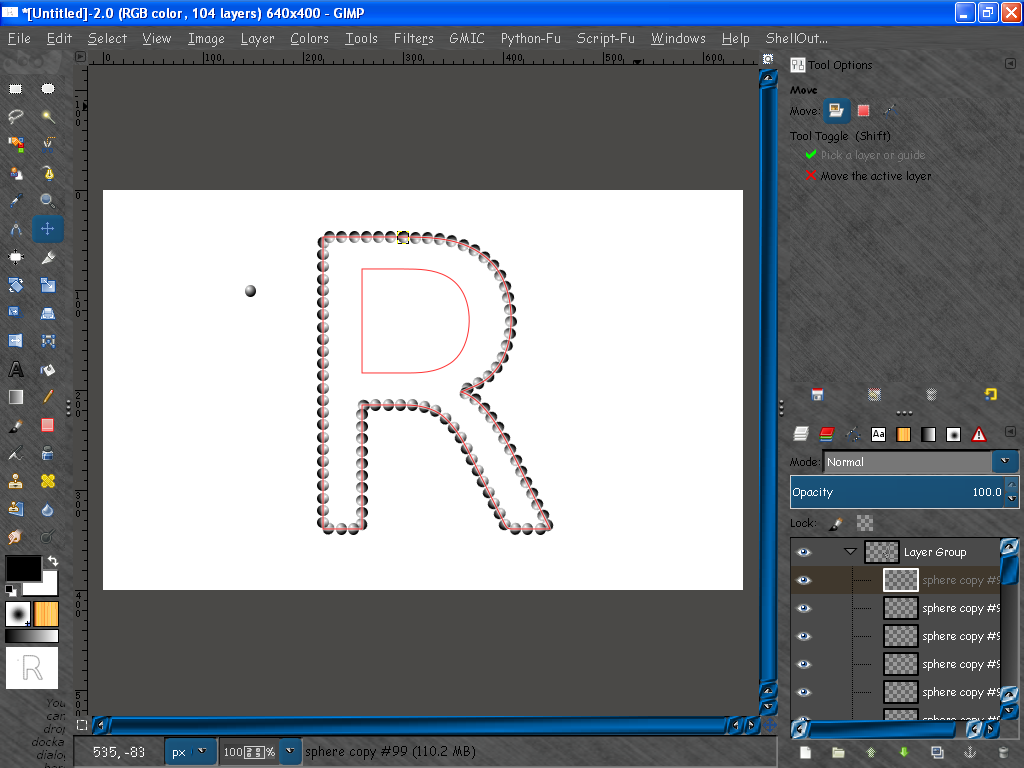
Now i have suggested allowing copies along a set of non connected paths on 1 layer. For instance this R i made.
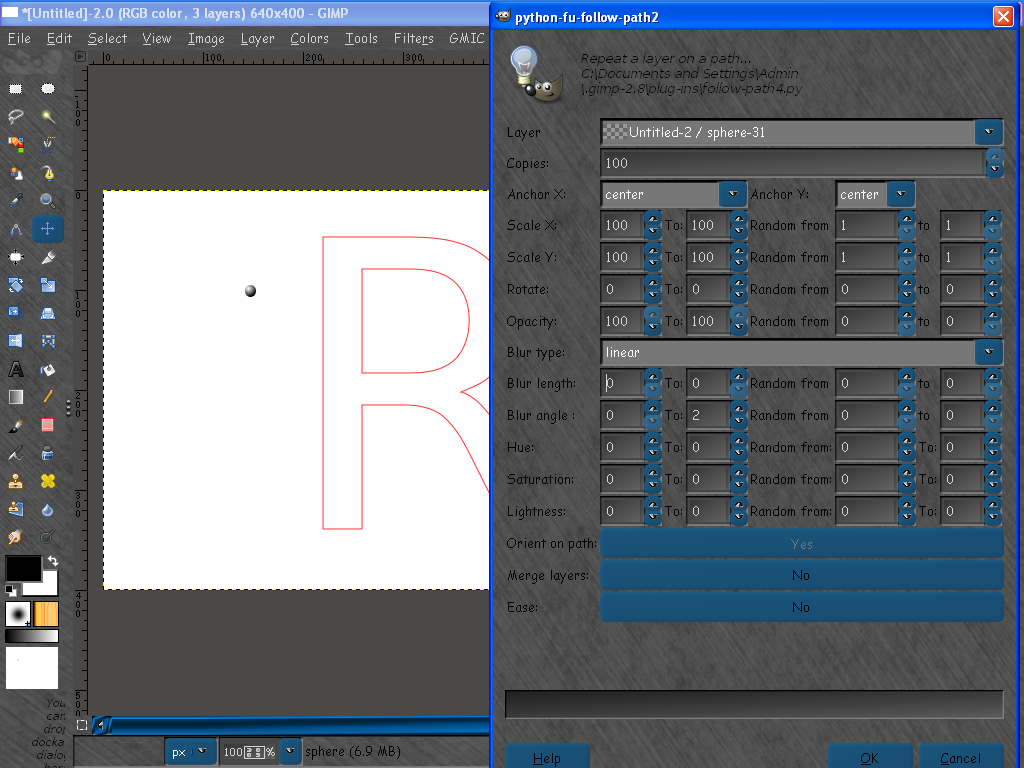
Here are my results with a sphere layer and a R text path.
Image
Results
Image
100 copies seems to be the plugins limit also. This should be changed to unlimited (a much larger number) i believe.

I am sure stroke path with a brush with certain dynamics can achieve the same results but this seems easier to control within one dialog anyways. :)

By the way there are 2 files in the download package.
gimpfu2.py (needs to go in the lib/gimp/2.0/python folder
followpath4.py (needs to go in the USERNAME/.gimp-2.8/plug-ins folder.
Restart GIMP. You will find it under Right click path and select Tools>Follow Path.
Directions for use-
Create a new document - create a object on that layer - create a minimum 2 point path. Open the filter and select your path layer and copies amount. You need at least 2 copies for the filter to run. I have asked the author to change this to allow 1 copy for single object shadow blur.

Your thoughts or suggestions?

_________________
Image


Share on Facebook Share on Twitter Share on Orkut Share on Digg Share on MySpace Share on Delicious Share on Technorati
Top
 Post subject: Re: The new Follow Path filter
PostPosted: Mon Dec 09, 2013 4:38 pm  (#2) 
Offline
GimpChat Member
User avatar

Joined: Dec 08, 2013
Posts: 1088
Pick up the follow path path last night and now I can't wait to try it. Nice job Rod. Thankyou...

_________________
Image


Top
 Post subject: Re: The new Follow Path filter
PostPosted: Mon Dec 09, 2013 5:15 pm  (#3) 
Offline
GimpChat Member
User avatar

Joined: Apr 07, 2010
Posts: 14182
Looks cool, Does it also fill the center part of the R? (the hole)
Also, with all those sliders how is a person supposed to know what to set them at?

_________________
Image


Top
 Post subject: Re: The new Follow Path filter
PostPosted: Mon Dec 09, 2013 8:25 pm  (#4) 
Offline
GimpChat Member
User avatar

Joined: Jul 17, 2012
Posts: 2769
www.youtube.com Video from : www.youtube.com


http://www.arakne.es/en/dessign/gimp-pl ... ow-path-2/

www.youtube.com Video from : www.youtube.com


Top
 Post subject: Re: The new Follow Path filter
PostPosted: Mon Dec 09, 2013 8:40 pm  (#5) 
Offline
Administrator
User avatar

Joined: Aug 10, 2012
Posts: 14019
Location: Native to NYC living in Arizona, Gimp 2.8 - 3.0, Win 11 PC.
I'm having a difficult time keeping up with all the new stuff and updates. :sleepkbd
Slow Down! :hehe

_________________
Image
"A wise man learns more from a foolish question than a fool can learn from a wise answer"
Image


Top
 Post subject: Re: The new Follow Path filter
PostPosted: Mon Dec 09, 2013 8:44 pm  (#6) 
Offline
GimpChat Member
User avatar

Joined: Jul 17, 2012
Posts: 2769
i agree, its a bit overkill


Top
 Post subject: Re: The new Follow Path filter
PostPosted: Mon Dec 09, 2013 8:50 pm  (#7) 
Offline
Administrator
User avatar

Joined: Aug 10, 2012
Posts: 14019
Location: Native to NYC living in Arizona, Gimp 2.8 - 3.0, Win 11 PC.
Esper wrote:
i agree, its a bit overkill

Don't get me wrong, this is great.
It's just that I now have so much stuff sitting around that I have to figure out. :hehe

_________________
Image
"A wise man learns more from a foolish question than a fool can learn from a wise answer"
Image


Top
 Post subject: Re: The new Follow Path filter
PostPosted: Fri Oct 21, 2016 8:52 am  (#8) 
Offline
Global Moderator
User avatar

Joined: May 16, 2010
Posts: 16028
Almost has a flash feel to it. :)

Image

_________________
Image


Top
Post new topic Reply to topic  [ 8 posts ] 

All times are UTC - 5 hours [ DST ]


* Login  


Powered by phpBB3 © phpBB Group