It is currently Sat Jun 20, 2026 7:01 pm


All times are UTC - 5 hours [ DST ]


Post new topic Reply to topic  [ 6 posts ] 
Author Message
 Post subject: GEGL Orton - a classic photography effect
PostPosted: Sun Dec 01, 2024 11:53 am  (#1) 
Offline
GimpChat Member
User avatar

Joined: Oct 31, 2020
Posts: 2012
I followed a photography tutorial on a "orton effect" and recreated it in GEGL so we can have an instant quality orton effect/dreamy landscape in GIMP.

Download plugin here
viewtopic.php?f=9&t=21457#p293489

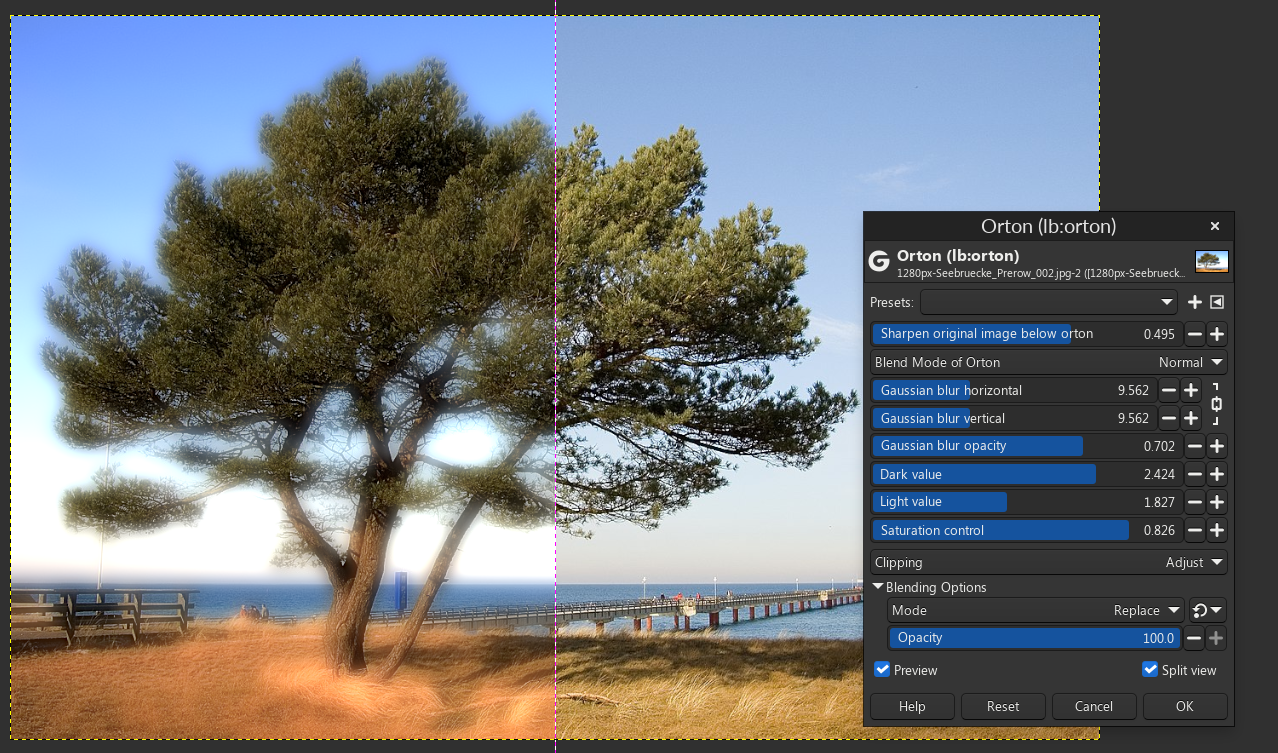
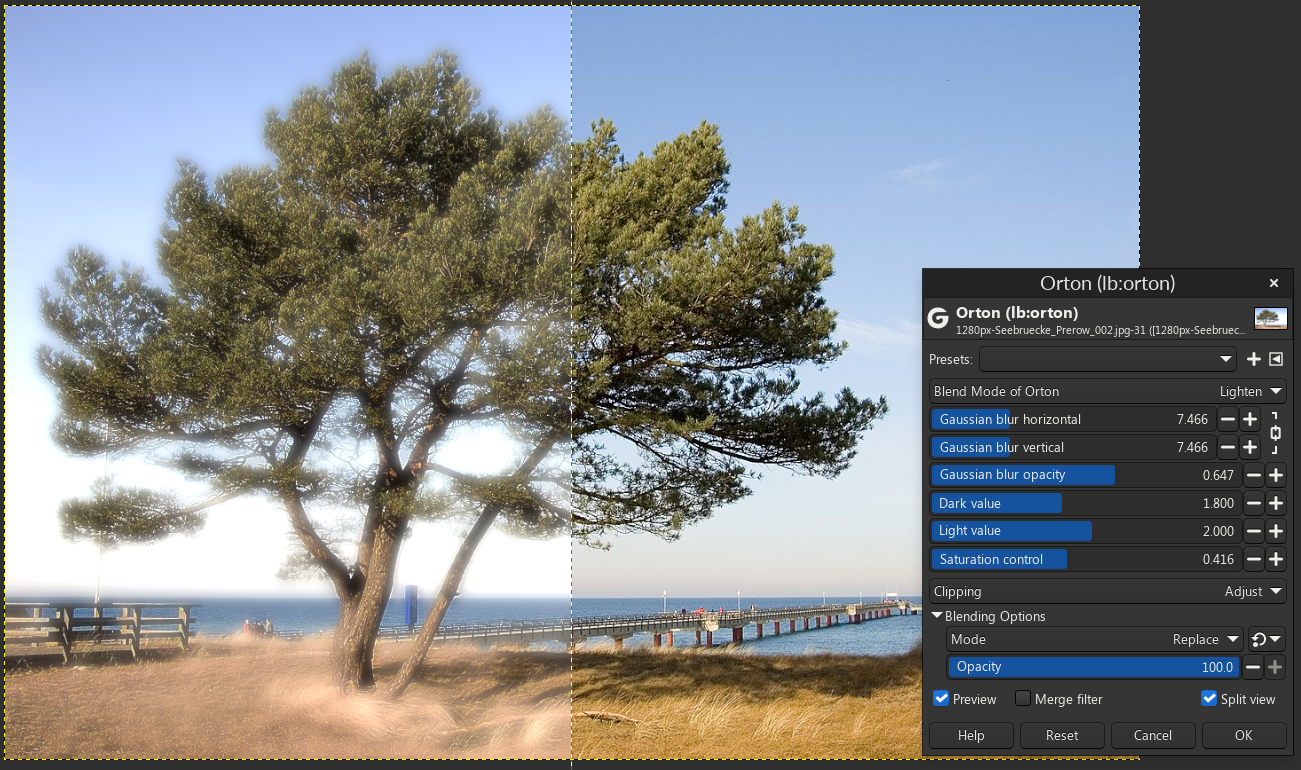
Below is unreleased now released plugin GEGL Orton that I put together yesterday and today. It sharpens the below layer and the top layer is a gaussian blur with opacity control, levels, and saturation to modify it. The dilemma I am having is that Orton has many blend modes but only looks authentic on "normal" and "lighten" blend modes, and I am deciding what I should do before release. Keep normal and lighten as the only blend modes or one ones that look highly unorthodox.

Attached first two pics a normal orton as defined by industry standards

NORMAL (orthodox)
Attachment:
orton_normal.png
orton_normal.png [ 1.15 MiB | Viewed 2809 times ]


LIGHTEN (orthodox)
Attachment:
2024-12-01_10-57.png
2024-12-01_10-57.png [ 1.22 MiB | Viewed 2809 times ]


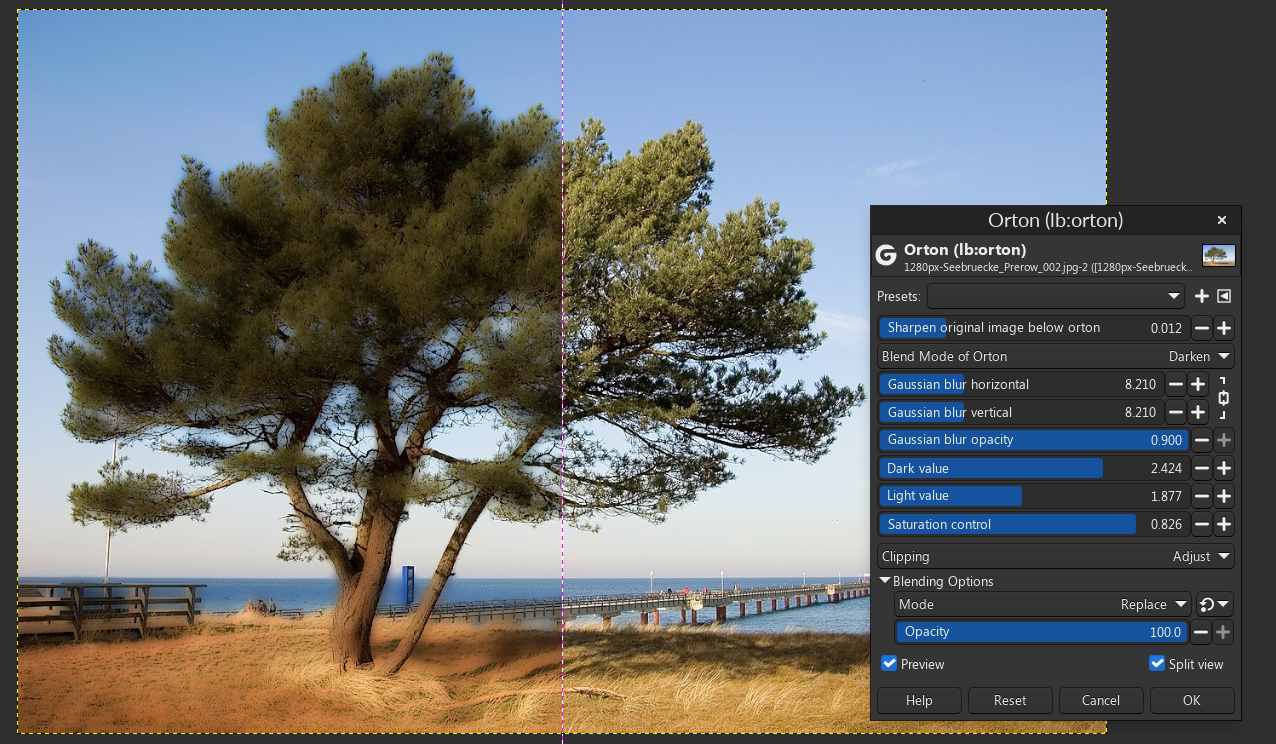
However the third pic is my unique orton that is highly unorthodox that I term "dark orton"
DARKEN (unorthodox)
Attachment:
2024-12-01_11-42.png
2024-12-01_11-42.png [ 1.15 MiB | Viewed 2809 times ]


and yes I am aware that all the blur filters blended and Bloom and SoftGlow in GIMP are other Orton Effects that GIMP can do without plugins. I just made this to show what is possible with GEGL.


Last edited by contrast_ on Sun Dec 01, 2024 12:42 pm, edited 3 times in total.

Share on Facebook Share on Twitter Share on Orkut Share on Digg Share on MySpace Share on Delicious Share on Technorati
Top
 Post subject: Re: Sneak peek at GEGL plugins I am working on
PostPosted: Sun Dec 01, 2024 11:56 am  (#2) 
Offline
GimpChat Member
User avatar

Joined: Oct 31, 2020
Posts: 2012
Another preview of Orton in early development (50 minutes ago) before it had a sharpen original image slider.

Attachment:
pasted_image115.png
pasted_image115.png [ 992.56 KiB | Viewed 2806 times ]


Top
 Post subject: Re: Sneak peek at GEGL plugins I am working on
PostPosted: Sun Dec 01, 2024 12:09 pm  (#3) 
Offline
GimpChat Member
User avatar

Joined: Oct 31, 2020
Posts: 2012
Hardlight can make an even darker orton but this isn't orthodox at all. This is an example of a feature that may be useful that I cut in an official plugin release

Attachment:
darker_orton.png
darker_orton.png [ 918.12 KiB | Viewed 2802 times ]


Top
 Post subject: Re: Sneak peek at GEGL plugins I am working on
PostPosted: Sun Dec 01, 2024 12:16 pm  (#4) 
Offline
GimpChat Member
User avatar

Joined: Oct 31, 2020
Posts: 2012
And the "Screen" blend mode orton which is orthodox but too similar to bloom and softlight

Attachment:
2024-12-01_12-15.png
2024-12-01_12-15.png [ 768.06 KiB | Viewed 2800 times ]


Top
 Post subject: Re: Sneak peek at GEGL plugins I am working on
PostPosted: Sun Dec 01, 2024 12:38 pm  (#5) 
Offline
GimpChat Member
User avatar

Joined: Oct 31, 2020
Posts: 2012
Download GEGL Orton here (works on both 2.10 and 3)

Attachment:
windows_binaries_gegl_plugin.zip [32.87 KiB]
Downloaded 68 times

Attachment:
linux_binaries_gegl_plugin.zip [7.18 KiB]
Downloaded 64 times

Attachment:
SourceCode.zip [4.78 KiB]
Downloaded 55 times


>Filters>Artistic>Orton effect on GIMP 3 in 2.10 its GEGL Operation "orton"


LOCATION TO PUT BINARIES

Windows

C:\Users\(USERNAME)\AppData\Local\gegl-0.4\plug-ins

Linux

~/.local/share/gegl-0.4/plug-ins

Linux (Flatpak includes Chromebook)

~/.var/app/org.gimp.GIMP/data/gegl-0.4/plug-ins


Top
 Post subject: Re: GEGL Orton - a classic photography effect
PostPosted: Tue Dec 03, 2024 8:42 am  (#6) 
Offline
GimpChat Member
User avatar

Joined: Oct 31, 2020
Posts: 2012
its now on Github

https://github.com/LinuxBeaver/GIMP-GEGL-PLUGIN_Orton


Top
Post new topic Reply to topic  [ 6 posts ] 

All times are UTC - 5 hours [ DST ]


* Login  


Powered by phpBB3 © phpBB Group