It is currently Sat Jul 18, 2026 10:22 am


All times are UTC - 5 hours [ DST ]


Post new topic Reply to topic  [ 7 posts ] 
Author Message
 Post subject: create_glossy_round_button.py
PostPosted: Fri May 29, 2020 12:31 am  (#1) 
There is a few plugin that creates web buttons, I don't know if there are any like the one I created with a choice of a Monogram

I wrote this script following steps in Round Web 2.0 Button with a Metal Ring tutorial by Gtust.com found at link: https://web.archive.org/web/20090217010 ... metal-ring

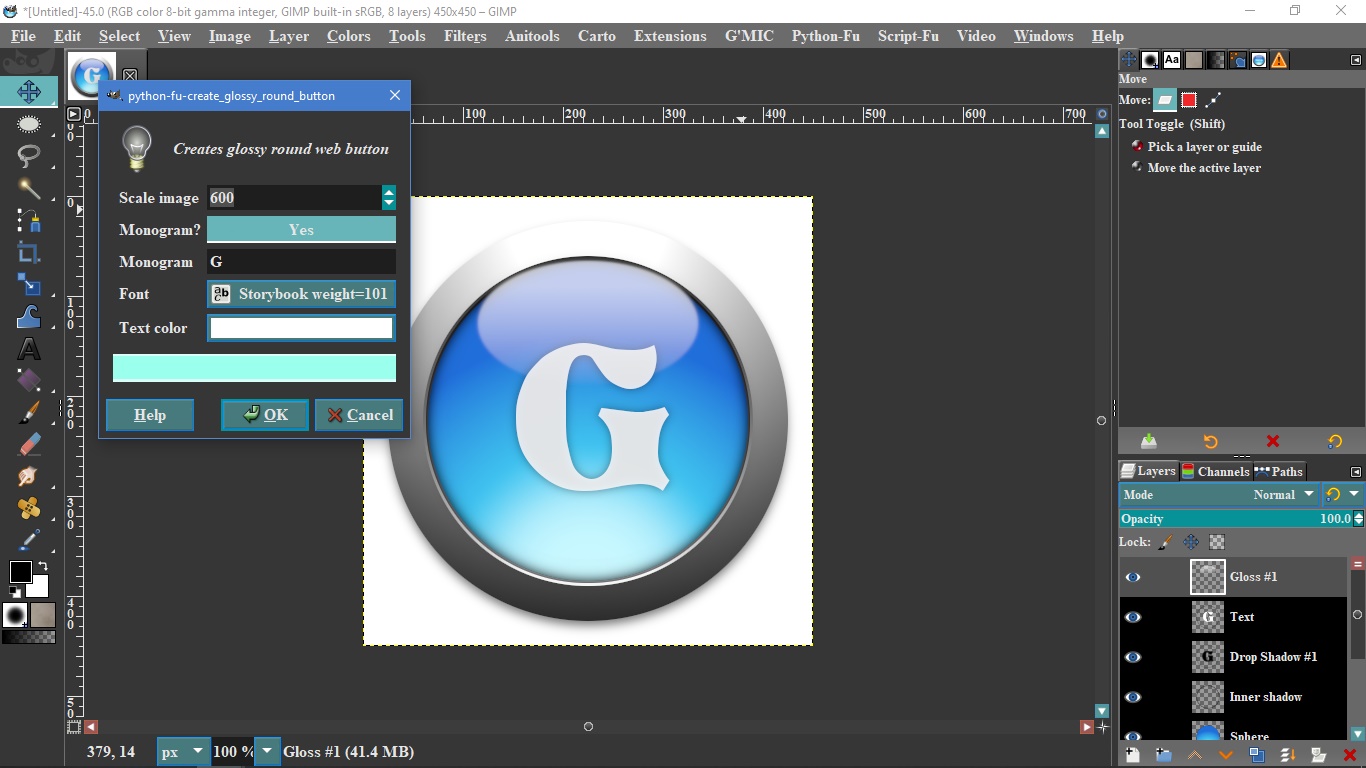
1. It Creates a 450 x 450 px Web 2.0 Button (default), but you can scale it down to 100 px or scale it down to
800 px max.
2. Have an option to create Monogram letter or not on the Button and user select any Font in your system to create the Monogram.
3. User can select the color desire for the Monogram.

This is how th dialog looks like:
Image


Attachments:
create_glossy_round_button.zip [2.26 KiB]
Downloaded 94 times
Share on Facebook Share on Twitter Share on Orkut Share on Digg Share on MySpace Share on Delicious Share on Technorati
Top
 Post subject: Re: create_glossy_round_button.py
PostPosted: Fri May 29, 2020 2:05 am  (#2) 
Offline
GimpChat Member

Joined: Mar 06, 2015
Posts: 308
Thank you Pocholo
For the nice plugin

I like it and it is working fine for me.

Doron


Attachments:
Screenshot 2020-05-29 at 10.02.37 AM.png
Screenshot 2020-05-29 at 10.02.37 AM.png [ 1.56 MiB | Viewed 1958 times ]
Top
 Post subject: Re: create_glossy_round_button.py
PostPosted: Fri May 29, 2020 3:12 am  (#3) 
Offline
GimpChat Member
User avatar

Joined: Mar 01, 2014
Posts: 14068
Location: Spain, Aragón
Thank you Pocholo one more time for your nice plug-ins. It works fine and quick. :tyspin :cool


Attachments:
Thank you Pocholo.jpg
Thank you Pocholo.jpg [ 308.11 KiB | Viewed 1947 times ]

_________________
Image

Gimp 2.10.30(samj) portable _ OS Windows 10 Home_ 64bits
Don’t be afraid to start over. It’s a new chance to rebuild what you want.
Top
 Post subject: Re: create_glossy_round_button.py
PostPosted: Fri May 29, 2020 5:03 am  (#4) 
Offline
GimpChat Member
User avatar

Joined: Apr 15, 2017
Posts: 1837
I have a plugin that already does this, though without the text. It's easy to add text and this one can do non-square buttons as well.

Attachment:
button.jpg
button.jpg [ 89.12 KiB | Viewed 1926 times ]


Attachment:
Round_Web_2_0_Button_with_a_Metal_Ring_gimp_2_8.scm [15.1 KiB]
Downloaded 110 times


Last edited by racer-x on Fri May 29, 2020 5:51 am, edited 1 time in total.

Top
 Post subject: Re: create_glossy_round_button.py
PostPosted: Fri May 29, 2020 5:42 am  (#5) 
Offline
GimpChat Member

Joined: Apr 09, 2018
Posts: 1888
Location: France
Congratulations to all :clap
but can I give an opinion despite my zero level?...I dare ;) : the clear oval above the letter is too sharp, too sharp ...IMHO

_________________
Les parfums, les couleurs et les sons se répondent.Baudelaire (Les fleurs du mal)
2.10.36/(Samj) Gimp 2.10.38 OS Windows 10 Home 64 bits


Top
 Post subject: Re: create_glossy_round_button.py
PostPosted: Fri May 29, 2020 5:52 am  (#6) 
Offline
GimpChat Member
User avatar

Joined: Apr 15, 2017
Posts: 1837
level_0 wrote:
Congratulations to all :clap
but can I give an opinion despite my zero level?...I dare ;) : the clear oval above the letter is too sharp, too sharp ...IMHO


You can add blur or reduce opacity on that layer if you'd like.


Top
 Post subject: Re: create_glossy_round_button.py
PostPosted: Fri May 29, 2020 6:02 am  (#7) 
Offline
GimpChat Member

Joined: Apr 09, 2018
Posts: 1888
Location: France
Ok racer-x, I will try this afternoon. :)

_________________
Les parfums, les couleurs et les sons se répondent.Baudelaire (Les fleurs du mal)
2.10.36/(Samj) Gimp 2.10.38 OS Windows 10 Home 64 bits


Top
Post new topic Reply to topic  [ 7 posts ] 

All times are UTC - 5 hours [ DST ]


* Login  


Powered by phpBB3 © phpBB Group


