It is currently Tue Aug 18, 2026 11:33 am


All times are UTC - 5 hours [ DST ]


Post new topic Reply to topic  [ 17 posts ] 
Author Message
 Post subject: Linocut Look Plug-in
PostPosted: Thu Jun 06, 2019 8:28 am  (#1) 
Offline
Script Coder
User avatar

Joined: May 07, 2014
Posts: 4527
Location: Canada
After seeing this on facebook ad.
Image

It inspired me to copy this look with a plug-in:
Image

_________________
TinT


Last edited by trandoductin on Wed Jan 29, 2025 3:24 pm, edited 1 time in total.

Share on Facebook Share on Twitter Share on Orkut Share on Digg Share on MySpace Share on Delicious Share on Technorati
Top
 Post subject: Re: Linocut Look Plug-in
PostPosted: Thu Jun 06, 2019 9:18 am  (#2) 
Offline
Script Coder
User avatar

Joined: May 07, 2014
Posts: 4527
Location: Canada
Image

_________________
TinT


Top
 Post subject: Re: Linocut Look Plug-in
PostPosted: Thu Jun 06, 2019 9:21 am  (#3) 
Offline
Script Coder
User avatar

Joined: May 07, 2014
Posts: 4527
Location: Canada
I know it's not exactly like the linocut look shown because the original doesn't have uniformly divided cuts. But it's the best I can do.

_________________
TinT


Top
 Post subject: Re: Linocut Look Plug-in
PostPosted: Thu Jun 06, 2019 1:27 pm  (#4) 
Offline
Script Coder
User avatar

Joined: May 07, 2014
Posts: 4527
Location: Canada
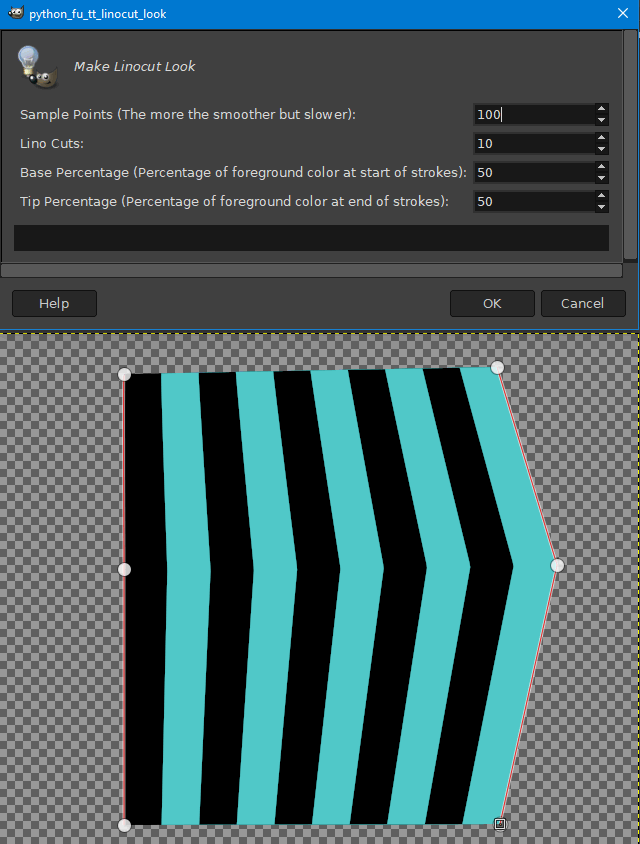
Example of version 2 that allows user to specify base/tip percentage.
Here's an example of base percentage 100 (at the base of strokes, foreground color takes up 100%) and tip percentage of 10 (you can see foreground[pink] color area gets smaller and smaller toward the tip).
Image

_________________
TinT


Top
 Post subject: Re: Linocut Look Plug-in
PostPosted: Thu Jun 06, 2019 1:29 pm  (#5) 
Offline
Script Coder
User avatar

Joined: May 07, 2014
Posts: 4527
Location: Canada
With this new base/tip percentage we're a lot closer to the original inspirational image.

_________________
TinT


Top
 Post subject: Re: Linocut Look Plug-in
PostPosted: Thu Jun 06, 2019 4:37 pm  (#6) 
Offline
Script Coder
User avatar

Joined: May 07, 2014
Posts: 4527
Location: Canada
Image

_________________
TinT


Top
 Post subject: Re: Linocut Look Plug-in
PostPosted: Thu Jun 06, 2019 5:21 pm  (#7) 
Offline
GimpChat Member
User avatar

Joined: May 10, 2013
Posts: 1435
Location: FInland
Interesting plug-in, it sure has potential.
edit: found the problem, need to have same amount of points in both paths.

Not quite like the one you can find in google image search, but I'll give it another go.
And rotating the layer with old script adds jaggies....

Image


Last edited by Nidhogg on Thu Jun 06, 2019 6:02 pm, edited 1 time in total.

Top
 Post subject: Re: Linocut Look Plug-in
PostPosted: Thu Jun 06, 2019 5:58 pm  (#8) 
Offline
GimpChat Member
User avatar

Joined: May 10, 2013
Posts: 1435
Location: FInland
Now I'm happy.
Created 2 paths, the end points meet at the center of canvas, but in the leaf tip a gap was left.
After success, using path rotator script with 8 copies all that had to be done was ctrl+F for each copy.
Great plug-in, thank you! I can already imagine the possibilities with colors and some FX.

Image

Fixed leaf overlap to make it look better.

Image


Top
 Post subject: Re: Linocut Look Plug-in
PostPosted: Thu Jun 06, 2019 7:16 pm  (#9) 
Offline
GimpChat Member
User avatar

Joined: Sep 24, 2010
Posts: 12832
Pretty cool, Tran. Definitely like your version better than mine (and dumb me took me a while to figure out how to use this cool plugin). Thanks for the new toy, Tran. :)


Attachments:
flowebr.png
flowebr.png [ 769.76 KiB | Viewed 7344 times ]

_________________
Lyle

Psalm 109:8

Image
Top
 Post subject: Re: Linocut Look Plug-in
PostPosted: Thu Jun 06, 2019 7:32 pm  (#10) 
Offline
GimpChat Member
User avatar

Joined: Sep 24, 2010
Posts: 12832
As a side note, Hollister (Hop) David is a true master at the linocut look. Been following him at DeviantArt for several years now. :)

https://www.deviantart.com/hop41

_________________
Lyle

Psalm 109:8

Image


Top
 Post subject: Re: Linocut Look Plug-in
PostPosted: Thu Jun 06, 2019 8:48 pm  (#11) 
Offline
Script Coder
User avatar

Joined: May 07, 2014
Posts: 4527
Location: Canada
Thanks for trying it out lylejk!

_________________
TinT


Top
 Post subject: Re: Linocut Look Plug-in
PostPosted: Thu Jun 06, 2019 8:51 pm  (#12) 
Offline
Script Coder
User avatar

Joined: May 07, 2014
Posts: 4527
Location: Canada
Nidhogg wrote:
Interesting plug-in, it sure has potential.
edit: found the problem, need to have same amount of points in both paths.

Not quite like the one you can find in google image search, but I'll give it another go.
And rotating the layer with old script adds jaggies....

[ Image ]


You can have different number of points on the 2 strokes, but the path just has to be visible.

_________________
TinT


Top
 Post subject: Re: Linocut Look Plug-in
PostPosted: Tue Jan 28, 2025 1:57 am  (#13) 
Offline
GimpChat Member
User avatar

Joined: Jan 06, 2020
Posts: 401
Location: The Netherlands
Can anyone help me with this plug-in linocut that works in Gimp 2.10


Last edited by Jappaloe63 on Tue Jan 28, 2025 5:13 am, edited 1 time in total.

Top
 Post subject: Re: Linocut Look Plug-in
PostPosted: Tue Jan 28, 2025 3:13 am  (#14) 
Offline
Global Moderator
User avatar

Joined: May 16, 2010
Posts: 16161
Jappaloe63 wrote:
Can anyone help me with the plug-in. I use Gimp 2.10

Heck i can't even find the plug-in. :(

_________________
Image


Top
 Post subject: Re: Linocut Look Plug-in
PostPosted: Tue Jan 28, 2025 6:25 am  (#15) 
Offline
GimpChat Member
User avatar

Joined: Jan 13, 2011
Posts: 2648
Location: Poland
So here it is

Image


Attachments:
linocut_look Rel.2.zip [2.14 KiB]
Downloaded 83 times

_________________
Image
Top
 Post subject: Re: Linocut Look Plug-in
PostPosted: Tue Jan 28, 2025 6:46 am  (#16) 
Offline
Global Moderator
User avatar

Joined: May 16, 2010
Posts: 16161
You are a rock star MareroQ! :) Thx!!

_________________
Image


Top
 Post subject: Re: Linocut Look Plug-in
PostPosted: Tue Jan 28, 2025 10:56 am  (#17) 
Offline
GimpChat Member
User avatar

Joined: Jan 06, 2020
Posts: 401
Location: The Netherlands
:thanku Thank you!


Top
Post new topic Reply to topic  [ 17 posts ] 

All times are UTC - 5 hours [ DST ]


* Login  


Powered by phpBB3 © phpBB Group