It is currently Tue Jul 14, 2026 4:28 am


All times are UTC - 5 hours [ DST ]


Post new topic Reply to topic  [ 9 posts ] 
Author Message
 Post subject: Custom Font Filesize Reducer v0.1 for Gimp 2.10
PostPosted: Thu Sep 19, 2024 10:34 am  (#1) 
Offline
GimpChat Member
User avatar

Joined: Aug 08, 2016
Posts: 2842
Location: East Midlands of England
This may be of some use - or no use at all...

Download, unzip and install the plug-in in your user plug-in folder.

Attachment:
Custom_Font_Filesize_Reducer_v01.zip [6.35 KiB]
Downloaded 63 times


Pdf version of this short guide...

Attachment:
Size-Reducer.pdf [185.79 KiB]
Downloaded 112 times


So your custom font file is too big for your liking and you need to do something about it.

This plug-in attempts to provide you with information about the layers contained in your custom font file so that you can make a decision about reducing the size of the file - perhaps you need to meet the size restrictions imposed by a hosting website.

There are choices to make:

1. With filesizes that exceed a limit by a larger amount you would probably need to scale the font so that all its layers are smaller.

2. If the font is only slightly over a limit it may be possible to simply remove some layers from the file and reduce the size that way.

3. If your custom font contains both cases, you could remove one of them (usually the lower-case).

Your custom font may only contain a relatively small number layers to start with – say upper-case and some basic punctuation – in which case scaling down would appear to be the only option.

If the file contains a generous selection of other characters then you could remove some of these layers and see if this reduces the size of the file by the amount you need.

Open up the custom font file that you want to work with and call up the filter:

Filters>>Custom Fonts>>Utility Tools>>Custom Font Size Reducer v0.1...

Set the first option, ‘Analyse custom font’ to ‘Yes’ and click on ‘OK’.
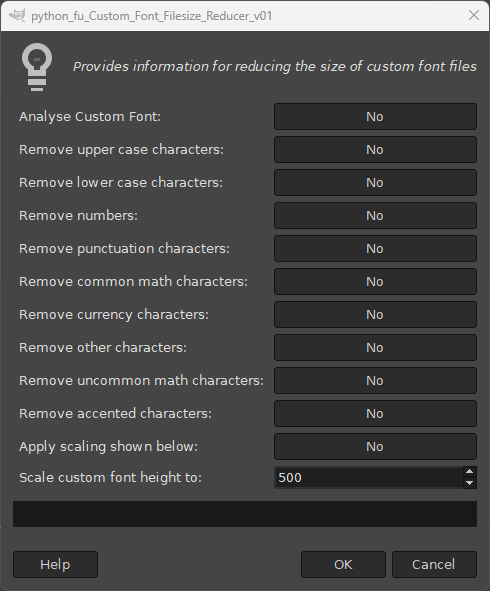
Image

This will open a message box to provide you with a list of character groups and the individual characters in the file (the space character is counted as a character).

The groupings are my own attempt to classify the characters in a meaningful way.
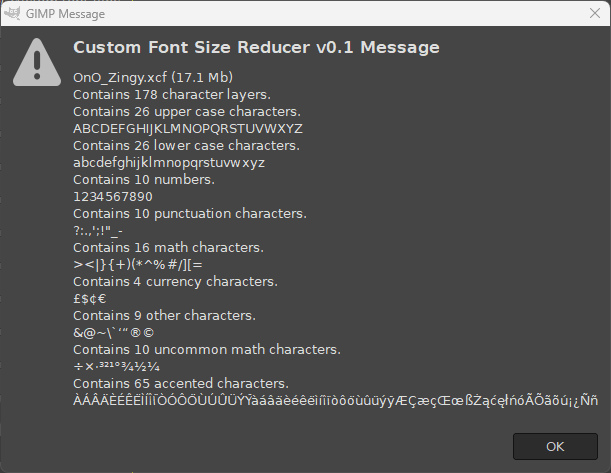
Image

You can decide which, if any, layers you want to remove from the file. You can delete these by hand or use the other filter dialog options to remove groups of characters.

The following illustration attempts to show the relationships between the options and the characters.
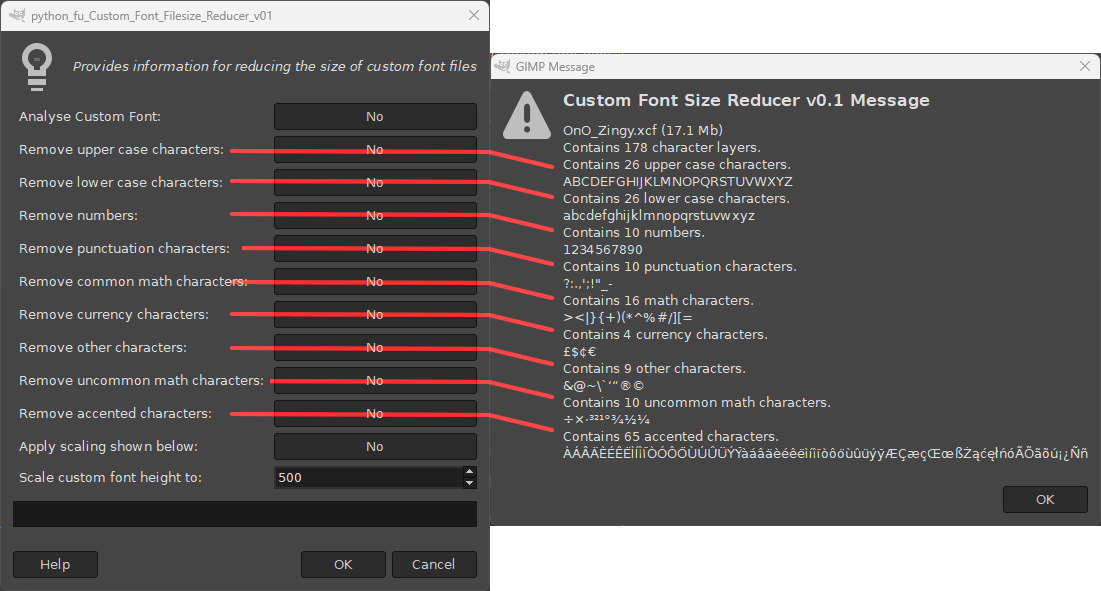
Image

Removing layers is a fairly drastic step to take but if you do make a mistake use undo (Ctrl + Z) to get the layers back.

If you remove upper-case or lower-case characters, any corresponding kerning paths will also be removed from the custom font file.

The last two options can be used to scale down the size of the custom font and all of its character layers.

The value used can be set in the range of 100 – 1000 pixels for the height of the image file.

Characters and Groupings Used:

Upper case characters ABCDEFGHIJKLMNOPQRSTUVWXYZ
Lower case characters abcdefghijklmnopqrstuvwxyz
Numbers 1234567890
Punctuation characters ?:.,';!"_-
Math characters ><|}{+)(*^%#/][=
Currency characters £$¢€
Other characters &@~\`‘“®©
Uncommon math characters ÷×·³²¹°¾½¼
Accented characters ÀÁÂÄÈÉÊËÌÍÎÏÒÓÔÖÙÚÛÜÝŸ
(mainly non-English characters) àáâäèéêëìíîïòôöùûüýÿÆçæçŒœ
߯ąćęłńóÃÕãõú¡¿Ññ

_________________
Image
"Let no one steal your dreams."
Paul Cookson

Custom Font Links
2.10 Tools
Character Paths
White Bases


Share on Facebook Share on Twitter Share on Orkut Share on Digg Share on MySpace Share on Delicious Share on Technorati
Top
 Post subject: Re: Custom Font Filesize Reducer v0.1 for Gimp 2.10
PostPosted: Thu Sep 19, 2024 11:44 pm  (#2) 
Offline
GimpChat Member
User avatar

Joined: May 24, 2021
Posts: 859
Location: SEA - South East Asia
I particularly like the Analyse part, that can be very useful even if we don't need to reduce the size, it help to know what we have exactly, that's very well thought!

It's even useful for people who don't make Custom Fonts, but just download them, instead of scrolling thru the layers' dialog and search for missing characters, they just have to run your script and they will know what's inside or not and can even delete characters they don't use in their language if they wish. :coolthup
Attachment:
screenshot_20240920-125339.jpg
screenshot_20240920-125339.jpg [ 196.92 KiB | Viewed 1231 times ]

That is a Great plugin :bigthup
Thank you very much Skinnyhouse :tyspin

_________________
Patrice


Top
 Post subject: Re: Custom Font Filesize Reducer v0.1 for Gimp 2.10
PostPosted: Fri Sep 20, 2024 12:29 am  (#3) 
Offline
Global Moderator
User avatar

Joined: May 16, 2010
Posts: 16102
I agree! Great idea Skinnyhouse. Thank you. :)

_________________
Image


Top
 Post subject: Re: Custom Font Filesize Reducer v0.1 for Gimp 2.10
PostPosted: Fri Sep 20, 2024 1:31 am  (#4) 
Offline
GimpChat Member

Joined: Apr 11, 2024
Posts: 304
Thanks a lot, Skinnyhouse.


Top
 Post subject: Re: Custom Font Filesize Reducer v0.1 for Gimp 2.10
PostPosted: Fri Sep 20, 2024 1:51 am  (#5) 
Offline
GimpChat Member
User avatar

Joined: Aug 08, 2016
Posts: 2842
Location: East Midlands of England
:tyspin
quietreader, Rod, Patrice.

Idea came from a post by Issabella while battling with a large custom font.
But I was quite pleased with the analysis thing!

_________________
Image
"Let no one steal your dreams."
Paul Cookson

Custom Font Links
2.10 Tools
Character Paths
White Bases


Top
 Post subject: Re: Custom Font Filesize Reducer v0.1 for Gimp 2.10
PostPosted: Fri Sep 20, 2024 3:02 am  (#6) 
Offline
GimpChat Member
User avatar

Joined: Mar 01, 2014
Posts: 14053
Location: Spain, Aragón
Thank you so much Skinnyhouse. It's so clever of you. :tyspin :clap

_________________
Image

Gimp 2.10.30(samj) portable _ OS Windows 10 Home_ 64bits
Don’t be afraid to start over. It’s a new chance to rebuild what you want.


Top
 Post subject: Re: Custom Font Filesize Reducer v0.1 for Gimp 2.10
PostPosted: Fri Sep 20, 2024 3:56 am  (#7) 
Offline
GimpChat Member
User avatar

Joined: Mar 01, 2014
Posts: 14053
Location: Spain, Aragón
I tested it and it works great. So The plugin works phenomenally and is a great step forward. I was able to select everything to make sure the content doesn't exceed the allowed limit.
But one of the parts exceeds the limit by a little. In my case there are 4 parts. The second one exceeds with zip at 6.19 but the fourth has 3.16
Would it be very problematic if the split parts had less difference in weight? I mean that the parts had more or less a similar weight. Sorry if I overstep my bounds. I really appreciate all your work and effort. Thank you very much. :tyspin

_________________
Image

Gimp 2.10.30(samj) portable _ OS Windows 10 Home_ 64bits
Don’t be afraid to start over. It’s a new chance to rebuild what you want.


Top
 Post subject: Re: Custom Font Filesize Reducer v0.1 for Gimp 2.10
PostPosted: Thu Sep 26, 2024 10:04 am  (#8) 
Offline
GimpChat Member
User avatar

Joined: Aug 08, 2016
Posts: 2842
Location: East Midlands of England
Hi Issabella...
Back after a short break away.
Funnily enough I was working on the very same thing before I thought that you would need the sort of information that file reducer provides in order to make an informed judgement about where to split the files.
I will have another look now and see what I can do.
:bigthup

_________________
Image
"Let no one steal your dreams."
Paul Cookson

Custom Font Links
2.10 Tools
Character Paths
White Bases


Top
 Post subject: Re: Custom Font Filesize Reducer v0.1 for Gimp 2.10
PostPosted: Thu Sep 26, 2024 2:45 pm  (#9) 
Offline
GimpChat Member
User avatar

Joined: Mar 01, 2014
Posts: 14053
Location: Spain, Aragón
Thanks a lot, Skinnyhouse. I have just seen your answer in the thread.
You know how to resolve any problem with custom fonts. :hi5 :tyspin
Thank you so much for so much problem I give you. :)

_________________
Image

Gimp 2.10.30(samj) portable _ OS Windows 10 Home_ 64bits
Don’t be afraid to start over. It’s a new chance to rebuild what you want.


Top
Post new topic Reply to topic  [ 9 posts ] 

All times are UTC - 5 hours [ DST ]


* Login  


Powered by phpBB3 © phpBB Group





