It is currently Mon Sep 07, 2026 10:01 am


All times are UTC - 5 hours [ DST ]


Post new topic Reply to topic  [ 6 posts ] 
Author Message
 Post subject: GEGL "Glass over Text' is STAND ALONE BUT NOW PART OF GEGL EFFECTS
PostPosted: Thu May 18, 2023 7:12 pm  (#1) 
Offline
GimpChat Member
User avatar

Joined: Oct 31, 2020
Posts: 2013
*June 10 2023 update. This plugin is now part of GEGL Effects and can be downloaded by downloading GEGL Effects here.
https://github.com/LinuxBeaver/GEGL-Eff ... L/releases


New plugin here. Inspired by Plastic and Glass. Goes on layer above or use the normal blend mode. Also feel free to experiment with other blend modes.

Preview
Attachment:
preview.png
preview.png [ 108.8 KiB | Viewed 22769 times ]


Video of the plugin here.
https://twitter.com/LinuxBeaver/status/ ... 4016882694

Code
https://github.com/LinuxBeaver/GEGL-Eff ... _text_here

Binaries for Windows and Linux (it is with GEGL Effects)
https://github.com/LinuxBeaver/GEGL-Eff ... L/releases

Directory to put binaries

Windows
C:\\Users\(USERNAME)\AppData\Local\gegl-0.4\plug-ins

Linux
/home/(USERNAME)/.local/share/gegl-0.4/plug-ins

Linux (Flatpak includes Chromebook)
/home/(USERNAME)/.var/app/org.gimp.GIMP/data/gegl-0.4/plug-ins


Last edited by contrast_ on Sat Jun 10, 2023 3:48 pm, edited 2 times in total.

Share on Facebook Share on Twitter Share on Orkut Share on Digg Share on MySpace Share on Delicious Share on Technorati
Top
 Post subject: Re: GEGL "Glass over Text'plugin
PostPosted: Thu May 18, 2023 11:21 pm  (#2) 
Offline
GimpChat Member
User avatar

Joined: Oct 31, 2020
Posts: 2013
Image


Top
 Post subject: Re: GEGL "Glass over Text'plugin
PostPosted: Fri May 26, 2023 12:45 am  (#3) 
Offline
GimpChat Member
User avatar

Joined: Jan 06, 2020
Posts: 401
Location: The Netherlands
Sometimes I follow a Photoshop tutorial... see how far I can get. Now I've given it a twist with GEGL glass over text.


Attachments:
COLOR.png
COLOR.png [ 672.6 KiB | Viewed 22663 times ]
Top
 Post subject: Re: GEGL "Glass over Text'plugin
PostPosted: Fri May 26, 2023 1:09 am  (#4) 
Offline
GimpChat Member
User avatar

Joined: Sep 27, 2016
Posts: 345
Location: Germany, BW
What a cool outcome! :coolthup

_________________
Regards
nelo

(Gimp 2.10 on Linux Mint MATE 20.1)


Top
 Post subject: Re: GEGL "Glass over Text' is STAND ALONE BUT NOW PART OF GEGL EFFECTS
PostPosted: Sat Jun 10, 2023 3:47 pm  (#5) 
Offline
GimpChat Member
User avatar

Joined: Oct 31, 2020
Posts: 2013
Glass on Text is now part of GEGL Effects but still has a stand alone plugin.
https://github.com/LinuxBeaver/GEGL-Eff ... ne10th2023

Image


Top
 Post subject: Re: GEGL "Glass over Text' is STAND ALONE BUT NOW PART OF GEGL EFFECTS
PostPosted: Sat Sep 02, 2023 5:25 pm  (#6) 
Offline
GimpChat Member
User avatar

Joined: Oct 31, 2020
Posts: 2013
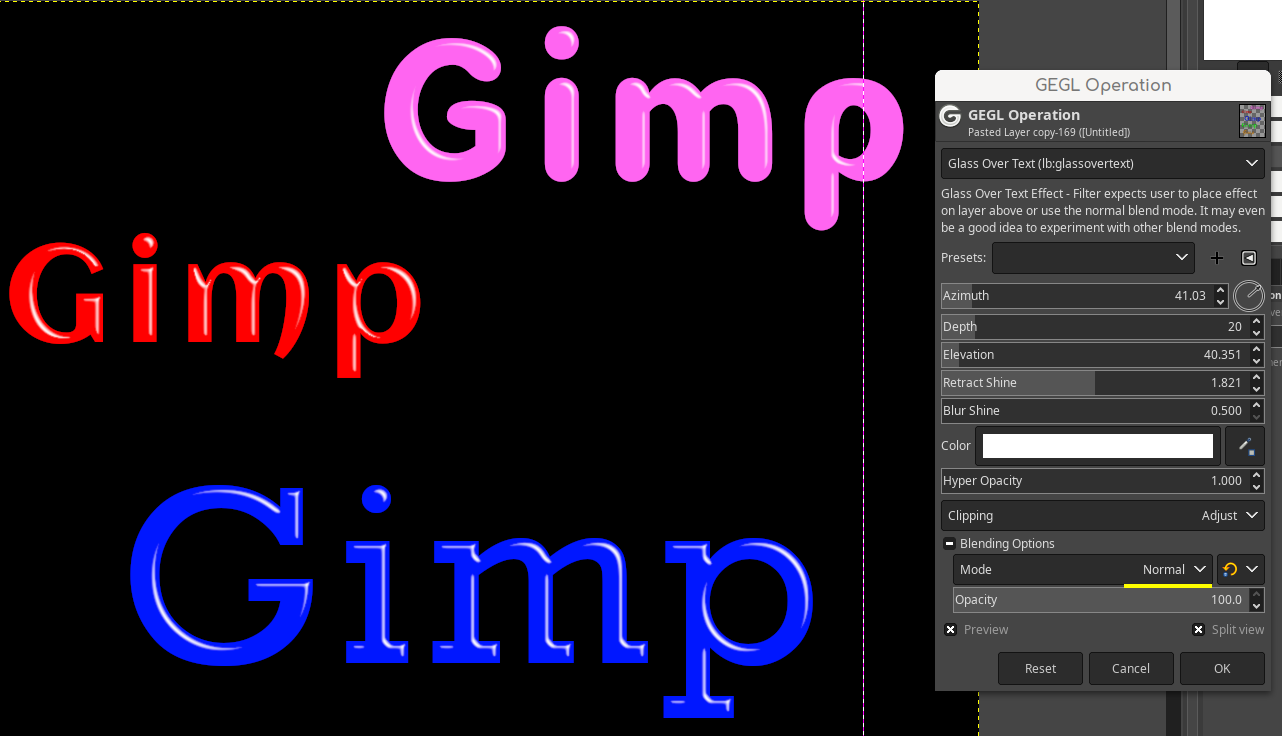
I'm trying to promote my glass on text plugin as it is a counterpart to a old script fu named "shine". As I've said countless times this plugin ships with my layer effects engine - GEGL Effects, but below I have decided to provide stand alone binaries for this plugin. If you already have a modern version of my layer effects engine with glass on text tab, you can ignore this.

Attachment:
got.png
got.png [ 110.94 KiB | Viewed 22411 times ]


REMEMBER, this download is for people that do not have my layer effects engine and just want glass on text as a stand alone filter.

Windows download of glass on text as a stand alone.

Attachment:
glass_on_text_windows.zip [37.03 KiB]
Downloaded 197 times


Linux download of glass on text as stand alone.
Attachment:
glass_on_text_linux.zip [8.88 KiB]
Downloaded 199 times


Directory to put binary. They do not work in the normal plugins folder.

**Windows**

C:\Users\(USERNAME)\AppData\Local\gegl-0.4\plug-ins

**Linux**

/home/(USERNAME)/.local/share/gegl-0.4/plug-ins

**Linux (Flatpak includes Chromebook)**

/home/(USERNAME)/.var/app/org.gimp.GIMP/data/gegl-0.4/plug-ins

--
Enjoy, this filter does not shine people properly. Only text and shapes. Remember to use blending options/blend modes other then the default "replace".


Top
Post new topic Reply to topic  [ 6 posts ] 

All times are UTC - 5 hours [ DST ]


* Login  


Powered by phpBB3 © phpBB Group