It is currently Mon Jun 15, 2026 5:33 pm


All times are UTC - 5 hours [ DST ]


Post new topic Reply to topic  [ 19 posts ] 
Author Message
 Post subject: Luminosity Mask Drive-Thru 2, a Gimp 3 plugin
PostPosted: Thu Nov 21, 2024 11:26 am  (#1) 
Offline
GimpChat Member
User avatar

Joined: Jul 04, 2019
Posts: 280
Location: Lake Havasu City, Arizona, USA
Hi,
I updated my Luminosity Mask Drive-Thru (LMDT) 2.10 plugin to Gimp 3 RC 1.

The plugin was tested on Windows 10, but should work with Linux. LMDT is designed to create luminosity mask for selected layer with and without a selection.
Attachment:
File comment: This is the default dialog.
LMDT plugin dialog.png
LMDT plugin dialog.png [ 20.31 KiB | Viewed 11646 times ]


Attachment:
File comment: This is some sample mask output.
layers dock.png
layers dock.png [ 38.72 KiB | Viewed 11646 times ]


Here is plugin:
Attachment:
File comment: LMDT version 2 for Gimp 3
LMDT 2.zip [11.55 KiB]
Downloaded 366 times

_________________
Charles


Share on Facebook Share on Twitter Share on Orkut Share on Digg Share on MySpace Share on Delicious Share on Technorati
Top
 Post subject: Re: Luminosity Mask Drive-Thru 2, a Gimp 3 plugin
PostPosted: Thu Nov 21, 2024 9:40 pm  (#2) 
Offline
GimpChat Member
User avatar

Joined: Jan 13, 2011
Posts: 2639
Location: Poland
Hi Charles.
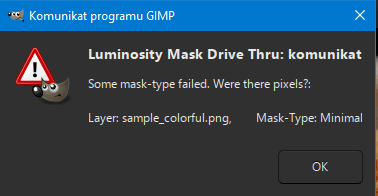
I have a small problem with this plugin:
Image
And a small suggestion - remove the file extension in the layer name (e.g. .png) before adding the mask name.
Simple code for Gimp-2.10.xx:
def rem_ex(image,layer):
   pdb.gimp_image_set_active_layer(image,layer)
   sourcename = layer.name
   if '.' in sourcename:
      split = sourcename.split(".", 1)
      sourcename = split[0]
      layer.name = sourcename


Big applause to the leader in porting Python plugins to Gimp 3. :yes

_________________
Image


Top
 Post subject: Re: Luminosity Mask Drive-Thru 2, a Gimp 3 plugin
PostPosted: Fri Nov 22, 2024 10:11 am  (#3) 
Offline
GimpChat Member
User avatar

Joined: Jul 04, 2019
Posts: 280
Location: Lake Havasu City, Arizona, USA
Thank you Mr. Q. for your suggestion. I thought about it, but I think reflection is the best way to go. There's the possibility that user has named their layer, 'My Layer.Mr Polecat'.

I fixed a problem with the 'Selection Channel' option. I hadn't quite rapped my around the option. In v2.01, LMDT correctly generates the alpha channel mask based on the component type during layer masking. I also renamed the "Selection Channel" to 'Alpha Channel'.

Here in the layer dock, the mask changes per the "Alpha Channel" option.
Attachment:
File comment: The image is made from red and blue.
layer dock 2.png
layer dock 2.png [ 25.51 KiB | Viewed 11547 times ]


I've added the Alpha Channel compenent to the mask-type fail Gimp message:
Attachment:
File comment: The mask cycling resulted in no pixels for the mask-type.
fail message.png
fail message.png [ 11.06 KiB | Viewed 11547 times ]


Here is the LMDT version 2.01.
Attachment:
File comment: Fix and improve the previous version.
LMDT 2.01.zip [11.69 KiB]
Downloaded 180 times

_________________
Charles


Top
 Post subject: Re: Luminosity Mask Drive-Thru 2, a Gimp 3 plugin
PostPosted: Fri Nov 22, 2024 10:26 am  (#4) 
Offline
GimpChat Member
User avatar

Joined: Jul 04, 2019
Posts: 280
Location: Lake Havasu City, Arizona, USA
Here is an image of LMDT's v2.01 dault dialog.
Attachment:
default dialog.png
default dialog.png [ 30.34 KiB | Viewed 11544 times ]

_________________
Charles


Top
 Post subject: Re: Luminosity Mask Drive-Thru 2, a Gimp 3 plugin
PostPosted: Fri Nov 22, 2024 11:02 am  (#5) 
Offline
GimpChat Member
User avatar

Joined: Jul 04, 2019
Posts: 280
Location: Lake Havasu City, Arizona, USA
Mr. Q and interested parties,

Was the problem you were referring to the language translator? I fixed the missing translator in this version, 2.02. While I was at it, I found a bug where some mask-type generation failures were not reported.

Mask-type aren't guaranteed to create a mask, because these mask-types are based on pixel luminosity. For example, a completely black image will cause all of the Light and Midtone group mask-types to fail.

As an alternate to mask-type failure, the plugin could generate a black mask, but why create a mask that basically does nothing?

Here is the LMDT v2.02.
Attachment:
File comment: Fix and improve the previous version.
LMDT 2.02.zip [11.77 KiB]
Downloaded 448 times

_________________
Charles


Top
 Post subject: Re: Luminosity Mask Drive-Thru 2, a Gimp 3 plugin
PostPosted: Fri Nov 22, 2024 1:20 pm  (#6) 
Offline
GimpChat Member

Joined: Mar 04, 2011
Posts: 2603
Always willing to give a try-out, although a quick one, looks good.
This using a linux (kubuntu 22.04) Gimp 3.0 RC1 appimage (ivan-hc appimage)

Attachment:
g3.jpg
g3.jpg [ 141.22 KiB | Viewed 11527 times ]


Seems to work OK. Adjusting using Curves
You could add to the read-me, a reminder for linux users to make the .py files executable.


Top
 Post subject: Re: Luminosity Mask Drive-Thru 2, a Gimp 3 plugin
PostPosted: Fri Nov 22, 2024 8:10 pm  (#7) 
Offline
GimpChat Member
User avatar

Joined: Jul 04, 2019
Posts: 280
Location: Lake Havasu City, Arizona, USA
Thank you Rich2005 for your help. I've fixed a couple of flaws with the Midtone mask generation. I've updated in the "Read Me.txt". Mr. Q was on to it, one of the flaws was causing the Minimal mask-type to frequently fail.

This is a sample screenshot after a LMDT run with all Midtones selected.
Attachment:
File comment: Mask-type is sorted by impact from least to most.
Gimp 3 LMDT 203.png
Gimp 3 LMDT 203.png [ 538.31 KiB | Viewed 11503 times ]


Here is the Python plug-in LMDT v2.03:
Attachment:
File comment: Fix and improve the previous version.
LMDT 2.03.zip [12 KiB]
Downloaded 183 times

_________________
Charles


Top
 Post subject: Re: Luminosity Mask Drive-Thru 2, a Gimp 3 plugin
PostPosted: Sat Nov 23, 2024 12:03 am  (#8) 
Offline
GimpChat Member
User avatar

Joined: Jan 13, 2011
Posts: 2639
Location: Poland
Thanks for the update. :bigthup

Using a dot in the layer name is of course a user choice (which I will gently call a "ridiculous" decision).
Using LMDT for taken photos will always be loaded with the extension - so maybe only as an option: should I remove the extension from the layer name? (default YES)

Theoretically it is possible to create 56 masks (14 type mask x 4 type alpha chanel) and to achieve this you need to run the plugin 4 times and click 15 times.
So one more 'crazy' option to consider (yes - only for the lazy) - should I create all possible masks?
Sorry for the comments I try to refrain from - but sometimes I forget about it. :hehe

_________________
Image


Top
 Post subject: Re: Luminosity Mask Drive-Thru 2, a Gimp 3 plugin
PostPosted: Sat Nov 23, 2024 1:58 am  (#9) 
Offline
GimpChat Member
User avatar

Joined: Dec 09, 2018
Posts: 734
MareroQ wrote:
Using a dot in the layer name is of course a user choice (which I will gently call a "ridiculous" decision).
Using LMDT for taken photos will always be loaded with the extension - so maybe only as an option: should I remove the extension from the layer name? (default YES)

I've images stored from my very old camera with the picture number and filename of the format 7640.img.jpg which will be the layer name when opening the file in gimp :hehe
For non camera files I often use many dots to record the settings used so I can go back and repeat the results so put them in the layer name which is then used for the exported filename e.g. test01-point-distance-0.14-z-0.75

In case it's of any use here's what I use in plugins for gimp 2.10, python2 to remove the file extension:

def name_less_suffix(name):
    'Return the name without any image-type suffix.'

    for suf in '.png', '.jpg', '.jpeg', '.xcf', '.pat':
        if len(name) > len(suf) and name.endswith(suf):
            return name[:-len(suf)]

    return name


Top
 Post subject: Re: Luminosity Mask Drive-Thru 2, a Gimp 3 plugin
PostPosted: Sun Nov 24, 2024 8:03 am  (#10) 
Offline
GimpChat Member
User avatar

Joined: Jul 04, 2019
Posts: 280
Location: Lake Havasu City, Arizona, USA
MareroQ wrote:
Thanks for the update. :bigthup

Theoretically it is possible to create 56 masks (14 type mask x 4 type alpha chanel) and to achieve this you need to run the plugin 4 times and click 15 times.
So one more 'crazy' option to consider (yes - only for the lazy) - should I create all possible masks?
Sorry for the comments I try to refrain from - but sometimes I forget about it. :hehe


The crazy option is now available in LMDT v2.1. I've added switches to the mask-groups and to the Alpha Channel. In order to make the options sane, I've also added a Group option.
Attachment:
File comment: The Group option is hidden until it becomes viable.
group option.png
group option.png [ 33.79 KiB | Viewed 11416 times ]


The Group option organizes output and makes it easier to compare Alpha Channel mask.
Attachment:
File comment: The output grouped four Alpha Channels and the Light mask-type.
sample output.png
sample output.png [ 460.59 KiB | Viewed 11416 times ]


Here is LMDT 2.1:
Attachment:
File comment: Fix and improve the previous version.
LMDT 2.1.zip [43.7 KiB]
Downloaded 275 times

_________________
Charles


Top
 Post subject: Re: Luminosity Mask Drive-Thru 2, a Gimp 3 plugin
PostPosted: Sun Nov 24, 2024 10:36 pm  (#11) 
Offline
GimpChat Member
User avatar

Joined: Jan 13, 2011
Posts: 2639
Location: Poland
Content removed because no longer relevant to users.
Version 2.13 works as expected.

_________________
Image


Last edited by MareroQ on Wed Nov 27, 2024 11:17 am, edited 1 time in total.

Top
 Post subject: Re: Luminosity Mask Drive-Thru 2, a Gimp 3 plugin
PostPosted: Tue Nov 26, 2024 11:34 am  (#12) 
Offline
GimpChat Member
User avatar

Joined: Jul 04, 2019
Posts: 280
Location: Lake Havasu City, Arizona, USA
MareroQ wrote:
I really appreciate your work on LMDT development.

A very quick first test showed:
1. The wrong layer description for Midtone:
Greatest swapped with Minimal
Expanded swapped with Wide.

2. It creates a mask but displays a message that the mask cannot be created (which may be related to issue 1).

Thank you very much MareroQ for your help. I believe I've fixed the inverted layer naming problem.
Attachment:
File comment: The layers stack is in order; the masks appear correct; the failures sync.
test.png
test.png [ 221.42 KiB | Viewed 11307 times ]


Here is LMDT 2.12 with the fixes.
Attachment:
File comment: Fix and improve the previous version.
LMDT 2.12.zip [14.19 KiB]
Downloaded 3121 times

_________________
Charles


Top
 Post subject: Re: Luminosity Mask Drive-Thru 2, a Gimp 3 plugin
PostPosted: Tue Nov 26, 2024 10:25 pm  (#13) 
Offline
GimpChat Member
User avatar

Joined: Jan 13, 2011
Posts: 2639
Location: Poland
Content removed because no longer relevant to users.
Version 2.13 works as expected.

_________________
Image


Last edited by MareroQ on Wed Nov 27, 2024 11:17 am, edited 1 time in total.

Top
 Post subject: Re: Luminosity Mask Drive-Thru 2, a Gimp 3 plugin
PostPosted: Wed Nov 27, 2024 8:46 am  (#14) 
Offline
GimpChat Member
User avatar

Joined: Jul 04, 2019
Posts: 280
Location: Lake Havasu City, Arizona, USA
Thanks again, Mr. Q. I believe I've got it fixed this time. I did some additional factoring, so that helps me get to a correct solution.

LMDT automatically removes empty mask groups which occur when the mask-types fail. The problem with the Midtones was an inverted option check. One line of code, and it all goes wrong.
Attachment:
File comment: I'm over-confident that this is correct.
test.png
test.png [ 111.35 KiB | Viewed 11239 times ]


LMDT v2.13:
Attachment:
File comment: Fix and improve previous version.
LMDT 2.13.zip [14.6 KiB]
Downloaded 192 times

_________________
Charles


Top
 Post subject: Re: Luminosity Mask Drive-Thru 2, a Gimp 3 plugin
PostPosted: Wed Nov 27, 2024 11:13 am  (#15) 
Offline
GimpChat Member
User avatar

Joined: Jan 13, 2011
Posts: 2639
Location: Poland
Yes, Cowboy. That was a bullseye. :pshoot
:tyspin

_________________
Image


Top
 Post subject: Re: Luminosity Mask Drive-Thru 2, a Gimp 3 plugin
PostPosted: Tue Feb 11, 2025 4:07 pm  (#16) 
Offline
GimpChat Member
User avatar

Joined: Jul 04, 2019
Posts: 280
Location: Lake Havasu City, Arizona, USA
There's a fix for layer opacity. Tested on Windows 10, Gimp 3 RC3.


Attachments:
File comment: Fix and improve the previous version.
LMDT 2.22.zip [54.11 KiB]
Downloaded 522 times

_________________
Charles
Top
 Post subject: Re: Luminosity Mask Drive-Thru 2, a Gimp 3 plugin
PostPosted: Sat May 03, 2025 8:08 am  (#17) 
Offline
New Member

Joined: May 03, 2025
Posts: 1
rich2005 wrote:
Always willing to give a try-out, although a quick one, looks good.
This using a linux (kubuntu 22.04) Gimp 3.0 RC1 appimage (ivan-hc appimage)

Attachment:
g3.jpg


Seems to work OK. Adjusting using Curves
You could add to the read-me, a reminder for linux users to make the .py files executable.


Thanks for the plugin and the "read-me". I could not get it going until I read the read-me about the .py thing as I am using Linux.


Top
 Post subject: Re: Luminosity Mask Drive-Thru 2, a Gimp 3 plugin
PostPosted: Sun May 04, 2025 3:32 am  (#18) 
Offline
GimpChat Member

Joined: Jan 07, 2025
Posts: 11
Windows 10, Gimp 3.0. 2-1, The LMDT gimp plugin works perfectly for me. Thanks gasMask.


Top
 Post subject: Re: Luminosity Mask Drive-Thru 2, a Gimp 3 plugin
PostPosted: Sun Oct 26, 2025 12:11 pm  (#19) 
Offline
New Member

Joined: Oct 26, 2025
Posts: 1
denzjos wrote:
Windows 10, Gimp 3.0. 2-1, The LMDT gimp plugin works perfectly for me. Thanks gasMask.


Similarly, no problems here using Windows 10 - thanks for a useful (and usable) plug-in


Top
Post new topic Reply to topic  [ 19 posts ] 

All times are UTC - 5 hours [ DST ]


* Login  


Powered by phpBB3 © phpBB Group