It is currently Thu Jun 18, 2026 6:12 am


All times are UTC - 5 hours [ DST ]


Post new topic Reply to topic  [ 15 posts ] 
Author Message
 Post subject: Autotrace for Gimp3 Win10
PostPosted: Mon Apr 21, 2025 10:46 pm  (#1) 
Offline
GimpChat Member
User avatar

Joined: Jan 13, 2011
Posts: 2639
Location: Poland
Autotrace - converts bitmap to vector graphics.
https://autotrace.sourceforge.net/

Unzip the attachment and place it in your (home) plug-ins directory.
It also contains the necessary exe and dll libraries.

Very important:
The plugin path cannot contain directories with spaces and special (accented) characters.
The default installation and portable version of Samj meet these conditions.


This plug-ins:
1.Saves active layer as File-name.ppm in dir Autotrace_for_Gimp3.
2. Launches autotrace.exe (console) - create 'File-name'.svg.
3. Wait for the console to close.
4. Opened 'File-name'.svg as layer and/or path.
IF YOU DON'T CHANGE THE FILE NAME - THEY WILL BE OVERWRITTEN.

In menu: In menu: Filters ➤ Edge-Detect ➤ Autotrace

Image

Image


Attachments:
Autotrace_for_Gimp3.zip [313.79 KiB]
Downloaded 260 times

_________________
Image
Share on Facebook Share on Twitter Share on Orkut Share on Digg Share on MySpace Share on Delicious Share on Technorati
Top
 Post subject: Re: Autotrace for Gimp3 Win10
PostPosted: Tue Apr 22, 2025 1:07 pm  (#2) 
Offline
GimpChat Member

Joined: Jan 07, 2025
Posts: 11
Windows 10, Gimp 3.0. 2-1. I placed the Potrace folder with its files in the Gimp 3 Plugins folder, but I don't see Autotrace in the Edge Detect menu. Any suggestions?


Top
 Post subject: Re: Autotrace for Gimp3 Win10
PostPosted: Tue Apr 22, 2025 1:46 pm  (#3) 
Offline
GimpChat Member
User avatar

Joined: Jan 13, 2011
Posts: 2639
Location: Poland
Hi Denzjos.
Potrace or Autotrace? ;)

Is it in such a location?
Image

_________________
Image


Top
 Post subject: Re: Autotrace for Gimp3 Win10
PostPosted: Wed Apr 23, 2025 2:29 am  (#4) 
Offline
GimpChat Member

Joined: Jan 07, 2025
Posts: 11
Attachment:
potrace.jpg
potrace.jpg [ 31.37 KiB | Viewed 6940 times ]

I now have installed autotrace and the plugin is visible in the gimp menu and is working. Still can't see potrace, weird...


Top
 Post subject: Re: Autotrace for Gimp3 Win10
PostPosted: Thu Sep 11, 2025 2:16 pm  (#5) 
Offline
GimpChat Member

Joined: Sep 11, 2025
Posts: 7
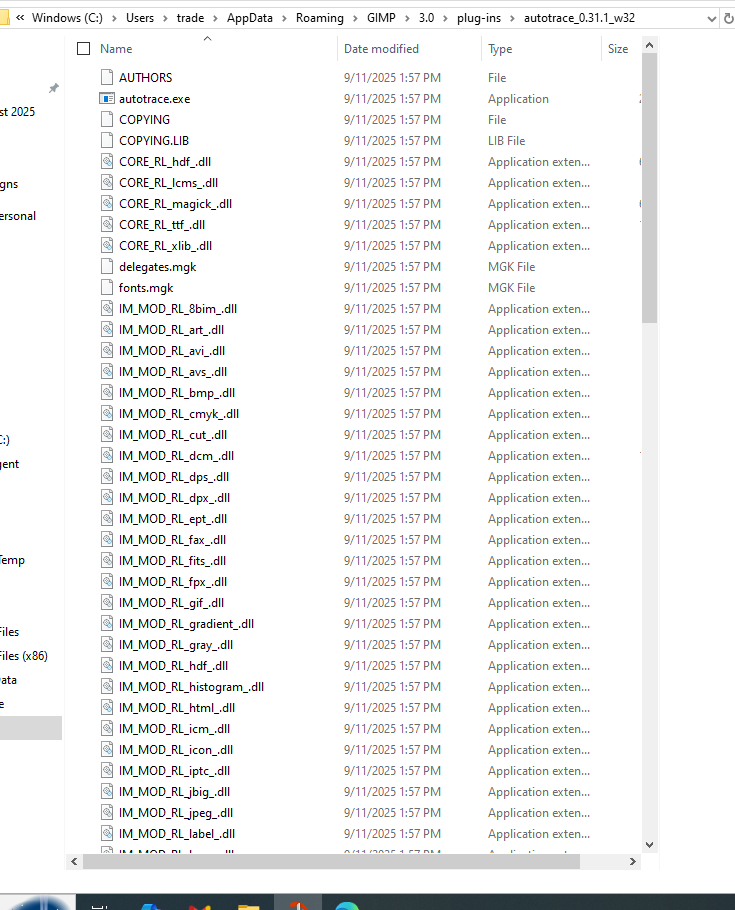
Would love to get this Autotrace plugin working but it is not showing up in my filters.
I installed latest version of GIMP. I downloaded the Autotrace plugin file and put it in my plugins folder.
Is there anything else I need to do in order to get this to work properly on my windows 10 machine?
Image


Attachments:
autotrace.png
autotrace.png [ 119.86 KiB | Viewed 4076 times ]
Top
 Post subject: Re: Autotrace for Gimp3 Win10
PostPosted: Thu Sep 11, 2025 2:30 pm  (#6) 
Offline
GimpChat Member

Joined: Apr 11, 2024
Posts: 298
should you not name your folder just "autotrace" without the version number?


Top
 Post subject: Re: Autotrace for Gimp3 Win10
PostPosted: Thu Sep 11, 2025 2:45 pm  (#7) 
Offline
GimpChat Member

Joined: Sep 11, 2025
Posts: 7
I wish it was that simple. I renamed the directory to "autotrace" and still nothing shows up in the filters. Does it matter that I am running a 64 bit machine?


Top
 Post subject: Re: Autotrace for Gimp3 Win10
PostPosted: Thu Sep 11, 2025 2:58 pm  (#8) 
Offline
GimpChat Member

Joined: Sep 11, 2025
Posts: 7
Did some more reading on this which makes me even more confused. One instruction said to download, extract, and put the folder in the plugins folder (which I did).

Reading in Sourceforge, it says to load the plugin and then "compile" it. What? Isn't that what a plugin does? Well it has been 20 years since I compiled anything so if this step is necessary, please include instructions on how to do this. Thank-you


Top
 Post subject: Re: Autotrace for Gimp3 Win10
PostPosted: Fri Sep 12, 2025 12:18 am  (#9) 
Offline
GimpChat Member
User avatar

Joined: May 10, 2013
Posts: 1430
Location: FInland
trader4300 wrote:
Reading in Sourceforge, it says to load the plugin and then "compile" it.

You don't need to compile the plug-ins / scripts posted here. They are already compiled.
Extract the archive and put the Autotrace_for_Gimp3 folder in your Gimp user plug-ins folder. Do not rename the folder, in Gimp3 the folder name needs to be same as the plugin name. That is, the py file Autotrace_for_Gimp3.py

Attachment:
Autotrace.jpg
Autotrace.jpg [ 131.31 KiB | Viewed 4060 times ]


Top
 Post subject: Re: Autotrace for Gimp3 Win10
PostPosted: Fri Sep 12, 2025 8:16 am  (#10) 
Offline
GimpChat Member

Joined: Sep 11, 2025
Posts: 7
Ok, thanks for the input. I will rename that directory back to the original and try again.


Top
 Post subject: Re: Autotrace for Gimp3 Win10
PostPosted: Fri Sep 12, 2025 11:30 am  (#11) 
Offline
GimpChat Member

Joined: Sep 11, 2025
Posts: 7
YES! That did it. Thank-you everyone for all the help.


Top
 Post subject: Re: Autotrace for Gimp3 Win10
PostPosted: Mon Sep 15, 2025 4:31 am  (#12) 
Offline
GimpChat Member

Joined: Sep 05, 2025
Posts: 13
Hi, mareroq, This is the first time autotrace works for me in portable gimp. Thanks.


Top
 Post subject: Re: Autotrace for Gimp3 Win10
PostPosted: Mon Sep 15, 2025 2:01 pm  (#13) 
Offline
GimpChat Member

Joined: Sep 11, 2025
Posts: 7
Attachment:
autotrace errors.png
autotrace errors.png [ 52.32 KiB | Viewed 3958 times ]
Tried Autotrace the 2nd time now and it is failing. 1st time it worked fine as reported. After closing and reopening Gimp and attempting the Autotrace filter,
I get the following errors. Can anybody explain why this is happening?


Top
 Post subject: Re: Autotrace for Gimp3 Win10
PostPosted: Tue Feb 10, 2026 10:15 am  (#14) 
Offline
New Member

Joined: Feb 10, 2026
Posts: 1
trader4300, adding an alpha channel to the layer will fix this error


Top
 Post subject: Re: Autotrace for Gimp3 Win10
PostPosted: Tue Feb 10, 2026 10:48 am  (#15) 
Offline
GimpChat Member

Joined: Sep 11, 2025
Posts: 7
OK, I added an alpha channel and still get these error messages which really mean nothing to me. Is this a problem with autotrace, my image, or the process I am using?


Attachments:
Gimp Autotrace failed.png
Gimp Autotrace failed.png [ 842.21 KiB | Viewed 2794 times ]
Top
Post new topic Reply to topic  [ 15 posts ] 

All times are UTC - 5 hours [ DST ]


* Login  


Powered by phpBB3 © phpBB Group