It is currently Fri Jul 24, 2026 2:25 pm


All times are UTC - 5 hours [ DST ]


Post new topic Reply to topic  [ 4 posts ] 
Author Message
 Post subject: OK One time...someone help me installing Gimp please.
PostPosted: Wed May 09, 2012 8:04 am  (#1) 
Offline
New Member
User avatar

Joined: May 09, 2012
Posts: 1
Image


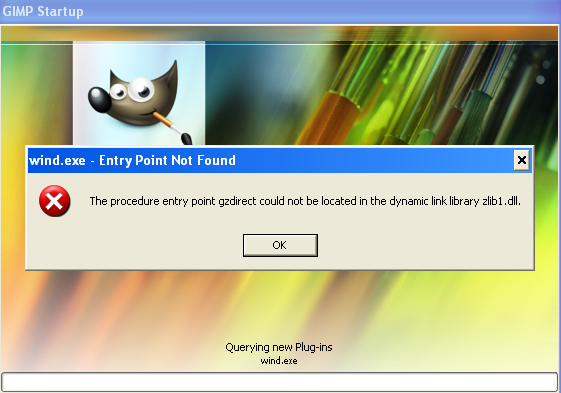
so ^that's^ a photo capture of what is coming up when I try to start Gimp, the latest one 2.8 and the one before that 2.7 i believe. I tried some stuff i read but it didn't work. I'm not computer Illiterate so if you tell me to do this do that i can carry out some simple instructions absolutely...

i have home edition windows xp sp3 version 2002...

I just hope i didn't file all kinds of files and crap all over the place on the HD. I was looking and I installed and uninstalled so much it leavves junk im using CCleaner to fix that. so if you know my problem and can help me them please do..I rather have gimp than paint. unfortunatly i dont have linus box no mo or i would do it that way but im using what i can afford now a netbook and a difficult transition
thank you


Attachments:
File comment: the pop up of trouble
gimpstartup.JPG
gimpstartup.JPG [ 31.4 KiB | Viewed 1746 times ]
Share on Facebook Share on Twitter Share on Orkut Share on Digg Share on MySpace Share on Delicious Share on Technorati
Top
 Post subject: Re: OK One time...someone help me installing Gimp please.
PostPosted: Wed May 09, 2012 9:35 am  (#2) 
Offline
GimpChat Member

Joined: Mar 23, 2011
Posts: 15
Delete zlib1.dll from your plugin folder and it should work fine!


Top
 Post subject: Re: OK One time...someone help me installing Gimp please.
PostPosted: Wed May 09, 2012 10:06 am  (#3) 
Offline
Script Coder
User avatar

Joined: Oct 25, 2010
Posts: 4812
chaazy wrote:
Delete zlib1.dll from your plugin folder and it should work fine!

Not sure this is the right thing to do. It is likely a conflict between some zlib1.dll coming with Gimp and another zlib1.dll (obsoelete version of same, likely) elsewhere on the system (it is distributed with other programs), taken in account first (Googling for this shows that this problem also existed in 2.6).

It is very likely that getting a unique and up-to-date version of zlib1.dll will fix the problem for Gimp and still allow the other software to run.

http://www.zlib.net/DLL_FAQ.txt

_________________
Image


Top
 Post subject: Re: OK One time...someone help me installing Gimp please.
PostPosted: Wed May 09, 2012 1:01 pm  (#4) 
Offline
GimpChat Member

Joined: Mar 23, 2011
Posts: 15
Deleted the file myself and I've experienced no problems at all. And since deleting it, I've added more plugins and scripts, and have not had any problems with these either.

Not really a technical sort of person, just wanted Gimp to work and this was a simple solution which was the only thing that got me past all the error messages.

Got the advise from here; http://registry.gimp.org/node/26266


Top
Post new topic Reply to topic  [ 4 posts ] 

All times are UTC - 5 hours [ DST ]


* Login  


Powered by phpBB3 © phpBB Group