Some interesting scripts from samj (all use GMIC)if you do not have this plugin go to the text tutorials for instructions
Spirals
Brief description of options.
Centre Spiral = Choice of positioning the center of the spiral center of the image / X & Y (pixels) / Center the selection.
Centre Spiral X (pixels) X = Determination of the center of the spiral.
Y Center Spiral (pixels) Y = Determination of the center of the spiral.
Tours / Laps = Number of turns.
Increment Teta (Degrees) = increment of the angle.
Dimension Spiral coefficient = Changes the size of the spiral.
Rotation sense = Choice of rotation.
Rendering type = render:
- Points Color Rendering.
- Circles Color Rendering.
- Gallery Random Colors.
- Rings Around The Centre Random Colors.
- Successive Segments Random Colors.
- Circles Random Colors.
- Points Random Colors.
- Color Rendering Triangles 1.
- 2 Color Rendering Triangles.
- Random Colors Triangles 1.
- Triangles 2 Random Colors.
- Color Rendering Rectangles.
- Random Colors Rectangles.
Render size (pixels) size = radius circle.
Color Rendering = Choice of color rendering.
Dispersion / Spread = Effect level.
Blur / Blur = Effect level.
= Mixture composed of layers:
- Without / Without.
- Average.
- Multiply.
- Divide.
- Screen.
- Darken.
- Lighten.
- Difference.
- Negation.
- Exclusion.
- Overlay.
- HARDLIGHT.
- Softlight.
- Dodge.
- Colorburn.
- Reflect.
- Freeze.
- Stamp.
- Interpolation.
- Preserve.
Compose (continued) = Blend Layers:
- Without / Without.
- Grainextract.
- Grainmerge.
- Xor.
- Hue.
- Saturation.
- Value.
- Luminance.
- Lightness.
- Edges.
- Median.
- Fade.
- Shapeaverage.
- Preserve.
Selection consists Preserve: Preserving the positioning of the selection if Compose option.
Option verbose messages = (useless).
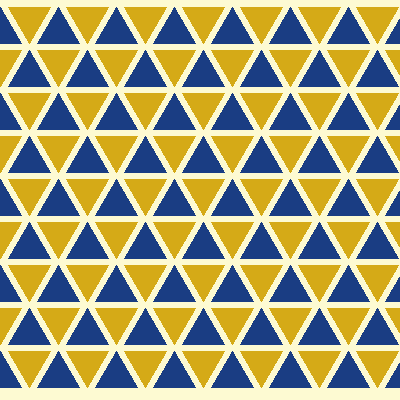
Triagles & Stars
Here is a brief description of the parameters:
"Joined Radius Circle / Inscribed Circle Radius (pixels)"
The size of the triangle is determined by the radius of the inscribed circle in pixels.
"Effect / Effect"
Choose the effect, or a triangle of two, the entire image is covered with triangles, stars.
"Angle (degrees)"
Rotation of the triangles or stars.
"Color Triangle 1/1 Color Triangle"
Choosing the color of the first triangle.
"Color Triangle 2/2 Color Triangle"
Choosing the color of the second triangle.
"Angle (degrees)"
Rotation angle in degrees triangles or stars from the center of the inscribed circle.
"Background Color / Background Color"
Background color.
"X Spacing / Spacing X (pixels)"
X spacing in pixels between the triangles or stars.
"Spacing Y / Y Spacing (pixel)"
Y spacing in pixels between the triangles or stars.
"Transparency"
Triangles or stars are transparent or semitransparent.
"Relief / Emboss"
Application of the graft "Relief" Gimp.
"Deformation Distortion"
Choice of distortions made.
"Amplitude / Angle Distortion G'MIC"
Parameter related to the distortion, amplitude or angle according to the previous selection.
"Blur / Blur"
Amount of blur.
"Compose" and "Compose (continued)"
Mixing with the bottom layer.
"Compose Preserve Selection"
Preserves the selection or multiple selection following Compose G'MIC
"Messages"
Enable messages (without utility, used for testing).
Ellipses Diamonds
Here is a brief description of the parameters:
"Size (Pattern / Pattern): 1/2 X (pixels)"
Parameter to give the pixel dimension of a radius of the ellipse or the half-diagonal of the lozenge.
"Size (Pattern / Pattern): 1/2 Y (pixels)"
Parameter to give the pixel dimensions of the other radius of the ellipse or of the other half-diagonal of the lozenge.
"Effect / Effect"
Choose a report, ellipses or diamonds.
"Angle (degrees)"
Angle of rotation in degrees ellipses or lozenges from the center of gravity.
"Color Pattern / Pattern Color"
Colored ellipses or diamonds.
"Background Color / Background Color"
Background color.
"X Spacing / Spacing X (pixels)"
X spacing in pixels between the ellipses or diamonds.
"Spacing Y / Y Spacing (pixel)"
Y spacing in pixels between the ellipses or diamonds.
"Transparency"
Ellipses or diamonds are transparent or semitransparent.
"Relief / Emboss"
Application of the graft "Relief" Gimp.
"Deformation Distortion"
Choice of distortions made.
"Amplitude / Angle Distortion G'MIC"
Parameter related to the distortion, amplitude or angle according to the previous selection.
"Blur / Blur"
Amount of blur.
"Compose" and "Compose (continued)"
Mixing with the bottom layer.
"Compose Preserve Selection"
Preserves the selection or multiple selection following Compose G'MIC
"Messages"
Enable messages (without utility, used for testing)
Attachment:
 scripts.zip [16.83 KiB]
Downloaded 202 times
 Login
 Register
 Tweets
 FAQ
 Advanced Search