It is currently Wed Jun 03, 2026 6:43 pm


All times are UTC - 5 hours [ DST ]


Post new topic Reply to topic  [ 14 posts ] 
Author Message
 Post subject: AutotraceSwitch_WIN_32bit
PostPosted: Wed Jan 07, 2015 2:41 pm  (#1) 
Offline
GimpChat Member
User avatar

Joined: Jan 13, 2011
Posts: 2637
Location: Poland
It's just a curiosity for Windows XP.
Why?
Autotrace - vectorization in color - very interesting - the lack of new compilations (since 2002 year).

Usage:
1. Download autotrace http://autotrace.sourceforge.net/
2. Unzip and copy the files to a directory C:/Autotrace
3. Copy autotrace.bat to a directory C:/Autotrace
4. Copy AutotraceSwitch_opensvg.py, AutotraceSwitch_savepng.py to a directory Gimp plug-ins.
5. In menu Gimp: Filters -> Edge-Detect -> Autotrace (in two consecutive steps)
The principle of operation of the plugin as Potrace http://gimpchat.com/viewtopic.php?f=9&t=11769#p159071

ps. Switch: Autotrace, Potrace, Voronoi - it should work for Linux - you only need to change the path of programs (after repair my computer - I'll do tests in Ubuntu).
Question: Trace (Gimp plugin in Python, frontend for autotrace) http://registry.gimp.org/node/21349 - to cannon is still for Linux ?


Attachments:
AutotraceSwitch_0.1_WIN_XP_32bit.zip [2.76 KiB]
Downloaded 178 times
autotraceexample.png
autotraceexample.png [ 797.89 KiB | Viewed 4688 times ]

_________________
Image


Last edited by MareroQ on Tue Feb 23, 2016 10:24 am, edited 1 time in total.
Share on Facebook Share on Twitter Share on Orkut Share on Digg Share on MySpace Share on Delicious Share on Technorati
Top
 Post subject: Re: AutotraceSwitch_0.1_ONLY_WIN_XP_32bit
PostPosted: Wed Jan 07, 2015 2:52 pm  (#2) 
Offline
GimpChat Member
User avatar

Joined: Sep 24, 2010
Posts: 12775
Yeah; it's unfortunately no one's ported this cool utility so that it would be friendly with Win7 or Win8/8.1. Fortunately for my, I have an XP VM (but still use GIMP in Win8.1 only). :)

_________________
Lyle

Psalm 109:8

Image


Top
 Post subject: Re: AutotraceSwitch_0.1_ONLY_WIN_XP_32bit
PostPosted: Tue Feb 23, 2016 9:34 am  (#3) 
Offline
GimpChat Member
User avatar

Joined: Jan 13, 2011
Posts: 2637
Location: Poland
I compiled all over again autotrace (author: Martin Weber) version 0.31.1.(2002-11-09).
Tested only on Vista 32 bits.
A few changes to the plugin AutotraceSwitch.py (v 0.2)

The default installation C:/autotrace (or edit AutotraceSwitch.py and autotrace.bat - which files should be on the same disk).

Delineate 0.5 also works well.


Attachments:
Autotrace_Win.png
Autotrace_Win.png [ 401.56 KiB | Viewed 4197 times ]
AutotraceSwitch_0.2_WIN_32bit.7z [1.67 KiB]
Downloaded 152 times
autotrace.7z [3.36 MiB]
Downloaded 178 times

_________________
Image
Top
 Post subject: Re: AutotraceSwitch_WIN_32bit
PostPosted: Tue Feb 23, 2016 11:44 am  (#4) 
Offline
GimpChat Member

Joined: Mar 04, 2011
Posts: 2599
I am tacking this on here as AutoTrace related, but linux. Apologies proffered to all Win users.

Autotrace is useful in that unlike potrace (and Inkscape) it offers a centerline trace rather than outlining everything. Worth a try with the new windows autotrace from MareoQ

The standard lenna image is not the best to use as an example, but with some preliminary Gimp editing you might get this.

Attachment:
atrace-0.jpg
atrace-0.jpg [ 115.63 KiB | Viewed 4176 times ]

a trace of single paths.

And again for linux users, a really old front end for Autotrace, SVGPage. Useful in that you can 'tweak' the parameters without using command line.

Attachment:
atrace-1.jpg
atrace-1.jpg [ 125.6 KiB | Viewed 4176 times ]

This might might not be so easy to find these days. Attached a deb (zipped). It is a python application, works with most distros but you might have to unpack the deb and install manually.


Attachments:
svgpage05.zip [719.35 KiB]
Downloaded 179 times
Top
 Post subject: Re: AutotraceSwitch_WIN_32bit
PostPosted: Sat Feb 27, 2016 4:17 pm  (#5) 
Offline
GimpChat Member
User avatar

Joined: Jan 13, 2011
Posts: 2637
Location: Poland
In this version 0.3 AutotraceSwitch.py added the ability to export to Inkscape and return after editing to GIMP.

PS. Hi Rich.
In Windows, I can open the SVGpage 0.5 but "Render as an SVG" does not work.
I can not change the program - to find autotrace.exe. :oops:


Attachments:
With Gimp to Inkskape and return to Gimp.png
With Gimp to Inkskape and return to Gimp.png [ 939.46 KiB | Viewed 4087 times ]
AutotraceSwitch v 0.3.7z [1.76 KiB]
Downloaded 161 times

_________________
Image
Top
 Post subject: Re: AutotraceSwitch_WIN_32bit
PostPosted: Sat Feb 27, 2016 7:45 pm  (#6) 
Offline
GimpChat Member
User avatar

Joined: Sep 24, 2010
Posts: 12775
Where did you get that graphic, MareroQ? I would like a link.

As a side note, I tried your Autotrace compile in Win10; will not work. It first was missing a dll (don't recall which one). Found a copy but then it would just do nothing. Oh well; again, I have Autotrace for my XP VM and it still works there. :)

_________________
Lyle

Psalm 109:8

Image


Top
 Post subject: Re: AutotraceSwitch_WIN_32bit
PostPosted: Sat Feb 27, 2016 11:24 pm  (#7) 
Offline
GimpChat Member
User avatar

Joined: Mar 16, 2015
Posts: 613
Location: On Earth,specifically Queensland,Australia
I found similar graphics under polish folk art in Pinterest, Lyle.

_________________
Image


Top
 Post subject: Re: AutotraceSwitch_WIN_32bit
PostPosted: Sun Feb 28, 2016 1:15 am  (#8) 
Offline
GimpChat Member
User avatar

Joined: Jan 13, 2011
Posts: 2637
Location: Poland
Hi Lylejk.

Link to graphics:

https://www.google.pl/search?q=wycinanki-lowickie-piekne-niepowtarzalne&biw=1440&bih=751&tbm=isch&tbo=u&source=univ&sa=X&ved=0ahUKEwiq5_Lg35nLAhVoLZoKHTw1ACYQsAQIIQ#tbm=isch&tbs=rimg%3ACc0csGsS9KalIjiuIaf_1VsSuUhY_1BDxnXdeOyESWmWRaEUfjkbq044l5Rlce1dzkm1tw--yL2W6ZABw3eFmpkFY5dSoSCa4hp_19WxK5SEYNC43ULZhEuKhIJFj8EPGdd144RKFHHKVf5hdcqEgnIRJaZZFoRRxG8u_1PNOvvC4ioSCeORurTjiXlGEc--xSO6DZgnKhIJVx7V3OSbW3AR8mSYufhRl8MqEgn77IvZbpkAHBErDJ9MewVAYyoSCTd4WamQVjl1EdGwlV4vZfnL&q=wycinanki-lowickie-piekne-niepowtarzalne

Can you check again what a file is missing (or wrong version) in autotrace?
Thank you in advance.

AUTOTRACE.EXE - by Dependency Walker:

ACTIVEDS.DLL ADSLDPC.DLL ADVPACK.DLL API32.DLL APPHELP.DLL ATL.DLL AUTHZ.DLL BCRYPT.DLL BROWSEUI.DLL CABINET.DLL CERTCLI.DLL CFGMGR32.DLL CLBCATQ.DLL COMCTL32.DLL COMDLG32.DLL CREDUI.DLL CRYPT32.DLL CRYPTUI.DLL CSCAPI.DLL DBGHELP.DLL DEVMGR.DLL DHCPCSVC.DLL DHCPCSVC6.DLL DNSAPI.DLL DUSER.DLL DWMAPI.DLL EFSADU.DLL FECLIENT.DLL FWPUCLNT.DLL GDI32.DLL GDIPLUS.DLL GPAPI.DLL GPSVC.DLL HLINK.DLL IERTUTIL.DLL IEUI.DLL IMAGEHLP.DLL IMGUTIL.DLL IMM32.DLL INETCOMM.DLL IPHLPAPI.DLL KERNEL32.DLL KTMW32.DLL LIBBZ2-1.DLL LIBEXPAT-1.DLL LIBFFTW3-3.DLL LIBFONTCONFIG-1.DLL LIBFREETYPE-6.DLL LIBGCC_S_DW2-1.DLL LIBGLIB-2.0-0.DLL LIBGOMP-1.DLL LIBHARFBUZZ-0.DLL LIBICONV-2.DLL LIBINTL-8.DLL LIBLCMS2-2.DLL LIBLQR-1-0.DLL LIBLTDL-7.DLL LIBMAGICKCORE-6.Q16HDRI-2.DLL LIBPNG16-16.DLL LIBWINPTHREAD-1.DLL LINKINFO.DLL MFC42U.DLL MLANG.DLL MMDEVAPI.DLL MPR.DLL MPRAPI.DLL MSASN1.DLL MSCTF.DLL MSFEEDS.DLL MSHTML.DLL MSI.DLL MSILTCFG.DLL MSIMG32.DLL MSLS31.DLL MSOERT2.DLL MSRATING.DLL MSSIGN32.DLL MSVCRT.DLL NCRYPT.DLL NETAPI32.DLL NETPLWIZ.DLL NETRAP.DLL NEWDEV.DLL NLAAPI.DLL NORMALIZ.DLL NSI.DLL NTDLL.DLL NTDSAPI.DLL NTSHRUI.DLL OCCACHE.DLL ODBC32.DLL OLE32.DLL OLEACC.DLL OLEAUT32.DLL OLEDLG.DLL POWRPROF.DLL PRINTUI.DLL PROPSYS.DLL PSAPI.DLL PUIAPI.DLL QUERY.DLL RASAPI32.DLL RASDLG.DLL RASMAN.DLL REGAPI.DLL RPCHTTP.DLL RPCRT4.DLL RTUTILS.DLL SAMLIB.DLL SCECLI.DLL SECUR32.DLL SENSAPI.DLL SETUPAPI.DLL SHDOCVW.DLL SHELL32.DLL SHLWAPI.DLL SLC.DLL SYSNTFY.DLL TAPI32.DLL URLMON.DLL USER32.DLL USERENV.DLL USP10.DLL UXTHEME.DLL VERSION.DLL W32TOPL.DLL WER.DLL WINBRAND.DLL WINDOWSCODECS.DLL WINHTTP.DLL WININET.DLL WINMM.DLL WINNSI.DLL WINSCARD.DLL WINSPOOL.DRV WINSTA.DLL WINTRUST.DLL WLDAP32.DLL WS2_32.DLL WTSAPI32.DLL XMLLITE.DLL ZLIB1.DLL


Attachments:
Lister autotrace.png
Lister autotrace.png [ 13.76 KiB | Viewed 4056 times ]

_________________
Image
Top
 Post subject: Re: AutotraceSwitch_WIN_32bit
PostPosted: Sun Feb 28, 2016 4:38 pm  (#9) 
Offline
GimpChat Member
User avatar

Joined: Mar 16, 2015
Posts: 613
Location: On Earth,specifically Queensland,Australia
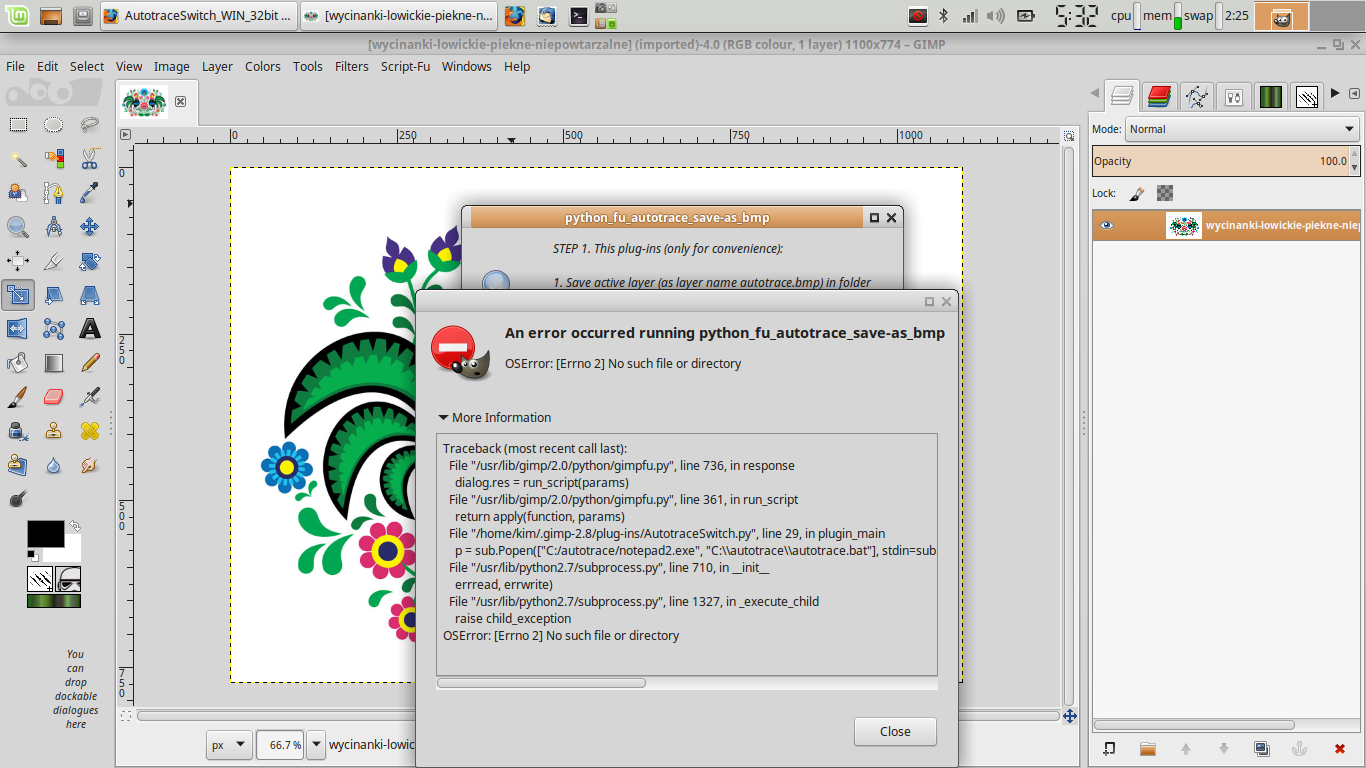
Image I tried AutotraceSwitch in Gimp in linux under Wine. SVGPage works but I can't make AutotraceSwitch work. I tried editing the .py but I can't get it to open Autotrace. I tried pointing it to where Autotrace is but I must be doing it wrong because it comes up with the same error.


_________________
Image


Top
 Post subject: Re: AutotraceSwitch_WIN_32bit
PostPosted: Sun Feb 28, 2016 7:37 pm  (#10) 
Offline
GimpChat Member
User avatar

Joined: Sep 24, 2010
Posts: 12775
Thanks for that linke, MareroQ. Wow; these graphics are awesome. :)

_________________
Lyle

Psalm 109:8

Image


Top
 Post subject: Re: AutotraceSwitch_WIN_32bit
PostPosted: Thu Jun 23, 2016 2:34 am  (#11) 
Offline
GimpChat Member

Joined: Mar 04, 2011
Posts: 2599
lylejk wrote:
As a side note, I tried your Autotrace compile in Win10; will not work. It first was missing a dll (don't recall which one). Found a copy but then it would just do nothing. Oh well; again, I have Autotrace for my XP VM and it still works there. :)


The error that is thrown up is a missing libexpat-1.dll

A couple of files which I got from the Fedora package mingw32-expat-2.1.0-6.fc21.noarch.rpm libexpat-1.dll xmlwf

This came about from a request to turn solid lines from some sort of overlay into dashed lines.

The obvious, redraw or create paths duplicating the shapes, was not received very well.

Using MareroQ's windows Autotrace, it is possible to centerline trace quite fine lines.

I did a demo of the process. https://youtu.be/UEQDOBI0cqQ 5 minutes

Strange country for me, Win10 and Gimp 2.8.16

Might come in useful some day.


Attachments:
libexpat-1.zip [97.15 KiB]
Downloaded 103 times
Top
 Post subject: Re: AutotraceSwitch_WIN_32bit
PostPosted: Thu Jun 23, 2016 11:19 am  (#12) 
Offline
GimpChat Member
User avatar

Joined: Jan 13, 2011
Posts: 2637
Location: Poland
Thank You for the information.

Please comment - a new approach to bat-> Python

_________________
Image


Top
 Post subject: Re: AutotraceSwitch_WIN_32bit
PostPosted: Thu Jun 23, 2016 2:34 pm  (#13) 
Offline
GimpChat Member
User avatar

Joined: Jul 04, 2010
Posts: 2253
Location: Retired Moderator Slowly Returning to the Living.
Running Windows 7 - 64b and was running into some errors. Then I re-read the posts, following the steps in detail. It works for Windows 7. I stroked the path on a transparent layer, with white (1 pixel wide) and set the stroked layer's Mode to Soft light. The second image is stroking the path with black on a white layer. Autotrace gives a lot of possibilities!

Attachment:
QR_Autotrace_Experiment.jpg
QR_Autotrace_Experiment.jpg [ 416.22 KiB | Viewed 2027 times ]

Attachment:
QR_Autotrace_Path.jpg
QR_Autotrace_Path.jpg [ 246.82 KiB | Viewed 2027 times ]

_________________
Artists aren't crazy! We're eccentric! ~G.M. Ross

Image

My Sigs = My Photos
Check out my work at http://www.flickr.com/photos/photomastergreg.


Top
 Post subject: Re: AutotraceSwitch_WIN_32bit
PostPosted: Thu Jun 23, 2016 4:42 pm  (#14) 
Offline
GimpChat Member
User avatar

Joined: Jul 04, 2010
Posts: 2253
Location: Retired Moderator Slowly Returning to the Living.
I love the effect, especially when stroking the path to highlight the edges! I applied it to my Sunflower Droste.
Really love the edges!!

Attachment:
SunflowerDrosteAutoTrace.jpg
SunflowerDrosteAutoTrace.jpg [ 1.4 MiB | Viewed 2021 times ]

_________________
Artists aren't crazy! We're eccentric! ~G.M. Ross

Image

My Sigs = My Photos
Check out my work at http://www.flickr.com/photos/photomastergreg.


Top
Post new topic Reply to topic  [ 14 posts ] 

All times are UTC - 5 hours [ DST ]


* Login  


Powered by phpBB3 © phpBB Group