It is currently Sun Jun 07, 2026 3:40 pm


All times are UTC - 5 hours [ DST ]


Post new topic Reply to topic  [ 13 posts ] 
Author Message
 Post subject: Pseudo 3D Logo
PostPosted: Tue Jan 15, 2013 9:16 am  (#1) 
Offline
GimpChat Member
User avatar

Joined: Jan 15, 2013
Posts: 133
Hi,
I am searching for a script that will add a 3d effect on a selection before I try to make it myself. I've searched here and the registry but I might not be using the correct terms, so I thought I'd ask before taking this on.

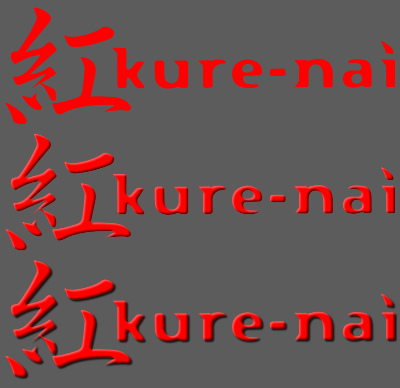
What I'm trying to accomplish is 2 drop shadows on an inverted selection with color selections and offsets for the highlight and shadow layers. If possible an added option to apply a real drop shadow as well on the non inverted alpha.

So in gimp steps, something like this.
1. Alpha to Selection
2. Invert Selection
3. Drop Shadow (script-fu-drop-shadow img drawable 3 3 4 '(0 0 0) 80 0)
4. Drop Shadow (script-fu-drop-shadow img drawable -3 -3 4 '(255 255 255) 35 0)
5. Invert Selection (or select none?)
6. Drop Shadow (script-fu-drop-shadow img drawable 3 3 4 '(0 0 0) 80 0)

Image

If there isn't something like this already, can anyone recommend a similar script to copy from? I've only written 2 simple scripts before and nothing interactive. I would also welcome any advice on pitfalls I might run into.

This might be above my head, but I use it enough to spend the time to try and make it. (Unless of course some script-fu guru wants to knock it out.) Thanks for any input that can be offered.

Ako

Edit: Attached the finished version to this post. There shouldn't be any more revisions, but will update it here if there is.


Attachments:
File comment: Latest Version
akovia-3d.scm [4.89 KiB]
Downloaded 138 times

_________________
Gimp 2.8.16
Arch Linux - XFCE 4.12
Some of my work.


Last edited by akovia on Fri Jan 18, 2013 12:03 pm, edited 1 time in total.
Share on Facebook Share on Twitter Share on Orkut Share on Digg Share on MySpace Share on Delicious Share on Technorati
Top
 Post subject: Re: Pseudo 3D Logo
PostPosted: Tue Jan 15, 2013 10:59 am  (#2) 
Offline
GimpChat Member
User avatar

Joined: Nov 16, 2011
Posts: 5127
Location: Metro Vancouver, BC
Look at, Create > Logo menu.
You might find something similar you can check the code.

_________________
Image
Gimp 2.8.18, Linux, median user
Gimp Chat Tutorials Index
Spirit Bear (Kermode)


Top
 Post subject: Re: Pseudo 3D Logo
PostPosted: Tue Jan 15, 2013 12:21 pm  (#3) 
Offline
GimpChat Member
User avatar

Joined: Jan 15, 2013
Posts: 133
Thanks for the tip!
I'll start there.

_________________
Gimp 2.8.16
Arch Linux - XFCE 4.12
Some of my work.


Top
 Post subject: Re: Pseudo 3D Logo
PostPosted: Tue Jan 15, 2013 5:17 pm  (#4) 
Offline
Script Coder
User avatar

Joined: Jun 22, 2010
Posts: 1171
Location: Here and there
Here's a very quick go at a script to follow your instructions although I'm not sure what your example image is showing as your instructions don't make any of those examples.

Attachment:
Untitled.png
Untitled.png [ 25.26 KiB | Viewed 2738 times ]


It should give you some idea of what you need to do.

Kevin


Attachments:
gc2013_akovia_3d.scm [2.05 KiB]
Downloaded 141 times
Top
 Post subject: Re: Pseudo 3D Logo
PostPosted: Tue Jan 15, 2013 10:24 pm  (#5) 
Offline
GimpChat Member
User avatar

Joined: Jan 15, 2013
Posts: 133
My Hero!

I apologize for not being more concise, I really didn't expect someone to try and write it. I'm so glad you did though as I was coming back after getting stuck. I now have a working script to build on.

I had some follow up questions if your up to it, but I can hack my way through if not.

1. - I thought it was brilliant how you tied the internal offsets together to cut down on the controls clutter, and I would like to keep it if possible, (don't need different offset amounts for the 2 internal shadows) but not sure how I can rotate the direction. Basically, I want to tie the internal & external shadows to follow the same direction. I could change the highlight color to black, but that seems unintuitive. Of course I could just add all the controls for each drop shadow back in separately. Just wasn't sure if you might have a more elegant solution.

2. Is it possible to rename the drop shadow layers to reflect what they are, or is that done internally in the drop shadow script?

Either way, I couldn't be happier and you have my thanks. I'll keep pecking away at it and post what I come up with if anyone's interested.

Many Thanks,
Ako

Edit: In my image, the 3 examples are as follows.
1. Raw (No Effect)
2. Both internal shadows applied
3. Internal and drop shadows

_________________
Gimp 2.8.16
Arch Linux - XFCE 4.12
Some of my work.


Top
 Post subject: Re: Pseudo 3D Logo
PostPosted: Wed Jan 16, 2013 4:22 am  (#6) 
Offline
Script Coder
User avatar

Joined: Jun 22, 2010
Posts: 1171
Location: Here and there
Hi Ako

akovia wrote:
I apologize for not being more concise...
Please don't apologise for being explicit about your requirements, it saves lots of time. :)

akovia wrote:
1. - I thought it was brilliant how you tied the internal offsets together to cut down on the controls clutter, and I would like to keep it if possible, (don't need different offset amounts for the 2 internal shadows) but not sure how I can rotate the direction. Basically, I want to tie the internal & external shadows to follow the same direction.
I'm not sure I understand what you are saying. I get that you don't need to specify separate values for the different internal shadows (which the script already does), but I'm not sure what you mean by "direction". Could you detail what things you want to be able to change on the user interface.

akovia wrote:
I could change the highlight color to black, but that seems unintuitive. Of course I could just add all the controls for each drop shadow back in separately. Just wasn't sure if you might have a more elegant solution.
Your explicit instructions have the colours swapped compared to your examples. Which do you require? Do you expect the highlight to be on the top left corner and the shadow on the bottom right?

akovia wrote:
2. Is it possible to rename the drop shadow layers to reflect what they are, or is that done internally in the drop shadow script?
That's being done in the drop shadow script (see drop-shadow.scm) in your GIMP installation. As that script always puts the drop-shadow layer immediately underneath the source layer it should be possible to find that layer and re-name it. That is tricky and I'll have a look at doing it.

I think I also need to ask which version of GIMP you are using, as so far I've written this with 2.6 in mind, but if you're using 2.8 I should make it more in keeping with that.

Kevin


Top
 Post subject: Re: Pseudo 3D Logo
PostPosted: Wed Jan 16, 2013 9:04 am  (#7) 
Offline
GimpChat Member
User avatar

Joined: Jan 15, 2013
Posts: 133
Hi Kevin,

Let me start from scratch.

Gimp 2.8
xubuntu 12.04

I am a mod over at fanart.tv and am creating hundreds of logos and cleararts (logos with images of main characters without a background.) When I'm doing just a logo, it usually doesn't matter which direction the shadow is facing, but when it is added with cutout/render of a person to make a clearart, I take my cue of which direction the shadow points, depending on the lighting in the render. Thus I need full 360 degree control of all shadows.

My example in the first post was indeed wrong for what I was trying to achieve. (sorry) I had never thought of tying values together like you did, so it didn't occur to me to be more precise. The end result should have the drop shadow follow the internal shadows' direction so they end up not opposing each other. So basically when you choose the placement of the highlight color, both shadows will be 180 degrees opposed to it. In a sense, choosing the direction of the light. This is probably more trouble than it's worth as I still want to be able to change how far the drop shadow is offset from the logo so it couldn't be tied to the inner shadows' offset. It would just take it's direction cue from the inner shadow somehow and have it's own offset amount. I realize it could be done, but my head spins thinking about it. =P Anyway, just swapping the color variables in the script-fu-drop-shadow lines works fine.

As far as controls, I have found when I use this I need to be able to adjust the blur and opacity differently. The internal blurs can be tied together, but the internal opacities need to be adjustable separately. Tweaking the highlight opacity makes a huge difference in the outcome depending on the properties of the logo. I also wanted the drop shadow to be an option.

I made most of these adjustments last night before reading this and it is working pretty good. I think I still need to set an active layer somewhere as the script fails if I don't have the active layer selected in the layers tab, even though it has the selection. (still a scripting newbie)

I put in sane defaults to get good results by adjusting the max values from (1-255) to (1-100) and copied some code from another script to fail and give a message if there is no selection. Lastly I changed the selection to none instead of invert right before the drop shadow code. This at least puts the drop shadow below the selection layer in the tree so it's easier to discern the 3 drop shadow layers apart. If you do figure out how to name the drop shadows layers, that would be fantastic, but I'm fine with this if that's too much trouble.

Please let me know what you think and what suggestions you might have to improve it.

My Sincere Thanks!


Attachments:
akovia-3d-r1.scm [2.45 KiB]
Downloaded 132 times

_________________
Gimp 2.8.16
Arch Linux - XFCE 4.12
Some of my work.
Top
 Post subject: Re: Pseudo 3D Logo
PostPosted: Wed Jan 16, 2013 9:29 am  (#8) 
Offline
Script Coder
User avatar

Joined: Jun 22, 2010
Posts: 1171
Location: Here and there
Looks good so far.

I've got the layer-naming to work.

Now about the shadow/highlight direction.

How would you feel about having "size" values for the shadow/highlight offsets and a single angular direction?

For example, you would specify a size of 3 for the internals, a size of 5 for the external and an angle of 45 to put the shadows on the bottom right?


Top
 Post subject: Re: Pseudo 3D Logo
PostPosted: Wed Jan 16, 2013 11:21 am  (#9) 
Offline
GimpChat Member
User avatar

Joined: Jan 15, 2013
Posts: 133
paynekj wrote:
Looks good so far.

I've got the layer-naming to work.

Now about the shadow/highlight direction.

How would you feel about having "size" values for the shadow/highlight offsets and a single angular direction?

For example, you would specify a size of 3 for the internals, a size of 5 for the external and an angle of 45 to put the shadows on the bottom right?


Exactly!
I thought it was too complicated to tackle, but it looks like you understood what I was trying to say. That would be beyond my expectations. Then it really would work as a "Lighting 3D" effect and would be easier to use and understand for anyone else wanting to use it.

_________________
Gimp 2.8.16
Arch Linux - XFCE 4.12
Some of my work.


Top
 Post subject: Re: Pseudo 3D Logo
PostPosted: Wed Jan 16, 2013 11:31 am  (#10) 
Offline
Script Coder
User avatar

Joined: Jun 22, 2010
Posts: 1171
Location: Here and there
akovia wrote:
Exactly!
I thought it was too complicated to tackle, but it looks like you understood what I was trying to say. That would be beyond my expectations. Then it really would work as a "Lighting 3D" effect and would be easier to use and understand for anyone else wanting to use it.


I'm pleased you said that, because I went ahead and did it anyway ;)


Attachments:
akovia-3d-r2.scm [6.36 KiB]
Downloaded 141 times
Top
 Post subject: Re: Pseudo 3D Logo
PostPosted: Wed Jan 16, 2013 11:51 am  (#11) 
Offline
GimpChat Member
User avatar

Joined: Jan 15, 2013
Posts: 133
I am truly astonished. I honestly couldn't follow all of the code and I could never come up with something like that. It really feels like a polished script that deserves menu space now. :mrgreen:

I really don't know how to thank you properly. I came here hoping for a little help and you took it beyond what I had original imagined. :tyspin

I think you can call this one done!

Now if I could only wipe this grin off my face...

Ako

_________________
Gimp 2.8.16
Arch Linux - XFCE 4.12
Some of my work.


Top
 Post subject: Re: Pseudo 3D Logo
PostPosted: Wed Jan 16, 2013 11:54 am  (#12) 
Offline
Script Coder
User avatar

Joined: Jun 22, 2010
Posts: 1171
Location: Here and there
akovia wrote:
Now if I could only wipe this grin off my face...


I think that will soon go as you have no excuse now to do all the hard work using it :)


Top
 Post subject: Re: Pseudo 3D Logo
PostPosted: Fri Jan 18, 2013 11:59 am  (#13) 
Offline
GimpChat Member
User avatar

Joined: Jan 15, 2013
Posts: 133
Well I'm still grinning, but I wanted to upload a small revision.

The internal highlight and shadow opacities were swapped.
ie.. A value of 35 on the highlight would end up as 35 on the shadow and visa-versa.

I also removed all my old code, put in a description, and put our names on it.

Thanks again for all your hard work. I looked over the code again, and though my math is not good enough to grasp all you did with the shadow direction, I did see what you did to rename the shadow layers and thought it was brilliant! (I still couldn't write it, but I get it.) :bigthup

Ako


Attachments:
akovia-3d.scm [4.89 KiB]
Downloaded 132 times

_________________
Gimp 2.8.16
Arch Linux - XFCE 4.12
Some of my work.
Top
Post new topic Reply to topic  [ 13 posts ] 

All times are UTC - 5 hours [ DST ]


* Login  


Powered by phpBB3 © phpBB Group