It is currently Sun Jun 07, 2026 5:41 pm


All times are UTC - 5 hours [ DST ]


Post new topic Reply to topic  [ 16 posts ] 
Author Message
 Post subject: layerfx bug
PostPosted: Wed Jan 16, 2013 8:02 pm  (#1) 
Offline
GimpChat Member
User avatar

Joined: Jul 17, 2012
Posts: 2769
so layerfx again....
im obsessed with that script

use it a lot - the python version, not the scm, because you have the preview option, which i couldnt do without

now layerfx.py is not perfect, but i has one bug that really annoys me:
everytime i use it, my history is gone
i have to save everything all the time and restart Gimp so that i get the history back in swing
it seems no one here on GC is able to fix that, because its python

who and how do i contact/report that bug ?

the original author is a certain Jonathan Stipe
is he a developer ?
there is an email adress in the script, but he wrote the script in 2008....thats five years ago....

should i write him an email ?
post something on the registry ?
what is the proper etiquette


Share on Facebook Share on Twitter Share on Orkut Share on Digg Share on MySpace Share on Delicious Share on Technorati
Top
 Post subject: Re: layerfx bug
PostPosted: Wed Jan 16, 2013 9:19 pm  (#2) 
Offline
GimpChat Member

Joined: Jul 11, 2010
Posts: 349
A python script is a text file. You can open it in a text editor to look through it to see what information was included by the author.


Top
 Post subject: Re: layerfx bug
PostPosted: Wed Jan 16, 2013 9:25 pm  (#3) 
Offline
GimpChat Member
User avatar

Joined: Sep 22, 2012
Posts: 2089
Location: US
Ofnuts could probably help. He's the one of few here who writes Python scripts.
Layerfx has more than one bug that annoy me.


Top
 Post subject: Re: layerfx bug
PostPosted: Wed Jan 16, 2013 9:26 pm  (#4) 
Offline
GimpChat Member
User avatar

Joined: Jul 17, 2012
Posts: 2769
bilbo9955 wrote:
A python script is a text file. You can open it in a text editor to look through it to see what information was included by the author.
i know, thats where i got the email adress from

K1TesseraEna wrote:
Layerfx has more than one bug that annoy me.
can you please tell me of the bugs you experienced ?!

Quote:
Ofnuts could probably help. He's the one of few here who writes Python scripts.
well what should i do, sent him a pm ? i dont want to bother him...
and wouldnt it be best to ask the original author of the script ?


Top
 Post subject: Re: layerfx bug
PostPosted: Wed Jan 16, 2013 9:38 pm  (#5) 
Offline
GimpChat Member
User avatar

Joined: Sep 22, 2012
Posts: 2089
Location: US
Esper wrote:
bilbo9955 wrote:
A python script is a text file. You can open it in a text editor to look through it to see what information was included by the author.
i know, thats where i got the email adress from

K1TesseraEna wrote:
Layerfx has more than one bug that annoy me.
can you please tell me of the bugs you experienced ?!

Quote:
Ofnuts could probably help. He's the one of few here who writes Python scripts.
well what should i do, sent him a pm ? i dont want to bother him...
and wouldnt it be best to ask the original author of the script ?


Just edit the header to 'layerfx bug (attn Ofnuts)' - I've done it before - he is the nice person but he probably doesn't read all threads but sure enough this will get his attention.

As for the laeyrfx bugs i have to get back to this later. I'm not at the computer right now and I need GIMP for that.


Top
 Post subject: Re: layerfx bug
PostPosted: Wed Jan 16, 2013 9:53 pm  (#6) 
Offline
GimpChat Member
User avatar

Joined: Jul 17, 2012
Posts: 2769
i just realized, theres a new python version (Rev 8) here:
http://gimpscripts.com/2011/10/gimp-layer-effects/

release date is September 7, 2012

will have to check if it has the same bug as the one i had installed


Top
 Post subject: Re: layerfx bug
PostPosted: Wed Jan 16, 2013 9:57 pm  (#7) 
Offline
GimpChat Member
User avatar

Joined: Sep 22, 2012
Posts: 2089
Location: US
After some checking I found out that he does maintain his script, after all (not what I originally thought) .
'Last seen' on Plugin Registry site in August 2012.

Yes, I should try the updated version too.


Top
 Post subject: Re: layerfx bug
PostPosted: Thu Jan 17, 2013 12:35 pm  (#8) 
Offline
GimpChat Member
User avatar

Joined: Jul 17, 2012
Posts: 2769
it seems the new version is better

the history is no longer vanishing and the processing is much quicker

also it creates layergroups for each effect now

cool


Top
 Post subject: Re: layerfx bug
PostPosted: Thu Jan 17, 2013 9:55 pm  (#9) 
Offline
GimpChat Member
User avatar

Joined: Sep 22, 2012
Posts: 2089
Location: US
Esper, I'm gonna need your collaboration on this.

I've installed updated version but the same old bugs are still there.

I need you to check these two functions, plz

1. Bevel and Emboss (Outer Bevel). Although the preview shows the correct results, after executing the script effect all i can see is unchanged plain text.
To get the right effect I have to change Shadow Mode from Multiply to Normal in the default script settings, or do the same on shadows layer in created layer group, or move text layer one step up (above shadows layer).

2. Gradient Overlay isn't working at all, even in preview mode.
No matter what gradient I choose all the script does is fill text with solid color from the first pixel row of a gradient (far left).

That's what I meant saying layerfx has more than 1 bug. I wonder if your script behaves the same way.


Top
 Post subject: Re: layerfx bug
PostPosted: Thu Jan 17, 2013 10:37 pm  (#10) 
Offline
Script Coder
User avatar

Joined: Feb 18, 2011
Posts: 4826
Location: Bendigo Vic. Australia
Esper layer effects layerfx.py did not effect my history file in 2.8.2

_________________
Image
No matter how much you push the envelope, it'll still be stationery.


Top
 Post subject: Re: layerfx bug
PostPosted: Thu Jan 17, 2013 10:45 pm  (#11) 
Offline
GimpChat Member
User avatar

Joined: Nov 16, 2011
Posts: 5127
Location: Metro Vancouver, BC
Win32, Gimp 2.8.2
I seem to get better results with, layerfx.py than layerfx.2.8.py.

Edit,
I just compared layerfx.2.8.py and layerfx.py. In my editor, I don't get proper python highlighting in layerfx.2.8.py until after line 923.
Re-checking.

_________________
Image
Gimp 2.8.18, Linux, median user
Gimp Chat Tutorials Index
Spirit Bear (Kermode)


Top
 Post subject: Re: layerfx bug
PostPosted: Thu Jan 17, 2013 11:15 pm  (#12) 
Offline
GimpChat Member
User avatar

Joined: Jul 17, 2012
Posts: 2769
K1te, i use win7 64bit (i think) with Gimp 2.8.2

K1TesseraEna wrote:
1. Bevel and Emboss (Outer Bevel). Although the preview shows the correct results, after executing the script effect all i can see is unchanged plain text.
To get the right effect I have to change Shadow Mode from Multiply to Normal in the default script settings, or do the same on shadows layer in created layer group, or move text layer one step up (above shadows layer).
The Bevel and Emboss works fine for me - always did - what text color did you use ? Maybe thats the problem ?

K1TesseraEna wrote:
2. Gradient Overlay isn't working at all, even in preview mode.
No matter what gradient I choose all the script does is fill text with solid color from the first pixel row of a gradient (far left).
The gradient option works fine for me, although i dont understand the controls. At first i got the same effect as you, but then i played around with the values and it worked. I really hate it, when complex scripts come without a manual ! :rasp
I must say, i never used the gradient effect before, because im always doing it with the gradient tool.
Attachment:
Gradient.png
Gradient.png [ 63.3 KiB | Viewed 1432 times ]


Graechan wrote:
Esper layer effects layerfx.py did not effect my history file in 2.8.2
Yes Graechan, that seems to have been fixed in the new version. Its working for me again too.
Very happy about that !


Top
 Post subject: Re: layerfx bug
PostPosted: Fri Jan 18, 2013 2:52 am  (#13) 
Offline
Script Coder
User avatar

Joined: Feb 18, 2011
Posts: 4826
Location: Bendigo Vic. Australia
Esper the new release 8 version is layerfx.2.8.py I'm using layerfx.py becouse the release 8 version seemed to have bugs

But maybe it has been fixed now

_________________
Image
No matter how much you push the envelope, it'll still be stationery.


Top
 Post subject: Re: layerfx bug
PostPosted: Sat Jan 19, 2013 6:45 am  (#14) 
Offline
GimpChat Member
User avatar

Joined: Jul 17, 2012
Posts: 2769
K1TesseraEna wrote:
1. Bevel and Emboss (Outer Bevel). Although the preview shows the correct results, after executing the script effect all i can see is unchanged plain text.
To get the right effect I have to change Shadow Mode from Multiply to Normal in the default script settings, or do the same on shadows layer in created layer group, or move text layer one step up (above shadows layer).
now i experienced something similar with pillow emboss

the problem was the layergroup
as soon as i took the layers out of the group folder, it looked right

isnt it so, that a layergroup can have only one mode ?
but bevel/emboss needs three different


Top
 Post subject: Re: layerfx bug
PostPosted: Sat Jan 19, 2013 12:43 pm  (#15) 
Offline
GimpChat Member
User avatar

Joined: Sep 22, 2012
Posts: 2089
Location: US
Esper wrote:
the problem was the layergroup
as soon as i took the layers out of the group folder, it looked right

isnt it so, that a layergroup can have only one mode ?
but bevel/emboss needs three different


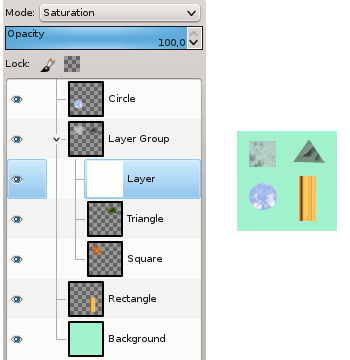
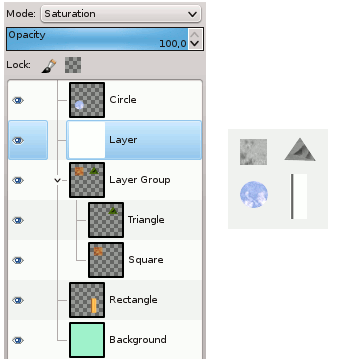
No, changing blend mode of layers within layer group was one of the main purposes of the Layer Group implementation.
In this picture, layer filled with white affects only layers within group without affecting layers beneath that group.
Layer modes are saturation, normal, normal.
If you take it out of the group (right), it changes the appearance of all layers below that group.
ImageImage


You're right about groups in Layerfx 2.8 Pillow Emboss, as soon as you break a group it shows the right result,
although script preview always shows correct effect.
For my script it's also the true for Outer Bevel effect.
Something buggy going on here.


Top
 Post subject: Re: layerfx bug
PostPosted: Sat Jan 19, 2013 5:54 pm  (#16) 
Offline
GimpChat Member
User avatar

Joined: Jul 17, 2012
Posts: 2769
how do we report that ?


Top
Post new topic Reply to topic  [ 16 posts ] 

All times are UTC - 5 hours [ DST ]


* Login  


Powered by phpBB3 © phpBB Group