It is currently Tue Jul 07, 2026 3:59 am


All times are UTC - 5 hours [ DST ]


Post new topic Reply to topic  [ 12 posts ] 
Author Message
 Post subject: Logo on each page
PostPosted: Thu Feb 14, 2013 2:37 pm  (#1) 
Offline
New Member

Joined: Feb 14, 2013
Posts: 3
I'm a complete newbie so bear with me. I need to add a logo at the corner on each page of the 300+ pages catalog. The steps : 1.to load a logo as layer, 2. to insert it to the image, 3. to position it in the corner of the page. What I have now is this (2 steps):

(define (script-fu-catalog-page image layer)

(set! (back-layer(car(gimp-file-load-layer RUN-NONINTERACTIVE image "logo_layer1.jpg")))
(gimp-image-insert-layer image layer 0 0)
(gimp-displays-flush)
)
)
(script-fu-register
"script-fu-catalog-page"
"<Image>/Filters/Catalog Page"
"Catalog Page for Company123"
"Ferdy"
"Ferdy"
"February 2013"
"RGB"
SF-IMAGE "Image" 0
SF-DRAWABLE "Layer" 0

)

Apparently it doesn't work (unbound variable: image ). Please help me with this :umbsmile


Share on Facebook Share on Twitter Share on Orkut Share on Digg Share on MySpace Share on Delicious Share on Technorati
Top
 Post subject: Re: Logo on each page
PostPosted: Thu Feb 14, 2013 2:50 pm  (#2) 
Offline
GimpChat Member
User avatar

Joined: Nov 16, 2011
Posts: 5127
Location: Metro Vancouver, BC
I'm not sure if it will work in your case, but have a look at,
BIMP. Batch Image Manipulation Plugin

_________________
Image
Gimp 2.8.18, Linux, median user
Gimp Chat Tutorials Index
Spirit Bear (Kermode)


Top
 Post subject: Re: Logo on each page
PostPosted: Thu Feb 14, 2013 2:52 pm  (#3) 
Offline
Script Coder
User avatar

Joined: Jun 22, 2010
Posts: 1171
Location: Here and there
If you'd rather continue to learn script-fu programing, try this:

(define (script-fu-catalog-page image layer)
  (let* (
          (back-layer 0)
        )
    (set! back-layer (car (gimp-file-load-layer RUN-NONINTERACTIVE image "logo_layer1.jpg")))
    (gimp-image-insert-layer image back-layer 0 0)
    (gimp-displays-flush)
  )
)

(script-fu-register
  "script-fu-catalog-page"
  "<Image>/Filters/Catalog Page"
  "Catalog Page for Company123"
  "Ferdy"
  "Ferdy"
  "February 2013"
  "RGB"
  SF-IMAGE "Image" 0
  SF-DRAWABLE "Layer" 0
)


and it so so happens that this very forum has the best set of links to GIMP script writing: viewtopic.php?f=9&t=724


Top
 Post subject: Re: Logo on each page
PostPosted: Thu Feb 14, 2013 4:12 pm  (#4) 
Offline
New Member

Joined: Feb 14, 2013
Posts: 3
Odinbc, thank You for the reply. :) Interesting plugin, unfortunately it doesn't support pdf.
paynekj, thanks for the code and links, I'll definitely study it. :)

What about pdf, how the code could be edited to work with pdf?
My guess is by adding (file-pdf-load NON-INTERACTIVE image image) after define statement and ..something else (I'm really a newbie).

(I just would like to open a pdf file and push the right button like 300+ times. ;) )


Top
 Post subject: Re: Logo on each page
PostPosted: Thu Feb 14, 2013 4:57 pm  (#5) 
Offline
GimpChat Member
User avatar

Joined: Nov 16, 2011
Posts: 5127
Location: Metro Vancouver, BC
Ferdy wrote:
Odinbc, thank You for the reply. :) Interesting plugin, unfortunately it doesn't support pdf.
paynekj, thanks for the code and links, I'll definitely study it. :)

What about pdf, how the code could be edited to work with pdf?
(I just would like to open a pdf file and push the right button like 300+ times. ;) )
What is your OS?

_________________
Image
Gimp 2.8.18, Linux, median user
Gimp Chat Tutorials Index
Spirit Bear (Kermode)


Top
 Post subject: Re: Logo on each page
PostPosted: Thu Feb 14, 2013 5:52 pm  (#6) 
Offline
New Member

Joined: Feb 14, 2013
Posts: 3
Odinbc > Windows 7


Top
 Post subject: Re: Logo on each page
PostPosted: Thu Feb 14, 2013 6:06 pm  (#7) 
Offline
GimpChat Member
User avatar

Joined: Nov 16, 2011
Posts: 5127
Location: Metro Vancouver, BC
You seem to know a bit about code and the command line, how about using LaTeX? Search for LaTeX eso-pic.

_________________
Image
Gimp 2.8.18, Linux, median user
Gimp Chat Tutorials Index
Spirit Bear (Kermode)


Top
 Post subject: Re: Logo on each page
PostPosted: Thu Feb 14, 2013 7:14 pm  (#8) 
Offline
GimpChat Member
User avatar

Joined: Nov 16, 2011
Posts: 5127
Location: Metro Vancouver, BC
OK, I've found a simple solution for you, it was staring me right in the face. Gimp and a little PDF tool called call PDFTK Builder, which was already on my computer as well. This method will work on a multi-page PDF document, not on a batch of PDF files.

After you compile a PDF of your catalog.
  • In Gimp, open a transparent image the same size as your catalog page.
  • Position your logo, select all. (everything should be transparent except your logo)
  • Export as a PDF, un-check any export options.

Open PDFTK Builder.
  • Background/Stamp tab, Source PDF (catalog.pdf), Background PDF (logo.pdf).
  • Select the Stamp option and un-check, Add Background/Stamp to First Page Only.
  • Save as....

I would definitely test this first to make sure your logo.pdf was exported properly and the logo is positioned properly.

FYI, This doesn't work with EPS files, they don't hold transparency on export.

_________________
Image
Gimp 2.8.18, Linux, median user
Gimp Chat Tutorials Index
Spirit Bear (Kermode)


Top
 Post subject: Re: Logo on each page
PostPosted: Sun Feb 17, 2013 7:09 pm  (#9) 
Offline
GimpChat Member
User avatar

Joined: Nov 16, 2011
Posts: 5127
Location: Metro Vancouver, BC
Another way to go for adding text or an image logo to multiple pages of a PDF.

PDFill PDF Tools (win)
  1. Design your logo (bmp, png, gif, jpeg, tiff, wmf).
  2. In PDFill PDF Tools | Add PDF Watermark | by Image.
  3. Select a PDF file that you wish to add watermark by Image.
  4. Select the image file that you want to add into this PDF file.
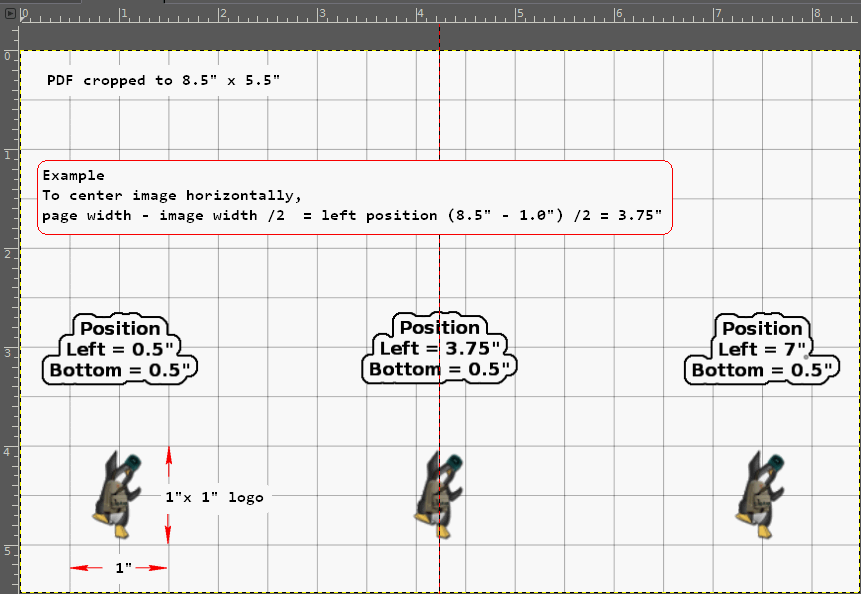
  5. In the Add Watermark by Image dialog | Any position, with (from) left and bottom positions defined. For example to center your image horizontally, page width - image width /2 = left position (8.5" - 1.0") /2 = 3.75".
  6. Order: Foreground
  7. URL: (optional)
  8. Save as...

Image

This tool adds a logo to every page in your PDF. If you only want a logo on one page, this method using PDFTK Builder will be a better choice.

If you download 'PDFill PDF Tools' a trial version of 'PDFill PDF Editor' is included, it is not required for full use of the free 'PDFill PDF Tools' and 'PDF and Image Writer'. PDFill PDF Tools (win only), PDFTK Builder is a GUI for the PDFtk Server (Win, Mac and Linux).

_________________
Image
Gimp 2.8.18, Linux, median user
Gimp Chat Tutorials Index
Spirit Bear (Kermode)


Top
 Post subject: Re: Logo on each page
PostPosted: Sun Feb 17, 2013 8:36 pm  (#10) 
Offline
GimpChat Member
User avatar

Joined: Apr 07, 2010
Posts: 14182
cute logo Odin

_________________
Image


Top
 Post subject: Re: Logo on each page
PostPosted: Sun Feb 17, 2013 9:10 pm  (#11) 
Offline
GimpChat Member
User avatar

Joined: Nov 16, 2011
Posts: 5127
Location: Metro Vancouver, BC
molly wrote:
cute logo Odin
I had to celebrate your hard work on the staff caricatures somehow :bigthup

_________________
Image
Gimp 2.8.18, Linux, median user
Gimp Chat Tutorials Index
Spirit Bear (Kermode)


Top
 Post subject: Re: Logo on each page
PostPosted: Mon Feb 18, 2013 5:45 am  (#12) 
Offline
GimpChat Member
User avatar

Joined: Apr 07, 2010
Posts: 14182
Thanks, It was fun,

_________________
Image


Top
Post new topic Reply to topic  [ 12 posts ] 

All times are UTC - 5 hours [ DST ]


* Login  


Powered by phpBB3 © phpBB Group