It is currently Thu Nov 05, 2026 11:13 am


All times are UTC - 5 hours [ DST ]


Post new topic Reply to topic  [ 11 posts ] 
Author Message
 Post subject: Using curve splines in a script
PostPosted: Mon Jun 03, 2013 8:28 am  (#1) 
Offline
Global Moderator
User avatar

Joined: May 16, 2010
Posts: 16244
Is this the proper code for adding a 7pt curve to an image?
(gimp-curves-spline drawable 0 7 '(cp1.x 0 cp1.y 0,cp2.x 13 cp2.y 62,cp3.x 69 cp3.y 74,cp4.x 100 cp4.y 120,cp5.x 168 cp5.y 144,cp6.x 185 cp6.y 221,cp7.x 254 cp7.y 254))


Or should the x and y pts be closer together like this?
cp1.x0 cp1.y0

_________________
Image


Share on Facebook Share on Twitter Share on Orkut Share on Digg Share on MySpace Share on Delicious Share on Technorati
Top
 Post subject: Re: Using curve splines in a script
PostPosted: Mon Jun 03, 2013 8:41 am  (#2) 
Offline
Global Moderator
User avatar

Joined: May 16, 2010
Posts: 16244
Or perhaps this?
     (gimp-curves-spline drawable HISTOGRAM-VALUE 7 '(cp1.0,cp1.0,cp2.13,cp2.62,cp3.69,cp3.74,cp4.100,cp4.120,cp5.168,cp5.144,cp6.185,cp6.221,cp7.254,cp7.254))

_________________
Image


Top
 Post subject: Re: Using curve splines in a script
PostPosted: Mon Jun 03, 2013 9:18 am  (#3) 
Offline
Global Moderator
User avatar

Joined: May 16, 2010
Posts: 16244
I think i figured it out.
     (gimp-curves-spline drawable 0 7 (list->vector (list 0 0 13 62 69 74 100 120 168 144 185 221 254 254)) 

_________________
Image


Top
 Post subject: Re: Using curve splines in a script
PostPosted: Mon Jun 03, 2013 9:31 am  (#4) 
Offline
Script Coder
User avatar

Joined: Apr 23, 2010
Posts: 1553
Location: not from Guildford after all
EDIT: I had some bad information in this post originally and have updated it to be more accurate. In particular, one can no longer pass lists to the PDB when it is expecting vectors (you used to be able to do this way back when).

In Script-fu, you do not use commas to separate elements in a list. Just use spaces, tabs, and newlines. Also, if your list contains any variable names then you do not want to quote your list with the apostrophe; instead you will want to use the 'list' function.

For example,
(define x 10)
(define y 20)
'(10 20) ; is OK
'(x y) ; does not use the values for x and y, but instead creates a list of the two symbols.
(list 10 20) ; is OK
(list x y) ; evaluates the two variables, producing the list '(10 20)


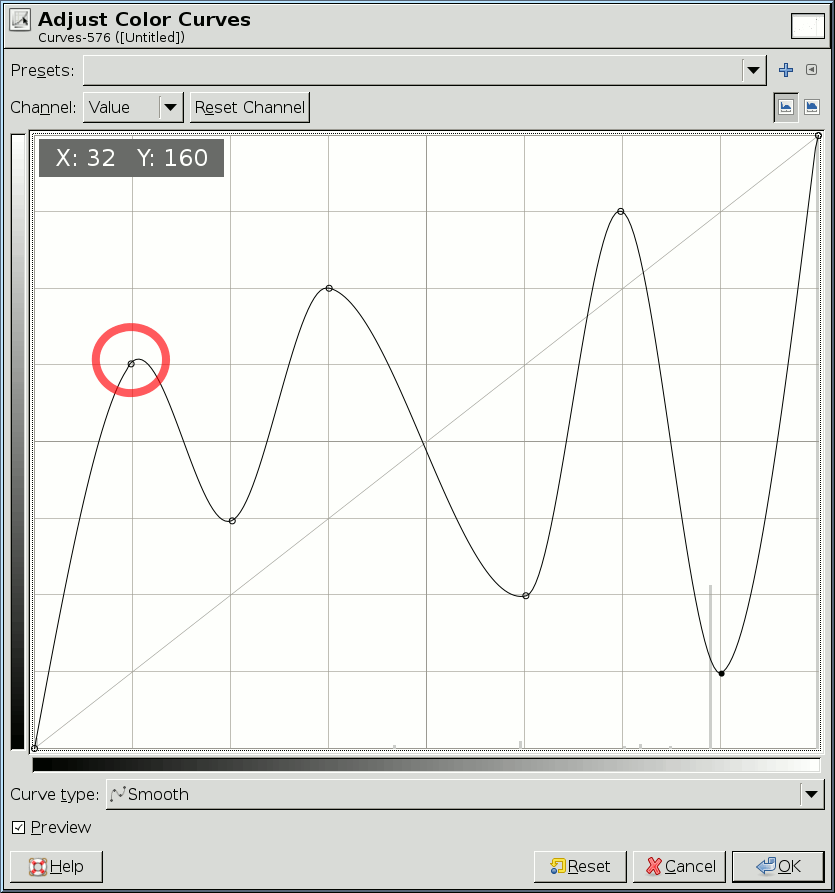
As to the format for specifying a seven-point spline curve, the x and y coordinates follow the values that would appear in the corresponding Curves Tool graph as shown below (the text box in the upper-left contain the coordinates of the second point of the curve, circled in red).
Attachment:
SSspline-curve.png
SSspline-curve.png [ 28.78 KiB | Viewed 4034 times ]


The list should contain a series of alternating x and y values, each x corresponding to that point's horizontal position in the above graph and the y corresponding to the vertical position. To be safe, the x coordinate of the first point should always be "0", and of the last point it should always be "255".

For the seven points listed, the spline curve would be the list: '(0 0 32 160 64 96 96 192 160 64 192 224 224 32) with x coordinates shown in blue and y in red.

(gimp-curves-spline drawable HISTOGRAM-VALUE 14 (list->vector '(0 0 32 160 64 96 96 192 160 64 192 224 224 32)))

Alternately, you could use #(...) to build your vector out of constants. It behaves analogously to how '(...) works for lists of constants.
(gimp-curves-spline drawable HISTOGRAM-VALUE 14 #(0 0 32 160 64 96 96 192 160 64 192 224 224 32))


If you've assigned those values to variables, or you've calculated them algorithmically, then you will have to use 'vector' to create your vector, instead of just quoting it ('vector' work just like 'list' but produces a vector instead of a list).

(gimp-curves-spline drawable HISTOGRAM-VALUE 14 (vector x0 y0 x1 y1 x2 y2 x3 y3 x4 y4 x5 y5 x6 y6))

_________________
Any sufficiently primitive technology is indistinguishable from a rock.


Last edited by saulgoode on Mon Jun 03, 2013 11:03 am, edited 3 times in total.

Top
 Post subject: Re: Using curve splines in a script
PostPosted: Mon Jun 03, 2013 9:38 am  (#5) 
Offline
GimpChat Member

Joined: May 09, 2012
Posts: 914
Examples gimp-curves-spline :
crystal-logo.scm
neon-logo.scm
sota-chrome-logo.scm


Top
 Post subject: Re: Using curve splines in a script
PostPosted: Mon Jun 03, 2013 9:44 am  (#6) 
Offline
Global Moderator
User avatar

Joined: May 16, 2010
Posts: 16244
samj wrote:
Examples gimp-curves-spline :
crystal-logo.scm
neon-logo.scm
sota-chrome-logo.scm


Thank you Saulgoode and Sam. :)

_________________
Image


Top
 Post subject: Re: Using curve splines in a script
PostPosted: Mon Jun 03, 2013 10:13 am  (#7) 
Offline
Global Moderator
User avatar

Joined: May 16, 2010
Posts: 16244
I have also seen it written this way.
(gimp-curves-spline drawable 0 6 #(0 0 0 15 255 255))


So what is the correct way to just call the curves tool with those points i have? Like this?
      (gimp-curves-spline drawable HISTOGRAM-VALUE 7 '(0 0 13 62 69 74 100 120 168 144 185 221 255 255))


Or do i have to use cons to construct an array of pts?

_________________
Image


Top
 Post subject: Re: Using curve splines in a script
PostPosted: Mon Jun 03, 2013 11:01 am  (#8) 
Offline
Script Coder
User avatar

Joined: Apr 23, 2010
Posts: 1553
Location: not from Guildford after all
Rod, I had so much bad information in my previous post, I have edited it to correct the errors. Please read it again as I think it now addresses your questions. (If not, I will be glad to elaborate.)

_________________
Any sufficiently primitive technology is indistinguishable from a rock.


Top
 Post subject: Re: Using curve splines in a script
PostPosted: Mon Jun 03, 2013 11:16 am  (#9) 
Offline
Global Moderator
User avatar

Joined: May 16, 2010
Posts: 16244
saulgoode wrote:
Rod, I had so much bad information in my previous post, I have edited it to correct the errors. Please read it again as I think it now addresses your questions. (If not, I will be glad to elaborate.)


Thanks for all your help Saulgoode. I think i have it now. :bigthup
      (gimp-curves-spline drawable HISTOGRAM-VALUE 14 (list->vectors '(0 0 13 62 69 74 100 120 168 144 185 221 255 255))


That should do it. :)

_________________
Image


Top
 Post subject: Re: Using curve splines in a script
PostPosted: Mon Jun 03, 2013 11:33 am  (#10) 
Offline
Script Coder
User avatar

Joined: Apr 23, 2010
Posts: 1553
Location: not from Guildford after all
Rod wrote:
      (gimp-curves-spline drawable HISTOGRAM-VALUE 14 (list->vectors '(0 0 13 62 69 74 100 120 168 144 185 221 255 255))


That should do it. :)

Except that the procedure to convert a list to a vector should be 'list->vector'. I've been playing around a lot with GIMP paths lately and it has damaged my brain. A GIMP path is now called a 'vectors' (but a GIMP 'vectors' is a completely different animal than a Scheme 'vector').

_________________
Any sufficiently primitive technology is indistinguishable from a rock.


Top
 Post subject: Re: Using curve splines in a script
PostPosted: Mon Jun 03, 2013 11:39 am  (#11) 
Offline
Global Moderator
User avatar

Joined: May 16, 2010
Posts: 16244
saulgoode wrote:
Rod wrote:
      (gimp-curves-spline drawable HISTOGRAM-VALUE 14 (list->vectors '(0 0 13 62 69 74 100 120 168 144 185 221 255 255))


That should do it. :)

Except that the procedure to convert a list to a vector should be 'list->vector'. I've been playing around a lot with GIMP paths lately and it has damaged my brain. A GIMP path is now called a 'vectors' (but a GIMP 'vectors' is a completely different animal than a Scheme 'vector').

Ahh i was wondering why the list>vectors wasn't changing color, and the script wouldn't show in the menus. :lol
Thanks i changed it to vector.

Eat some smoked fish and that will help your brain. Not to mention its pretty tasty. ;)

_________________
Image


Top
Post new topic Reply to topic  [ 11 posts ] 

All times are UTC - 5 hours [ DST ]


* Login  


Powered by phpBB3 © phpBB Group