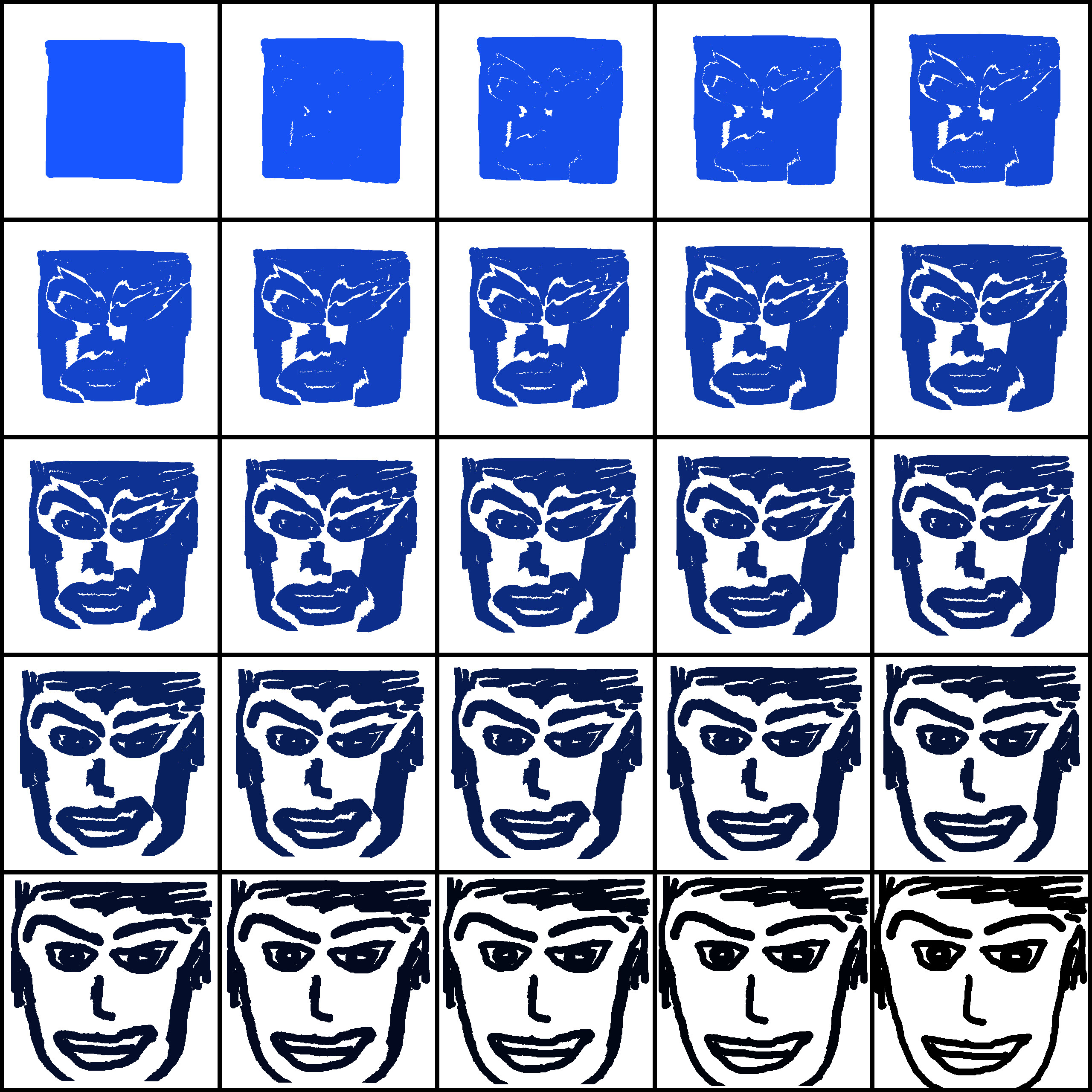
When you have a horizontal image of let's say 25 tiles for example.
And you want to put it as a 5x5 with border spacing around each one.
#!/usr/bin/env python
# Author: (Tin Tran)
# Created On: 2024.08.03
# My own grunty bot/script that will take a 1D horizontal multiframe tiles and arranges into 2D xtiles by ytiles
#
# License: Whatever GIMP's License is.
# Revisions:
# Rel 0.10: Initial Version
from gimpfu import *
import random
import math
import os
def oneDtiletwoD(image,layer,xtiles,ytiles,borderpixels):
    xtiles = int(xtiles)
    ytiles = int(ytiles)
    frames = xtiles*ytiles
    width = layer.width/frames
    height = layer.height
    w = (width+borderpixels*2)*xtiles + borderpixels*2
    h = (height+borderpixels*2)*xtiles + borderpixels*2
    new_image = pdb.gimp_image_new(w,h,RGB)
    display_new = pdb.gimp_display_new(new_image)
    new_layer = pdb.gimp_layer_new(new_image,w,h,RGBA_IMAGE,'new layer',100,LAYER_MODE_NORMAL)
    pdb.gimp_image_insert_layer(new_image,new_layer,None,0)
    for y in range(0,ytiles):
        for x in range(0,xtiles):
            frame = y*xtiles+x;
            pdb.gimp_image_select_rectangle(image,CHANNEL_OP_REPLACE,frame*width,0,width,height)
            pdb.gimp_edit_copy(layer)
            floating_sel = pdb.gimp_edit_paste(new_layer,TRUE)
            pdb.gimp_floating_sel_to_layer(floating_sel)
            pdb.gimp_layer_set_offsets(floating_sel,x*(width+borderpixels*2)+borderpixels*2,y*(height+borderpixels*2)+borderpixels*2)

register(
    "python_fu_1Dtile2D",
    "description",
    "longer description",
    "author name",
    "copyright name",
    "2024.08.03",
    "1D tile 2D...",
    "RGB*",      # Alternately use RGB, RGB*, GRAY*, INDEXED etc.
    [
    #INPUT BEGINS
    (PF_IMAGE, "image", "Image", None),
    (PF_DRAWABLE,   "layer", "Drawable", None),
    (PF_INT, "xtiles", "xtiles:", 5),
    (PF_INT, "ytiles", "xtiles:", 5),
    (PF_INT, "borderpixels", "borderpixels:", 10),
    #INPUT ENDS
    ],
    [],
    oneDtiletwoD,
    menu="<Image>/Python-Fu")

main()

# Below is all the example input types for INPUTS for the plug-in which can be cut and pasted into #INPUT BEGINS section and edited to taste (found online years back that I didn't want to constantly look up)
# Since GIMP is free anyways, I thought it would be handy here for me to CUT and PASTE, CHANGE, USE.
#           (PF_INT, "p0", "_INT:", 0), # PF_INT8, PF_INT16, PF_INT32  similar but no difference in Python.
#           (PF_FLOAT, "p02", "_FLOAT:", 3.141),
#           (PF_STRING, "p03", "_STRING:", "foo"),  # alias PF_VALUE
#           (PF_TEXT, "p04", "TEXT:", "bar"),
#           # PF_VALUE
#           # Pick one from set of choices
#           (PF_OPTION,"p1",   "OPTION:", 0, ["0th","1st","2nd"]), # initially 0th is choice
#           (PF_RADIO, "p16", "RADIO:", 0, (("0th", 1),("1st",0))), # note bool indicates initial setting of buttons
#           # PF_RADIO is usually called a radio button group.
#           # SLIDER, ADJUSTMENT types require the extra parameter of the form (min, max, step).
#           (PF_TOGGLE, "p2",   "TOGGLE:", 1), # initially True, checked.  Alias PF_BOOL
#           # PF_TOGGLE is usually called a checkbox.
#           (PF_SLIDER, "p3", "SLIDER:", 0, (0, 100, 10)),
#           (PF_SPINNER, "p4", "SPINNER:", 21, (1, 1000, 50)),  # alias PF_ADJUSTMENT
#           # Pickers ie combo boxes ie choosers from lists of existing Gimp objects
#           (PF_COLOR, "p14", "_COLOR:", (100, 21, 40) ), # extra param is RGB triple
#           # PF_COLOUR is an alias by aussie PyGimp author lol
#           (PF_IMAGE, "p15", "IMAGE:", None), # should be type gimp.image, but None works
#           (PF_FONT, "p17", "FONT:", 0),
#           (PF_FILE, "p18", "FILE:", 0),
#           (PF_BRUSH, "p19", "BRUSH:", 0),
#           (PF_PATTERN, "p20", "PATTERN:", 0),
#           (PF_GRADIENT, "p21", "GRADIENT:", 0),
#           (PF_PALETTE, "p22", "PALETTE:", 0),
#           (PF_LAYER, "p23", "LAYER:", None),
#           (PF_CHANNEL, "p24", "CHANNEL:", None),  # ??? Usually empty, I don't know why.
#           (PF_DRAWABLE, "p25", "DRAWABLE:", None),
#           # Mostly undocumented, but work
#           (PF_VECTORS, "p26", "VECTORS:", None),
#           (PF_FILENAME, "p27", "FILENAME:", 0),
#           (PF_DIRNAME, "p28", "DIRNAME:", 0)
#           # PF_REGION might work but probably of little use.  See gimpfu.py.
 Login
Login Register
 Tweets
 FAQ
FAQ Advanced Search