It is currently Sun Sep 20, 2026 8:53 pm


All times are UTC - 5 hours [ DST ]


Post new topic Reply to topic  [ 23 posts ]  Go to page 1, 2  Next
Author Message
 Post subject: Error After GIMP 2.8.6 Linux Mint Compile
PostPosted: Thu Jun 27, 2013 12:54 pm  (#1) 
Offline
GimpChat Member

Joined: Dec 27, 2012
Posts: 393
Location: England
I managed to compile - I think that's the right term - the new version of Gimp from a tarball.It wasn't available via synaptic for my OS, Linux Mint 15, and I was a bit dubious about using the PPA I was looking at as there was a big red cross in the left corner of my FireFox browser that looked to all the world as if it was a big don't use sign, or maybe I'm just being overly cautious.
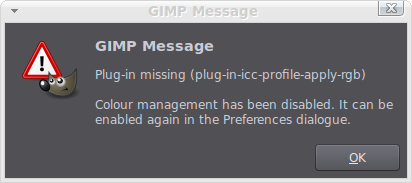
Anyway, I complied it, first time I've ever done anything like that so I was pretty pleased, but now I get this message when I open certain files,Image

So, I know I need the plug-in mentioned but I haven't been able to find it yet, and I'm not sure whether it should go in my users folder or else where.
Also, although I have the help files installed, synaptic tells me they are, Gimp preferences states that there are no local help files installed.
And finally, when I click the close window cross at the top right hand side Gimp wants to shut down all the open images. A warning comes up saying that all the images will be closed so it's not a surprise but in the last version clicking the right hand corner cross used to shut the open images one at a time, and when the final image was closed Gimp would stay open with no image loaded, but now as soon as the final image is closed Gimp shuts down. I don't know if this new behaviour is the default for the 2.8.6 version or if it can be switch back to behave the way 2.8.4 did.
Apart from these few things everything else seems okay.
If anyone has any pointers on how to solve these problems it will be much appreciated.

_________________
Image

DeviantArt gallery


Share on Facebook Share on Twitter Share on Orkut Share on Digg Share on MySpace Share on Delicious Share on Technorati
Top
 Post subject: Re: Error After GIMP 2.8.6 Linux Mint Compile
PostPosted: Sat Jun 29, 2013 6:13 am  (#2) 
Offline
GimpChat Member

Joined: Dec 27, 2012
Posts: 393
Location: England
Okay posted this in the wrong section but now that it's here I intend to make some notes in case there are of help to any other Mint users with the same problems.

For the help files I found that they were installed into file system folder usr/share gimp/2.0. For some reason I don't understand Gimp can't read them when they are in this folder but if the help files are moved to the File system usr/local/share/gimp/2.0 folder then Gimp can read them.
To move the help files from one folder to the next without using terminal right click on the 2.0 folders and then click 'Open as administrator' and then click copy or paste as required. This is one of the great things about Mint, it has the ability to work with files without having to learn a lot of different terminal commands.
I also removed the help files from the usr/share/gimp/2.0 folder so that there isn't a doubling up of files on my system. Not sure if this needs to be done but it doesn't appear to have hurt the system so no harm there.
Still haven't found a way to to use Gimp's own browser to view the files as I'm told it's not installed, it probably is but it's just hiding somewhere, so I'm currently using FireFox to view the files.

No luck with the colour profile as of yet, it appears to be move elusive than a winning lottery ticket.

Thanks to admin for moving this to it's own thread :cool and for the info on the changes to how Gimp closes down open images in this version.

_________________
Image

DeviantArt gallery


Top
 Post subject: Re: Error After GIMP 2.8.6 Linux Mint Compile
PostPosted: Sat Jun 29, 2013 8:17 am  (#3) 
Offline
Script Coder

Joined: Apr 10, 2011
Posts: 532
Can you post the exact steps you took to compile GIMP? It's very hard to say what is wrong without further information.


Top
 Post subject: Re: Error After GIMP 2.8.6 Linux Mint Compile
PostPosted: Sat Jun 29, 2013 8:51 am  (#4) 
Offline
Global Moderator
User avatar

Joined: May 16, 2010
Posts: 16173
I don't understand why it wasn't available via your packager. Linux always has an available GIMP distro.
You would need all GIMPS dependencies plus BABL, and GEGL to compile GIMP correctly.

Anyways all plugins would need to go in your /.gimp-2.8/plug-ins folder.
color profile can be set here - Edit>Preferences>Color Management

_________________
Image


Top
 Post subject: Re: Error After GIMP 2.8.6 Linux Mint Compile
PostPosted: Sat Jun 29, 2013 12:18 pm  (#5) 
Offline
GimpChat Member

Joined: Dec 27, 2012
Posts: 393
Location: England
dd wrote:
Can you post the exact steps you took to compile GIMP? It's very hard to say what is wrong without further information.


I can't remember the exact steps I used to compile Gimp but I did follow the install instructions that came with the tarball

Rod wrote:
I don't understand why it wasn't available via your packager. Linux always has an available GIMP distro.
You would need all GIMPS dependencies plus BABL, and GEGL to compile GIMP correctly.

Anyways all plugins would need to go in your /.gimp-2.8/plug-ins folder.
color profile can be set here - Edit>Preferences>Color Management


2.8.4 is available via my package manager but I wanted to install 2.8.6, and since Mint 15 has yet to be updated to the new version of Gimp I had to download it and then compile the files. I installed BABL AND GEGL and any other files that terminal asked for during the install process. The new version of Gimp is working fine so I guess I got most of the compile and install process right, though I'm far from an expert in these matters so that statement's a bit of a stab in the dark.
The only real problems that I've got are with Gimp not being able to use It's own browser for the help files, it's no big deal though just one of those things I'd like to fix, and the lack of the plug-in that controls colour management, plug-in-icc-profile-apply-rgb. If I set Colour Management, under edit preferences, to Colour Managed Display and then open an image that has an embedded colour profile Gimp throws up the message as seen at the top of this thread and switches the colour management back to No Colour Management. So Gimp definitely wants this missing plug-in but I can't find it anywhere in any of Gimp's files or at the Gimp plug-in registry or by searching on-line.
As to Gimp's own browser, it is installed and the file is located at usr/local/lib/gimp/2.0/plug-ins. All of the other plug-ins in that folder work okay so I'm at a loss as to why the browser one won't.

Thanks for having a look at this guys, your help is always appreciated.

_________________
Image

DeviantArt gallery


Top
 Post subject: Re: Error After GIMP 2.8.6 Linux Mint Compile
PostPosted: Sat Jun 29, 2013 1:56 pm  (#6) 
Offline
GimpChat Member
User avatar

Joined: Oct 29, 2010
Posts: 711
Location: Netherlands
Hi Caz,
When you started the compile you probably ran either:
./autogen.sh

or
./configure

In both cases your Gimp will get installed in the /usr/local directory.
If you want to have the binaries in the normal place you'll have to add
--prefix=/usr
.
Of course this is for babl and gegl also.
Gerard.

_________________
Gentoo Linux always up-to-date.
Kernel-3.17.4 Python-2.7.8/3.3.5
Gimp-2.8.14

I use Linux only.
And Virtualbox with Win 7


Top
 Post subject: Re: Error After GIMP 2.8.6 Linux Mint Compile
PostPosted: Sat Jun 29, 2013 2:05 pm  (#7) 
Offline
Script Coder
User avatar

Joined: Apr 23, 2010
Posts: 1553
Location: not from Guildford after all
Did you install a package named liblcms-dev ?

_________________
Any sufficiently primitive technology is indistinguishable from a rock.


Top
 Post subject: Re: Error After GIMP 2.8.6 Linux Mint Compile
PostPosted: Sat Jun 29, 2013 2:20 pm  (#8) 
Offline
GimpChat Member
User avatar

Joined: Jun 16, 2013
Posts: 107
If it's any help, check out this link:

http://lightningismyname.blogspot.com.es/p/compiling-gimp.html


Top
 Post subject: Re: Error After GIMP 2.8.6 Linux Mint Compile
PostPosted: Sat Jun 29, 2013 4:29 pm  (#9) 
Offline
Script Coder

Joined: Apr 10, 2011
Posts: 532
Ok when you run the configure script, it shows a list of optional dependencies, and whether they are found on your system or not. If I recall correctly, both the help browser and colour management are dependent on these optional dependencies, so they may not get added in if you only add the dependencies the script complains about (optional dependencies being, well, optional, the script will not complain even if you don't have them).

So you'll need to track down the dependencies you need for these features, and then recompile gimp. Here's a page that is about Gimp 2.8.2, but the same should probably still apply to the most recent version: http://archive.linuxfromscratch.org/blf ... /gimp.html

It says, on dependencies:

Quote:
Gimp Dependencies
Required

gegl-0.2.0, GTK+-2.24.13 and Intltool-0.50.2
Recommended

libjpeg-8d, libpng-1.5.13, LibTIFF-4.0.3 and PyGTK-2.24.0 (including the gtk and pango modules).
[Note]
Note

If the recommended dependencies are not installed, the configure switches below will need to be modified as explained in the section called “Command Explanations” below.
Optional

AAlib-1.4rc5, alsa-lib-1.0.26, cURL-7.28.0, D-Bus GLib Bindings-0.100, ISO Codes-3.39, little cms-1.19, libexif-0.6.21, librsvg-2.36.4, libwmf, Poppler-0.20.5, an MTA (that provides a sendmail program), WebKitGTK+-1.10.1 (this must be compiled with the GTK+ 2 backend for the Gimp to use it to create its help browser) and GTK-Doc-1.18
Optional, for the help files

pngnq and pngcrush


The one you need for colour management is the little cms one, and webkitgtk is the one that is needed for the help browser.


Top
 Post subject: Re: Error After GIMP 2.8.6 Linux Mint Compile
PostPosted: Sun Jun 30, 2013 1:16 am  (#10) 
Offline
GimpChat Member

Joined: Feb 22, 2012
Posts: 295
Location: Germany
The plug-in you are missing is the plug-in lcms (I think in linux without extension) and is compiled, if the library 'little-cms', as mentioned above, is present. You need the version 1.19 for gimp-2.8.x, the 2.xx version of little-cms is not recognized by gimp-2.8.x.

Can you disable color management in preferences so that error does not occur? Or does it come, whatever you do?


Top
 Post subject: Re: Error After GIMP 2.8.6 Linux Mint Compile
PostPosted: Sun Jun 30, 2013 5:32 am  (#11) 
Offline
GimpChat Member

Joined: Dec 27, 2012
Posts: 393
Location: England
Thank you everyone, all of the info posted here is going to be of a great help.
It's pretty clear now that I've made a fair few mistakes when compiling Gimp. I only added the dependences that where listed after I ran ./configure, the ones that the script said where needed. None that where option, and not asked for, where added, so I'm going to guess that that's where my main problem lies.

I can't find the package libicms-dev listed in synaptic so it's unlikely that I installed it.

I have 'liblcms1 1.19' and 'liblcms2-2 2.4' installed but not 'liblcms1-dev'. I'm not sure if I should remove 2.4 version?

webkitgtk is install but not dev package for it.

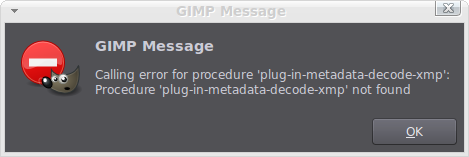
Once colour management is disabled in preferences then the error message no longer appears, but I have now found that I get a new error message when i open certain images.
Image

I will wait and see if it will be possible to repair Gimp before starting again, but a fresh install might be the easiest thing to do.

Thanks for all the help so far.

_________________
Image

DeviantArt gallery


Top
 Post subject: Re: Error After GIMP 2.8.6 Linux Mint Compile
PostPosted: Sun Jun 30, 2013 5:52 am  (#12) 
Offline
GimpChat Member

Joined: Feb 22, 2012
Posts: 295
Location: Germany
Yes, you definitly need some more libraries.
No, you need not to deinstall lcms2. but you need lcms1-dev
For the last error you need libexif, always the dev-version.
The usual way to test, if you have a special library is with pkg-config. Therefore you need a
libblabla.pc in pkg-config - folder. This .pc is only included in the dev version of the library. There are
of course, some other things in the dev version.


Top
 Post subject: Re: Error After GIMP 2.8.6 Linux Mint Compile
PostPosted: Sun Jun 30, 2013 11:25 am  (#13) 
Offline
GimpChat Member

Joined: Dec 27, 2012
Posts: 393
Location: England
Thanks, Onkel Hattl, libexif fixed the latest error.
I'm going to make sure I have all the files installed and then compile Gimp again.

_________________
Image

DeviantArt gallery


Top
 Post subject: Re: Error After GIMP 2.8.6 Linux Mint Compile
PostPosted: Sun Jun 30, 2013 11:46 am  (#14) 
Offline
GimpChat Member

Joined: Feb 22, 2012
Posts: 295
Location: Germany
Hi Caz.

I made it the following way:
After configure, gimp tells, which features are turned on with the current library configuration.
I tried to switch on as many as I could. Watch the configure process and you will see, what configure
complains about missing libraries.
And a hint: for "compressor" you need libz, libbz and liblzma, that is not clear during the configure process.


Top
 Post subject: Re: Error After GIMP 2.8.6 Linux Mint Compile
PostPosted: Sun Jun 30, 2013 1:47 pm  (#15) 
Offline
GimpChat Member

Joined: Dec 27, 2012
Posts: 393
Location: England
Onkel Hatti wrote:
Hi Caz.

I made it the following way:
After configure, gimp tells, which features are turned on with the current library configuration.
I tried to switch on as many as I could. Watch the configure process and you will see, what configure
complains about missing libraries.
And a hint: for "compressor" you need libz, libbz and liblzma, that is not clear during the configure process.


I have managed to turn on most of the features and was hoping that by running configuration, make install and make, that this would over write my existing installation of Gimp. It appears not to have and I'm still stuck with the same old error messages. Trouble is I can't find a way to remove Gimp before running the configuration and install process again. I tried 'sudo apt-get purge gimp' but terminal says that Gimp is not installed so can't be removed. Any ideas on how to remove Gimp would be much appreciated.

Here's a copy of the last few lines from my terminal output after running './configure' in case they are of any help.
Thanks for all the help with this.


Building GIMP with prefix=/usr/local, datarootdir=${prefix}/share
Desktop files install into ${datarootdir}

Extra Binaries:
gimp-console: yes

Optional Features:
D-Bus service: no
Language selection: yes

Optional Plug-Ins:
Ascii Art: no (AA library not found)
Compressor: no
Ghostscript: no (Ghostscript library not found)
Help Browser: yes
LCMS: yes
JPEG: yes
JPEG 2000: yes
MNG: yes
PDF (import): Using PostScript plug-in (libpoppler not found)
PDF (export): yes
PNG: yes
Print: yes
PSP: yes
Python: yes
Script-Fu: yes
SVG: yes
TIFF: yes
TWAIN (MacOS X): no
TWAIN (Win32): no
URI: yes (using GIO/GVfs)
Webpage: yes
Windows ICO: yes
WMF: yes
XJT: yes
X11 Mouse Cursor: yes
XPM: yes

Plug-In Features:
EXIF support: yes

Optional Modules:
ALSA (MIDI Input): no (libasound not found or unusable)
Linux Input: yes (GUdev support: no)
DirectInput (Win32): no
Color Correction: yes
Soft Proof: yes

Tests:
Use xvfb-run no (not found)

_________________
Image

DeviantArt gallery


Top
 Post subject: Re: Error After GIMP 2.8.6 Linux Mint Compile
PostPosted: Sun Jun 30, 2013 2:12 pm  (#16) 
Offline
GimpChat Member
User avatar

Joined: Oct 29, 2010
Posts: 711
Location: Netherlands
Hi Caz,
May I suggest you install "mc".
This is a filebrowser that might already be on your system.
Just go into a tty by typing
ctrl-alt-F1

and log in.
If you enter mc and you get "command not found" then install it.
This will enable you to take a look at all the directories and files.
I still think you should use --prefix=/usr rather then /usr/local.
A long time ago I wrote a howto on this forum installing Gimp-3.7 from git.
If you can find it it might contain info that's useful.
Good luck,
Gerard.

_________________
Gentoo Linux always up-to-date.
Kernel-3.17.4 Python-2.7.8/3.3.5
Gimp-2.8.14

I use Linux only.
And Virtualbox with Win 7


Top
 Post subject: Re: Error After GIMP 2.8.6 Linux Mint Compile
PostPosted: Sun Jun 30, 2013 2:39 pm  (#17) 
Offline
Script Coder
User avatar

Joined: Apr 23, 2010
Posts: 1553
Location: not from Guildford after all
Caz wrote:
I have managed to turn on most of the features and was hoping that by running configuration, make install and make, that this would over write my existing installation of Gimp. It appears not to have and I'm still stuck with the same old error messages. Trouble is I can't find a way to remove Gimp before running the configuration and install process again. I tried 'sudo apt-get purge gimp' but terminal says that Gimp is not installed so can't be removed. Any ideas on how to remove Gimp would be much appreciated.

Performing 'which gimp' in the terminal will instruct as to where gimp has been installed. If it has been installed in /usr/local/bin then it is a version you've previously built from source (and thus your package manager knows not of its existence).

To remove such an install, run the following as root in your build directory:

./configure --prefix=/usr/local/bin
make uninstall


You should then build your new version using a prefix of /usr/bin

_________________
Any sufficiently primitive technology is indistinguishable from a rock.


Top
 Post subject: Re: Error After GIMP 2.8.6 Linux Mint Compile
PostPosted: Sun Jun 30, 2013 5:49 pm  (#18) 
Offline
Script Coder

Joined: Apr 10, 2011
Posts: 532
Here's a suggestion that is worth considering for anyone who likes to roll their own binaries:

First run sudo make uninstall in your source directory. This will remove the old version of gimp.

Then, run sudo apt-get install checkinstall

Then, compile gimp again, but this time, instead of the "sudo make install" step, just substitute it with sudo checkinstall, follow the instructions, and it will be the same as make install BUT additionally, it will wrap the installed files in a .deb package, which means you can easily remove gimp later on with dpkg, apt or synaptic.

(Also remember the correct order is make first, then make install/checkinstall)


Top
 Post subject: Re: Error After GIMP 2.8.6 Linux Mint Compile
PostPosted: Mon Jul 01, 2013 1:01 pm  (#19) 
Offline
GimpChat Member

Joined: Dec 27, 2012
Posts: 393
Location: England
Thanks for all the help :bigthup
I found where Gimp was hiding by using the 'which gimp' command in terminal then removed it, compiled again and installed using the instructions provided by dd which worked a charm. And best of all it's listed in synaptic which in my opinion is very cool.
All the error messages are now gone and the manual and help files use Gimp's own browser.
Not come across any other problems so far but there were a few libraries that I couldn't find before compiling, the ones for compressor spring to mind, so I'll have to see if any other problems crop up further down the road, but at least I know that I'm on the right track now.

gerard82 wrote:
Hi Caz,
May I suggest you install "mc".
This is a filebrowser that might already be on your system.
Just go into a tty by typing
ctrl-alt-F1

and log in.
If you enter mc and you get "command not found" then install it.
This will enable you to take a look at all the directories and files.
I still think you should use --prefix=/usr rather then /usr/local.
A long time ago I wrote a howto on this forum installing Gimp-3.7 from git.
If you can find it it might contain info that's useful.
Good luck,
Gerard.


I tried this and mc in not installed. I decided before I went any further that I would try to get back to the desktop but got myself stuck again and had to reboot, ctrl-alt-F1 takes me to a black screen with a few bits of text and the old blinking cursor. I would like to check out mc but have no idea how to get out of tty.

Thanks again to everyone. I really wouldn't have been able to install Gimp if it wasn't for the great advice you have all given me.

_________________
Image

DeviantArt gallery


Top
 Post subject: Re: Error After GIMP 2.8.6 Linux Mint Compile
PostPosted: Tue Jul 02, 2013 8:39 am  (#20) 
Offline
Script Coder

Joined: Apr 10, 2011
Posts: 532
Caz wrote:
I tried this and mc in not installed. I decided before I went any further that I would try to get back to the desktop but got myself stuck again and had to reboot, ctrl-alt-F1 takes me to a black screen with a few bits of text and the old blinking cursor. I would like to check out mc but have no idea how to get out of tty.


You don't have to use the tty to use cli programs. You can just open a terminal (in menu > accessories) and use any cli programs there, which is easier.

The tty:s are in my opinion more useful for, for example, when some app hangs your desktop and you need to kill it to make it responsive again, or something like that.

Anyway, there are several of the virtual tty terminals, you can use them by pressing ctrl-alt-f1 to f6, the graphical desktop (xorg) is usually in f7 or f8 (in mint I think it's in f8) so you can get back to the graphical desktop by pressing ctrl-alt-f8. But again, most of the time it's easier to just use a terminal window in your desktop.


Top
Post new topic Reply to topic  [ 23 posts ]  Go to page 1, 2  Next

All times are UTC - 5 hours [ DST ]


* Login  


Powered by phpBB3 © phpBB Group