It is currently Tue Jul 14, 2026 3:09 am


All times are UTC - 5 hours [ DST ]


Post new topic Reply to topic  [ 33 posts ]  Go to page 1, 2  Next
Author Message
 Post subject: New filter : 'Arrays & tiles / Extract objects'
PostPosted: Thu Jul 11, 2013 9:45 am  (#1) 
Offline
GimpChat Member
User avatar

Joined: Jan 03, 2011
Posts: 1656
I've added a new G'MIC filter Arrays & tiles / Extract objects.
It is quite experimental, but seems to be already useful in some situations.
It tries to automatically extract foreground objects from an image with a 'constant' colored background.
The extraction creates as many new layers as there are object detected.

Here is a typical example of use. Suppose you are interested to get each letter from an alphabet that you have found on the web, for instance this one :

Image

Extracting each letter manually is a pain for people like me :)
And in this case, you cannot extract easily the shapes you are interested in, because they are not placed along a regular grid for instance.
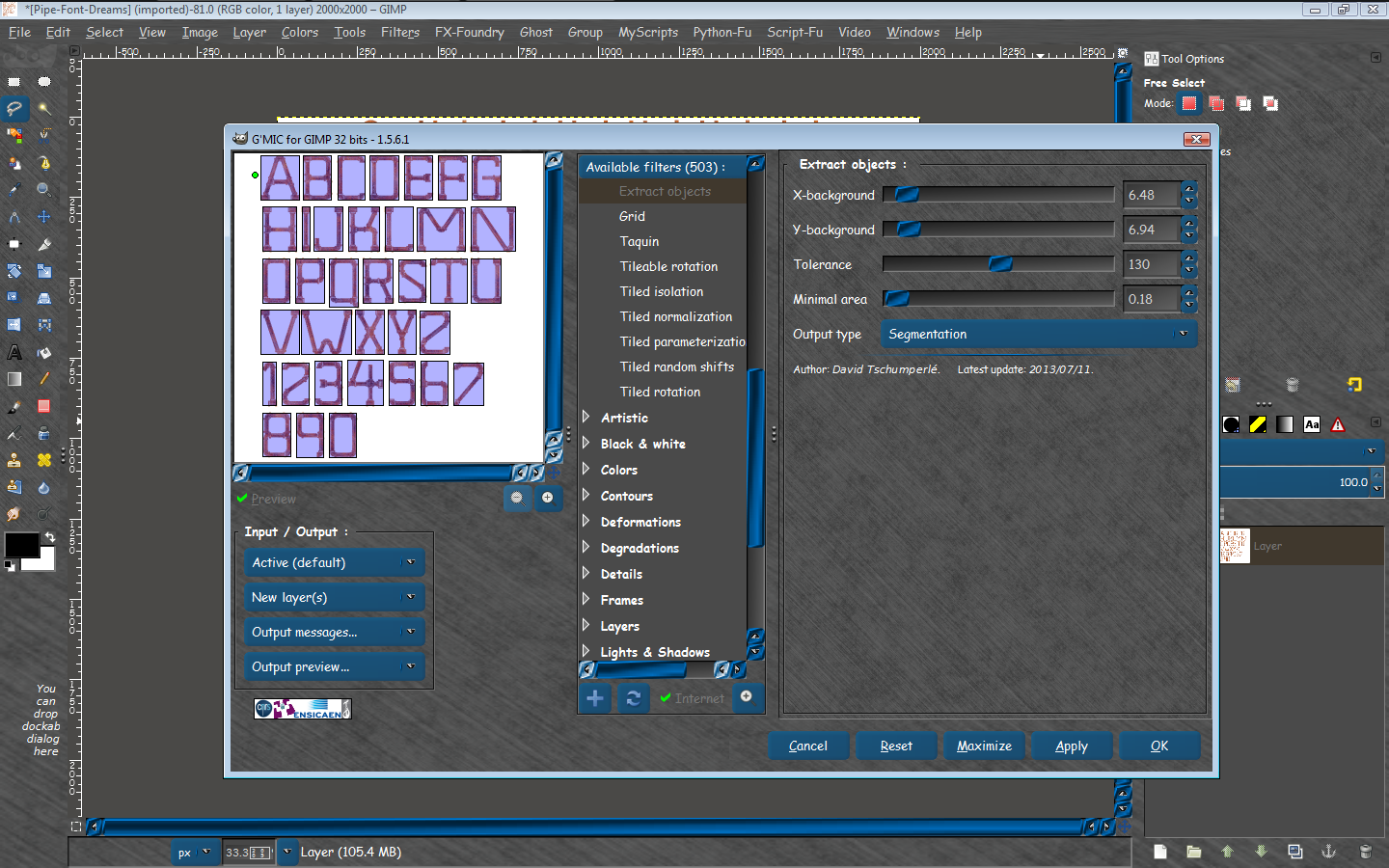
So, now, what I can do is open G'MIC and select filter Arrays & tiles / Extract objects (of course, you need a refresh to see this filter appearing in your G'MIC) :

Attachment:
gmic_extract_objects.png
gmic_extract_objects.png [ 109.56 KiB | Viewed 11980 times ]


The green dots appearing in the preview is the point that must be set on background, it will define a reference color for the background, used to detect all foreground objects.
You set all the parameters (background point position, color tolerance, minimal size of detected objects, etc..), and you click OK.
And you get :

Attachment:
gmic_extract_objects2.png
gmic_extract_objects2.png [ 56.15 KiB | Viewed 11980 times ]


Here, I got 27 layers, i.e. all individual letters + the character.

Of course, this is not working so good when you have more complex backgrounds or shapes, but still it does a quite decent job and I'm sure this can be useful in many situations.

That's it, feel free to test and give feedback on this filter.


Share on Facebook Share on Twitter Share on Orkut Share on Digg Share on MySpace Share on Delicious Share on Technorati
Top
 Post subject: Re: New filter : 'Arrays & tiles / Extract objects'
PostPosted: Thu Jul 11, 2013 9:55 am  (#2) 
Offline
GimpChat Member
User avatar

Joined: Jun 02, 2013
Posts: 2090
Wow, this is awesome.

_________________
Image


Top
 Post subject: Re: New filter : 'Arrays & tiles / Extract objects'
PostPosted: Thu Jul 11, 2013 10:05 am  (#3) 
Offline
GimpChat Member
User avatar

Joined: Jan 03, 2011
Posts: 1656
Another example of use :

Attachment:
gmic_extract_objects3.png
gmic_extract_objects3.png [ 232.8 KiB | Viewed 11962 times ]


Very useful when you want to do sprite packing afterwards :)


Top
 Post subject: Re: New filter : 'Arrays & tiles / Extract objects'
PostPosted: Thu Jul 11, 2013 10:10 am  (#4) 
Offline
GimpChat Member
User avatar

Joined: Jul 17, 2012
Posts: 2769
thanks Rononours !

Minimal Area, is that value in pixels ?


Top
 Post subject: Re: New filter : 'Arrays & tiles / Extract objects'
PostPosted: Thu Jul 11, 2013 10:12 am  (#5) 
Offline
GimpChat Member
User avatar

Joined: Sep 24, 2010
Posts: 12796
Definitely awesome David. Just wish I can go from 1.5.6.1 beta to 1.5.6. Not sure what the issues are for the compile. Oh well; just spieling now. :)

edit:

Spieling's over; just tried samj's compile (though it's in the beta zip file, it's the full release) and it works fine. Happy I am. :)

_________________
Lyle

Psalm 109:8

Image


Top
 Post subject: Re: New filter : 'Arrays & tiles / Extract objects'
PostPosted: Thu Jul 11, 2013 10:46 am  (#6) 
Offline
Retired Staff
User avatar

Joined: May 22, 2008
Posts: 6946
Location: Somewhere in GIMP
I can't begin to tell you how many times I could have used this. It's wonderful. I just tried it with an image with a transparent background and it worked great for that too.

Thank you, thank you, David! :hi5 :yes

_________________
Image
World War IV will be fought with sticks and stones. - Albert Einstein


Top
 Post subject: Re: New filter : 'Arrays & tiles / Extract objects'
PostPosted: Thu Jul 11, 2013 10:55 am  (#7) 
Offline
GimpChat Member
User avatar

Joined: Nov 16, 2011
Posts: 5127
Location: Metro Vancouver, BC
Wow, my mind is racing with ways this can be used!

_________________
Image
Gimp 2.8.18, Linux, median user
Gimp Chat Tutorials Index
Spirit Bear (Kermode)


Top
 Post subject: Re: New filter : 'Arrays & tiles / Extract objects'
PostPosted: Thu Jul 11, 2013 11:04 am  (#8) 
Offline
GimpChat Member
User avatar

Joined: Sep 24, 2010
Posts: 12796
Very cool since I have sprite tape too. Thier's Pan to Bow afterwards. :)


Attachments:
alphabet.png
alphabet.png [ 286.17 KiB | Viewed 11902 times ]

_________________
Lyle

Psalm 109:8

Image
Top
 Post subject: Re: New filter : 'Arrays & tiles / Extract objects'
PostPosted: Thu Jul 11, 2013 11:12 am  (#9) 
Offline
GimpChat Member
User avatar

Joined: Sep 24, 2010
Posts: 12796
And why not. lol

:)


Attachments:
alphabet.png
alphabet.png [ 725.27 KiB | Viewed 11901 times ]

_________________
Lyle

Psalm 109:8

Image
Top
 Post subject: Re: New filter : 'Arrays & tiles / Extract objects'
PostPosted: Thu Jul 11, 2013 11:57 am  (#10) 
Offline
GimpChat Member
User avatar

Joined: Jan 03, 2011
Posts: 1656
Thanks for your feedback.

The minimal area is expressed as a percentage of the total number of pixel (width*height), so the preview
is almost accurate.


Top
 Post subject: Re: New filter : 'Arrays & tiles / Extract objects'
PostPosted: Thu Jul 11, 2013 12:04 pm  (#11) 
Offline
GimpChat Member
User avatar

Joined: Jan 03, 2011
Posts: 1656
I love it for Sprite packing I must admit (that was the primary reason that decided me to code this filter by the way).
From this image : Image

I can render something like this, in less than 2 minutes :

Attachment:
gmic_pack_balls.jpg
gmic_pack_balls.jpg [ 158.55 KiB | Viewed 4647 times ]


Yes, this is ugly, but that was fast :clap


Top
 Post subject: Re: New filter : 'Arrays & tiles / Extract objects'
PostPosted: Thu Jul 11, 2013 1:15 pm  (#12) 
Offline
GimpChat Founder
User avatar

Joined: May 22, 2008
Posts: 5241
Location: Gimpville
Thanks for another neat filter! :coolthup

_________________
“If you reach for the stars, you just might land on a decently sized hill.” - Stuart Hill


Top
 Post subject: Re: New filter : 'Arrays & tiles / Extract objects'
PostPosted: Thu Jul 11, 2013 1:16 pm  (#13) 
Offline
GimpChat Member
User avatar

Joined: Sep 24, 2010
Posts: 12796
Now that's way cool David. :)

_________________
Lyle

Psalm 109:8

Image


Top
 Post subject: Re: New filter : 'Arrays & tiles / Extract objects'
PostPosted: Thu Jul 11, 2013 1:48 pm  (#14) 
Offline
GimpChat Member
User avatar

Joined: Jan 20, 2013
Posts: 14831
Location: roma, italy
excellent filter, David! Thank you

_________________
"Where am I ?"


Top
 Post subject: Re: New filter : 'Arrays & tiles / Extract objects'
PostPosted: Thu Jul 11, 2013 2:15 pm  (#15) 
Offline
Global Moderator
User avatar

Joined: May 16, 2010
Posts: 16102
Thanks David this is excellent and goes right along Rob's "Break Apart Alpha" script. :)
Having both these filters for object extraction is awesome because both work in a different way.

_________________
Image


Top
 Post subject: Re: New filter : 'Arrays & tiles / Extract objects'
PostPosted: Thu Jul 11, 2013 2:35 pm  (#16) 
Offline
GimpChat Member
User avatar

Joined: Jan 03, 2011
Posts: 1656
Ha interesting Rod. My filter miserably fails with your gear image, that's an interesting challenge.
I'll have a look.


Top
 Post subject: Re: New filter : 'Arrays & tiles / Extract objects'
PostPosted: Thu Jul 11, 2013 2:55 pm  (#17) 
Offline
GimpChat Member

Joined: Sep 24, 2012
Posts: 275
Location: Scotland
How about a foreground select for not so flat backgrounds, based on the b&w recolorize filter? Was thinking of doing that myself but still busy with other things - you would just paint roughly on foreground/background with one colour for each. Maybe there's already a filter like that and I missed it though.


Top
 Post subject: Re: New filter : 'Arrays & tiles / Extract objects'
PostPosted: Thu Jul 11, 2013 3:08 pm  (#18) 
Offline
Global Moderator
User avatar

Joined: May 16, 2010
Posts: 16102
Separating letters or objects into layers for GBR (Gimp Brush) saving is much easier now for sure! :)

Image

GBR Rusted-Pipe zip attached. :)
Image

Attachment:
RUSTED-PIPE-Brushes_RD.zip [2.66 MiB]
Downloaded 398 times


David i think probably because of the same reason as Robs. He had to add a threshold setting for the shadows around the objects.

_________________
Image


Top
 Post subject: Re: New filter : 'Arrays & tiles / Extract objects'
PostPosted: Thu Jul 11, 2013 11:15 pm  (#19) 
Offline
Script Coder
User avatar

Joined: Feb 18, 2011
Posts: 4826
Location: Bendigo Vic. Australia
I beat 'O' to using the filter for an animation

Image

_________________
Image
No matter how much you push the envelope, it'll still be stationery.


Top
 Post subject: Re: New filter : 'Arrays & tiles / Extract objects'
PostPosted: Fri Jul 12, 2013 4:17 am  (#20) 
Offline
GimpChat Member
User avatar

Joined: Jan 03, 2011
Posts: 1656
I've done some small modifications to the filter :

- Improvement of the detection algorithm.
- Added few parameters to better control the segmentation step (opacity threshold, connectivity).
- Added a progress bar.

Looks like this now :

Attachment:
gmic_extract_objects4.png
gmic_extract_objects4.png [ 188.45 KiB | Viewed 4583 times ]


Top
Post new topic Reply to topic  [ 33 posts ]  Go to page 1, 2  Next

All times are UTC - 5 hours [ DST ]


* Login  


Powered by phpBB3 © phpBB Group